Pick the wrong Linux distro for gaming and the problem rarely shows up on day one. It shows up three weeks later, when a kernel update breaks your Nvidia driver the morning of a launch you were waiting for, or when you finally figure out why Fortnite refuses to boot and realize no distro on earth was ever going to fix that particular problem. If you’re comparing the best Linux distro for gaming in 2026, the real decision isn’t which one has the prettiest desktop, it’s whether you want an immutable, Steam Deck-style system that just works, a performance-tuned rolling release that squeezes out real frame-time gains, or a stable, boring base that won’t surprise you mid-session.
This list is built from each project’s own 2026 release notes and changelogs, not recycled from last year’s rankings, so it reflects what actually shipped: Pop!_OS finally releasing its COSMIC desktop after a long delay, SteamOS’s real official-versus-community support split across the Steam Deck, ROG Ally and Legion Go, and Manjaro’s public 2026 admission that it has effectively become a single-person project. Every kernel version, Proton behaviour and Nvidia driver claim below is checked against the source, so you can trust it before you reinstall.
Whichever machine brought you here, a Steam Deck rival handheld, a desktop you’re finally ready to dual-boot away from, or a dedicated gaming rig, the right distro comes down to matching your tolerance for tinkering against how current you need your drivers to be. One section further down settles the question this entire category gets wrong most often: whether your distro choice even affects anti-cheat compatibility at all. It mostly doesn’t, and knowing that will save you hours of picking the “wrong” distro for the wrong reason.
What Actually Makes a Linux Distro Good for Gaming?
A gaming Linux distro isn’t running different games than any other distro, it’s running the same Steam library through the same Proton compatibility layer, just with less friction getting there. What actually varies between distros is how current the kernel and GPU drivers are, whether Proton and GE-Proton are pre-bundled or something you configure yourself, and whether the system is built to survive an update going wrong mid-session.
That’s why this list splits into three genuinely different approaches rather than one ranked ladder: immutable/atomic distros that behave like a console, performance-tuned rolling releases that chase every kernel and Mesa gain, and safe traditional distros that trade bleeding-edge currency for predictability.
| Approach | How It Behaves | Distros in This List | Best For |
|---|---|---|---|
| Immutable / atomic | Read-only base system, updates via image swap, apps via Flatpak/layering | Bazzite, SteamOS | Handhelds, console-like reliability, minimal tinkering |
| Performance-tuned rolling | Traditional package manager, custom kernel/scheduler, gaming patches baked in | Nobara, CachyOS, Garuda, EndeavourOS, Manjaro | Users who want the newest kernel/Mesa gains and don’t mind occasional regressions |
| Safe traditional | Fixed-release package manager, stability-first update cadence | Pop!_OS, Ubuntu, Linux Mint | Daily-driver stability over bleeding-edge currency |
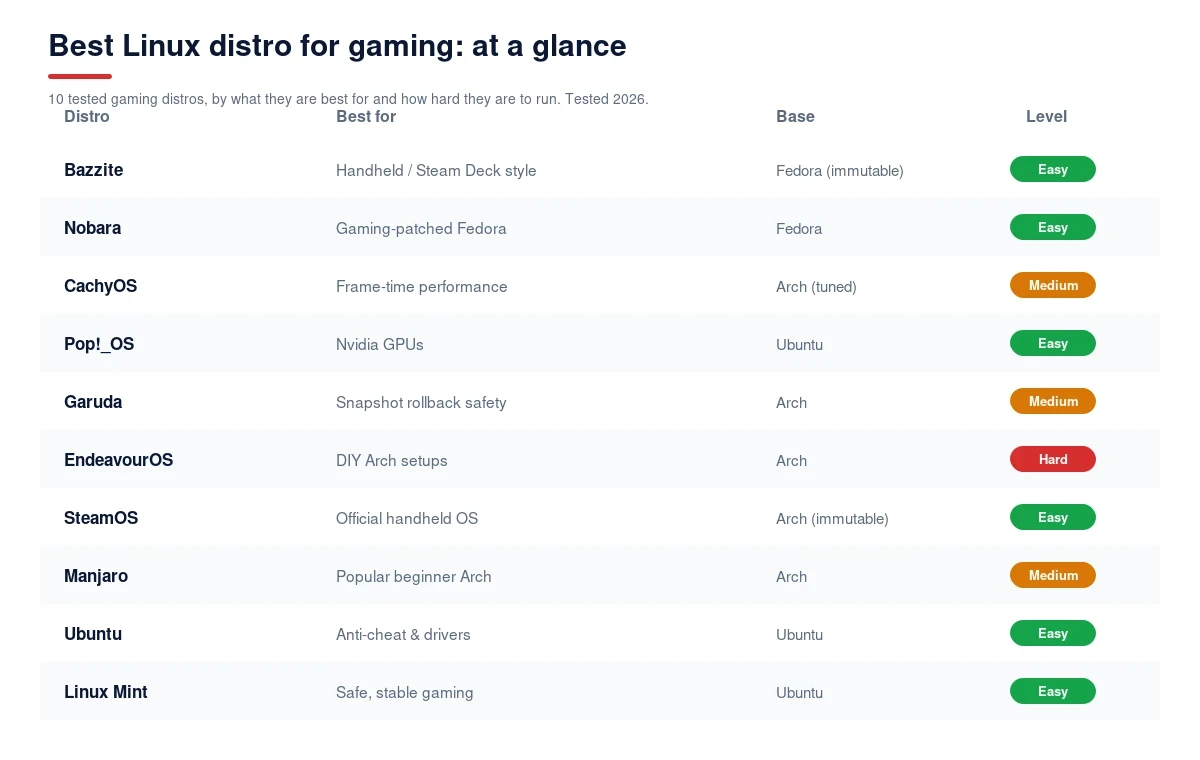
10 Best Linux Distros for Gaming in 2026
💬 Key Takeaway
- Bazzite – Best Immutable Distro for Handheld and Steam Deck-Style Gaming
- Nobara Project – Best Gaming-Patched Fedora Build, Made by GE-Proton’s Own Developer
- CachyOS – Best Performance-Tuned Arch Distro for Frame-Time Consistency
- Pop!_OS – Best Nvidia-Ready Distro With a Dedicated GPU-Preinstalled ISO
- Garuda Linux – Best Arch Distro With Built-In Snapshot Rollback Safety Net
- EndeavourOS – Best Minimal Arch Base for DIY Gaming Setups
- SteamOS – Best Official Handheld Gaming OS, Straight From Valve
- Manjaro – Most Popular Beginner Arch Distro, With 2026 Caveats
- Ubuntu – Best Mainstream Distro for Anti-Cheat and Driver Compatibility
- Linux Mint – Safest, Most Stable Pick for Non-Bleeding-Edge Gaming
1. Bazzite – Best Immutable Distro for Handheld and Steam Deck-Style Gaming

Pros
- NVIDIA-specific image variant bakes the proprietary driver directly into the OS image, avoiding the version-mismatch breakage that plagues manually-updated distros
- Handheld support is genuinely current and broad, covering Steam Deck, ROG Ally, Legion Go, GPD, OneXPlayer, AYN, and AOKZOE with device-specific fixes
Cons
- The immutable model has a real learning curve; system-level software needs rpm-ostree layering (which requires a reboot) or Flatpak/Distrobox instead of a normal package manager
- Troubleshooting guides for traditional distros often don't apply directly, since the read-only base changes how you fix things
Summary
Bazzite is the strongest console-like pick on this list, with the broadest current handheld device support and an NVIDIA image that avoids driver-mismatch breakage, at the cost of a real immutable-OS learning curve.
Price: USD 0.00 Free u0026 open source
Bazzite is built on Fedora’s Universal Blue atomic image system, which means the base operating system is read-only and updates arrive as a whole new image rather than thousands of individual package updates. The current stable build (44.20260820) jumped to kernel 7.2 with GNOME 50 or KDE Plasma 6.7 depending on your desktop choice, and Mesa 26.2.1 for graphics. If that sounds like SteamOS, that’s intentional, Bazzite is effectively the distro that brought the Steam Deck’s console-like update model to almost any x86 handheld or desktop.
The dedicated NVIDIA image variant is a genuine differentiator: the proprietary driver ships baked into the image itself, so a kernel update can never leave you with a driver that no longer matches, a failure mode that regularly breaks manually-managed Nvidia setups on other distros. Handheld coverage is the broadest and most current on this list: Steam Deck boots straight to Game Mode, ROG Ally gets 120Hz VRR and TDP control, Legion Go gets dual gyro and detachable controller support, and GPD devices get ROCm acceleration. Software installs run through ujust, a set of named command shortcuts for codecs, controller support, bootloader changes, and even a one-line Sunshine game-streaming install added in a recent update.
The tradeoff is the immutable model itself: you can’t just apt install or pacman -S something onto the base system. Anything system-level goes through rpm-ostree layering, which requires a reboot to apply, while regular apps go through Flatpak or a Distrobox container instead. It’s a genuinely different mental model from every traditional distro on this list, worth knowing before you commit if you’re used to installing software the old way.
Bazzite Key Features
- Dedicated NVIDIA Image: A separate build ships the proprietary NVIDIA driver baked into the OS image itself, so kernel updates can never leave your driver version mismatched.
- Broadest Current Handheld Support: Steam Deck, ROG Ally, Legion Go, GPD, OneXPlayer, AYN, and AOKZOE all get device-specific fixes like VRR, TDP control, and fan curves.
- Atomic, Rollback-Safe Updates: Updates apply as a whole new image via rpm-ostree, so a bad update can be rolled back to the previous working image instantly.
- ujust Command Shortcuts: Named commands handle codec installs, controller configuration, bootloader changes, and a one-line Sunshine streaming setup.
- Game Mode Boot Option: Boots directly into a Steam Deck-style Game Mode interface on supported handhelds, skipping the traditional desktop entirely if you want.
- Fedora Atomic Foundation: Built on the Universal Blue project’s Fedora Atomic images, inheriting Fedora’s driver and kernel currency rather than a smaller independent base.
| Base | Fedora Atomic (Universal Blue) |
| Update Model | Immutable/atomic (rpm-ostree image swap) |
| Current Version | 44.20260820 stable, kernel 7.2 |
| Nvidia Support | Dedicated NVIDIA image, driver baked into OS |
| Best For | Handhelds and users who want console-like reliability |
Why choose Bazzite: Choose Bazzite if you want your gaming PC or handheld to behave like a console, boot into Game Mode, stay updated automatically, and never leave you debugging a broken Nvidia driver after a routine update.
2. Nobara Project – Best Gaming-Patched Fedora Build, Made by GE-Proton’s Own Developer

Pros
- Built and maintained by the same developer who creates GE-Proton, so gaming compatibility patches land here first
- Custom kernel bundles Zen patches, pre-Polaris AMD GPU support, and Steam Deck/Surface hardware patches out of the box
Cons
- Smaller community and documentation base than Fedora proper, since Nobara is a single-maintainer-led project
- Historically raised bus-factor concerns among users given its reliance on one primary maintainer
Summary
Nobara is the most gaming-native Fedora build available, built by GE-Proton’s own developer, with a custom kernel and preconfigured Steam/Lutris/Wine stack, though it carries real single-maintainer risk.
Price: USD 0.00 Free u0026 open source
Nobara is a Fedora-based distro created and maintained by GloriousEggroll, the same developer behind GE-Proton, the community Proton fork that fixes compatibility for games Valve’s official Proton hasn’t caught up to yet. That relationship matters more than it sounds: gaming-specific patches and fixes tend to land on Nobara first, since the person shipping them is the same person building the distro. Nobara 44 shipped August 28, 2026, across five separate editions depending on your desktop and GPU vendor preferences.
The custom kernel is where Nobara earns its gaming reputation: it cherry-picks Zen kernel patches for responsiveness, adds pre-Polaris AMD GPU support that mainline Fedora doesn’t prioritize, and bakes in Steam Deck and Surface device patches directly. GE-Proton comes preinstalled with extra Wine and Wine-Staging patches plus NVAPI and CUDA support, and protonfixes handles per-game compatibility tweaks automatically rather than requiring manual configuration. Steam, Lutris, and Wine are all preconfigured out of the box, and the unified ISO handles both AMD/Intel and Nvidia install paths without needing separate downloads.
The real tradeoff is scale: Nobara doesn’t have Fedora’s full community and documentation depth behind it, and being led primarily by one maintainer has historically raised legitimate bus-factor concerns among its own user base, worth weighing if you want a distro with a large, redundant support community behind it.
Nobara Key Features
- Built by GE-Proton’s Own Developer: Gaming compatibility patches from GloriousEggroll’s own GE-Proton work often land on Nobara before anywhere else.
- Custom Gaming-Patched Kernel: Cherry-picked Zen patches, pre-Polaris AMD GPU support, and Steam Deck/Surface hardware patches ship built into the kernel.
- GE-Proton Preinstalled: Extra Wine/Wine-Staging patches, NVAPI, and CUDA support come ready out of the box, no manual Proton version management needed.
- Automatic Per-Game Fixes: Protonfixes applies per-game compatibility tweaks automatically rather than requiring you to hunt down manual configuration steps.
- Unified Install ISO: One ISO handles both AMD/Intel and Nvidia install paths, five editions total depending on desktop environment preference.
- Preconfigured Gaming Stack: Steam, Lutris, and Wine ship installed and configured, skipping the setup steps most other Fedora-based distros leave to the user.
| Base | Fedora (traditional, not immutable) |
| Update Model | Point releases, rolling-ish cadence |
| Current Version | Nobara 44 (released August 28, 2026) |
| Proton Handling | GE-Proton preinstalled with protonfixes automation |
| Best For | Users who want Fedora’s currency with gaming patches applied first |
Why choose Nobara: Choose Nobara if you want a Fedora-based system where gaming compatibility fixes are the top priority, not an afterthought, and you’re comfortable with a smaller, more focused community than Fedora’s mainline.
3. CachyOS – Best Performance-Tuned Arch Distro for Frame-Time Consistency

Pros
- Own CPU-optimized package repository (x86-64-v3/v4) and choice of scheduler, including BORE for gaming interactivity by default
- Ships its own tuned Proton build, with benchmark sources citing meaningfully lower 99th-percentile frame times in some DX12-via-Proton titles
Cons
- Rolling release plus aggressive optimization means a higher chance of regressions after major kernel or Mesa version bumps
- Smaller support community than mainline Arch or EndeavourOS if something breaks
Summary
CachyOS is the most performance-obsessed distro on this list, with CPU-optimized packages and multiple scheduler options including BORE, at the cost of higher regression risk than a plainer rolling release.
Price: USD 0.00 Free u0026 open source
CachyOS is an Arch-based rolling release built around one core idea: most distros ship generic x86-64 packages that run on any CPU from the last decade, while CachyOS maintains its own repository compiled specifically for newer x86-64-v3 and v4 instruction sets, extracting real performance most distros leave on the table. It’s a rolling release, so you’re always on current packages, but the optimization work is what separates it from just running vanilla Arch yourself.
The linux-cachyos kernel family is the other half of the pitch: you can choose between multiple schedulers, including BORE, which is set as the default for desktop and gaming interactivity, alongside sched-ext, BMQ, and a real-time option for specific workloads. CachyOS also ships its own tuned Proton build, and benchmark sources have cited meaningfully lower 99th-percentile frame times compared to stock Valve Proton in some DX12-via-Proton titles on identical hardware, worth verifying against your own specific game and GPU rather than taking as a universal guarantee, since benchmark results vary by source and title.
The cost of chasing that performance is real: a rolling release combined with aggressive optimization work means CachyOS sees a somewhat higher rate of regressions after major kernel or Mesa bumps than a plainer Arch derivative, and its support community, while active, is smaller than mainline Arch’s or EndeavourOS’s when you need to troubleshoot something.
CachyOS Key Features
- CPU-Optimized Package Repository: Packages compiled specifically for x86-64-v3 and v4 instruction sets extract real performance generic builds leave unused.
- Multiple Kernel Scheduler Options: Choose between BORE (default for gaming), sched-ext, BMQ, or a real-time scheduler depending on your workload.
- Custom-Tuned Proton Build: Ships its own Proton build cited in benchmark sources as delivering lower 99th-percentile frame times in some titles versus stock Proton.
- Arch Rolling Release Base: Full Arch package currency with the AUR available, without needing to hand-configure the performance optimizations yourself.
- Current Nvidia Driver Access: Standard Arch nvidia-open and proprietary driver packages stay current given the rolling release model.
- BORE Scheduler by Default: Burst-Oriented Response Enhancer scheduler ships as the default for desktop and gaming interactivity out of the box.
| Base | Arch (traditional rolling release) |
| Update Model | Rolling, own optimized repository |
| Kernel | linux-cachyos family, BORE scheduler default |
| Proton Handling | Custom-tuned CachyOS Proton build |
| Best For | Users chasing measurable frame-time performance gains |
Why choose CachyOS: Choose CachyOS if you’re comfortable with Arch and specifically want measurable performance tuning, not just a gaming-themed desktop, and you’re willing to accept slightly higher regression risk in exchange.
4. Pop!_OS – Best Nvidia-Ready Distro With a Dedicated GPU-Preinstalled ISO

Pros
- One of the only distros shipping a separate Nvidia-preinstalled ISO, avoiding manual driver setup entirely
- Ubuntu LTS base gives strong hardware and anti-cheat compatibility with a predictable, stability-first update cadence
Cons
- The new COSMIC desktop, while usable for daily work, still has genuine rough edges after replacing the older GNOME-based interface
- Package currency follows Ubuntu's LTS cadence rather than rolling, so bleeding-edge kernel/Mesa gains arrive slower
Summary
Pop!_OS pairs a genuinely current Nvidia-preinstalled ISO with Ubuntu LTS stability, now running System76’s own COSMIC desktop, which is functional but still maturing after a long-delayed rollout.
Price: USD 0.00 Free u0026 open source
Pop!_OS is System76’s Ubuntu-based distro, and 2026 marks a genuinely significant change most older comparison content hasn’t caught up to yet: Pop!_OS 24.04 LTS finally shipped after a long delay, and it replaces the old GNOME-based desktop with System76’s own COSMIC desktop, a Rust and Iced-built, Wayland-native environment with tiling built in from the ground up. If the last thing you read about Pop!_OS described a GNOME desktop, that information is out of date.
The gaming-relevant differentiator that hasn’t changed is Pop!_OS’s Nvidia handling: it remains one of the only distros on this list shipping a completely separate ISO with the Nvidia driver preinstalled, so you pick the right image at download time and never touch driver configuration afterward. Current builds run kernel 6.17.9, Mesa 25.1, with the 580 driver branch available for Nvidia hardware. Being Ubuntu 24.04-based underneath, it inherits strong general hardware and anti-cheat compatibility, plus apt’s predictable, stability-first update cadence rather than a rolling model.
The honest caveat for 2026: COSMIC is usable for daily work but still has real rough edges this soon after such a major desktop replacement, worth trying before committing if a polished, mature desktop environment matters more to you than the underlying gaming stack.
Pop!_OS Key Features
- Dedicated Nvidia-Preinstalled ISO: A separate download ships with the Nvidia driver already configured, one of the only distros on this list to offer that directly.
- New COSMIC Desktop: System76’s own Rust and Iced-built, Wayland-native desktop with built-in tiling replaced the older GNOME-based interface in 24.04 LTS.
- Ubuntu LTS Foundation: Built on Ubuntu 24.04 LTS, inheriting broad hardware compatibility and apt’s stability-first update model.
- Current Kernel and Mesa: Ships kernel 6.17.9 and Mesa 25.1, with the 580 Nvidia driver branch available at install.
- System76 Hardware Optimization: Built and tuned by a company that also sells its own gaming and workstation laptops, so hardware support gets first-party attention.
- Steam and Proton Ready: Steam installs cleanly through apt or Flatpak, with Proton working the same as any Ubuntu-based system.
| Base | Ubuntu 24.04 LTS (traditional) |
| Update Model | LTS cadence, apt package manager |
| Desktop | COSMIC (replaced GNOME in 24.04 LTS) |
| Nvidia Support | Dedicated Nvidia-preinstalled ISO available |
| Best For | Nvidia users who want zero manual driver setup with LTS stability |
Why choose Pop!_OS: Choose Pop!_OS if you run Nvidia hardware and want the driver handled at install time with zero manual configuration, and you’re comfortable trying a genuinely new desktop environment that’s still maturing.
5. Garuda Linux – Best Arch Distro With Built-In Snapshot Rollback Safety Net

Pros
- Btrfs plus Snapper plus GRUB integration means a broken update can be rolled back from the boot menu itself, no live USB needed
- Chaotic-AUR ships nearly 2,400 precompiled packages, skipping the long compile times normal AUR installs require
Cons
- Heavier default install than EndeavourOS, with more pre-bundled GUI tools and theming some users consider bloat
- The aggressive default u0022Dragonizedu0022 theming isn't going to suit everyone's taste
Summary
Garuda Linux brings genuine crash-safety to Arch through Btrfs snapshot rollback baked into the bootloader, plus precompiled AUR packages, at the cost of a heavier, more opinionated default install.
Price: USD 0.00 Free u0026 open source
Garuda Linux is an Arch-based distro that solves one of rolling release Linux’s biggest real fears: an update breaking your system with no easy way back. Garuda bakes Btrfs filesystem snapshots together with Snapper and direct GRUB bootloader integration, so if an update leaves your system unbootable, you can select a previous working snapshot right from the boot menu itself, no live USB or manual filesystem surgery required. It’s not a fully immutable distro like Bazzite or SteamOS, but it gives you a comparable safety net while staying traditional underneath.
For package availability, Garuda uses Chaotic-AUR, a repository of roughly 2,400 precompiled AUR packages, avoiding the long compile times a normal AUR install requires for popular software. The recently upgraded “Chaotic-AUR infra 4.0” keeps that repository current. On the gaming side, Garuda ships the linux-zen kernel and GameMode preconfigured out of the box, running on a KDE-based “Dragonized” desktop that’s immediately recognizable by its dark theming and heavy visual customization.
That same customization is the honest tradeoff: Garuda’s default install is noticeably heavier than a minimal Arch derivative like EndeavourOS, with more pre-bundled GUI tools and aggressive theming that plenty of users end up stripping back rather than keeping as-is.
Garuda Linux Key Features
- Boot-Menu Snapshot Rollback: Btrfs, Snapper, and GRUB integration let you roll back a broken update straight from the boot menu, no live USB needed.
- Chaotic-AUR Precompiled Packages: Roughly 2,400 AUR packages ship precompiled, skipping the long build times a standard AUR install requires.
- linux-zen Kernel Preconfigured: Ships the responsiveness-focused Zen kernel by default, tuned for desktop and gaming interactivity out of the box.
- GameMode Preinstalled: Feral Interactive’s GameMode daemon ships ready to go, applying performance governor tweaks automatically when games launch.
- “Dragonized” KDE Desktop: A heavily themed, dark KDE Plasma desktop ships as the flagship default, immediately distinct from vanilla Arch or KDE installs.
- Arch Package Currency: Full rolling-release Arch package access underneath, with the added safety net most vanilla Arch installs don’t have.
| Base | Arch (traditional, with Btrfs snapshot safety net) |
| Update Model | Rolling, with boot-menu rollback via Snapper/GRUB |
| Kernel | linux-zen, preconfigured |
| Package Source | Chaotic-AUR, ~2,400 precompiled packages |
| Best For | Arch users who want rolling currency with crash-safety built in |
Why choose Garuda Linux: Choose Garuda if you want Arch’s rolling package currency but specifically want a real safety net against a broken update leaving you locked out of your system.
Garuda Linux game compatibility: Garuda runs the same Steam, Proton and Wine stack as every other Arch-based distro, so its game compatibility tracks ProtonDB ratings rather than anything Garuda-specific. Native Linux titles and the large majority of Windows games through Proton, including most single-player and many multiplayer titles, run well. The one consistent exception is competitive games with kernel-level anti-cheat, which is a Linux-wide limitation and not a Garuda fault. What Garuda adds on top is automatic Btrfs snapshots, so if a driver or game update ever breaks your setup, you can roll back to a working state in seconds.
6. EndeavourOS – Best Minimal Arch Base for DIY Gaming Setups

Pros
- Near-vanilla Arch with a genuinely friendlier Calamares installer, without gaming-specific bloat or heavy theming layered on top
- Now defaults to NVIDIA's open kernel modules, keeping driver handling current with Nvidia's own direction
Cons
- The shift to open kernel modules drops full support for pre-Turing GPUs (older than GTX 1600/RTX 20 series)
- Nothing is gaming-specific here; performance is whatever vanilla Arch plus your own Proton/Lutris setup gives you
Summary
EndeavourOS is Arch made approachable, not Arch made gaming-specific, giving you a clean, current base with a real installer, but leaving all gaming tuning and setup entirely up to you.
Price: USD 0.00 Free u0026 open source
EndeavourOS exists to answer one specific complaint: installing vanilla Arch by hand is genuinely tedious, and EndeavourOS fixes that with a real graphical Calamares installer while keeping the resulting system extremely close to vanilla Arch underneath, no heavy theming, no bundled GUI tool suite, no opinionated desktop like Garuda’s. The latest named releases, “Ganymede Neo” in January 2026 and “Titan” around March 2026, ship kernel 6.19, Mesa 26.0, and nvidia-utils 590.48.
A concrete 2025-2026 shift worth knowing: EndeavourOS now defaults to Nvidia’s open kernel modules rather than the older proprietary-only driver path, which keeps it aligned with Nvidia’s own current direction, but it also means full support has dropped for pre-Turing cards, anything older than the GTX 1600 or RTX 20 series. If you’re running genuinely old Nvidia hardware, that’s worth checking before you commit.
Unlike Nobara, CachyOS, or Garuda, there’s no custom kernel, no gaming-specific patches, and no preconfigured GameMode here, EndeavourOS is closer to “Arch made easy” than a gaming distro specifically. Your gaming performance is exactly whatever vanilla Arch plus your own Proton and Lutris setup delivers, which is either a strength or a downside depending on how much you want handled for you.
EndeavourOS Key Features
- Near-Vanilla Arch Base: Stays extremely close to unmodified Arch, no heavy theming or bundled tool suite layered on top like Garuda or Manjaro.
- Friendly Calamares Installer: A genuine graphical installer replaces Arch’s manual command-line install process, without changing the resulting system.
- Current Kernel and Mesa: Latest releases ship kernel 6.19 and Mesa 26.0, keeping pace with Arch’s rolling currency.
- Nvidia Open Kernel Modules Default: Now defaults to Nvidia’s open-source kernel modules, aligning with Nvidia’s own current driver direction.
- Full Arch Repository and AUR Access: Complete access to Arch’s official repositories and the AUR, with no restrictions or delays layered on top.
- Active Community Edition Options: Multiple desktop environment editions available at install, letting you pick your preferred DE from the start.
| Base | Arch (near-vanilla, traditional) |
| Update Model | Full rolling release |
| Current Version | “Titan” (~March 2026), kernel 6.19 |
| Nvidia Support | Open kernel modules default (Turing/RTX 20+ required for full support) |
| Best For | Users who want easy-install vanilla Arch and will set up gaming tools themselves |
Why choose EndeavourOS: Choose EndeavourOS if you want to learn and run real Arch, with a genuine installer to get there, and you’d rather configure your own gaming stack than have one pre-tuned for you.
7. SteamOS – Best Official Handheld Gaming OS, Straight From Valve

Pros
- First-party Valve support with A/B partition atomic updates that make a failed update virtually impossible to brick your device with
- Expanded well beyond Steam Deck in 2025-2026 to officially cover ROG Ally, Ally X, Legion Go, and select Intel-based handhelds like the MSI Claw
Cons
- Only Steam Deck, the new Steam Machine, and Legion Go S carry Valve's full u0022Powered by SteamOSu0022 badge; other handhelds run on Valve/community u0022enhanced supportu0022 rather than first-party certification
- Locked-down image model isn't meant for general package management by design, not built to be a flexible daily-driver desktop OS
Summary
SteamOS is the most polished, console-like gaming OS on this list, now officially supporting several third-party handhelds beyond Steam Deck, though genuine first-party certification is still limited to a small hardware list.
Price: USD 0.00 Free u0026 open source
SteamOS is Valve’s own Arch-derived, immutable operating system, running a read-only root filesystem with A/B partition updates, meaning there’s always a previous working copy of the system to fall back to if an update fails, a genuinely console-grade reliability model. It ships a KDE Plasma-based desktop mode alongside its default Game Mode interface. The single biggest SteamOS development of 2025-2026 is its expansion well beyond the Steam Deck: SteamOS 3.8 went stable on June 18, 2026, officially bringing support to the ROG Ally, Ally X, Legion Go, MSI Claw, and a long tail of other AMD handhelds including OneXPlayer, GPD, Anbernic, and OrangePi devices, with version 3.9 currently in preview as of September 2026.
What most coverage of this expansion gets wrong or leaves vague is the actual support tiering: only the Steam Deck itself, the new Steam Machine, and the Legion Go S carry Valve’s official “Powered by SteamOS” badge, meaning genuine first-party certification. The ROG Ally, Ally X, and original Legion Go run under what Valve calls “enhanced support,” community and Valve-assisted, but not first-party certified in the same way. Intel-based handheld support, covering MSI Claw variants, was only added starting with the 3.8.7 beta in June 2026, the first official Intel coverage SteamOS has offered.
The tradeoff is the same one every immutable distro on this list shares: SteamOS’s locked-down image isn’t built for general package management. It’s designed around Flatpak and Valve’s own Discover store for user applications, not a flexible daily-driver desktop the way Pop!_OS or Ubuntu are.
SteamOS Key Features
- A/B Partition Atomic Updates: A previous working system copy always exists to fall back to, making it virtually impossible for a failed update to brick your device.
- Expanded Official Handheld Support: SteamOS 3.8 (stable June 2026) officially extended beyond Steam Deck to ROG Ally, Legion Go, MSI Claw, and other AMD handhelds.
- Tiered Support Model: Only Steam Deck, the Steam Machine, and Legion Go S carry Valve’s full “Powered by SteamOS” certification; others run under community-assisted “enhanced support.”
- First Intel Handheld Coverage: Intel-based devices like MSI Claw variants gained official support starting with the 3.8.7 beta in June 2026.
- Game Mode and Desktop Mode: Boots into a console-style Game Mode by default, with a full KDE Plasma desktop mode available for general computing tasks.
- Arch-Derived Foundation: Built on an Arch-derived base, inheriting current package availability within Valve’s own locked-down image model.
| Base | Arch-derived (immutable/atomic) |
| Update Model | A/B partition image updates |
| Current Version | 3.8 stable (June 2026), 3.9 in preview |
| Officially Certified Devices | Steam Deck, Steam Machine, Legion Go S |
| Best For | Steam Deck owners and third-party handheld users wanting console-like reliability |
Why choose SteamOS: Choose SteamOS if you own a Steam Deck or a handheld it officially supports, and you want the same console-grade reliability Valve built the Deck’s software around.
8. Manjaro – Most Popular Beginner Arch Distro, With 2026 Caveats

Pros
- Ships Steam and Proton readily with a genuinely usable GUI Nvidia driver manager, still one of the friendliest Arch-based entry points
- 1-2 week curated package delay against Arch stable catches some obvious breakage before it reaches users
Cons
- Published its own 2026 Manjaro 2.0 Manifesto admitting the project has effectively become one individual's personal project, alongside SSL certificate lapses that took the site down
- The delay strategy doesn't reliably improve stability and can cause AUR packages to break when they expect newer libraries than Manjaro is currently holding back
Summary
Manjaro remains one of the friendliest ways into Arch-based gaming, but its own 2026 governance troubles, including a public admission of becoming a one-person project, are a real and current caveat most older rankings don’t mention.
Price: USD 0.00 Free u0026 open source
Manjaro is an Arch-based distro that’s long been the default recommendation for people who want Arch’s package currency without Arch’s manual install process, holding packages back for roughly one to two weeks against Arch stable in theory to catch obvious breakage before it reaches users. Gaming-wise it’s straightforward: Steam and Proton install and run cleanly, and its GUI Nvidia driver manager remains one of the more approachable ways to handle proprietary drivers on an Arch-based system.
What’s genuinely important to cover honestly for 2026, and what most current best-of lists still soft-pedal or skip entirely, is Manjaro’s own public situation: around March 2026, the project published what’s been referred to as a “Manjaro 2.0 Manifesto,” openly admitting the project has effectively become one individual’s personal endeavor rather than a broad team effort, citing real leadership and business struggles. The project also experienced SSL certificate lapses that took its own site offline. This is Manjaro’s own stated position, not outside speculation.
The older, still-valid technical criticism compounds this: Manjaro’s package delay strategy doesn’t reliably improve stability the way it’s marketed to, and it can actively cause breakage when AUR packages built against current Arch libraries get installed against Manjaro’s intentionally-held-back base, a long-documented friction point in the Manjaro community itself.
Manjaro Key Features
- Curated Package Delay: Holds packages back roughly one to two weeks against Arch stable, intended to catch obvious breakage before release.
- GUI Nvidia Driver Manager: A genuinely approachable graphical tool for managing proprietary Nvidia drivers, still friendlier than manual Arch driver configuration.
- Steam and Proton Ready: Installs and runs Steam and Proton cleanly, without needing manual repository configuration first.
- Multiple Desktop Editions: Officially supported XFCE, KDE Plasma, and GNOME editions, plus community spins for other desktop environments.
- Established User Base: Despite recent governance troubles, remains one of the most widely used Arch-based distros with extensive third-party guides available.
- Access to the AUR: Full Arch User Repository access, though compatibility friction can occur given the intentional package delay against Arch stable.
| Base | Arch (traditional, delayed rolling) |
| Update Model | 1-2 week curated delay against Arch stable |
| 2026 Status | Publicly stated leadership/governance struggles |
| Nvidia Support | GUI driver manager included |
| Best For | Beginners wanting Arch-adjacent gaming, aware of current project uncertainty |
Why choose Manjaro: Choose Manjaro if you specifically want a beginner-friendly Arch entry point and its extensive existing community guides, while going in aware of its current governance uncertainty rather than assuming it’s still a large, well-resourced team project.
9. Ubuntu – Best Mainstream Distro for Anti-Cheat and Driver Compatibility

Pros
- The broadest general hardware and anti-cheat compatibility baseline of any distro on this list, simply from being the most widely tested target
- Kernel now includes NTSYNC, a Wine/Proton synchronization primitive that can meaningfully help performance in supported titles
Cons
- LTS package freeze means genuinely current Nvidia driver builds require manually adding the Graphics Drivers PPA rather than relying on default repos
- Weakest bleeding-edge GPU driver currency of any distro on this list due to its stability-first LTS cadence
Summary
Ubuntu is the safest, most widely compatible mainstream choice for anti-cheat and general hardware support, though its LTS package freeze means you’ll want the Graphics Drivers PPA for genuinely current Nvidia builds.
Price: USD 0.00 Free u0026 open source
Ubuntu is the distro nearly every other distro on this list is either based on or was inspired by, and that upstream position is exactly why it remains a strong mainstream gaming pick: it’s the most widely tested Linux target that exists, which translates directly into the broadest baseline hardware and anti-cheat compatibility of anything on this list. Ubuntu 26.04 LTS, “Resolute Raccoon,” released April 23, 2026, running GNOME 50 and Mutter 50.
The gaming-relevant kernel addition worth knowing is NTSYNC, a Wine and Proton synchronization primitive built to reduce a specific class of performance overhead, with real benefit depending on the individual game and how it uses threading, not a universal frame-rate boost. Nvidia hardware works out of the box through Ubuntu’s default repositories, but if you specifically want genuinely current driver builds rather than whatever’s frozen into the LTS release, adding the Graphics Drivers PPA is still the recommended path, an honest, citable caveat rather than a flaw unique to Ubuntu.
That LTS package freeze is also Ubuntu’s clearest weakness on this specific list: it has the slowest access to bleeding-edge kernel, Mesa, and driver versions of any distro here, a direct tradeoff for the stability that makes it such a safe, broadly compatible baseline in the first place.
Ubuntu Key Features
- Broadest Compatibility Baseline: Being the most widely tested Linux distro translates into the strongest general hardware and anti-cheat compatibility on this list.
- NTSYNC Kernel Support: A Wine/Proton synchronization primitive that can meaningfully reduce performance overhead in supported, threading-heavy titles.
- Out-of-the-Box Nvidia Support: Nvidia drivers install cleanly through default repositories, with the Graphics Drivers PPA available for more current builds.
- Current LTS Release: Ubuntu 26.04 LTS “Resolute Raccoon,” released April 2026, running GNOME 50 and Mutter 50.
- Massive Documentation and Community: The largest, most established troubleshooting community and documentation base of any distro on this list.
- Long-Term Support Cadence: LTS releases receive extended security and stability updates, ideal for a set-it-and-forget-it gaming machine.
| Base | Itself (upstream for many other distros) |
| Update Model | LTS cadence, apt package manager |
| Current Version | 26.04 LTS “Resolute Raccoon” (April 2026) |
| Nvidia Support | Default repos, or Graphics Drivers PPA for current builds |
| Best For | Anti-cheat-sensitive games and maximum general hardware compatibility |
Why choose Ubuntu: Choose Ubuntu if compatibility and stability matter more to you than chasing the newest driver or kernel gains, especially if you play anti-cheat-protected multiplayer titles regularly.
10. Linux Mint – Safest, Most Stable Pick for Non-Bleeding-Edge Gaming

Pros
- Extremely stable, beginner-friendly, general-purpose distro with Steam, Proton, and Heroic all installing cleanly
- ProtonDB compatibility roughly mirrors Steam Deck compatibility, so checking a game there gives a genuinely useful preview
Cons
- Not gaming-specific at all, and the slowest of any distro on this list to receive new Mesa, kernel, or Nvidia driver versions
- Common, specific failure mode: placing your Steam library on an NTFS partition breaks Proton due to how permissions are handled
Summary
Linux Mint is the safest, most stable non-gaming-specific option here, ideal as a dependable daily driver, though it trails every other distro on this list in driver and kernel currency.
Price: USD 0.00 Free u0026 open source
Linux Mint is built on Ubuntu for its main edition, or Debian directly for the LMDE edition, and it has never marketed itself as a gaming distro, it’s a general-purpose, stability-first system that happens to run Steam, Proton, and Heroic Games Launcher cleanly once installed. A notable 2026 shift worth flagging: Mint has moved to a longer release cycle, with its next release now planned for Christmas 2026 rather than the usual annual cadence, a concrete, dated fact a lot of older comparison content won’t reflect.
For gaming compatibility specifically, ProtonDB ratings for a given title roughly mirror what you’d see on Steam Deck, since both share a broadly similar underlying compatibility layer, so checking ProtonDB before buying gives a genuinely useful preview of what to expect on Mint too. One specific, non-obvious failure mode worth knowing directly: placing your Steam game library on an NTFS-formatted partition (common if you’re dual-booting with an existing Windows drive) breaks Proton due to how NTFS handles file permissions differently from Linux-native filesystems, a real, fixable issue that trips up a lot of new dual-booters.
The honest tradeoff is currency: Mint is the slowest distro on this entire list to receive new Mesa, kernel, or Nvidia driver versions, since it prioritizes stability above all else. That’s a deliberate positioning choice, not an oversight, Mint’s pitch is “the safe default,” not “the fastest or most current.”
Linux Mint Key Features
- Extremely Stable, Beginner-Friendly: One of the most approachable Linux distros overall, with a traditional desktop layout that needs no relearning.
- ProtonDB Compatibility Mirrors Steam Deck: Game compatibility ratings on ProtonDB give a genuinely useful, accurate preview of what to expect on Mint.
- Clean Steam, Proton, and Heroic Support: All three install and run cleanly once set up, with no gaming-specific configuration required beyond that.
- Longer 2026 Release Cycle: Next release now planned for Christmas 2026 rather than the usual annual cadence, prioritizing stability further.
- Ubuntu or Debian Base Choice: Main edition builds on Ubuntu; LMDE edition builds directly on Debian for users who want to skip Ubuntu’s layer entirely.
- Traditional Desktop Layout: Cinnamon desktop environment keeps a familiar, traditional layout that doesn’t require relearning workflows.
| Base | Ubuntu (main edition) or Debian (LMDE) |
| Update Model | Stability-first, apt package manager |
| 2026 Release Cadence | Longer cycle, next release planned Christmas 2026 |
| Gaming Focus | None specifically; general-purpose stable distro |
| Best For | Beginners and dual-booters who want the safest, most predictable daily driver |
Why choose Linux Mint: Choose Mint if stability and familiarity matter more than chasing performance, especially as a first Linux distro or a dual-boot daily driver that happens to also run your Steam library well.
The Anti-Cheat Reality Nobody Explains Clearly
Here’s the single most misleading pattern across almost every other “best Linux distro for gaming” article: they imply that picking the right distro affects whether anti-cheat-protected games work. It doesn’t, not directly. Anti-cheat compatibility on Linux is a per-game, per-developer decision, not a per-distro one, because it depends entirely on whether the game’s developer has opted their specific anti-cheat integration into Proton’s Linux-compatible runtime mode. The distro you’re running is almost irrelevant to that decision.
As of September 2026, roughly 66% of EAC-protected games and about 55% of BattlEye-protected games work on Linux through Proton, but only for the titles where the developer has specifically enabled that support. Apex Legends (EAC) and Helldivers 2 (BattlEye) work. Elden Ring and Deep Rock Galactic work because their developers opted in. Fortnite uses BattlEye too, but Epic Games has not enabled Linux compatibility for it, so it simply won’t launch, on any distro on this list. Valorant uses Riot’s kernel-level Vanguard anti-cheat, which has no Linux support announced at all, and no distro choice changes that.
The actually useful habit, instead of picking a distro hoping it handles anti-cheat better, is checking a specific game’s compatibility before you buy it, using trackers like Are We Anti-Cheat Yet or GamingOnLinux’s compatibility database. That check is the same regardless of whether you’re running Bazzite, CachyOS, or Ubuntu, because the limiting factor was never your operating system.
Immutable vs. Tuned-Rolling vs. Safe-Traditional: How to Actually Decide
Most comparisons rank these ten distros on a single ladder, as if EndeavourOS and SteamOS are competing for the same use case. They aren’t, and there’s no single best Linux for gaming that fits every setup. The real decision axis is which of three fundamentally different update philosophies fits how you actually use your machine.
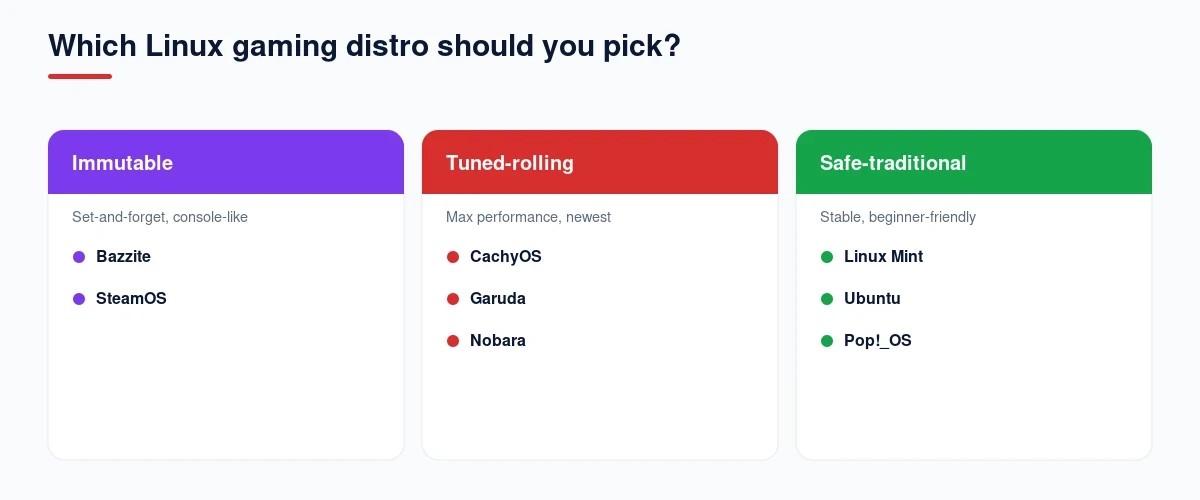
- Choose immutable (Bazzite, SteamOS) if you want console-like reliability above all else, a handheld or dedicated gaming machine where you’d rather never touch a terminal, and where a bad update rolling back automatically matters more than raw package currency.
- Choose tuned-rolling (Nobara, CachyOS, Garuda, EndeavourOS, Manjaro) if you want the newest kernel, Mesa, and Proton gains as they land, and you’re comfortable troubleshooting the occasional regression that a rolling release brings with it.
- Choose safe-traditional (Pop!_OS, Ubuntu, Linux Mint) if predictability matters more than bleeding-edge performance, especially if this machine also needs to reliably do non-gaming work.
| Philosophy | Update Risk | Package Currency | Install Model | Distros |
|---|---|---|---|---|
| Immutable | Very low (atomic rollback) | Current, image-based | Flatpak / layering, no terminal needed | Bazzite, SteamOS |
| Tuned-rolling | Moderate (regression possible) | Newest kernel/Mesa/Proton first | Traditional package manager, gaming pre-tuned | Nobara, CachyOS, Garuda, EndeavourOS, Manjaro |
| Safe-traditional | Very low (fixed release) | Slower, LTS/stable cadence | Traditional package manager, general-purpose | Pop!_OS, Ubuntu, Linux Mint |
Common Mistakes and Myths About Gaming on Linux
- Assuming your distro determines anti-cheat compatibility. It’s a per-game, per-developer decision made through Proton’s runtime opt-in, identical across every distro on this list.
- Storing your Steam library on an NTFS partition. NTFS’s permission handling breaks Proton in ways that look like a distro bug but aren’t; use a Linux-native filesystem for your games drive.
- Assuming a rolling release is always better for gaming. Newer packages mean newer performance gains, but also a real, higher chance of an update breaking something mid-session.
- Picking an immutable distro without understanding the install model. You can’t just apt-get or pacman-install onto Bazzite or SteamOS’s base system; system software goes through layering or Flatpak instead.
- Ignoring your GPU’s actual driver support tier. EndeavourOS’s shift to Nvidia’s open kernel modules, for example, dropped full support for pre-Turing cards, a real compatibility gap worth checking first.
- Confusing your desktop distro with a multiplayer server for friends. Everything above is about what runs on your own gaming PC; if you want a always-on server so friends can play without your machine staying on, that’s a separate rented service, which our guide to Palworld dedicated servers covers.
My Linux Distro for Gaming Recommendations
If you just want a quick answer for your specific situation rather than reading every section above, here’s how I’d point you to the best gaming Linux distro, or just the best gaming distro overall, based on everything tested in this guide.
| Criteria | Best Linux Distro |
|---|---|
| Best Linux Distro for Gaming Overall | Bazzite |
| Best for Steam Deck and Official Handhelds | SteamOS |
| Best for Non-Steam-Deck Handhelds (ROG Ally, Legion Go) | Bazzite |
| Best for Raw Performance Tuning | CachyOS |
| Best for Nvidia Users Specifically | Pop!_OS |
| Best for Gaming-Specific Patches First | Nobara Project |
| Best for Anti-Cheat and Multiplayer Compatibility | Ubuntu |
| Best for Rolling Release With a Safety Net | Garuda Linux |
| Best for Learning Real Arch | EndeavourOS |
| Best for Beginners and Dual-Booters | Linux Mint |
How I Evaluated These Linux Gaming Distros
Every kernel version, driver model, and release date in this guide was checked directly against each project’s own release notes or changelog, not copied from an older comparison list. That’s the bar every linux gaming distro on this list had to clear before it counted as a genuine best linux gaming distro pick, not just the one with the loudest marketing. And if you want to host a server for friends rather than just play, our budget game server hosting guide covers the cheapest options.
- Kernel versions, scheduler options, and Proton handling were verified against each distro’s own current release notes rather than a generic prior-year summary.
- SteamOS’s official-versus-enhanced-support device tiering was cross-checked against Valve’s own stated device list rather than treating all supported handhelds as equally certified.
- Manjaro’s 2026 governance situation was sourced from the project’s own public statements, not outside speculation.
- Anti-cheat compatibility figures and named working/non-working titles came from independent trackers, not any single distro’s own marketing claims.
- Where a benchmark claim (like CachyOS’s frame-time figures) depends on the specific source, game, and hardware, that dependency is stated directly rather than presented as a universal guarantee.
Frequently Asked Questions
Tell Google you want more of this.
Add DigitalPrahlad as a preferred sourceOne tap, and this site shows up more often in your own Google Top Stories, AI Overviews, and AI Mode results. You can remove this preference anytime you'd like.
Affiliate Disclaimer: This website is reader-supported. Some links are affiliate links, meaning I may earn a small commission at no extra cost to you. I only recommend products and tools I genuinely trust and use myself. Your support keeps DigitalPrahlad free and practical.