Rust is one of the hardest games to host well. A fresh map runs fine on almost anything, but by day five of a wipe there are thousands of player-built entities on the map, the server is chewing through RAM, and a cheap host starts to rubber-band right when your clan raid begins. Picking the best Rust server hosting is really about how a server behaves late in a wipe, not on day one.
So for this guide I compared the same 10 hosts we track for our game server guides, using only each provider’s own Rust pages, pricing data and terms, checked on 11 October 2026. You’ll see real prices, how much RAM you actually get, which hosts have proper wipe and plugin tools, where their servers are around the world, and how long you have to ask for a refund.
Short on time? These are the top 3 Rust server hosting picks for 2026:
- Rust from $9.00/month for 6GB, unlimited player slots
- Code DPHost: 40% off your first order
- 15 locations across North America, Europe, Asia and Australia
- Official Rust partnered host
- Carbon or Oxide, auto-wipes, staging branch
- 15 locations on 5 continents, DDR5 hardware
- Free +4GB RAM boost on every Rust plan
- Built-in Auto Wipes, Oxide and Carbon
- 21 locations worldwide, free location changes
Best Rust server hosting at a glance
Here are the 10 best Rust server hosting providers in this guide, with the plan we’d start on, its regular monthly price and how long you have to claim a refund.
| Rank | Host | Best for | Starter Rust plan | Price | Refund |
|---|---|---|---|---|---|
| 1 | GravelHost | Best overall value | Eoka, 6GB, unlimited slots | $9.00/mo | 72 hours |
| 2 | Shockbyte | Best Rust tools | Wood, 8GB, 40 players | $14.99/mo | 72 hours |
| 3 | BisectHosting | Best for auto wipes | 6GB + 4GB boost | $17.99/mo | 3 days |
| 4 | HostHavoc | Best for competitive PvP | 30 slots, 10GB | $16.00/mo | 72 hours |
| 5 | Hostinger | Best Rust VPS with a game panel | Game Panel 2, 8GB | $9.49/mo* | 30 days |
| 6 | ScalaCube | Best for high slot counts | 150 slots, 32GB | $24.00/mo | 7 days |
| 7 | Apex Hosting | Best for beginners | 4GB | $14.99/mo | 7 days |
| 8 | Nodecraft | Best premium hardware | PRO 12GB | $59.98/mo | 7 days + free trial |
| 9 | UltaHost | Best for the Middle East | 50 slots | $12.50/mo | 30 days** |
| 10 | RackNerd | Best Rust dedicated server (DIY) | 8GB KVM VPS | $119.99/yr | None |
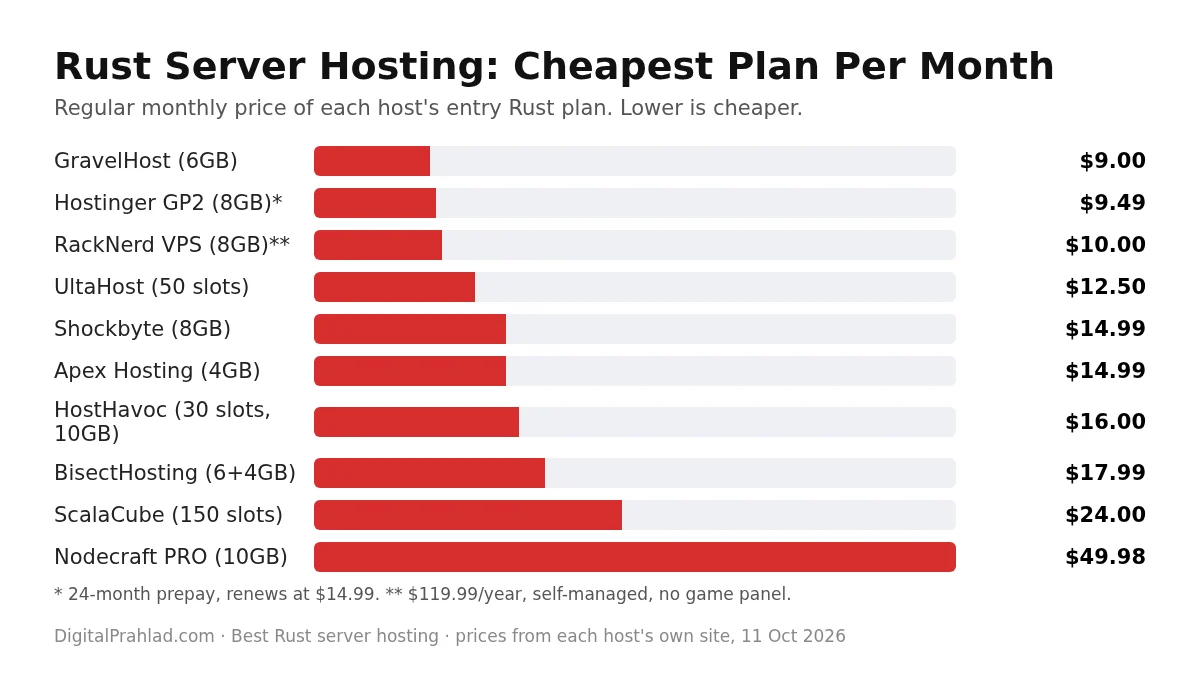
How much does Rust server hosting cost in 2026?
Before comparing the best Rust server hosting providers, know the price range: a properly sized Rust server costs about $15 to $35 a month for most groups. You can start at $9 to $12 for a small private server, while a busy 100-player community server with plugins usually lands between $35 and $60. Hosts price Rust in three different ways, which is why prices look so far apart:
- Per GB of RAM: GravelHost, Shockbyte, BisectHosting, Apex Hosting and Nodecraft. Best for planning, because RAM is what Rust runs out of first.
- Per player slot: HostHavoc, ScalaCube and UltaHost. Cheap-looking per slot, but check how much RAM sits behind those slots.
- Fixed VPS plans: Hostinger and RackNerd. More control, more work, and the best price per GB if you’re comfortable managing it.
| Budget | What you typically get | Good for |
|---|---|---|
| Under $10 | 6GB to 8GB, or a self-managed VPS | Private server for friends, testing |
| $10 to $20 | 8GB to 10GB, or 30 to 50 slots | Small community, vanilla |
| $20 to $40 | 10GB to 16GB | 50 to 100 players, light plugins |
| $40+ | 16GB to 32GB or dedicated cores | Large modded or high-pop servers |
10 best Rust server hosting providers in 2026
Each review below covers the actual Rust plans, the Rust-specific tools (plugins, wipes, maps, RCON), locations and the refund policy, so you can compare the best Rust server hosting providers like for like.
1. GravelHost: Best Overall Rust Server Hosting

Pros
- Rust from $9.00/month for 6GB with unlimited player slots
- Uncapped slots on every plan, so you size by RAM not players
- 15 locations across North America, Europe, Asia and Australia
- Code DPHost takes 40% off your first order
Cons
- Refund window is 72 hours
- No documented Rust wipe scheduler, only general scheduled tasks
- Premium Ryzen 9 5900X pricing not shown on the Rust page
Summary
GravelHost gives you the most RAM per dollar for Rust, with uncapped slots, Oxide support and 15 locations worldwide, which makes it the best value Rust server hosting in 2026.
Price: USD 9.00 Per month, Rust Eoka 6GB plan
Visit GravelHostGravelHost tops our best Rust server hosting list because it prices Rust by RAM and doesn’t cap player slots, so the player numbers on its plans are recommendations, not limits. At $9 for 6GB it’s the cheapest managed Rust server in this list, and the step up to 7.5GB for $14 covers most small communities. Oxide/uMod plugins install from the panel, and the custom panel has scheduled tasks, a firewall manager, free MySQL and full FTP.
GravelHost lists 15 locations across North America, Europe, Asia and Australia, from Dallas and New York to Amsterdam, London, Singapore and Sydney, so most groups can host close to their players. Read our full GravelHost review for our uptime monitoring and network tests.
GravelHost Rust plans
| Plan | RAM | Recommended players | NVMe storage | Price |
|---|---|---|---|---|
| Eoka | 6GB | 40 | 25GB | $9.00/mo |
| Crossbow | 7.5GB | 80 | 50GB | $14.00/mo |
| Assault Rifle | 9GB | 100 | 75GB | $21.00/mo |
| L96 Rifle | 13GB | 200 | 100GB | $31.00/mo |
Who should pick it: anyone who wants the most RAM for the money, wherever their players are. With code DPHost, your first month on the Eoka plan drops to about $5.40.
2. Shockbyte: Best Rust Tools and Official Partner

Pros
- Official Rust partnered host
- Carbon or Oxide, one-click plugin installs, auto-wipes and staging branch
- 15 locations on 5 continents, on DDR5 hardware
- 25% off with annual billing
Cons
- 72-hour refund, once per client, sometimes as credit
- Storage per plan not stated
- Custom Metal plan starts at $40/month
Summary
Shockbyte has the most complete Rust tooling we found: Carbon or Oxide, scheduled wipes, staging branch, custom maps and RustAdmin support, on modern EPYC and Ryzen hardware.
Price: USD 14.99 Per month, Rust Wood 8GB plan, monthly billing
Visit ShockbyteAmong the best Rust server hosting providers, Shockbyte is the only one that documents every Rust tool a server owner asks for: choose Carbon or Oxide from a dropdown, install plugins from a Modding tab, schedule map, blueprint or full wipes, switch to the staging branch, load custom maps and connect RustAdmin. Its hardware page lists AMD EPYC and Ryzen 9 9950X CPUs with DDR5 RAM and NVMe storage across 15 locations on five continents, including South America.
Shockbyte Rust plans
| Plan | RAM | Players | Monthly | Annual billing |
|---|---|---|---|---|
| Wood | 8GB | 40 | $14.99/mo | $11.24/mo |
| Fuel | 10GB | 75 | $24.99/mo | $18.74/mo |
| Metal | 12GB+ | 125+ | $40.00/mo | $30.00/mo |
Who should pick it: owners who want serious Rust tools without touching config files, especially modded or wiped-on-schedule community servers.
3. BisectHosting: Best for Auto Wipes and Bigger Maps

Pros
- Free +4GB RAM boost on every Rust plan
- Built-in Auto Wipes with Only Wipe on Empty option
- Oxide and Carbon support, Rust+ and beta branch
- 21 locations worldwide, including Sao Paulo and Sydney
Cons
- 3-day refund window
- Plugins upload manually, no one-click installer found
- Some locations showed out of stock when we checked
Summary
BisectHosting is the best Rust server hosting for automatic wipes and big maps, with a free 4GB RAM boost, Carbon support and DDoS protection rated up to 1.3 Tbps.
Price: USD 17.99 Per month, Rust 6GB plus 4GB boost
Visit BisectHostingEvery BisectHosting Rust plan gets a free +4GB RAM boost while Rust is running, so the $17.99 6GB plan actually runs with 10GB. Its Starbase panel has a proper Auto Wipes setting where you choose blueprints, map data or both, the interval, the time, and whether to wipe only when the server is empty. Oxide and Carbon are both supported, though not at the same time.
BisectHosting Rust plans
| Plan | Effective RAM | Players | World size | Price |
|---|---|---|---|---|
| 6GB + 4GB boost | 10GB | 1 to 32 | Up to 3,000 | $17.99/mo |
| 8GB + 4GB boost | 12GB | 33 to 48 | Up to 4,000 | $23.99/mo |
| 12GB + 4GB boost | 16GB | 49 to 60 | Up to 5,000 | $35.99/mo |
Who should pick it: community servers that wipe on a schedule and want a bigger map, on any continent, since it has 21 locations and free location changes. Annual billing drops the rate to $2.40 per GB.
4. HostHavoc: Best for Competitive PvP Servers

Pros
- Every slot tier includes 10GB RAM, from $16/month
- Owns and operates its own hardware
- One-click uMod/Oxide manager and a Rust wipe-day task
- Average ticket reply under 10 minutes
Cons
- 72-hour refund for first orders only
- More RAM costs extra ($15/month for 16GB)
- Carbon support not documented
Summary
HostHavoc pairs 10GB RAM on every Rust tier with owned hardware and a wipe-day scheduled task, a strong choice for competitive PvP servers.
Price: USD 16.00 Per month, Rust 30 slots with 10GB RAM
Visit HostHavocFor competitive servers, HostHavoc is one of the top Rust server hosting choices. It sells Rust by slot count, but every tier from 30 to 400 slots includes 10GB of RAM, so even the $16 plan has enough memory for a solid vanilla server. It owns its hardware, runs a modified TCAdmin panel with a one-click uMod/Oxide manager, and has a ready-made scheduled task that wipes only on the first Thursday of the month, Rust’s forced wipe day.
HostHavoc Rust plans
| Slots | RAM | Price |
|---|---|---|
| 30 | 10GB | $16.00/mo |
| 50 | 10GB | $17.50/mo |
| 100 | 10GB | $20.00/mo |
| 200 | 10GB | $36.00/mo |
Who should pick it: PvP communities that want reliable hardware and fast support. Code FALL takes 10% off new services for life.
5. Hostinger: Best Rust VPS With a Game Panel

Pros
- Full VPS with root access and a game panel
- Locations in the US, Europe, Brazil and Asia
- 30-day money-back guarantee
- Game Panel 4 gives 16GB for $13.99/month
Cons
- Promo prices need a 24-month prepay
- Rust needs Game Panel 2 or higher
- No documented wipe scheduler or Carbon support
Summary
Hostinger’s Game Panel VPS gives you the most RAM per dollar with locations on four continents and a 30-day refund, if you’re happy to manage a VPS.
Price: USD 9.49 Per month, Game Panel 2 8GB on a 24-month term
Visit HostingerHostinger isn’t a classic game host: you get a VPS with its Game Panel (CubeCoders AMP) on top, root access and weekly backups. Its own help centre says Rust won’t run on Game Panel 1 and recommends 12GB for the best performance, so start on Game Panel 2 (8GB) for a small server or Game Panel 4 (16GB) for a community one. uMod/Oxide installs from the panel’s Rust configuration.
Hostinger Rust plans
| Plan | vCPU | RAM | NVMe | Price (24 months) | Renews at |
|---|---|---|---|---|---|
| Game Panel 2 | 2 | 8GB | 100GB | $9.49/mo | $14.99/mo |
| Game Panel 4 | 4 | 16GB | 200GB | $13.99/mo | $28.99/mo |
| Game Panel 8 | 8 | 32GB | 400GB | $27.99/mo | $49.99/mo |
Who should pick it: technical owners who want lots of RAM cheaply and a long refund window. Remember the price is for a 24-month prepay.
Use code DPHOST at checkout for an additional 10% off at Hostinger
6. ScalaCube: Best for High Player Counts

Pros
- Every Rust plan has 32GB RAM and 8 CPU cores
- 150 to 250 player slots
- 14 locations from the US to Brazil, Europe and Asia
- 7-day refund window
Cons
- Starts at $24/month, more than small servers need
- Manual wipes only, no scheduler documented
- Plugins upload manually
Summary
ScalaCube gives every Rust plan 32GB of RAM and 8 cores, which makes it great value for big public servers rather than small private ones.
Price: USD 24.00 Per month, Rust 150 slots with 32GB RAM
Visit ScalaCubeScalaCube’s three Rust plans share the same hardware, 32GB RAM, 8 x 3.4 GHz cores and 320GB SSD, and differ only by player slots. That makes it oddly good value for large servers: 32GB for $24 a month is cheaper per GB than anyone else here. The trade-off is simpler tooling, with manual wipes from a button in the panel and manual plugin uploads.
ScalaCube Rust plans
| Plan | RAM | CPU | Storage | First month | Then |
|---|---|---|---|---|---|
| 150 slots | 32GB | 8 x 3.4 GHz | 320GB SSD | $19.20 | $24/mo |
| 200 slots | 32GB | 8 x 3.4 GHz | 320GB SSD | $25.60 | $32/mo |
| 250 slots | 32GB | 8 x 3.4 GHz | 320GB SSD | $32.00 | $40/mo |
Who should pick it: public servers aiming for 100+ players who don’t mind wiping by hand.
7. Apex Hosting: Best for Beginners

Pros
- Simple Apex Panel with a one-click uMod toggle
- DDoS protection up to 300 Gbps
- EX Series with dedicated Ryzen cores
- 7-day refund and 25% off the first order with APEX25
Cons
- 4GB entry plan is the bare minimum for Rust
- Pricier per GB than most
- No wipe scheduler documented
Summary
Apex Hosting is the easiest Rust server hosting to start with, thanks to its beginner-friendly panel, guides and a 7-day refund.
Price: USD 14.99 Per month, Rust 4GB plan recurring
Visit Apex HostingApex Hosting is built for people running their first server. Enabling uMod is a checkbox in the Apex Panel, the guides are clear, and the 7-day refund gives you time to test. Its EX Series adds 16GB DDR4 and 4 dedicated cores for serious servers. Apex itself calls 4GB the minimum for Rust, so treat the entry plan as a testing plan and size up for real players.
Apex Hosting Rust plans
| Plan | First month | Then |
|---|---|---|
| 4GB | $11.24 | $14.99/mo |
| 5GB | $14.06 | $18.75/mo |
| 10GB | $26.25 | $35.00/mo |
| EX Series 16GB, 4 dedicated cores | $53.99 | $71.99/mo |
Who should pick it: first-time server owners who value an easy panel and good guides over the lowest price.
8. Nodecraft: Best Premium Hardware and Free Trial

Pros
- Ryzen 9 7950X class CPUs at 4.5+ GHz with DDR5
- 28 locations, including Singapore, Tokyo and Sao Paulo
- Free 24-hour trial with no card
- 7-day money-back guarantee
Cons
- Most expensive per GB here ($5/GB)
- 30% discount is first month only
- Support hours are not 24/7
Summary
Nodecraft has the fastest hardware and widest network for Rust, plus a free trial, but you pay a premium for it.
Price: USD 59.98 Per month, Rust PRO 12GB plan
Visit NodecraftNodecraft’s PRO servers run on Ryzen 9 7950X class CPUs at 4.5 GHz or more with DDR5, and it averages just 12 customers per machine. Rust is mostly limited by single-core CPU speed, so that hardware shows in late-wipe performance. Its own wizard recommends the 12GB plan for most vanilla groups. It’s also the only host here with a free trial, 24 hours with no card.
Nodecraft Rust plans
| Plan | First month | Then |
|---|---|---|
| PRO 10GB | $34.99 | $49.98/mo |
| PRO 12GB (recommended) | $41.99 | $59.98/mo |
| PRO 16GB | $55.99 | $79.98/mo |
Who should pick it: owners who want the best hardware and a trial before paying, and can afford premium pricing.
9. UltaHost: Best for the Middle East and Long Refunds

Pros
- Rust from $12.50/month for 50 slots
- Dubai and Istanbul locations, rare among game hosts
- AMD EPYC processors and NVMe storage
- 30-day money-back guarantee on game hosting
Cons
- RAM per plan isn't stated
- Promotional purchases are excluded from refunds
- No wipe scheduler or named control panel
Summary
UltaHost is a solid pick for Rust players in the Middle East, with Dubai and Istanbul servers and a 30-day refund, though RAM per plan isn’t published.
Price: USD 12.50 Per month, Rust 50 slots
Visit UltaHostUltaHost prices Rust at about $0.25 per slot, starting at $12.50 for 50 slots, and offers Dubai and Istanbul alongside Dallas, New York, Frankfurt, Amsterdam and Singapore. It advertises a 30-day money-back guarantee, but its refund policy excludes plans bought with a promotion or discount, so check before you buy. It also doesn’t publish how much RAM each plan includes.
UltaHost Rust plans
| Slots | Price |
|---|---|
| 50 | $12.50/mo |
| 163 | $40.75/mo |
| 275 | $68.75/mo |
Who should pick it: players in the Gulf region who want a nearby server.
10. RackNerd: Best Rust Dedicated Server for DIY

Pros
- 8GB KVM VPS for $119.99 a year, about $10 a month
- Ryzen dedicated servers up to the 7950X3D
- Full root access, install any framework
- 15% off dedicated servers with code 15OFFDEDI
Cons
- No game panel: you install and manage everything
- No refunds by default
- No Asian locations
Summary
RackNerd is the cheapest route to a Rust dedicated server or VPS if you’re comfortable with Linux and SteamCMD.
Price: USD 119.99 Per year, 8GB KVM VPS special
Visit RackNerdRackNerd doesn’t sell game hosting, so this is the do-it-yourself route: you install the Rust dedicated server with SteamCMD, add Oxide or Carbon, and set up wipes and RCON yourself. In return you get the lowest price per GB here, and its Ryzen dedicated servers, like the Ryzen 5 7600 with 64GB DDR5 for $219 a month or the Ryzen 9 7950X3D, are serious machines for multiple servers.
RackNerd plans for Rust
| Plan | Specs | Price |
|---|---|---|
| 8GB KVM VPS (special) | 7 vCPU, 150GB SSD | $119.99/yr |
| 12GB KVM VPS | 7 vCore, 300GB | $55.99/mo |
| Ryzen 5 7600 dedicated | 64GB DDR5, 1TB NVMe | $219/mo |
| Ryzen 9 7950X3D dedicated | 128GB | $379/mo |
Who should pick it: experienced admins who want root access, multiple servers or a true dedicated machine. Self-hosting steps are below.
How much RAM does a Rust server need?
RAM is the single most important spec when you compare the best Rust server hosting plans. A fresh vanilla map uses a few gigabytes, but memory climbs every day of a wipe as players build, and plugins add more on top. The hosts’ own advice lines up: Hostinger recommends at least 12GB for the best performance, Nodecraft recommends 12GB for most vanilla groups, and Apex calls 4GB the bare minimum.
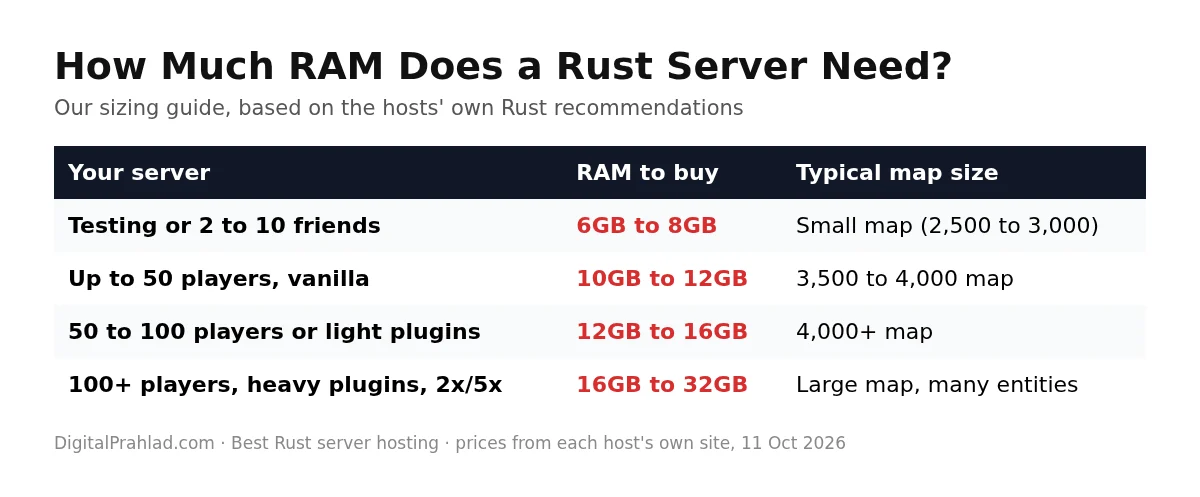
Map size and entity count matter more than raw player count, so a 30-player server on a 4,500 map can need more RAM than a 60-player server on a 3,000 map. For a quick estimate for Rust and other games, use our game server RAM calculator.
Best Rust dedicated server hosting
When people search for the best Rust dedicated server hosting, they usually mean one of two things. A Rust dedicated server is simply the server software Facepunch provides, which every host on this list runs for you. A dedicated machine is a whole physical server reserved for you, which only matters for very large or multi-server setups.
| Option | Example | Price | Best for |
|---|---|---|---|
| Managed game server | GravelHost, Shockbyte, BisectHosting | $9 to $40/mo | Most groups and communities |
| Dedicated CPU cores | Apex EX Series 16GB, 4 dedicated cores | $71.99/mo | Busy servers that need steady performance |
| Game panel VPS | Hostinger Game Panel 4, 16GB | $13.99/mo (24-month term) | Technical owners on a budget |
| Full dedicated server | RackNerd Ryzen 9 7950X3D, 128GB | $379/mo | Multiple servers or networks |
If DDoS attacks are a concern, which they often are for popular Rust servers, see our list of the best dedicated servers with DDoS protection.
Best Rust server hosting for low latency worldwide
The best Rust server hosting for you is the one closest to your players, because ping decides fights in Rust. A server in the same region as most of your players matters more than any hardware upgrade. Here’s where each host lists locations, by region, based on their own location pages (confirm Rust availability at checkout). Our guide to the best game server locations explains how to choose.
| Host | North America | Europe | South America | Asia | Oceania | Middle East |
|---|---|---|---|---|---|---|
| GravelHost | 8 sites | 3 sites | No | 3 sites | Sydney | No |
| Shockbyte | 5 sites | 5 sites | Sao Paulo | 3 sites | Australia | No |
| BisectHosting | 11 sites | 5 sites | Sao Paulo | 3 sites | Sydney | No |
| HostHavoc | 8 sites | 4 sites | No | 1 site | Sydney | No |
| Hostinger | 2 sites | 4 sites | Brazil | 3 sites | No | No |
| ScalaCube | 5 sites | 5 sites | Brazil | 2 sites | Australia | No |
| Apex Hosting | 6 sites | 3 sites | Sao Paulo | 2 sites | Sydney | Tel Aviv |
| Nodecraft | 12 sites | 9 sites | Sao Paulo | 2 sites | Melbourne, Sydney, Auckland | No |
| UltaHost | 2 sites | 2 sites | No | 1 site | No | Dubai, Istanbul |
| RackNerd | 9 sites | 3 sites | No | No | No | No |
Nodecraft has the widest network, with 28 locations including three in Oceania. BisectHosting and Shockbyte also cover every major region. UltaHost and Apex Hosting are the only ones with Middle East locations.
Rust server hosting refund policies compared
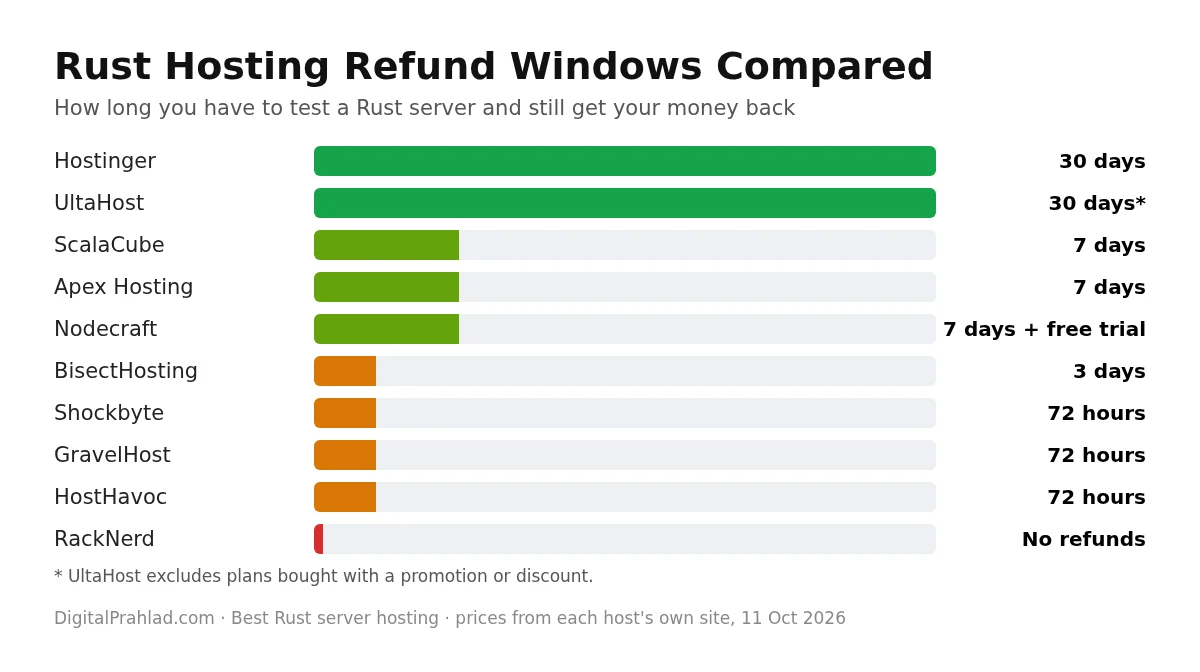
Even with the best Rust server hosting, performance problems often only show up a few days into a wipe, so the refund window matters more than usual. Test your server under real load before the window closes.
Best Rust server hosting free: what actually works
Searching for the best Rust server hosting free usually ends in disappointment, because a Rust server needs 6GB to 12GB of RAM and that costs real money. We didn’t find a reputable host offering free Rust servers. These are your real free or nearly free options:
- Host it on your own PC: the Rust dedicated server software is free through SteamCMD. Fine for a few friends if your PC has spare RAM and your internet upload is solid.
- Nodecraft’s free trial: 24 hours with no card, or 3 days with a card, to test before buying.
- Refund windows: Hostinger’s 30 days, or 7 days at ScalaCube, Apex and Nodecraft.
- Discounts: 40% off your first GravelHost order with code DPHost, or 25% off at Apex with APEX25.
For cheap servers in other games, see our best cheap game server hosting guide.
How to choose the best Rust server provider
- RAM first: the best Rust server provider for you sells enough RAM for the end of the wipe, not day one. See the table above.
- Single-core CPU speed: Rust leans on one fast core. Look for modern Ryzen or EPYC CPUs and avoid vague hardware claims.
- Location: pick the region closest to most players.
- Wipe tools: a scheduler that wipes automatically on forced wipe day saves a lot of late nights.
- Plugin framework: Oxide/uMod has the biggest plugin library; Carbon is newer and focused on performance. Check which your host supports.
- DDoS protection: popular Rust servers get attacked. Make sure it’s included, not an add-on.
- Refund window and billing: watch for prepay terms and promotional exclusions.
How to set up your own Rust dedicated server (SteamCMD)
If you pick a Rust dedicated server or VPS like RackNerd or Hostinger, these are the basic steps on Linux. Managed hosts do all of this for you. Running your server on Linux? See our tested picks for the best Linux distro for gaming.
# 1. Install SteamCMD (on Ubuntu, enable multiverse and i386 first)
sudo add-apt-repository multiverse && sudo dpkg --add-architecture i386
sudo apt update && sudo apt install -y steamcmd

# 2. Download the Rust dedicated server (Steam app 258550)
steamcmd +force_install_dir ~/rust +login anonymous +app_update 258550 validate +quit

# 3. Open the ports: 28015 game (UDP), 28016 RCON, 28082 Rust+ app
sudo ufw allow 28015/udp && sudo ufw allow 28016/tcp && sudo ufw allow 28082/tcp

# 4. Start the server
cd ~/rust && ./RustDedicated -batchmode
  +server.port 28015 +server.level "Procedural Map"
  +server.seed 12345 +server.worldsize 3500 +server.maxplayers 50
  +server.hostname "My Rust Server" +server.identity "main"
  +rcon.port 28016 +rcon.password "change-this" +rcon.web 1 +app.port 28082
Run it inside screen or a systemd service so it keeps running after you log out, then install Oxide or Carbon by copying their files into the server folder after each Rust update.
Rust wipes, plugins and maps explained
Forced wipe: Facepunch releases a monthly update on the first Thursday of every month, and every server must wipe the map then. Many communities also wipe weekly or every two weeks between forced wipes. Blueprint wipes are separate and usually monthly.
Oxide vs Carbon: Oxide (uMod) is the long-standing plugin framework with the largest plugin library. Carbon is a newer framework built for performance that can run most Oxide plugins. You can’t run both at once. Shockbyte and BisectHosting document Carbon support; most others document Oxide.
Custom maps: set a map URL (the level URL) in your server config. Shockbyte, BisectHosting, HostHavoc and Nodecraft all have guides for it.
Final verdict: the best Rust server hosting in 2026
For most groups, GravelHost is the best Rust server hosting in 2026: the most RAM for the money, uncapped slots and 15 locations worldwide, with 40% off using code DPHost. If you want the most complete Rust tools, choose Shockbyte. For automatic wipes and bigger maps, BisectHosting is the pick. Competitive PvP communities will like HostHavoc, and if you’re comfortable with a VPS, Hostinger gives the most RAM per dollar with a 30-day refund.
Frequently asked questions
What is the best Rust server hosting in 2026?
GravelHost is the best overall Rust server hosting for value, with 6GB from $9 a month, uncapped slots and 15 locations worldwide. Shockbyte has the best Rust tools, and BisectHosting is best for automatic wipes.
How much RAM does a Rust server need?
Plan 6GB to 8GB for a private server with a few friends, 10GB to 12GB for up to 50 players on vanilla, and 16GB or more for 100+ players or heavy plugins. Memory grows during a wipe as players build.
How much does it cost to host a Rust server?
Most Rust servers cost $15 to $35 a month. Small private servers start around $9 to $12, while large modded community servers usually cost $35 to $60 or more.
Can I host a Rust server for free?
Not on a reputable managed host, because Rust needs 6GB to 12GB of RAM. You can host one free on your own PC with SteamCMD, or test paid hosts with Nodecraft’s free trial and refund windows.
When is the Rust forced wipe?
Rust’s forced wipe happens on the first Thursday of every month, when Facepunch releases its monthly update. All servers must wipe the map then, and many also wipe blueprints.
Should I use Oxide or Carbon for Rust plugins?
Oxide (uMod) has the largest plugin library and the widest host support. Carbon is newer, focused on performance and runs most Oxide plugins. You can only run one at a time.
What ports does a Rust server use?
By default a Rust server uses port 28015 for the game, 28016 for RCON and 28082 for the Rust+ companion app. Your host may assign different ports.
Which Rust server location should I choose?
Choose the region closest to most of your players, because ping matters more than hardware in Rust fights. Nodecraft, BisectHosting and Shockbyte cover North America, Europe, South America, Asia and Oceania, and UltaHost and Apex Hosting also have Middle East locations.
Is a Rust dedicated server better than managed hosting?
For most groups, managed hosting is better because it handles updates, wipes and plugins for you. A VPS or dedicated server is cheaper per GB and more flexible, but you manage everything yourself.
Tell Google you want more of this.
Add DigitalPrahlad as a preferred sourceOne tap, and this site shows up more often in your own Google Top Stories, AI Overviews, and AI Mode results. You can remove this preference anytime you'd like.
Affiliate Disclaimer: This website is reader-supported. Some links are affiliate links, meaning I may earn a small commission at no extra cost to you. I only recommend products and tools I genuinely trust and use myself. Your support keeps DigitalPrahlad free and practical.