You need a Windows machine that’s always on: to run a trading bot, a desktop app, a scraper, or a remote office for your team. Your laptop can’t stay online 24/7, and a cheap Linux VPS won’t run Windows software. That’s exactly what a Windows RDP server solves, but the hard part is choosing one, because the prices, licenses and refund rules vary far more than the sales pages admit.
To find the best RDP for Windows in 2026, every provider below was checked against its own pricing, product and terms pages in October 2026: real monthly prices, whether the Windows Server license is included, how many RDP users you get, where the servers are, and whether you can actually get a refund. You’ll also find the best RDP client for Windows to connect with, including free options for Windows 10 and 11. Prefer rotating residential IPs over a Windows desktop? See the affordable residential proxies we recommend.
Disclosure: some links in this article are affiliate links. They don’t cost you anything extra.
Short on time? These are the top 3 picks for the best RDP for Windows in 2026:
- Windows Server license included
- Managed, DDR5 RAM and NVMe storage
- Windows Server 2022, 2019, Windows 10 and 11
- Windows license included, 2 RDP users by default
- 17 data center locations
- Free 1-month trial for eligible businesses
- Windows Server 2019 or 2022 license included
- Anytime money-back guarantee
- Intel Xeon Gold, 10Gbps network
What is a Windows RDP server?
A Windows RDP server is a remote Windows machine, usually a Windows VPS, that you control from your own computer using Microsoft’s Remote Desktop Protocol (RDP). You see its desktop as if you were sitting in front of it, and it keeps running 24/7 in a data center even when your own device is off.
People use Windows RDP for forex and trading platforms like MetaTrader, running Windows-only software, automation and bots, remote work, browser-based tasks from another country, and hosting apps that need Windows Server. When people search for the best RDP server for Windows or the best RDP hosting for Windows, this is what they need: a Windows VPS with RDP access, not just an app.
Best RDP for Windows at a glance
| # | Provider | Best for | Starting price | Windows license | Refund |
|---|---|---|---|---|---|
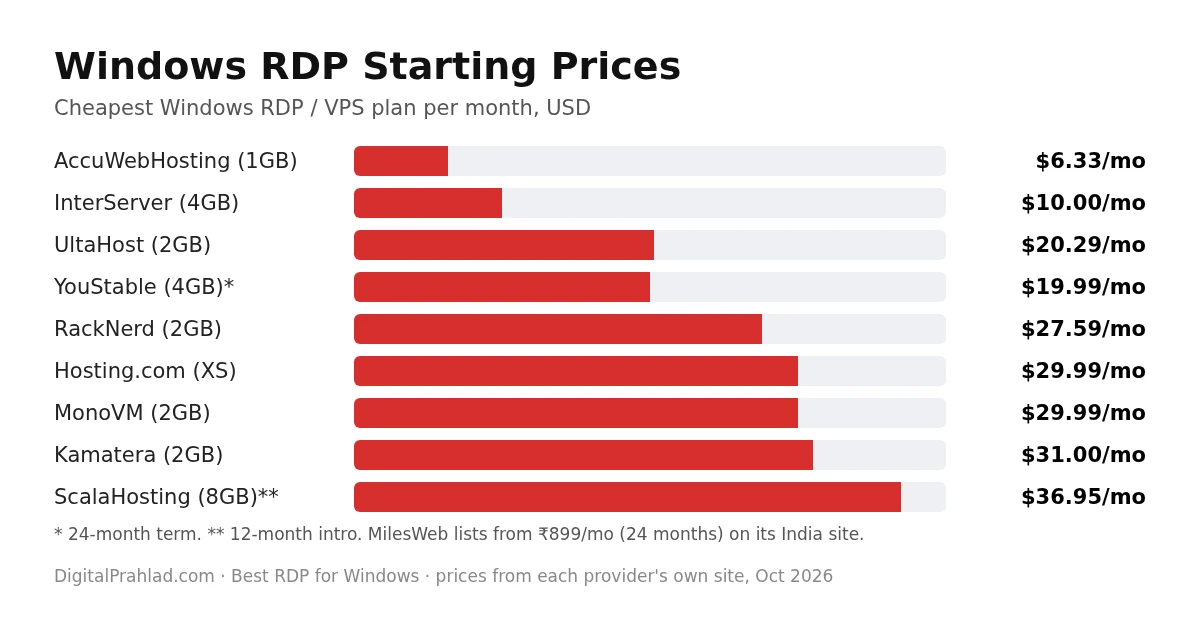
| 1 | UltaHost | Best overall | $20.29/mo | Included | 30 days, monthly plans |
| 2 | AccuWebHosting | Best budget, most locations | $6.33/mo intro | Included | 7 days |
| 3 | ScalaHosting | Best refund policy | $36.95/mo (8GB) | Included | 30 days + prorated |
| 4 | Kamatera | Hourly billing, custom specs | $31/mo | Included in price | None, free trial |
| 5 | InterServer | Most RAM per dollar | $10/mo (4GB) | Not stated | None |
| 6 | YouStable | Low 24-month price | $19.99/mo (24 mo) | Included | 7 days |
| 7 | MonoVM | Crypto payments, 20 locations | $29.99/mo | Included at $0 | 7 days |
| 8 | RackNerd | Ryzen CPUs, no long contract | $27.59/mo | Appears bundled | None |
| 9 | MilesWeb | Managed Windows VPS | From ₹899/mo | Included | 30 days |
| 10 | Hosting.com | Fully managed with Plesk | $29.99/mo | Included | None on VPS |
10 best RDP for Windows providers in 2026
Each review below covers real plans and prices, the Windows license, RDP access, locations and the refund rules, so you can compare the best RDP for Windows like for like.
1. UltaHost: Best Overall RDP for Windows

Pros
- Windows Server Standard license included in every plan
- Managed servers with DDR5 RAM and NVMe storage
- Windows Server 2022, 2019, Windows 10, 11 or a custom ISO
- Free DDoS protection and full admin RDP access
Cons
- 30-day refund only on monthly, non-promo plans
- Exact Windows RDP locations aren't listed
- RDP user limits not published
Summary
UltaHost is the best RDP for Windows overall, with the Windows license included, managed DDR5 servers and a choice of Windows versions.
Price: USD 20.29 Per month, Basic 2 vCPU 2GB, monthly billing
Visit UltaHostUltaHost’s RDP servers come with a licensed Windows Server Standard edition, and its FAQ is clear that the license cost is covered by UltaHost. Every plan is managed, runs on DDR5 RAM with NVMe storage, includes one IPv4 address and unmetered bandwidth, and offers free DDoS protection.
You can pick Windows Server 2022, 2019, Windows 10, Windows 11 or upload your own ISO. Prices drop with longer terms and, unusually, the renewal price matches the term price you sign up at. One catch: the 30-day refund applies to monthly plans only, not yearly or multi-year terms, and not to promotional purchases.
UltaHost Windows RDP plans
| Plan | vCPU / RAM / NVMe | Monthly | 2-year |
|---|---|---|---|
| Basic | 2 / 2GB / 50GB | $20.29 | $16.10/mo |
| Business | 2 / 4GB / 80GB | $29.39 | $24.14/mo |
| Professional | 3 / 6GB / 150GB | $41.99 | $33.93/mo |
| Enterprise | 4 / 8GB / 200GB | $60.99 | $48.87/mo |
Who should pick it: most people who want a reliable, managed Windows RDP with the license sorted and a choice of Windows versions.
2. AccuWebHosting: Best Budget RDP and Most Locations

Pros
- Licensed Windows Server included, 2 concurrent RDP connections by default
- 17 data center locations worldwide
- Intro prices from $6.33 a month
- Free 1-month Windows VPS trial for eligible businesses
Cons
- Discounted prices only in 5 core locations
- 7-day refund window
- Extra RDP users need paid CALs, Denver only
Summary
AccuWebHosting is the best budget RDP for Windows, with the license included, 2 RDP users by default and 17 locations.
Price: USD 6.33 Per month intro, Opal 1GB plan
Visit AccuWebHostingAccuWebHosting is one of the longest-running Windows VPS specialists. Every standard plan includes a fully licensed, activated Windows Server, and two concurrent RDP connections are supported by default. If you need more users, Microsoft RDP CALs cost $40 a month per 5 device CALs, available in Denver.
Its 17 locations span North America, Europe, Africa and Asia Pacific. The cheapest prices and free backups apply in five core locations: New York, Denver, London, Frankfurt and one in Asia, while other locations like Singapore and Tokyo cost more. Eligible businesses can also get a free first month on a 1GB Windows VPS, after strict verification.
AccuWebHosting Windows RDP plans
| Plan | vCPU / RAM / SSD | Intro | Renews at |
|---|---|---|---|
| Opal | 1 / 1GB / 40GB | $6.33/mo | $8.99/mo |
| Pearl | 1 / 2GB / 60GB | $9.99/mo | $14.99/mo |
| Diamond | 3 / 4GB / 100GB | $19.99/mo | $39.99/mo |
| Emerald | 4 / 8GB / 125GB | $39.99/mo | $79.99/mo |
Who should pick it: budget users, traders and anyone who needs a Windows RDP in a specific country.
3. ScalaHosting: Best Windows RDP Refund Policy

Pros
- Windows Server 2019 or 2022 Standard license included
- Anytime money-back: full refund for 30 days, prorated after
- Intel Xeon Gold up to 4.1GHz, 10Gbps network
- Daily snapshots and offsite backups
Cons
- Self-managed
- Price for the smallest config is inconsistent on its own site, so confirm at checkout
- Software licenses are excluded from refunds
Summary
ScalaHosting offers the most reassuring refund terms of any Windows RDP here, with the Windows license included and strong hardware.
Price: USD 36.95 Per month, 4 cores 8GB on a 12-month term
Visit ScalaHostingScalaHosting’s Windows VPS includes a Windows Server 2019 or 2022 Standard license in the price, with administrator access and remote desktop for every client. It runs on Intel Xeon Gold CPUs with a 10Gbps redundant network and keeps backups in three offsite locations. You can read more about the company in our ScalaHosting review.
Its standout feature is the Anytime Money-back Guarantee: a full refund for the first 30 days and a prorated refund for unused service after that, for new clients. Note that software licenses are listed as non-refundable, and the price for its smallest 2-core config shows two different values on ScalaHosting’s own pages, so check it at checkout.
ScalaHosting Windows RDP plans
| Config | Cores / RAM / NVMe | 12-month intro | Renews at |
|---|---|---|---|
| #2 | 4 / 8GB / 100GB | $36.95/mo | $49.95/mo |
| #3 | 8 / 16GB / 160GB | $66.95/mo | $95.95/mo |
| #4 | 16 / 32GB / 240GB | $122.95/mo | $183.95/mo |
Who should pick it: anyone who wants a safety net while testing a Windows RDP for real work.
4. Kamatera: Best for Hourly Billing and Custom Specs

Pros
- Hourly or monthly billing, no contract
- 21 data centers worldwide
- Windows Server 2025, 2022, 2019, 2016 and Windows 10/11
- 30-day free trial up to $100 of resources
Cons
- Windows Server license adds about $19 a month
- Extra RDP users cost $8.01 each per month
- No money-back guarantee
Summary
Kamatera is the most flexible RDP for Windows, with hourly billing, 21 locations and every recent Windows Server version.
Price: USD 31.00 Per month, Basic 1 core 2GB with Windows
Visit KamateraKamatera lets you build exactly the Windows server you need and pay by the hour or month, with no contract. It offers Windows Server 2025, 2022, 2019 and 2016 in Datacenter or Standard editions, plus Windows 10 and 11 desktop, across 21 data centers in the US, Europe, Asia, the Middle East and Australia.
Windows licensing is charged separately in its calculator, about $19 a month for Windows Server, and the preset plan prices appear to include it. Extra Remote Desktop users cost $8.01 per user per month. There’s no money-back guarantee, but the 30-day free trial covers one server up to $100 of resources.
Kamatera Windows RDP plans
| Plan | CPU / RAM / NVMe | Price |
|---|---|---|
| Basic | 1 core / 2GB / 30GB | $31/mo |
| Plus | 2 cores / 4GB / 30GB | $37/mo |
| Premium | 4 cores / 4GB / 40GB | $86/mo |
Who should pick it: developers and businesses that want custom specs, hourly billing or a Windows server in an unusual location.
5. InterServer: Most RAM per Dollar

Pros
- 4GB RAM, 80GB SSD for $10 a month
- Month-to-month pricing with no renewal increase
- Free DDoS protection up to 100Gbps
- RDP preinstalled, ready in under 20 minutes
Cons
- Windows license terms aren't stated on the page
- No refunds on VPS
- Only 3 US locations
Summary
InterServer gives you the most RAM for the money on a Windows server, with honest month-to-month pricing.
Price: USD 10.00 Per month, 2 slices 4GB
Visit InterServerInterServer sells Windows cloud servers in slices at $5 each, with a minimum of two. That gets you 1 core, 4GB RAM, 80GB SSD and 4TB of transfer for $10 a month, with no inflated renewal price. RDP comes preinstalled, servers are usually ready in under 20 minutes, and free DDoS protection up to 100Gbps is included.
The trade-offs: the page doesn’t say whether the Windows license is included, locations are limited to New York, Dallas and Los Angeles, and there are no refunds on VPS. Managed help is included from 8 slices up.
InterServer Windows RDP plans
| Slices | Cores / RAM / SSD | Price |
|---|---|---|
| 2 | 1 / 4GB / 80GB | $10/mo |
| 4 | 2 / 8GB / 160GB | $20/mo |
| 8 | 4 / 16GB / 320GB | $40/mo |
| 16 | 8 / 32GB / 640GB | $80/mo |
Who should pick it: users in the US who want the most RAM per dollar and don’t need a refund window.
6. YouStable: Best Low-Cost 24-Month Windows RDP

Pros
- Licensed Windows Server 2019 or 2022, activated instantly
- Admin RDP access and a dedicated IPv4 on every plan
- NVMe storage, from $19.99 a month on 24 months
- Data centers in the USA, Europe and Asia
Cons
- Unmanaged
- Backups are a paid add-on
- 7-day refund, first VPS only
Summary
YouStable is a low-cost Windows RDP with the license included and NVMe storage, best on a 24-month term.
Price: USD 19.99 Per month, RDP-Startup on a 24-month term
Visit YouStableYouStable’s Windows RDP plans include a licensed Windows Server, admin RDP access and a dedicated IPv4 address on every plan, with NVMe storage and 1TB of bandwidth. You can choose Windows Server 2019 or 2022, and the license activates instantly.
The best value is on the 24-month term, which also adds two months free. It’s an unmanaged service, backups cost extra, and the refund window is 7 days for your first VPS purchase.
YouStable Windows RDP plans
| Plan | Cores / RAM / NVMe | 24-month | Monthly |
|---|---|---|---|
| RDP-Startup | 2 / 4GB / 60GB | $19.99/mo | $39.99 |
| RDP-Pro | 4 / 8GB / 125GB | $28.99/mo | $56.99 |
| RDP-Popular | 6 / 16GB / 250GB | $50.99/mo | $101.99 |
| RDP-Extreme | 8 / 32GB / 500GB | $84.99/mo | $169.99 |
Who should pick it: budget-conscious users who are happy to commit to 24 months for a lower monthly price.
7. MonoVM: Best for Crypto Payments and Global Locations

Pros
- Accepts Bitcoin, ETH, USDT and many other cryptocurrencies
- 20 selectable locations worldwide
- Windows Server 2025, 2022, 2019, 2012 and Windows 10 at no extra cost
- Up to 30% off on 3-year terms
Cons
- Refunds only for technical issues, with KYC
- No backups included
- Unmanaged unless you buy a security add-on
Summary
MonoVM is the best RDP for Windows if you want to pay with crypto or need a server in one of 20 countries.
Price: USD 29.99 Per month, Windows 2GB plan monthly
Visit MonoVMMonoVM has sold VPS since 2011 and stands out for payment options, accepting cards, PayPal and a long list of cryptocurrencies. Its order page shows every Windows OS option, including Server 2025 and 2022, at no extra cost, and you can choose from 20 locations across the Americas, Europe and Asia Pacific. If crypto payment matters most, also see our list of the best RDP servers you can buy with Bitcoin.
Servers are unmanaged by default, backups are your responsibility, and the 7-day refund applies to technical issues after MonoVM has tried to fix them, with KYC documents required.
MonoVM Windows RDP plans
| Plan | vCPU / RAM / SSD | Monthly | 3-year |
|---|---|---|---|
| Windows 2GB | 2 / 2GB / 60GB | $29.99 | $21.00/mo |
| Windows 4GB | 2 / 4GB / 100GB | $44.99 | $31.92/mo |
| Windows 8GB | 4 / 8GB / 200GB | $84.99 | $59.47/mo |
| RDP 2GB (admin) | 2GB / 80GB | $39.99 | $27.99/mo |
Who should pick it: users who want to pay with crypto or need an RDP server in a specific country.
8. RackNerd: Best Ryzen Windows VPS Without Long Contracts

Pros
- AMD Ryzen 3900X CPUs with NVMe storage
- Same monthly price on every billing term
- Full administrator and remote desktop access
- 7 US locations
Cons
- No money-back guarantee
- Unmanaged, no backups
- Windows license inclusion not stated explicitly
Summary
RackNerd offers fast Ryzen-based Windows VPS with simple monthly pricing and no long contract needed.
Price: USD 27.59 Per month, 2GB Windows VPS
Visit RackNerdRackNerd’s Windows VPS runs on AMD Ryzen 3900X CPUs with NVMe storage and a 1Gbps port, and includes full administrator and remote desktop access. Pricing is the same per month whether you pay monthly or for two years, so there’s no penalty for staying flexible.
Windows Server options in the order form carry no extra charge, so the license appears bundled, though the page doesn’t say so outright. It’s unmanaged, has no backups by default and no money-back guarantee. Locations are New York, Chicago, Seattle, Dallas, San Jose, Atlanta and Ashburn.
RackNerd Windows RDP plans
| RAM | vCores / NVMe | Bandwidth | Price |
|---|---|---|---|
| 2GB | 1 / 35GB | 2TB | $27.59/mo |
| 4GB | 2 / 60GB | 2TB | $30.59/mo |
| 8GB | 3 / 110GB | 5TB | $44.59/mo |
| 16GB | 6 / 200GB | 10TB | $89.59/mo |
Who should pick it: experienced users in the US who want Ryzen performance without a long commitment.
9. MilesWeb: Best Managed Windows VPS Option

Pros
- Windows Server 2019, 2022 and 2025 licenses included
- Managed plans with 32 global data centers
- 30-day money-back on VPS
- MSSQL Express included
Cons
- Unmanaged plans are in one Asia location only
- DDoS protection and backups are paid add-ons
- Windows license is non-refundable
Summary
MilesWeb offers both unmanaged and managed Windows VPS with the license included and a 30-day refund window.
Price: INR 899 Per month, SM-W1 on a 24-month term
Visit MilesWebMilesWeb sells two Windows options. Its unmanaged Windows VPS (SM-W plans) runs in a single Asia data center and starts from ₹899 a month on a 24-month term for 2 vCPU, 4GB RAM and 50GB NVMe. Its managed Windows VPS (VMW plans) can be deployed in 32 data centers worldwide, from North America and Europe to Asia, Africa and Australia.
Windows Server 2019, 2022 and 2025 Standard licenses are included at no extra cost in the cart. The 30-day money-back covers VPS plans, but the Windows license itself is non-refundable, and DDoS protection and daily backups are paid add-ons. Prices on its site appeared in rupees (₹) from our location, so check the price in your currency at checkout.
MilesWeb Windows RDP plans
| Plan | Type | vCPU / RAM / Storage | Starting price |
|---|---|---|---|
| SM-W1 | Unmanaged, Asia | 2 / 4GB / 50GB NVMe | ₹899/mo (24 months) |
| SM-W2 | Unmanaged, Asia | 2 / 8GB / 100GB NVMe | ₹1,099/mo (24 months) |
| VMW2 | Managed, global | 2 / 4GB / 80GB | ₹3,499/mo (24 months) |
Who should pick it: users who want a managed Windows VPS in many countries, or a low-cost Windows server in Asia.
10. Hosting.com: Best Fully Managed Windows VPS with Plesk

Pros
- Windows Server 2022 and Plesk included on managed plans
- Daily backups and DDoS protection on managed plans
- 9 data center locations
- Self-managed plans from $29.99 a month
Cons
- Managed plans start at $139.99 a month
- VPS plans are excluded from the money-back guarantee
- Only Windows Server 2022
Summary
Hosting.com is the pick when you want a fully managed Windows VPS with Plesk, backups and DDoS protection handled for you.
Price: USD 29.99 Per month, self-managed Windows XS
Visit Hosting.comHosting.com, formerly A2 Hosting, offers self-managed and fully managed Windows VPS on Windows Server 2022. The managed plans bundle the Windows license and Plesk Web Admin at no extra cost, with daily backups, firewalls, brute force prevention and DDoS protection, across nine locations including Dallas, Toronto, London, Frankfurt, Singapore and Sydney.
Managed service comes at a premium, from $139.99 a month for 2 cores and 4GB RAM, and VPS plans are excluded from its money-back guarantee. Self-managed plans start lower, at $29.99 a month, with a promotional starting price of $15 shown on its page.
Hosting.com Windows RDP plans
| Plan | Cores / RAM / NVMe | Managed price |
|---|---|---|
| XS | 2 / 4GB / 80GB | $139.99/mo |
| S | 4 / 8GB / 160GB | $189.99/mo |
| M | 8 / 16GB / 320GB | $219.99/mo |
| L | 16 / 32GB / 640GB | $369.99/mo |
Who should pick it: businesses that want Windows hosting fully managed, with Plesk, rather than running the server themselves.
Best RDP client for Windows: how to connect to your server
The best RDP client for Windows for most people is the built-in Remote Desktop Connection, because it’s free, already installed and works with every Windows RDP server above. If you manage many servers, a free multi-connection tool saves time. Here’s how the main options compare:
| RDP client | Price | Best for |
|---|---|---|
| Remote Desktop Connection (mstsc) | Free, built into Windows | Connecting to one or two servers |
| Windows App (Microsoft) | Free | Microsoft’s newer remote desktop app, including Azure Virtual Desktop and Windows 365 |
| mRemoteNG | Free, open source | Managing many RDP connections in tabs |
| Devolutions Remote Desktop Manager | Free edition, paid tiers | Teams and admins with many servers and saved credentials |
| Royal TS | Free with limits, paid license | Organised connection lists across protocols |
Best free RDP client for Windows 10 and 11
On Windows 10 and Windows 11, the best free RDP client is the one you already have: press the Windows key, type Remote Desktop Connection (or run mstsc), enter your server’s IP address, then your username and password. It works on Home editions too for connecting out; only hosting incoming RDP sessions needs Windows Pro or Server. If you juggle several servers, mRemoteNG is the best free RDP software for Windows for keeping them organised in tabs.
How to connect to your Windows RDP server
- Buy a Windows RDP or Windows VPS plan and wait for the welcome email with your IP address, username (usually Administrator) and password.
- Open Remote Desktop Connection on your computer, or the Microsoft Remote Desktop / Windows App on Mac, iOS or Android.
- Enter the server’s IP address and click Connect.
- Enter the username and password, and accept the certificate warning on first login.
- Change the default password straight away and install Windows updates.
Windows license and RDP users explained
Most Windows RDP plans include the Windows Server license, but extra simultaneous RDP users usually need paid Remote Desktop licenses. Windows Server allows administrative remote sessions out of the box; for more users working at the same time, you need Remote Desktop Services client access licenses (CALs). Among the providers here, AccuWebHosting supports 2 concurrent RDP connections by default and sells RDP CALs at $40 a month per 5, and Kamatera charges $8.01 per extra RDP user per month. If several people will use the same server, ask about CALs before you buy.
Refund policies compared
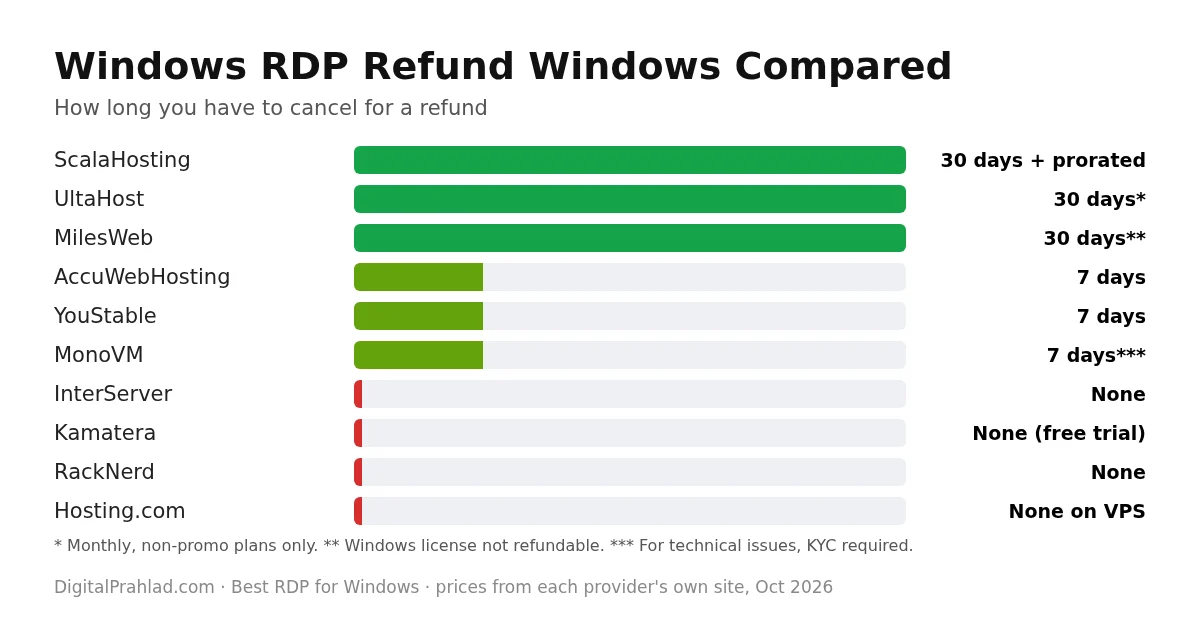
Refund terms are where Windows RDP providers differ most. Some give 30 days, several give none at all, and Windows licenses are often excluded.
How to choose the best RDP for Windows
- Check the Windows license. Make sure it’s included, or add its cost to the price.
- Size RAM for your software. 2GB to 4GB for light use, 8GB or more for trading platforms with several charts, browsers and heavier apps.
- Pick a nearby location. Lower latency makes the desktop feel faster; for forex, choose a location near your broker.
- Count your users. More than two simultaneous users usually means paid RDP CALs.
- Decide managed or unmanaged. Managed costs more but handles updates and security.
- Read the refund terms before paying for a long term.
If you’re running trading software, our list of the best forex dedicated servers covers low-latency options near major exchanges, and for always-on public servers, see the best dedicated servers with DDoS protection. Need a residential IP instead? See our guide to the best residential RDP providers.
Windows RDP security tips
- Change the default Administrator password to a long, unique one.
- Keep Network Level Authentication (NLA) turned on.
- Restrict RDP access to your own IP address in the firewall if you can.
- Install Windows updates promptly.
- Don’t share one admin account; create separate users.
- Take regular backups, since several providers don’t include them.
Final verdict
For most people, UltaHost is the best RDP for Windows in 2026: managed, licensed and flexible on Windows versions. On a tight budget, AccuWebHosting starts at $6.33 a month with 17 locations, and if a safety net matters most, ScalaHosting has the strongest refund policy. Need hourly billing or unusual locations? Choose Kamatera. And whichever you pick, connect with the free Remote Desktop Connection client that’s already on your PC.
Frequently asked questions
Need a whole machine rather than remote access? Compare the best Windows dedicated server hosting in the USA, with real prices, US data centers and the Windows license cost explained.
What is the best RDP for Windows in 2026?
UltaHost is the best RDP for Windows overall, with the Windows license included, managed DDR5 servers and a choice of Windows versions. AccuWebHosting is the best budget option from $6.33 a month, and ScalaHosting has the best refund policy.
What is the best RDP client for Windows?
The built-in Remote Desktop Connection (mstsc) is the best RDP client for Windows for most users because it’s free and preinstalled. For managing many servers, free tools like mRemoteNG or the free edition of Devolutions Remote Desktop Manager help.
What is the best free RDP client for Windows 10?
Remote Desktop Connection, built into Windows 10 and 11, is the best free RDP client. Open it from the Start menu or run mstsc, then enter your server’s IP address and login.
What is the best RDP server for Windows?
The best RDP server for Windows is a Windows VPS with the license included, enough RAM for your software and a nearby location. UltaHost, AccuWebHosting and ScalaHosting are our top picks.
Is the Windows license included with RDP hosting?
With UltaHost, AccuWebHosting, ScalaHosting, YouStable, MilesWeb and Hosting.com, yes. Kamatera charges about $19 a month for Windows Server, and InterServer doesn’t state it on its page.
How many users can connect to a Windows RDP server?
Windows Server allows administrative remote sessions by default, often two at once. More simultaneous users need paid Remote Desktop CALs, for example $40 a month per 5 at AccuWebHosting or $8.01 per user at Kamatera.
Is Windows RDP safe?
Yes, if you secure it: use a strong unique password, keep Network Level Authentication on, restrict RDP to your own IP where possible, install updates and keep backups.
Can I get a Windows RDP with a refund?
Yes. ScalaHosting offers a full refund for 30 days and prorated after, UltaHost gives 30 days on monthly plans, and MilesWeb 30 days on VPS. InterServer, Kamatera, RackNerd and Hosting.com VPS don’t offer refunds.
Which RDP is best for forex trading?
Choose a Windows RDP with enough RAM for your platform, at least 2GB to 4GB for MetaTrader, and a location near your broker’s servers. AccuWebHosting, Kamatera and UltaHost all offer multiple locations.
Tell Google you want more of this.
Add DigitalPrahlad as a preferred sourceOne tap, and this site shows up more often in your own Google Top Stories, AI Overviews, and AI Mode results. You can remove this preference anytime you'd like.
Affiliate Disclaimer: This website is reader-supported. Some links are affiliate links, meaning I may earn a small commission at no extra cost to you. I only recommend products and tools I genuinely trust and use myself. Your support keeps DigitalPrahlad free and practical.