Local business schema markup is one of the most underutilized yet high-impact SEO techniques available to small and local businesses today. If you want Google to truly understand who you are, what you do, where you’re located, and when you’re open, schema markup is your direct line of communication with search engine algorithms.
In this complete guide, I’ll walk you through how to setup local business schema markup step by step, with a real JSON-LD example you can copy and customize for your own website. Whether you’re a restaurant owner in Lucknow, a law firm in Delhi, or a plumber in Mumbai, this guide applies to you.
Quick Answer: Local Business Schema Markup is structured data code (usually JSON-LD format) added to your website that tells Google details about your business, name, address, phone, hours, ratings, and more, helping you appear in rich results and local knowledge panels.
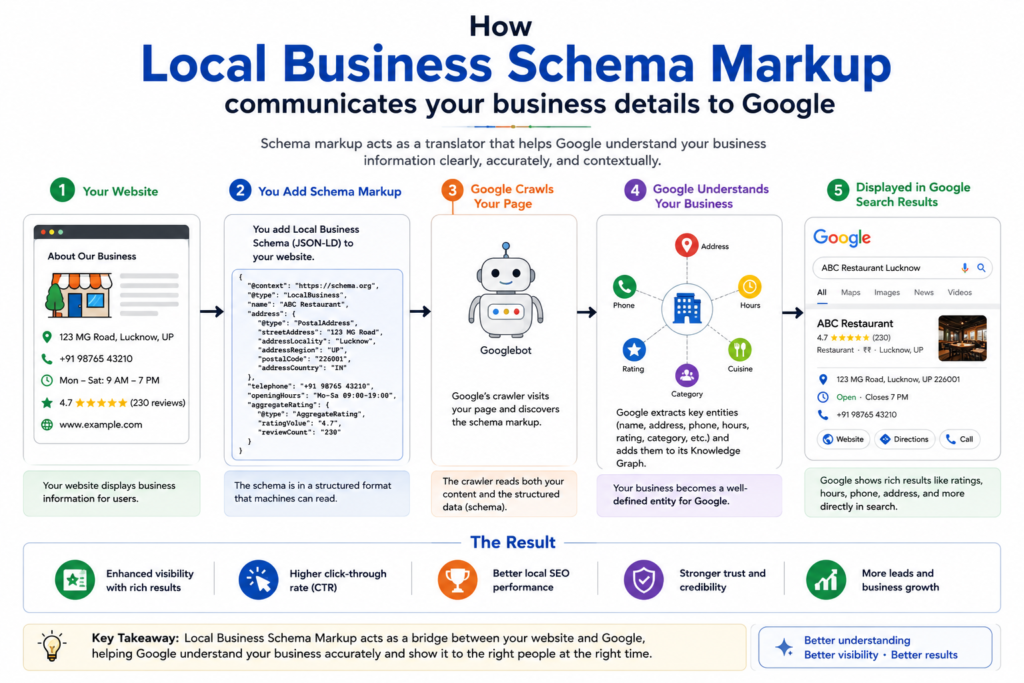
Quick Answer: Local Business Schema Markup is structured data code (usually JSON-LD format) added to your website that tells Google details about your business, name, address, phone, hours, ratings, and more, helping you appear in rich results and local knowledge panels.
What is Local Business Schema Markup?
Local Business Schema Markup is a type of structured data , a standardized format for providing information about a page and classifying the page content. It’s part of the Schema.org vocabulary, a collaborative project by Google, Bing, Yahoo, and Yandex.
Think of schema markup as a digital business card that Google can read automatically. Instead of Google having to guess that “9 AM – 6 PM” on your website means business hours, schema markup explicitly labels it as openingHours, eliminating ambiguity.
Schema markup uses three formats:
- JSON-LD (Recommended by Google) – JavaScript Object Notation for Linked Data, placed in a
<script>tag - Microdata – HTML attributes added inline to page content
- RDFa – Resource Description Framework attributes, similar to Microdata
Google officially recommends JSON-LD, and that’s what we’ll be using throughout this guide.
Why Local Business Schema Matters for SEO
Let me be direct: schema markup doesn’t directly boost rankings as a ranking factor. But its indirect SEO benefits are substantial and well-documented:
1. Rich Results & Enhanced SERP Presence
With proper local business schema, your listing can show star ratings, opening hours, phone numbers, address, and price range directly in Google Search results, without users needing to visit your site. This dramatically improves Click-Through Rate (CTR).
2. Google Knowledge Panel Eligibility
Schema markup significantly increases the probability of Google generating a Knowledge Panel for your business, that prominent info box that appears on the right side of desktop searches. This is pure real estate gold in local SEO.
3. Improved NLP Understanding & Entity Recognition
Google’s Natural Language Processing (NLP) algorithms, powered by BERT and MUM, use entities, people, places, organizations, concepts, to understand content. Schema markup creates explicit entity relationships, making it far easier for Google to categorize your business correctly within its Knowledge Graph. To understand how entity recognition impacts your search visibility in AI-powered search, read our guide on GEO vs SEO: The Future of Search Optimization.
For example, when you use "@type": "Restaurant" with "servesCuisine": "North Indian", you’re directly feeding entity data to Google, this is how you win NLP-based understanding.
4. Voice Search Optimization
With over 27% of global online searches being voice-based, schema markup plays a critical role. Voice assistants like Google Assistant rely heavily on structured data to answer queries like “What time does [business name] open?” or “Is [restaurant name] open on Sunday?”
5. Better Local Pack Rankings
While not a direct ranking signal, consistent NAP (Name, Address, Phone) data enforced through schema markup strengthens trust signals for local pack rankings when combined with a well-optimized Google Business Profile.
Types of Local Business Schema
The LocalBusiness type in Schema.org is incredibly versatile. It’s the parent type for hundreds of business-specific subtypes. Here are the most commonly used ones:
| Schema Type | Best For |
|---|---|
LocalBusiness | Generic local businesses |
Restaurant | Food & beverage establishments |
MedicalBusiness | Clinics, hospitals, doctors |
LegalService | Law firms, advocates |
AutomotiveBusiness | Car dealerships, repair shops |
FinancialService | Banks, insurance agencies |
RealEstateAgent | Property dealers, brokers |
BeautySalon | Salons, spas, parlors |
EducationalOrganization | Schools, coaching institutes |
Plumber, Electrician | Home service businesses |
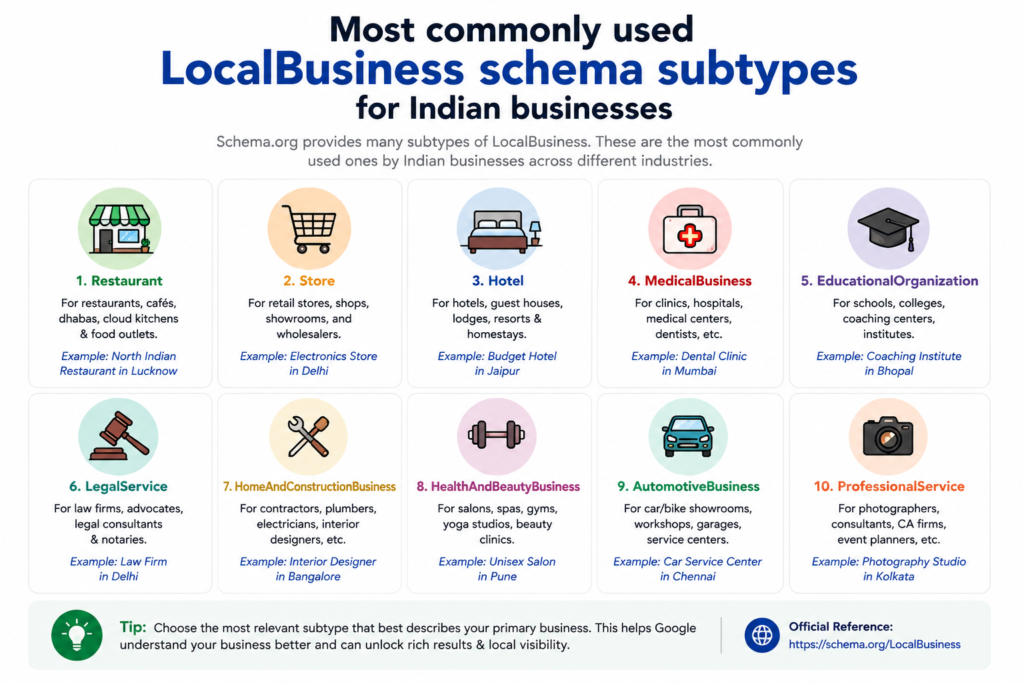
Pro Tip: Always use the most specific schema type available for your business. If you run a pizza restaurant, use Restaurant instead of the generic LocalBusiness. The more specific, the better Google understands your entity type.
The same logic applies to healthcare: a dental practice should use the Dentist subtype (which nests under MedicalBusiness), not a generic LocalBusiness tag. See our local SEO checklist for dentists for the full context around where schema fits into a dental practice’s broader local SEO setup.
Healthcare, finance, and legal businesses fall under Google’s YMYL (Your Money or Your Life) classification, which means schema accuracy matters even more there than elsewhere. Our YMYL SEO best practices guide covers the full standard those pages get held to.
How to Setup Local Business Schema Markup: Step-by-Step
Step 1: Identify Your Business Type
Visit schema.org/LocalBusiness and find the most specific subtype that matches your business. This is your @type value.
Step 2: Collect All Required Business Information
Before writing any code, gather the following data:
- Business Name (exactly as it appears on Google Business Profile)
- Street Address (complete with pincode)
- City, State, Country
- Phone Number (with country code)
- Website URL
- Business Hours (for each day of the week)
- Geo-coordinates (latitude/longitude from Google Maps)
- Logo URL
- Business Description
- Aggregate Rating (if you have reviews)
- Social Media Profiles
- Price Range (₹, ₹₹, ₹₹₹)
Step 3: Write Your JSON-LD Schema Code
Use the template in the next section and fill in your business details. JSON-LD is wrapped in a <script type="application/ld+json"> tag and can be placed anywhere in your HTML, though Google recommends placing it in the <head> section or just before the closing </body> tag.
Step 4: Add the Schema to Your Website
Depending on your platform, there are different methods (covered in detail below for WordPress users).
Step 5: Test and Validate
Use Google’s Rich Results Test and Schema Markup Validator to verify there are no errors.
Complete Local Business Schema Markup JSON-LD Example
Below is a comprehensive, production-ready JSON-LD schema markup example for a fictional digital marketing agency called “DigitalPrahlad” located in Lucknow, India. Customize the values as per your own business.
<script type="application/ld+json">

{

  "@context": "https://schema.org",

  "@type": "ProfessionalService",

  "@id": "https://digitalprahlad.com/#localbusiness",

  "name": "DigitalPrahlad – AI SEO Agency",

  "alternateName": "DigitalPrahlad",

  "description": "DigitalPrahlad is a Next-Gen AI SEO Specialist agency based in Lucknow, India, offering advanced SEO, content marketing, schema markup, and digital marketing services.",

  "url": "https://digitalprahlad.com",

  "logo": {

    "@type": "ImageObject",

    "url": "https://digitalprahlad.com/wp-content/uploads/logo.png",

    "width": 300,

    "height": 100

  },

  "image": [

    "https://digitalprahlad.com/wp-content/uploads/office-front.jpg",

    "https://digitalprahlad.com/wp-content/uploads/team-photo.jpg"

  ],

  "telephone": "+91-9876543210",

  "email": "[email protected]",

  "address": {

    "@type": "PostalAddress",

    "streetAddress": "123, Hazratganj Market",

    "addressLocality": "Lucknow",

    "addressRegion": "Uttar Pradesh",

    "postalCode": "226001",

    "addressCountry": "IN"

  },

  "geo": {

    "@type": "GeoCoordinates",

    "latitude": 26.8467,

    "longitude": 80.9462

  },

  "hasMap": "https://maps.google.com/?q=DigitalPrahlad+Lucknow",

  "openingHoursSpecification": [

    {

      "@type": "OpeningHoursSpecification",

      "dayOfWeek": ["Monday", "Tuesday", "Wednesday", "Thursday", "Friday"],

      "opens": "09:00",

      "closes": "18:00"

    },

    {

      "@type": "OpeningHoursSpecification",

      "dayOfWeek": "Saturday",

      "opens": "10:00",

      "closes": "15:00"

    }

  ],

  "priceRange": "₹₹",

  "currenciesAccepted": "INR",

  "paymentAccepted": "Cash, Credit Card, UPI, Bank Transfer",

  "areaServed": [

    {

      "@type": "City",

      "name": "Lucknow"

    },

    {

      "@type": "State",

      "name": "Uttar Pradesh"

    },

    {

      "@type": "Country",

      "name": "India"

    }

  ],

  "serviceArea": {

    "@type": "GeoCircle",

    "geoMidpoint": {

      "@type": "GeoCoordinates",

      "latitude": 26.8467,

      "longitude": 80.9462

    },

    "geoRadius": "50000"

  },

  "aggregateRating": {

    "@type": "AggregateRating",

    "ratingValue": "4.9",

    "reviewCount": "127",

    "bestRating": "5",

    "worstRating": "1"

  },

  "review": [

    {

      "@type": "Review",

      "reviewRating": {

        "@type": "Rating",

        "ratingValue": "5",

        "bestRating": "5"

      },

      "author": {

        "@type": "Person",

        "name": "Rahul Sharma"

      },

      "reviewBody": "DigitalPrahlad completely transformed our online presence. Our organic traffic increased by 300% in just 6 months.",

      "datePublished": "2025-03-15"

    }

  ],

  "sameAs": [

    "https://www.facebook.com/digitalprahlad",

    "https://twitter.com/digitalprahlad",

    "https://www.instagram.com/digitalprahlad",

    "https://www.linkedin.com/company/digitalprahlad",

    "https://www.youtube.com/@digitalprahlad"

  ],

  "founder": {

    "@type": "Person",

    "name": "Prahlad",

    "jobTitle": "AI SEO Specialist",

    "url": "https://digitalprahlad.com/about/"

  },

  "foundingDate": "2020",

  "numberOfEmployees": {

    "@type": "QuantitativeValue",

    "value": 10

  },

  "knowsAbout": [

    "Search Engine Optimization",

    "AI SEO",

    "Schema Markup",

    "Local SEO",

    "Content Marketing",

    "Technical SEO"

  ],

  "hasOfferCatalog": {

    "@type": "OfferCatalog",

    "name": "SEO Services",

    "itemListElement": [

      {

        "@type": "Offer",

        "itemOffered": {

          "@type": "Service",

          "name": "Local SEO Services",

          "description": "Complete local SEO optimization including Google Business Profile management, citation building, and local schema markup."

        }

      },

      {

        "@type": "Offer",

        "itemOffered": {

          "@type": "Service",

          "name": "Technical SEO Audit",

          "description": "Comprehensive technical SEO audit covering Core Web Vitals, structured data, crawlability, and indexation issues."

        }

      },

      {

        "@type": "Offer",

        "itemOffered": {

          "@type": "Service",

          "name": "AI SEO Content Strategy",

          "description": "AI-powered SEO content strategy aligned with Google's NLP algorithms and entity-based search."

        }

      }

    ]

  }

}

</script>
Breaking Down the Key Schema Properties
Let’s understand what each major property does and why it matters for SEO:
@context&@type: Defines the vocabulary (Schema.org) and the type of entity. This is the most critical line, it’s how Google classifies your business.@id: A unique identifier (canonical URL) for your business entity in the Knowledge Graph. Using#localbusinessanchors it to your homepage entity.name: Must exactly match your Google Business Profile name and NAP across citations.addresswithPostalAddress: The full structured address with all sub-properties helps Google map your physical location precisely.geowithGeoCoordinates: Latitude and longitude confirm your exact location, crucial for “near me” searches.openingHoursSpecification: More accurate than the simpleropeningHoursproperty, allows different hours for different days.aggregateRating: Enables star rating rich snippets in search results. Warning: Only include this if you have genuine verified reviews. Never fabricate ratings.sameAs: Links your schema entity to authoritative external profiles, this is how Google cross-verifies your entity across the web.areaServed: Tells Google which geographic areas your business serves, vital for multi-city service businesses.knowsAbout: Powerful NLP signal, explicitly tells Google’s Knowledge Graph what topics and entities your business is associated with.
How to Add Local Business Schema Markup to WordPress
There are three main methods to add schema markup to a WordPress website:
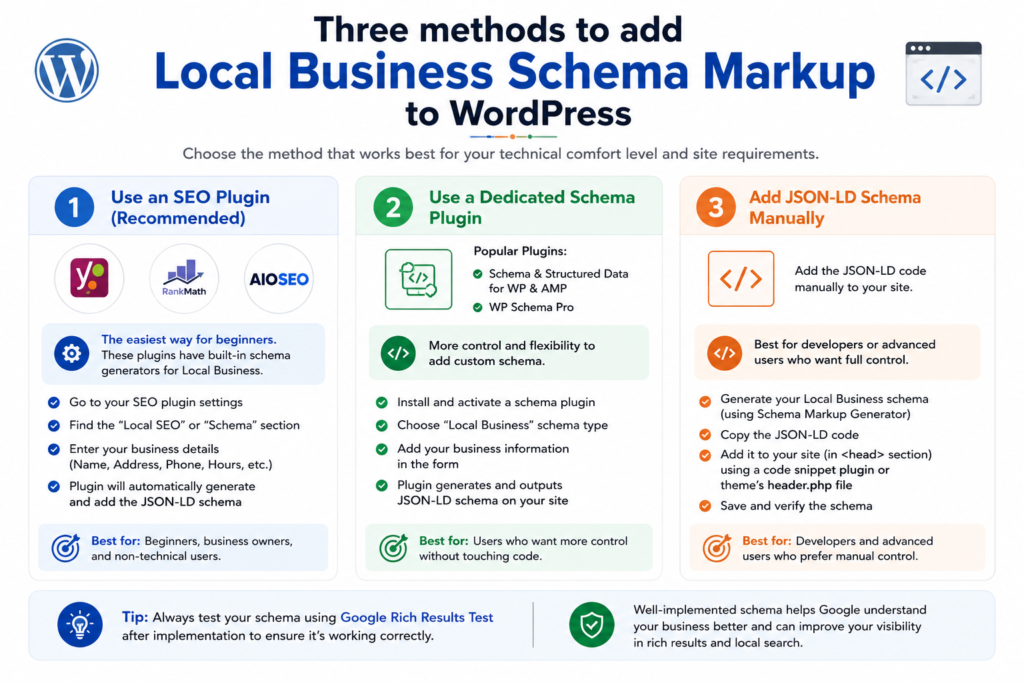
Method 1: Using RankMath SEO (Recommended)
RankMath is the most powerful free SEO plugin for WordPress and has built-in, excellent schema markup support. Here’s how to configure it:
- Install and activate RankMath SEO from the WordPress plugin repository.
- Go to RankMath → Titles & Meta → Local SEO.
- Toggle on “Use Schema Markup”.
- Fill in your business name, address, phone, hours, and social profiles.
- RankMath will automatically generate and inject the JSON-LD schema markup sitewide.
- For page-specific schema, edit any post/page and use the RankMath Schema tab in the sidebar.
Method 2: Using WPCode (Manual JSON-LD Injection)
If you want full manual control over your schema code (and have faced issues like a WordPress JSON response error while editing, this method bypasses the block editor entirely):
- Install the free WPCode plugin.
- Go to Code Snippets → Add Snippet.
- Choose “HTML Snippet”.
- Paste your complete JSON-LD schema code (from the example above).
- Set the location to “Site Wide Header”.
- Activate and save.
Method 3: Adding to functions.php (Developer Method)
For developers, you can add schema markup directly via the wp_head hook in your theme’s functions.php:
function add_local_business_schema() {
    if ( is_front_page() ) {
        echo '<script type="application/ld+json">';
        echo '{YOUR JSON-LD SCHEMA CODE HERE}';
        echo '</script>';
    }
}
add_action( 'wp_head', 'add_local_business_schema' );
Note: Method 3 is best for homepage-specific schema. For sitewide or post-specific schema, Methods 1 or 2 are more practical.
How to Test Your Local Business Schema Markup
Always validate your schema before and after deployment. Here are the three tools you should use:
1. Google Rich Results Test
URL: search.google.com/test/rich-results
This is Google’s official tool for testing if your pages are eligible for rich results. Enter your URL or paste your code directly. It will show you which rich result types are detected and flag any errors or warnings.
2. Schema Markup Validator
URL: validator.schema.org
The official Schema.org validator checks your structured data against the full Schema.org specification. It’s more comprehensive than Google’s tool and is ideal for catching property-level errors.
3. Google Search Console – Enhancements Report
After deployment, check Google Search Console → Enhancements section. Google will report any structured data issues it finds while crawling your site, including coverage status and specific errors.
What to Look For in Test Results
- Green checkmarks = Valid schema, rich results eligible
- Yellow warnings = Optional fields missing (not critical but recommended)
- Red errors = Required fields missing or incorrect format (must fix)
Common Local Business Schema Markup Mistakes to Avoid
❌ Mistake 1: NAP Inconsistency
Your business Name, Address, and Phone (NAP) in schema markup must exactly match your Google Business Profile and other citations across the web. Even minor differences (e.g., “St.” vs. “Street”) can confuse Google’s entity recognition system.
❌ Mistake 2: Using the Wrong @type
Using generic LocalBusiness when a specific subtype exists weakens your entity signals. Always check schema.org for the most specific type applicable to your business.
❌ Mistake 3: Fabricating Aggregate Ratings
Never add aggregateRating data that isn’t based on real, verifiable reviews. Google can detect this and it’s against their structured data guidelines. Violations can result in a manual action penalty.
❌ Mistake 4: Adding Schema Only to the Homepage
While the homepage is the primary location, consider adding relevant schema to your Contact page (LocalBusiness), Service pages (Service schema), and Blog posts (Article schema) for comprehensive entity coverage.
❌ Mistake 5: Outdated Business Hours
Always keep your openingHoursSpecification current, especially during holidays or seasonal changes. Outdated hours displayed in rich results frustrate users and erode trust.
❌ Mistake 6: Missing @id Property
The @id property is critical for entity disambiguation in Google’s Knowledge Graph. Without it, Google may struggle to connect your schema to your correct entity, especially if another business has a similar name.
❌ Mistake 7: Forgetting sameAs Links
The sameAs property links your entity to external authoritative sources (Wikipedia, Wikidata, social profiles). This dramatically improves entity confidence in Google’s Knowledge Graph.
Schema Markup + Google Business Profile: The Power Combo
Here’s something most SEO guides don’t tell you: Schema markup and Google Business Profile (GBP) are most powerful when used together, not in isolation.
Here’s why: Google cross-references data from multiple sources to build entity confidence. When your:
- Website schema says your business name is “DigitalPrahlad” at “123 Hazratganj, Lucknow”
- Google Business Profile shows the same name, address, and phone
- Social media profiles (via
sameAs) corroborate the information
…Google gains high confidence in your entity’s accuracy, which strengthens your local Knowledge Panel and local pack presence. As AI-powered search evolves with tools like Google AI Overviews, understanding the relationship between schema, SEO, and Generative Engine Optimization (GEO vs AEO vs SEO) becomes essential for forward-thinking businesses. Schema works best when the same name, address and phone also appear on directories, our list of Lucknow business listing sites shows where to keep those details consistent.
FAQ: Local Business Schema Markup
Does local business schema markup directly improve Google rankings?
Schema markup is not a direct Google ranking factor. However, it significantly improves CTR through rich results, strengthens entity recognition in Google’s Knowledge Graph, and indirectly supports higher rankings by improving user engagement signals.
Where should I place the JSON-LD schema markup on my website?
Google officially supports JSON-LD placed anywhere in the HTML document, in the <head> or <body>. The recommended best practice is to place it inside the <head> section or just before the closing </body> tag. For WordPress sites, using RankMath or WPCode handles placement automatically.
Can I have multiple schema types on the same page?
Yes! You can and should use multiple schema types on the same page when relevant. For example, a homepage can have LocalBusiness schema, WebSite schema, and Organization schema simultaneously. Use separate <script type=”application/ld+json”> blocks for each type.
How long does it take for schema markup to show in Google Search?
After adding schema markup, Google needs to re-crawl and re-index your page. This typically takes anywhere from a few days to 4-6 weeks. You can speed this up by submitting your URL for indexing through Google Search Console’s URL Inspection tool.
Is local business schema markup different from Organization schema?
Yes. Organization schema is for general organizations (companies, nonprofits, brands) without a physical storefront focus. LocalBusiness schema is specifically for businesses with a physical location that serves local customers. LocalBusiness is actually a subtype of Organization and includes additional location-specific properties like address, geo-coordinates, and opening hours.
Do I need schema markup if I already have a Google Business Profile?
Absolutely yes. Google Business Profile optimizes your presence in Google Maps and the Local Pack, while schema markup on your website strengthens your organic search entity signals. They work synergistically, businesses with both consistently outperform those with only one in local search.
Conclusion: Start Speaking Google’s Language
Setting up local business schema markup is one of the smartest SEO investments you can make for your local business website. It takes less than an hour to implement properly, but the benefits rich results, improved entity recognition, better local rankings, and voice search optimization compound over time.
Schema is also foundational to how AI systems like ChatGPT and Gemini understand your business, not just traditional search engines. See our 6 layers of AI search visibility strategy to see exactly where structured data fits into that bigger picture.
Here’s a quick recap of what we covered:
- Local business schema markup uses JSON-LD to tell Google exactly what your business is
- Use the most specific
@typeavailable for your business category - Always include
@id,sameAs,geo, andopeningHoursSpecificationfor maximum impact - Validate your schema using Google’s Rich Results Test before going live
- Combine schema markup with an optimized Google Business Profile for the best local SEO results
Want to go deeper into modern SEO? Read these related guides:
- GEO vs SEO: The Future of Search Optimization ExplainedHow schema and entity optimization fits into the AI search era
- GEO vs AEO vs SEO: Complete Comparison Guide (2026)The 3-layer framework for visibility across Google, AI Overviews, and voice search
- The 22-Step SEO Checklist for Website MigrationHow to re-validate schema and structured data without losing rankings during a site migration
If you found this guide helpful, share it with a fellow business owner who needs to get their local SEO game on point. And if you need professional help setting up schema markup and local SEO for your business, contact DigitalPrahlad, let’s build your online presence together.
Tell Google you want more of this.
Add DigitalPrahlad as a preferred sourceOne tap, and this site shows up more often in your own Google Top Stories, AI Overviews, and AI Mode results. You can remove this preference anytime you'd like.
Affiliate Disclaimer: This website is reader-supported. Some links are affiliate links, meaning I may earn a small commission at no extra cost to you. I only recommend products and tools I genuinely trust and use myself. Your support keeps DigitalPrahlad free and practical.