A patient fills in your online intake form. Their name, date of birth and the reason for their visit land on your server in seconds. If that server sits with a host that hasn’t signed a Business Associate Agreement, you’ve just broken HIPAA, even with an SSL padlock on the page and a strong password on the admin panel. That’s the gap most practices and health tech teams don’t see until an audit or a breach exposes it, and it’s why picking the best HIPAA compliant hosting matters so much.
The fix is choosing the best HIPAA compliant hosting for your needs: a provider that signs a BAA and can prove its safeguards. For this guide, every provider was checked against its own compliance, legal and pricing pages in October 2026: whether it signs a BAA, how you get it, which audits back it up (HITRUST CSF, SOC 2, ISO 27001) and what it really costs, including the fine print that limits what you can host. Taking card payments too? See the best PCI compliant hosting providers.
Whether you run a clinic website or build a telehealth app, here’s the best HIPAA compliant hosting for each situation.
Key takeaways
- A signed BAA is non-negotiable. No BAA, no ePHI, however secure the host is.
- There is no official HIPAA certification. Look for a BAA plus audits like HITRUST CSF and SOC 2 Type II.
- Best HIPAA compliant hosting overall: HIPAA Vault, with a BAA on every plan from $120 a month.
- AWS, Google Cloud and Azure all sign BAAs and hold HITRUST CSF, but you configure the safeguards yourself.
- Compliance is shared. Your host covers infrastructure; your application, staff and policies are on you.
Short on time? These are the top 3 picks for HIPAA compliant hosting in 2026:
- BAA included on every HIPAA plan
- SOC 2 and SOC 3 Type II audited, since 1994
- Managed FortiGate firewall, VPN and MFA
- BAA on every plan, signed within 48 hours
- HITRUST CSF and SOC 2 Type II
- 30-day free trial on WordPress plans
- Signed BAA for all HIPAA-ready environments
- Hardware firewall, VPN, IDS and EDR
- Wholly owned data centers
What is HIPAA compliant hosting?
HIPAA compliant hosting is hosting from a provider that signs a Business Associate Agreement with you and runs its infrastructure with the administrative, physical and technical safeguards the HIPAA Security Rule requires for electronic protected health information (ePHI). Without a signed BAA, a host can’t legally store or process ePHI for you, no matter how secure it is.
A few terms come up again and again, so here they are in plain words:
- HIPAA: the Health Insurance Portability and Accountability Act of 1996, the US law that protects patient health information. It’s enforced by the HHS Office for Civil Rights (OCR).
- ePHI: electronic protected health information, such as names linked to diagnoses, appointment records, lab results or insurance details.
- Covered entity: a healthcare provider, health plan or clearinghouse, like a clinic, hospital or dental practice.
- Business associate: any vendor that handles ePHI for a covered entity. Your host becomes one the moment it stores patient data for you.
- Business Associate Agreement (BAA): the contract in which the business associate promises to protect ePHI, report breaches and follow HIPAA rules. HIPAA requires one before a vendor touches ePHI.
- Security Rule: the part of HIPAA that sets the safeguards for ePHI. The Breach Notification Rule sets what must happen if data leaks, and the HITECH Act of 2009 made business associates, including hosts, directly liable.
One more thing to know before comparing providers: there is no official HIPAA certification. HHS doesn’t certify hosts, and AWS says so plainly on its own compliance page. When a host says it is HIPAA compliant, what you’re really checking is whether it signs a BAA and can prove its safeguards with independent audits such as HITRUST CSF, SOC 2 and ISO 27001.
SSL isn’t HIPAA compliance, and eligible isn’t compliant
An SSL certificate encrypts data while it travels between a browser and your server. That covers one technical safeguard, transmission security. It says nothing about who can access your database, whether access is logged, whether backups are encrypted, or whether the provider accepts legal responsibility for a breach. That’s why an SSL badge on its own never makes hosting HIPAA compliant.
The second trap is the word eligible. AWS, Google Cloud and Microsoft Azure describe specific services as HIPAA-eligible. That means the service can support compliance once you sign the BAA and configure encryption, access controls and logging correctly. It doesn’t mean everything in their catalog is covered, and it doesn’t mean your setup is compliant the moment you sign up.
| Type of host | What it means | Providers in this guide | Best for |
|---|---|---|---|
| Healthcare-specialized | Built for ePHI, compliance largely set up for you | HIPAA Vault, Aptible, ClearDATA | Teams that want compliance handled |
| Managed HIPAA hosting | General host with HIPAA-ready servers and a BAA | Atlantic.Net, Liquid Web, Rackspace | Businesses that want real infrastructure with support |
| Hyperscaler | HIPAA-eligible services you configure yourself | AWS, Google Cloud, Microsoft Azure | Teams with in-house security expertise |
| Bare-metal infrastructure | Single-tenant servers with a BAA, you manage the stack | Hivelocity | Health tech teams that want dedicated hardware |
10 best HIPAA compliant hosting providers in 2026
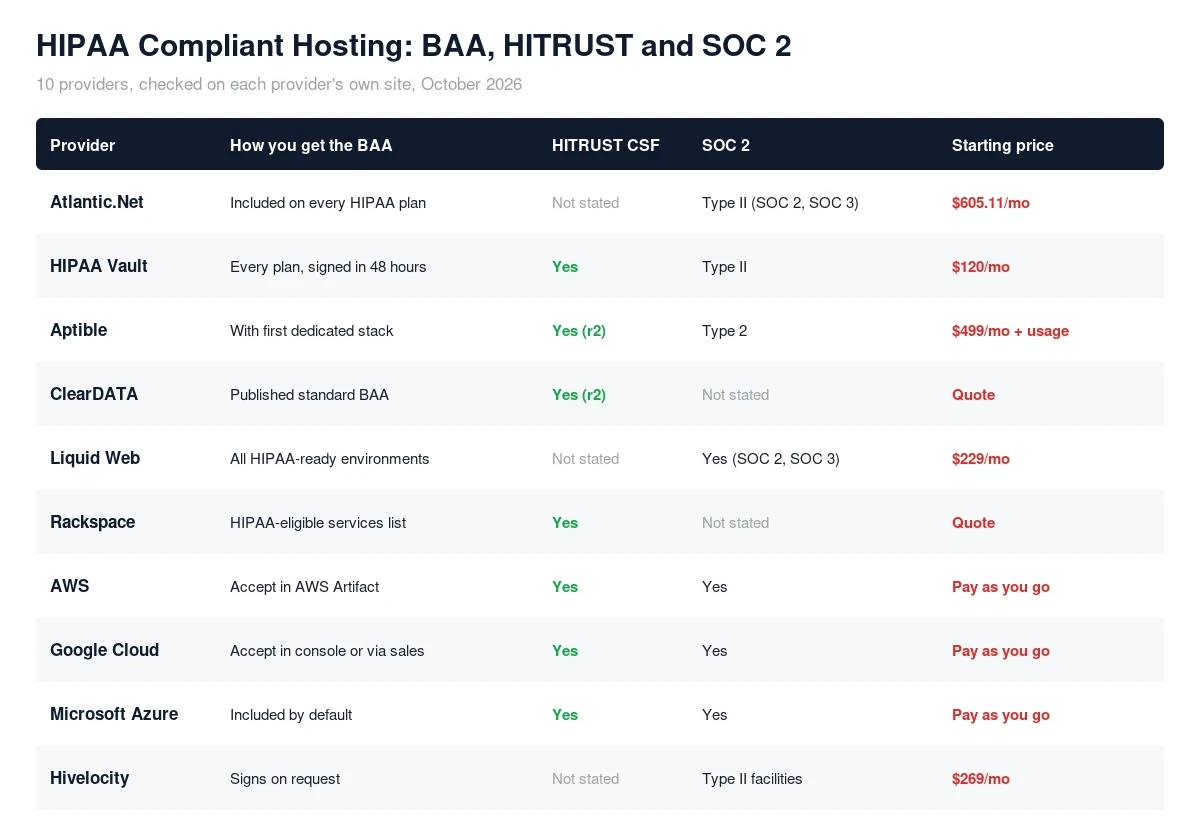
The best HIPAA compliant hosting providers in 2026 are Atlantic.Net, HIPAA Vault, Aptible, ClearDATA, Liquid Web, Rackspace, AWS, Google Cloud, Microsoft Azure and Hivelocity. Here’s how each one gives you a BAA and where pricing starts.
| # | Provider | Best for | How you get the BAA | Starting price |
|---|---|---|---|---|
| 1 | Atlantic.Net | Fully managed compliance, BAA on every plan | Included on every HIPAA plan | $605.11/mo |
| 2 | HIPAA Vault | Healthcare websites and WordPress | Every plan, signed within 48 hours | $120/mo |
| 3 | Aptible | Health tech software teams | With your first dedicated stack | $499/mo + usage |
| 4 | ClearDATA | Managed compliance on AWS, Azure or Google Cloud | Published standard BAA | Quote |
| 5 | Liquid Web | Fully managed HIPAA servers | All HIPAA-ready environments | $229/mo |
| 6 | Rackspace Technology | Enterprise HITRUST-certified hosting | Covers listed HIPAA-eligible services | Quote |
| 7 | AWS | Largest HIPAA-eligible service catalog | Accept in AWS Artifact | Pay as you go |
| 8 | Google Cloud | Data, analytics and AI workloads | Console or account manager | Pay as you go |
| 9 | Microsoft Azure | Microsoft-based organisations | Included by default | Pay as you go |
| 10 | Hivelocity | Single-tenant bare metal | Signs on request | $269/mo |
Healthcare-specialized HIPAA hosting platforms
These HIPAA compliant hosting providers exist only, or mainly, for healthcare. Compliance is built in rather than left for you to configure, which makes them the safest choice if you don’t have a dedicated security team.
1. Atlantic.Net: Best Managed HIPAA Hosting With a BAA on Every Plan

Pros
- BAA included on every HIPAA plan, with a managed FortiGate firewall, managed VPN, MFA and onsite plus off-site daily backups bundled into the base plan, not sold as add-ons
- Operating since 1994, SOC 2 and SOC 3 Type II audited by an independent CPA firm, across five US data centers with 24/7/365 US-based support
Cons
- High entry cost and a 12-month commitment: the cheapest HIPAA plan is $605.11/month plus a $150 one-time setup fee, with no low-cost or shared HIPAA tier
- Some transparency gaps: the auditing CPA firm is not named publicly, and dedicated HIPAA server pricing is not listed
Summary
Atlantic.Net is a long-established, fully managed HIPAA hosting provider with a BAA on every plan, SOC 2 and SOC 3 Type II audits and managed security bundled in, best for teams that want hands-off compliance from a US provider operating since 1994.
Price: USD 605.11 Per month, HIPAA Developer managed cloud (12-month term, $150 setup)
Visit Atlantic.NetAtlantic.Net specializes in compliance hosting and has been providing top-notch HIPAA Compliant Hosting for over a decade. They are fully audited and certified by one of the top CPA firms in the USA.
Founded in 1994, Atlantic.Net runs fully managed HIPAA cloud hosting with a Business Associate Agreement included on every plan, SOC 2 and SOC 3 Type II audits, and managed security built in rather than sold as add-ons. Its entry HIPAA Developer plan (6 vCPU, 16GB RAM, 200GB SSD, 10TB transfer) is $605.11 a month on a 12-month term, plus a one-time $150 setup fee.
Atlantic.Net pricing
| Entry Plan | HIPAA Developer (fully managed cloud) |
| Entry Price | $605.11/month (12-month term) + $150 one-time setup |
| Entry Specs | 6 vCPU, 16GB RAM, 200GB SSD, 10TB transfer |
| BAA | Included on every HIPAA plan |
| Audits | SOC 2 & SOC 3 Type II, HIPAA/HITECH |
| US Data Centers | Orlando, New York, Dallas, San Francisco, Ashburn |
| Support | 24/7/365 US-based, phone and email |
Why choose Atlantic.Net: Choose Atlantic.Net if you want hands-off, fully managed HIPAA compliance with a BAA on every plan and security bundled in, from a US provider that has run compliant infrastructure since 1994.
2. HIPAA Vault: Best HIPAA Compliant Hosting Overall

Pros
- A BAA comes with every HIPAA service, signed within 48 hours of activation
- HITRUST CSF certified with SOC 2 Type II, per its Linux hosting page
- Managed HIPAA WordPress with daily backups, two-factor logins and encryption
- 30-day free trial on WordPress plans
Cons
- Essential plan is limited to one site and under 10,000 visitors a month
- Linux plans start at $349 a month
- Costs more than general hosting, as all HIPAA hosting does
Summary
HIPAA Vault is the best overall HIPAA compliant hosting for medical websites, with a BAA on every plan, HITRUST CSF certification and managed WordPress from $120 a month.
Price: USD 120.00 Per month, Essential WordPress plan
Visit HIPAA VaultHIPAA Vault is the best HIPAA compliant hosting for most medical websites, and it shows. Every HIPAA service comes with a BAA, signed within 48 hours of activation, and its HIPAA compliant WordPress hosting includes daily full backups, two-factor logins, malware defense, and encryption in transit and at rest. Its Linux hosting page lists HIPAA, SOC 2 Type II and HITRUST CSF certification.
HIPAA Vault pricing
| Plan | Includes | Monthly | Billed yearly |
|---|---|---|---|
| WordPress Essential | 1 site, 10GB, under 10,000 visits a month | $120/mo | $99/mo |
| WordPress Starter | 2 sites, 40GB | $349/mo | $299/mo |
| WordPress Plus | 10 sites, 60GB, SSH access | $599/mo | $499/mo |
| Linux Starter | Managed HIPAA Linux server | $349/mo | $319/mo on 1 year |
| Linux Standard | Separate web and database servers | $649/mo | $599/mo on 1 year |
Who should use it: clinics, dental practices and health websites that collect patient data through forms or portals. If you run a practice website, pair it with our guide to local SEO for dentists to make sure patients can find it.
3. Aptible: Best HIPAA Platform for Health Tech Software

Pros
- HITRUST r2 certified and SOC 2 Type 2
- Every deployment includes a signed BAA once you run a dedicated stack
- Startup Program gives 50% off the Production base fee for six months
- LLM Gateway covers Anthropic, OpenAI and Bedrock models under one BAA
Cons
- $499 a month is a base fee, with usage billed on top
- HITRUST framework support for your own workloads is an Enterprise feature
- Built for developers, not for simple websites
Summary
Aptible is the best HIPAA compliant hosting platform for health tech software teams, with HITRUST r2 certification and a BAA on dedicated stacks.
Price: USD 499.00 Per month base fee plus usage, Production plan
Visit AptibleAptible is the best HIPAA compliant hosting choice for software teams: a platform-as-a-service built for HIPAA-regulated apps. You deploy containers and databases, and Aptible handles encryption, network isolation, logging and patching underneath. Aptible itself is HITRUST r2 certified, and when you request your first dedicated stack, its team arranges the BAA. Its docs say customers can fully inherit roughly 30% to 40% of HITRUST controls.
Aptible pricing
| Plan | Price | What you get |
|---|---|---|
| Development | $0/month + usage | Shared environment for building and testing |
| Production | $499/month base fee + usage | 1 dedicated stack, HIPAA and SOC 2 frameworks |
| Enterprise | Custom | Self-hosting, HITRUST and PCI frameworks, 99.95% uptime SLA |
Usage is billed on top: for example, containers at $0.05 to $0.10 per GB of RAM per hour and endpoints at $0.06 an hour. Who should use it: startups and engineering teams building patient-facing apps, telehealth platforms or AI tools that handle ePHI.
4. ClearDATA: Best Managed Compliance on AWS, Azure and Google Cloud

Pros
- Healthcare-only cloud security, compliance and operations partner
- HITRUST r2 certified (version 11.3, December 2024)
- Works across AWS, Azure and Google Cloud
- Publishes its standard BAA openly
Cons
- Pricing is quote-only
- Built for enterprise and mid-market, not small practices
- HITRUST certification runs on a two-year cycle, so check its current status
Summary
ClearDATA is the best choice when you want healthcare compliance managed for you on AWS, Azure or Google Cloud, backed by HITRUST r2 certification.
Price: USD 0.00 Custom quote
Visit ClearDATAClearDATA calls itself healthcare’s dedicated cloud security, compliance and operations partner. Rather than hosting your app itself, it runs cloud security posture management (CSPM), managed detection and response and cloud operations on top of AWS, Azure or Google Cloud. Its December 2024 announcement marked its sixth two-year HITRUST certification in 12 years, and it says customers can inherit up to roughly 60% of HITRUST requirements.
Who should use it: hospitals, payers and health tech companies already on a hyperscaler that want healthcare-specific compliance handled by specialists. Pricing is by consultation.
Managed HIPAA hosting providers
These are established hosts offering HIPAA compliant hosting on dedicated HIPAA-ready servers with a signed BAA. You get real infrastructure with a support team behind it. If you’re comparing general US hosting too, see our best cloud hosting providers in the USA.
5. Liquid Web: Best Fully Managed HIPAA Servers

Pros
- Signed BAA for all HIPAA-ready hosting environments
- Published pricing from $229 a month for Linux
- Hardware firewall, VPN, intrusion detection, EDR and Acronis backups
- Audited for HIPAA, SOC 2, SOC 3, SSAE-22 and PCI DSS
Cons
- No HITRUST certification claimed
- Dedicated servers and private cloud only, no HIPAA VPS
- You still own your application-level safeguards
Summary
Liquid Web is the best fully managed HIPAA compliant hosting for businesses that want dedicated servers, a signed BAA and published pricing.
Price: USD 229.00 Per month, Linux HIPAA dedicated server
Visit Liquid WebLiquid Web offers some of the best HIPAA compliant web hosting on managed hardware: Windows and Linux HIPAA-ready dedicated servers and HIPAA private cloud, all fully managed and backed by a signed BAA. Packages range from a standalone HIPAA server to a server-and-firewall bundle with a hardware firewall and VPN, up to multi-server setups. Intrusion detection, endpoint detection and response (EDR) and Acronis backups are included, and its data centers are wholly owned.
Liquid Web HIPAA pricing
| Package | What’s included | Starting price |
|---|---|---|
| Standalone HIPAA server (Linux) | Fully managed dedicated server, IDS, EDR, backups | $229/mo |
| Standalone HIPAA server (Windows) | Same, on Windows | $271/mo |
| HIPAA server and firewall | Adds a hardware firewall and VPN | Quote |
| Multi-server package | Web and database tiers | Quote |
Who should use it: practices, billing companies and SaaS businesses that want a managed server instead of a platform. For more managed server options, see our best dedicated servers in the USA.
6. Rackspace Technology: Best HITRUST-Certified Enterprise Hosting

Pros
- HITRUST CSF certified hosting, validated against 300+ requirements in 19 categories
- HITRUST-certified dedicated hosting at no additional cost
- Serves 2,500 healthcare organisations
- Clinical First Cloud for Epic with a 99.999% availability SLA
Cons
- Quote-only pricing
- Its BAA excludes third-party infrastructure such as the hyperscalers themselves
- Enterprise focus, not suited to small sites
Summary
Rackspace is the best HITRUST-certified HIPAA compliant hosting for enterprises, including Epic hosting, with a BAA covering its listed HIPAA-eligible services.
Price: USD 0.00 Custom enterprise quote
Visit RackspaceFor enterprise HIPAA compliant hosting, Rackspace stands out: its dedicated servers, private cloud, databases, networking and storage are HITRUST CSF certified across its data centers, validated against more than 300 HITRUST requirements in 19 security categories, and it provides that certified environment at no additional cost. Its BAA covers a published list of HIPAA-eligible services, including dedicated hosting and managed services on AWS, Azure and Google Cloud. Note that the cloud provider’s own infrastructure sits outside Rackspace’s BAA, so you’d sign that provider’s BAA too.
Who should use it: hospitals and large health systems, including Epic customers, that need enterprise SLAs and HITRUST evidence.
7. AWS: Best HIPAA-Eligible Service Catalog

Pros
- 170+ HIPAA-eligible services on its reference list
- Accept the BAA yourself in AWS Artifact
- HITRUST CSF v11 certified
- Covers AI services such as Amazon Bedrock
Cons
- You must configure every safeguard yourself
- Only listed services may touch ePHI
- Pay-as-you-go costs are hard to predict
Summary
AWS has one of the broadest HIPAA-eligible service catalogs, with a self-service BAA in AWS Artifact and HITRUST CSF certification.
Price: USD 0.00 Pay as you go
Visit AWSFor HIPAA compliant cloud hosting, AWS lets you accept its BAA in minutes through AWS Artifact in the console. Its HIPAA-eligible services reference, last updated in September 2026, lists more than 170 services, including EC2, S3, RDS and Amazon Bedrock. You may only process ePHI in those listed services. AWS is assessed against the HITRUST CSF v11 certification criteria, and it states that there is no HIPAA certification for a cloud provider.
Who should use it: engineering teams building custom healthcare systems that need the widest choice of services.
8. Google Cloud: Best for Healthcare Data and AI

Pros
- BAA covers Google Cloud's entire infrastructure, all regions and zones
- Same pricing for HIPAA customers, including sustained use discounts
- HITRUST CSF certified
- Strong analytics and AI, including BigQuery and its Agent Platform
Cons
- Only listed products are covered
- Pre-GA products can't be used with PHI
- The BAA can't be modified
Summary
Google Cloud is the best HIPAA-eligible cloud for healthcare data and AI, with infrastructure-wide BAA coverage and HITRUST CSF certification.
Price: USD 0.00 Pay as you go
Visit Google CloudAmong the best HIPAA compliant cloud hosting options, Google Cloud’s BAA covers its entire infrastructure, every region, zone and network path, and you can accept it in the console through Privacy compliance and records, or arrange it through your account manager. Around 147 products are listed as covered, including BigQuery and its generative AI and agent platform services. HIPAA customers pay the same prices as everyone else, and Google Cloud holds HITRUST CSF certification.
Who should use it: healthcare analytics, research and AI teams working with large datasets.
9. Microsoft Azure: Best for Microsoft-Based Organisations

Pros
- HIPAA BAA included by default, with no separate contract to sign
- One of the first hyperscalers with HITRUST CSF certification, since 2016
- Fits organisations already on Microsoft 365 and Entra ID
- ISO 27001 and CSA STAR
Cons
- Only in-scope services are covered
- You still configure your own safeguards
- Licensing and pricing can be complex
Summary
Microsoft Azure is the easiest hyperscaler for HIPAA, with the BAA included by default and long-standing HITRUST CSF certification.
Price: USD 0.00 Pay as you go
Visit Microsoft AzureAzure has the simplest BAA process of the three: the HIPAA BAA is part of the Microsoft Product Terms by default, so there’s nothing separate to sign. The in-scope services are listed on Microsoft’s cloud services in audit scope page, and audit reports sit in the Service Trust Portal. Azure was one of the first hyperscale platforms to earn HITRUST CSF certification, back in November 2016.
Who should use it: hospitals and practices already running Microsoft 365 and Microsoft Entra ID.
Bare-metal infrastructure with a BAA
Some teams want HIPAA compliant hosting on their own physical servers rather than a shared cloud. Single-tenant bare metal keeps your workload isolated, and DDoS protection matters for any public healthcare portal. See also our list of the best dedicated servers with DDoS protection.
10. Hivelocity: Best Single-Tenant Bare Metal for Healthcare

Pros
- Says yes to signing a BAA for healthcare workloads
- Single-tenant bare metal in SOC 2 Type II audited facilities
- DDoS protection, hardware firewalls and private networking
- Healthcare production servers from $269 a month
Cons
- Infrastructure only: you handle application and administrative safeguards
- No HITRUST certification claimed
- The cheaper Engineering tier is for de-identified data only
Summary
Hivelocity is the best HIPAA-eligible bare metal host for health tech teams that want dedicated hardware and a signed BAA.
Price: USD 269.00 Per month, healthcare Production Compute server
Visit HivelocityFor HIPAA compliant web hosting on bare metal, Hivelocity offers servers for health tech platforms, EHR systems and telehealth apps that need HIPAA-eligible infrastructure, and its healthcare page answers the key question directly: yes, it can sign a BAA. It runs in SOC 2 Type II audited facilities with biometric access and 24/7 surveillance, and includes DDoS protection, hardware firewalls, private networking and backup options. It’s clear that compliance is shared: Hivelocity covers the physical and infrastructure layer, and you handle your application and data.
Hivelocity healthcare tiers
| Tier | Use | Starting price |
|---|---|---|
| Engineering Compute | De-identified analytics only, not for PHI | $152/mo |
| Production Compute | Patient portals, scheduling, EHR | $269/mo |
| Hi-Protected Compute (GPU) | Imaging, telehealth, private AI | $999/mo |
Who should use it: health tech teams that want dedicated hardware they control, with a BAA in place.
Is WordPress HIPAA compliant? HIPAA compliant WordPress hosting
WordPress itself isn’t HIPAA compliant or non-compliant; your setup is. A WordPress site can handle ePHI only when the host signs a BAA, the site is encrypted and access-controlled, and every plugin that touches patient data, especially forms, is covered too.
- Choose HIPAA compliant WordPress hosting with a BAA, such as HIPAA Vault’s managed WordPress plans.
- Use a HIPAA compliant form tool that signs its own BAA, or keep patient data out of standard contact forms.
- Turn on two-factor login, limit admin accounts and keep plugins updated.
- Don’t store form submissions in the WordPress database unless it’s encrypted and covered by the BAA.
Are GoDaddy, Bluehost or other budget hosts HIPAA compliant?
Standard shared hosting plans from mainstream budget hosts are not a safe place for ePHI. Hosts like GoDaddy and Bluehost don’t advertise a BAA for their regular shared hosting, and without a BAA a host can’t legally store patient data for you. Before using any host, ask one simple question in writing: will you sign a BAA for this exact plan? If the answer isn’t a clear yes, keep patient data off it.
Affordable HIPAA compliant hosting for small businesses
For a small practice, the most affordable HIPAA compliant hosting is usually a managed plan with the BAA included, not a cheap cloud server you secure yourself. The cheapest options in this guide are:
| Need | Most affordable option | Starting price |
|---|---|---|
| Clinic or practice website | HIPAA Vault WordPress Essential | $120/mo, or $99/mo billed yearly |
| Managed HIPAA server | Liquid Web Linux HIPAA server | $229/mo |
| Dedicated hardware | Hivelocity Production Compute | $269/mo |
| Startup building an app | Aptible Production with Startup Program | $499/mo base, 50% off for 6 months |
When comparing HIPAA compliant hosting for small business budgets, remember to count your own time too. A cheap hyperscaler setup can cost more once you add the security work needed to configure it properly.
HIPAA compliant cloud hosting vs dedicated servers
HIPAA compliant cloud hosting is best for scaling apps, while a dedicated server is best for predictable workloads that need isolation. Cloud platforms like AWS, Google Cloud and Azure let you scale and pay for what you use, but you configure more yourself. Dedicated HIPAA servers from Liquid Web, Rackspace or Hivelocity give you single-tenant isolation and fixed monthly costs.
What safeguards does the HIPAA Security Rule require?
The HIPAA Security Rule requires administrative, physical and technical safeguards for ePHI. Your host covers part of them, mainly physical and infrastructure security, and you cover the rest.
- Administrative safeguards: risk analysis, security policies, staff training and the BAA itself.
- Physical safeguards: facility access controls and device security, which data center audits like SOC 2 cover.
- Technical safeguards: access control (unique logins and automatic logoff), audit controls (logging who accessed what), integrity controls, person or entity authentication, and transmission security (encryption in transit).
With any HIPAA compliant hosting, encryption at rest and multi-factor authentication aren’t optional in practice: almost every host on this list builds them in, and they’re the first things an auditor or the HHS Office for Civil Rights will ask about after a breach.
HIPAA compliant hosting checklist
Use this checklist to find the best HIPAA compliant hosting before you move any patient data to a new host. If a provider can’t tick every item, it isn’t ready for ePHI.
- The provider signs a Business Associate Agreement for the exact services you’ll use.
- Data is encrypted at rest and in transit.
- Access is controlled with unique logins and multi-factor authentication.
- Audit logs record who accessed ePHI and when.
- Backups are encrypted, tested and access-controlled.
- Independent audit reports are available, such as HITRUST CSF or SOC 2 Type II.
- The data center locations and services in HIPAA scope are documented.
- A breach notification process is defined in the BAA.
Common mistakes that cause HIPAA hosting violations
- Hosting ePHI before the BAA is signed. The BAA must be in place first, every time.
- Using a service that isn’t covered. On AWS, Google Cloud and Azure, only listed services may touch ePHI.
- Sending patient data through plain contact forms or email. Form plugins and email services need their own BAA too.
- Forgetting backups and logs. Backups and log files contain ePHI and must be encrypted and access-controlled.
- Assuming compliance is the host’s job. Every provider here uses shared responsibility. Your application, staff access and policies are on you.
How to choose the best HIPAA compliant hosting
- Confirm the BAA first, and read it. Real HIPAA compliant hosting always starts here. Check exactly which services it covers.
- Decide how much you want managed. A healthcare-specialized host handles most safeguards; a hyperscaler leaves them to you.
- Ask for audit evidence: HITRUST CSF, SOC 2 Type II or ISO 27001 reports.
- Check where data lives. Some budget providers, for example, limit HIPAA to just one or two US regions.
- Compare total cost, including usage fees, add-ons and the staff time needed to configure everything.
Healthcare is also a Your Money or Your Life (YMYL) topic in search, so your site needs to show expertise and trust as well as compliance. Our guide to YMYL SEO best practices explains how, and our healthcare SEO services help clinics and health brands grow safely.
Which is the best HIPAA compliant hosting for you?
The best HIPAA compliant hosting for you depends on one choice: pick a healthcare-specialized host if you want compliance handled, a managed host if you want servers with support, and a hyperscaler only if you have security expertise in-house.
| Your situation | Best HIPAA compliant host |
|---|---|
| Clinic, dental or medical website | HIPAA Vault |
| Managed dedicated server with published pricing | Liquid Web |
| Health tech startup building software | Aptible |
| Enterprise on AWS, Azure or Google Cloud | ClearDATA or Rackspace |
| Large health system or Epic hosting | Rackspace |
| In-house security team, custom build | AWS, Google Cloud or Azure |
| Microsoft 365 organisation | Microsoft Azure |
| Dedicated single-tenant hardware | Hivelocity |
| Hands-off managed compliance with a BAA on every plan | Atlantic.Net |
How we checked these HIPAA compliant hosting providers
- BAA first: each provider’s own pages had to state that it signs a BAA, and how you get it.
- Audits verified: HITRUST CSF, SOC 2 and ISO claims were checked on each provider’s own compliance pages, not badges.
- Fine print read: limits like a provider’s region count, Rackspace’s third-party exclusion and Aptible’s usage billing are stated plainly.
- Prices checked in October 2026 on each provider’s pricing pages. Kamatera and Atlantic.Net are not included.
Final verdict
The best HIPAA compliant hosting depends on what you’re building. For a healthcare website, HIPAA Vault is the strongest choice, with a BAA on every plan and HITRUST CSF certification. For a managed server with clear pricing, choose Liquid Web. Health tech teams building software should look at Aptible, and enterprises on a hyperscaler can lean on ClearDATA or Rackspace. Whatever you choose, get the BAA signed before a single patient record touches the server.
Frequently asked questions
What is the best HIPAA compliant hosting provider?
HIPAA Vault is the best overall HIPAA compliant hosting for healthcare websites, with a BAA on every plan, HITRUST CSF certification and managed WordPress from $120 a month. Liquid Web is best for managed servers, and Aptible is best for health tech software.
What makes hosting HIPAA compliant?
Hosting is HIPAA compliant when the provider signs a Business Associate Agreement and runs its infrastructure with the administrative, physical and technical safeguards required by the HIPAA Security Rule. You still need to configure your own application safely.
Does an SSL certificate make a website HIPAA compliant?
No. SSL only covers transmission security. HIPAA compliance also needs a signed BAA, access controls, audit logging, encryption at rest, backups and policies for staff.
What is a Business Associate Agreement (BAA)?
A BAA is a contract between a covered entity, such as a clinic, and a vendor that handles its ePHI, such as a host. It commits the vendor to protecting the data and reporting breaches, and HIPAA requires it before the vendor touches ePHI.
Are AWS, Google Cloud and Azure HIPAA compliant?
All three sign BAAs, offer HIPAA-eligible services and hold HITRUST CSF certification. They are not automatically compliant: you must use only covered services and configure encryption, access control and logging yourself.
Is there an official HIPAA certification for hosting?
No. HHS does not certify hosting providers. Look for a signed BAA plus independent audits such as HITRUST CSF, SOC 2 Type II or ISO 27001.
How much does HIPAA compliant hosting cost?
Managed HIPAA WordPress hosting starts around $120 a month at HIPAA Vault, managed HIPAA dedicated servers from $229 a month at Liquid Web, and platforms like Aptible start at $499 a month plus usage. Hyperscalers bill pay as you go.
Who enforces HIPAA?
The HHS Office for Civil Rights (OCR) enforces HIPAA’s Privacy, Security and Breach Notification Rules, and since the HITECH Act business associates such as hosting providers can be held directly liable.
Is WordPress HIPAA compliant?
WordPress can be used for HIPAA compliant sites only when the host signs a BAA, the site is encrypted and access-controlled, and any plugin that handles patient data, especially forms, is also covered by a BAA.
Is GoDaddy HIPAA compliant?
GoDaddy does not advertise a BAA for its standard shared hosting, so it should not be used to store ePHI. Choose a host that will sign a BAA for the exact plan you use.
Can I use regular shared hosting for patient data?
No. Regular shared hosting providers generally won’t sign a BAA, so they can’t legally host ePHI. Use a host that signs a BAA for the specific service you’re using.
Tell Google you want more of this.
Add DigitalPrahlad as a preferred sourceOne tap, and this site shows up more often in your own Google Top Stories, AI Overviews, and AI Mode results. You can remove this preference anytime you'd like.
Affiliate Disclaimer: This website is reader-supported. Some links are affiliate links, meaning I may earn a small commission at no extra cost to you. I only recommend products and tools I genuinely trust and use myself. Your support keeps DigitalPrahlad free and practical.