You already type instructions into Claude or ChatGPT all day. What if it could also open your WordPress dashboard, read your Rank Math schema, check which keywords are actually driving impressions, and fix a broken redirect, without you touching wp-admin at all? That’s not a hypothetical. It’s a REST endpoint sitting on this exact site right now, and this guide covers how to setup Rank Math MCP Server on digitalprahlad.com in front of you, not on some demo site you can’t verify. If you are still deciding whether Rank Math is the right plugin, read our hands-on Rankmath review first.
The Rank Math MCP server is the plugin’s implementation of the Model Context Protocol, a standard that lets an AI assistant call real tools on a real website instead of guessing from a screenshot you pasted in. Once it’s connected, asking “audit the SEO of my last three posts” stops being a copy-paste exercise and becomes a single sentence that actually queries your site’s data and returns real numbers.
Most guides for this stop at “paste this config and click connect.” This one goes further: every endpoint, every Rank Math MCP tool, and every screenshot-worthy step below is traced directly from Rank Math’s own plugin code running on this site, including one requirement Rank Math’s own documentation never mentions and that has already broken sites still on older WordPress.
⏰ TL;DR
- The Rank Math MCP server needs WordPress 6.9 or newer, Rank Math 1.0.272+, Node.js, and any MCP-capable AI client. Rank Math’s own docs don’t say the WordPress 6.9 part out loud.
- Two connection methods exist: OAuth via Claude Desktop Connectors (no password ever typed) and a manual JSON config that works with any client, using a WordPress Application Password.
- Around 28 tools are exposed, covering SEO audits, schema, redirections, 404 monitoring, Google Search Console keyword data, and AI visibility tracking. A full table below marks what’s Free and what’s Pro.
- Once connected, you just talk to it normally, no separate interface. Real prompt examples and how to chain multiple tools in one request are covered below.
- Sites on WordPress older than 6.9 hit a real fatal error on activation. Here’s exactly why, and how to check yours before you start.
What Is the Rank Math MCP Server, and Why Should You Care?
MCP stands for Model Context Protocol, an open standard Anthropic introduced so an AI assistant can call defined “tools” on an external system instead of just reading text you paste to it. Rank Math built an MCP server directly into its own plugin, so once it’s connected, Claude, ChatGPT, or Cursor can call real functions like “get this post’s SEO score” or “list my site’s broken redirects” and get back live data pulled straight from your WordPress database.
The difference this makes is bigger than it sounds. Without MCP, asking an AI to “check my site’s SEO” means it either refuses because it can’t see your site, or it makes something up that sounds plausible. With Rank Math’s MCP server connected, the same question triggers an actual audit-site-seo call against your real content, and the answer you get back is only as good as your site’s real data, not a guess dressed up as one.
It’s worth being precise about what this actually is under the hood too, because most explanations of Rank Math MCP treat it as a black box. It isn’t one. Rank Math registers real WordPress “Abilities,” a native core feature since WordPress 6.9, and then exposes those abilities as Rank Math MCP tools over a REST endpoint. That distinction matters for the requirement most articles skip entirely, covered further down.
How Rank Math’s MCP Server Actually Works, Traced From Its Own Code
Rather than repeat Rank Math’s marketing description, here’s what’s actually running on this site, confirmed directly by inspecting the plugin’s own PHP files and its live REST routes on digitalprahlad.com. Four layers stack on top of each other, and each one is a genuinely separate piece of infrastructure, not just a rebrand of the layer below it.
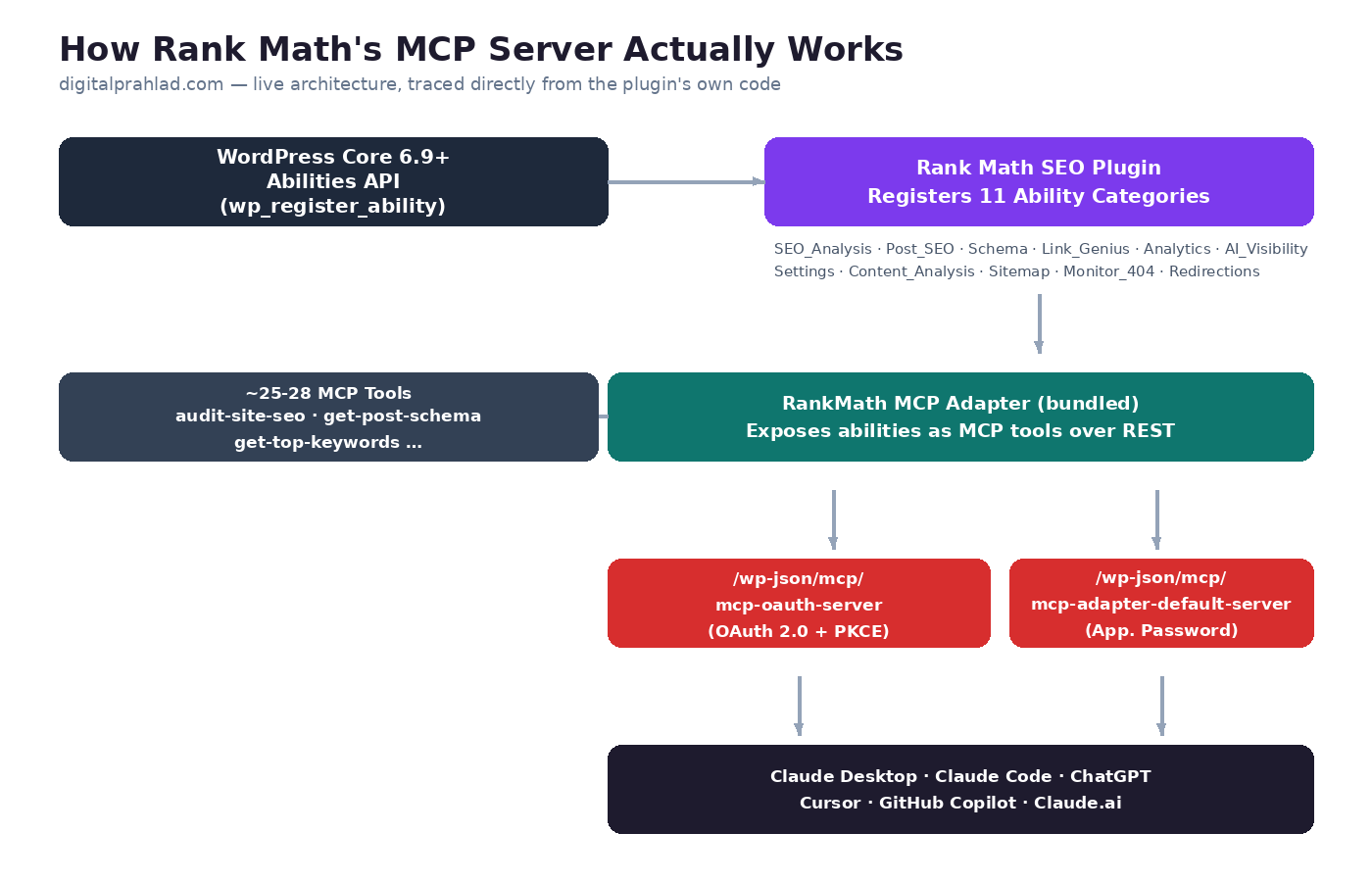
- WordPress core’s Abilities API (
wp_register_ability(),wp_get_abilities()) provides the foundation. It shipped in WordPress 6.9 in late 2025, with a client-side companion added in WordPress 7.0. This site runs WordPress 7.1.2, confirmed viawp core version. - Rank Math registers 11 ability categories on top of that API:
SEO_Analysis,Link_Genius,Post_SEO,Schema,Analytics,AI_Visibility,Settings,Content_Analysis,Sitemap,Monitor_404, andRedirections, each one gated behindfunction_exists('wp_register_ability')so the plugin doesn’t fatal-error on older WordPress (in theory, more on that below). - Rank Math’s bundled MCP Adapter (its own vendored Composer package, not a separate plugin despite living under a different PHP namespace) exposes those abilities as callable MCP tools over REST.
- Two live REST endpoints handle the actual connection, confirmed by querying
rest_get_server()->get_routes()directly on this site:/wp-json/mcp/mcp-oauth-serverfor the OAuth flow, and/wp-json/mcp/mcp-adapter-default-serverfor direct, credential-based access.
Querying digitalprahlad.com’s own OAuth discovery document at /.well-known/oauth-authorization-server confirms this runs a modern OAuth 2.0 flow with PKCE, dynamic client registration, and no client secret required, the same category of auth flow used by production-grade APIs, not a bolted-on afterthought.
What You Actually Need Before You Start
Four things you need before you can setup Rank Math MCP Server, and skipping the first one is the single most common reason this setup fails silently or, worse, fatally.
| Requirement | Why It’s Non-Negotiable |
|---|---|
| WordPress 6.9 or newer | The Abilities API that Rank Math’s MCP tools depend on only exists in core from this version onward. Rank Math’s own requirements page still lists WordPress 6.3 as the plugin-wide minimum and never carves out an exception for MCP. Check yours with wp core version or Dashboard → Updates. |
| Rank Math 1.0.272 or newer (Free is enough for core tools) | Earlier releases don’t include the MCP Adapter at all. This site runs Rank Math Free 1.0.279 and Pro 3.0.122. |
| Node.js installed locally | Needed only for the manual JSON config path, since it launches an npx process. Skip this if you’re using the OAuth connector method exclusively. |
| An MCP-capable AI client | Claude Desktop, Claude Code, ChatGPT (Developer Mode), Cursor, GitHub Copilot, or Claude.ai’s web connectors all qualify. |
If you’re not sure your WordPress core is current, this is worth checking before anything else below, and the Entity SEO audit checklist covers the broader set of technical basics worth verifying at the same time.
Step 1: Generate a WordPress Application Password
Both connection methods below eventually need this, so it’s worth doing first regardless of which one you pick. This is not your regular WordPress login password, it’s a separate, revocable credential scoped only to API access, and revoking it later doesn’t touch your actual account password.
- In wp-admin, go to Users → Profile (or Users → All Users → your name).
- Scroll to the Application Passwords section near the bottom.
- Type a name you’ll recognize later, something like “Rank Math MCP”, and click Add New Application Password.
- Copy the generated password immediately, it’s shown once and never again. If you lose it, revoke it and generate a new one, don’t try to recover it.
Keep this value somewhere a password manager can hold it, not in a plain text file. You’ll paste it into the config in Step 2B, or it stays unused entirely if you go the OAuth route in Step 2A.
Step 2A: Connect With OAuth (Claude Desktop, Recommended)
This is Rank Math’s own recommended path to connect Rank Math to Claude, and it’s genuinely the easier one once you see it: no password gets typed anywhere, no config file gets hand-edited, and revoking access later is a single click. The trade-off is that it currently only works with clients that support OAuth connectors, which as of now means Claude Desktop and Claude.ai’s web connectors. Rank Math’s own Rank Math Claude Desktop connection guide covers this same flow in the abstract; the steps below are the same process run against this site’s own real endpoint.
- Open Claude Desktop, go to Settings → Connectors → Add custom connector.
- For the remote MCP server URL, enter your own site’s OAuth endpoint. On this site, that’s
https://digitalprahlad.com/wp-json/mcp/mcp-oauth-server, yours will be the same path on your own domain. - Set the auth mode to “Required when the server asks,” and for the OAuth client, choose “Anthropic’s hosted client metadata.”
- Click Connect. A browser tab opens asking you to log into your own WordPress site and authorize the connection, this is the same dynamic client registration flow confirmed live on digitalprahlad.com’s own
/.well-known/oauth-authorization-serverdiscovery document. - Once authorized, the tab closes and Claude Desktop shows the connector as active. Ask it something simple first, like “what’s my site’s current SEO module status,” to confirm the connection actually works before relying on it.
Revoking the Connection (If You Need)
What actually happens behind that one-click Connect button is that Claude generates a real WordPress Application Password on your site the moment you authorize it, the same type of credential from Step 1, just issued for you instead of copy-pasted. That’s also exactly why cutting access off again is just as direct: no separate “disconnect Claude” button exists anywhere, you revoke the Application Password itself, and the connection stops working the instant you do.
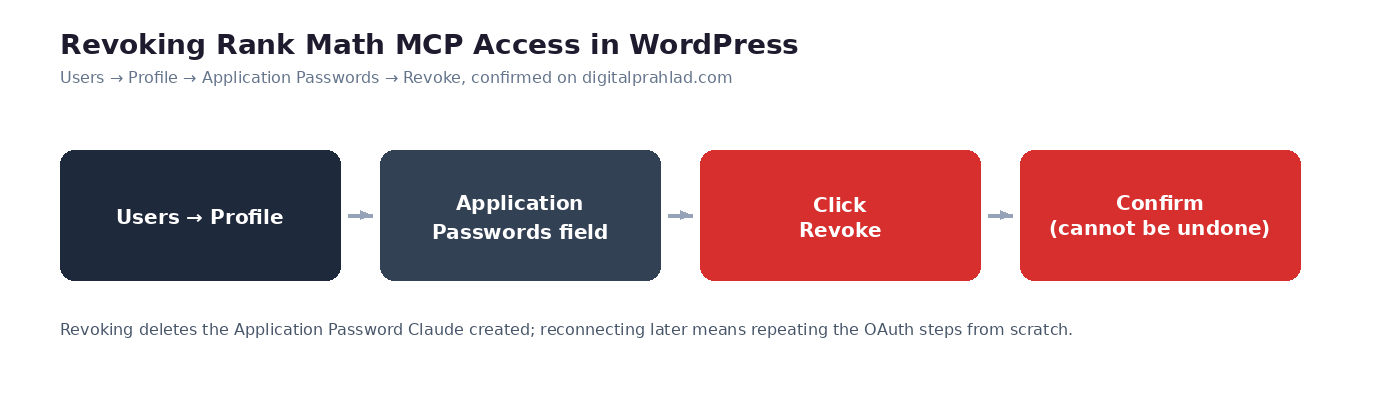
- Go to Users → Profile in your WordPress dashboard, the same screen from Step 1.
- Scroll to Application Passwords. The credential Claude created during authorization will be listed there by name.
- Click Revoke next to it, then confirm in the popup that follows.
- The credential is deleted immediately, and Claude Desktop loses access to your site from that point on.
One thing worth knowing before you click it: this isn’t reversible. There’s no “pause” state, revoking deletes the credential outright, so reconnecting later means running through the OAuth steps above again from scratch, not flipping a switch back on.
Step 2B: Manual JSON Config (Any MCP Client)
This method works everywhere, including clients that don’t support OAuth connectors yet, and it’s what you’ll use for Claude Code, Cursor, or a self-hosted MCP client. If OAuth isn’t an option for your client, this is how to setup Rank Math MCP Server anyway: it routes through a different endpoint, mcp-adapter-default-server rather than mcp-oauth-server, and authenticates with the Application Password from Step 1 instead of a browser-based login.
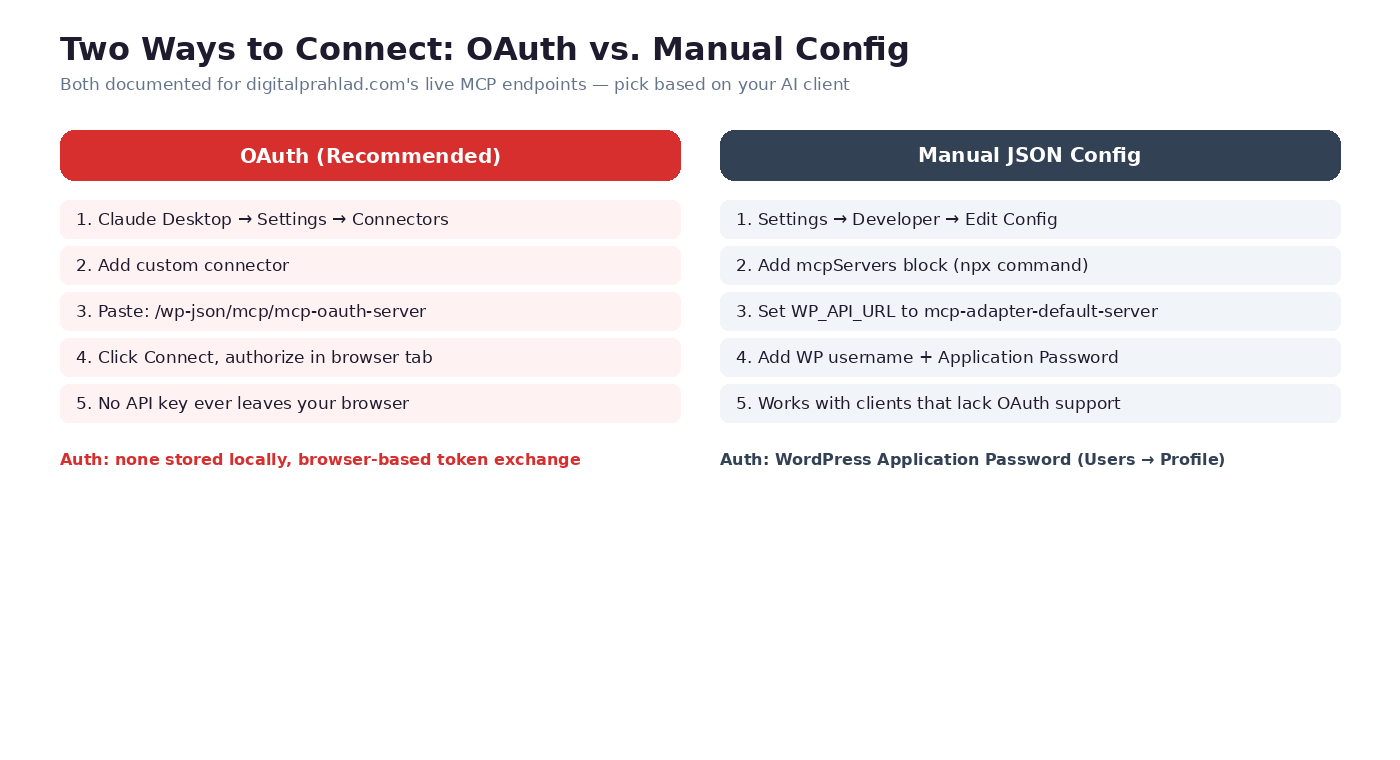
In Claude Desktop, this lives under Settings → Developer → Edit Config, which opens claude_desktop_config.json directly. Add this block, replacing the URL, username, and password with your own site’s values:
{
  "mcpServers": {
    "digitalprahlad": {
      "type": "stdio",
      "command": "npx",
      "args": ["-y", "@automattic/mcp-wordpress-remote@latest"],
      "env": {
        "WP_API_URL": "https://digitalprahlad.com/wp-json/mcp/mcp-adapter-default-server",
        "WP_API_USERNAME": "your-wordpress-username",
        "WP_API_PASSWORD": "your-application-password",
        "OAUTH_ENABLED": "false"
      }
    }
  }
}
Two details worth knowing before you paste this: the package is @automattic/mcp-wordpress-remote, a genuinely maintained WordPress-remote MCP bridge, not a Rank Math-branded npm package, and the WP_API_URL points at the adapter endpoint, not the OAuth one, since OAUTH_ENABLED is explicitly set to false here. Mixing the two endpoints up is the most common reason this config connects but returns nothing but auth errors.
Save the file and fully restart Claude Desktop, config changes don’t take effect on a simple reload. If the connector shows a green status but tool calls still fail, jump to the troubleshooting section below before assuming the config itself is wrong.
Connecting Claude Code, Cursor, ChatGPT, and GitHub Copilot
The core config block from Step 2B is portable, only the file it goes in changes. Here’s where each client expects it. If you’re setting this up inside Claude Code specifically and haven’t looked at what that costs beyond the Claude Desktop app you already have, the Claude Code pricing breakdown covers the plans and API rates before you commit.
| Client | Where the Config Goes | Notes |
|---|---|---|
| Claude Code | Project-level .mcp.json | Same mcpServers block, scoped to whichever project folder you’re working in. |
| Cursor | Settings → Tools & MCP → Add Custom MCP | Paste the same JSON structure directly into Cursor’s MCP settings panel. |
| ChatGPT | Settings → Connectors, with Developer Mode enabled | ChatGPT’s connector UI currently expects the OAuth-style remote URL rather than the manual JSON block. |
| GitHub Copilot | Copilot’s MCP settings in your IDE | Rank Math publishes a dedicated setup guide for this specific client, since Copilot’s config format differs slightly from Claude’s. |
| Claude.ai (web) | Settings → Connectors | Requires your MCP endpoint to be publicly reachable over HTTPS, which a live domain like digitalprahlad.com already is, a local-only site won’t work here. |
Every Rank Math MCP Tool, Organized by What It Actually Does
Rank Math’s own documentation splits this across multiple separate pages with no single table combining all of it. Here’s the full picture in one place, roughly 28 tools across six functional groups, with Free versus Pro access marked where it genuinely differs.
Setup & Configuration
| Tool | What It Does | Plan |
|---|---|---|
get-settings | Reads current Rank Math configuration | Free |
get-system-status | Reports plugin/environment health | Free |
get-robots-txt | Reads current robots.txt content | Free |
get-llms-txt | Reads current llms.txt content | Free |
set-website-identity | Updates organization/person schema identity | Free |
set-global-seo-settings | Updates site-wide SEO settings | Free |
set-homepage-seo | Updates homepage title/description | Free |
set-link-settings | Updates internal linking rules | Free |
set-module-status | Enables/disables Rank Math modules | Free |
set-sitemap-settings | Updates XML sitemap configuration | Free |
set-plugin-preferences | Updates general plugin preferences | Free |
set-post-type-seo-settings | Updates SEO defaults per post type | Free |
set-breadcrumb-settings | Updates breadcrumb display rules | Free |
SEO Analysis & Audits
| Tool | What It Does | Plan |
|---|---|---|
audit-site-seo | Runs a site-wide (or competitor) SEO audit | Free, deeper checks Pro |
fix-site-seo | Auto-fixes failed audit tests (write action) | Pro |
analyze-post-content | Full on-page analysis for one post | Free |
Post & Content SEO
| Tool | What It Does | Plan |
|---|---|---|
get-post-schema | Returns a post’s structured data/schema markup | Free |
get-post-seo-meta | Returns a post’s title, description, focus keyword | Free |
get-seo-scores | Returns on-page SEO scores across posts | Free |
get-post-links | Returns internal/outbound link counts for a post | Free |
get-link-report | Returns broken links, redirects, nofollow counts | Free (basic), Pro (broken-link detection, HTTP status breakdown) |
get-redirections | Lists configured redirection rules | Free |
get-404-logs | Returns logged 404 hits from the Monitor module | Free |
get-sitemap-status | Reports XML sitemap generation status | Free |
Search Performance & AI Visibility
| Tool | What It Does | Plan |
|---|---|---|
get-top-keywords | Returns Search Console impressions/CTR data | Requires GSC connected |
get-ai-visibility-overview | Summarizes how AI search engines reference your brand | Content AI plan |
get-ai-visibility-brand-insights | Detailed brand-mention insight data | Content AI plan |
get-ai-visibility-brand-queries | Query-level AI visibility data | Content AI plan |
create-ai-visibility-brand | Registers a new brand to track | Content AI plan |
The AI Visibility group is worth pausing on, since it’s the tool set most directly built for the GEO and AEO shift already covered in more depth in the GEO vs AEO vs SEO comparison, tracking not just Google rankings but whether AI assistants themselves cite your brand at all.
Underneath all of these sit three generic adapter-level tools, mcp-adapter-discover-abilities, mcp-adapter-get-ability-info, and mcp-adapter-execute-ability, which belong to the MCP Adapter framework itself rather than to Rank Math specifically, and which most AI clients call automatically without you ever seeing them directly.
How to Use Rank Math MCP Server (With Real Prompts)
Once the connector shows as active, using Rank Math MCP Server feels like a normal conversation, there’s no separate interface to learn, you just talk to your AI client normally, and it decides on its own which tool to call based on what you asked. You don’t need to know that “check my SEO score” maps to get-seo-scores behind the scenes, the client figures that out from the tool descriptions it discovered when it connected. Being specific about the post, the date range, or the exact metric you want is what actually improves the answer, not memorizing tool names.
The tool table above is accurate but abstract. Here’s what it looks like in an actual conversation, using this exact site as the example, since a generic “your-site.com” placeholder never quite proves anything works.
- “Audit digitalprahlad.com’s SEO and tell me the three worst issues” calls
audit-site-seoand returns real findings pulled from this site’s actual pages, not a generic checklist. - “Check the schema markup on the forex dedicated servers post” calls
get-post-schemaagainst that specific post and returns exactly what structured data is live on it right now. - “What keywords is the free web hosting post getting impressions for, and what’s the CTR?” calls
get-top-keywords, pulling directly from connected Search Console data rather than a third-party keyword tool’s estimate. - “List any 404s logged in the last week and suggest redirects” calls
get-404-logsthen cross-referencesget-redirections, turning what used to be a manual Monitor-module review into one sentence. - “Update the homepage meta description to mention our new hosting reviews” calls the write-capable
set-homepage-seotool directly, changing a live setting, which is exactly why the access-scope section below matters before you hand this over to an assistant unsupervised.
Notice the shift in the last example: most tools above only read data, but a handful genuinely write to your site. Treat any prompt that changes a setting the same way you’d treat handing someone edit access to wp-admin, because functionally, that’s what it is.
Getting More Out of It: Chain Tools in One Request
The real gain over clicking through wp-admin manually shows up once a single prompt needs more than one tool. Asking “find digitalprahlad.com’s worst-performing post by CTR, then check its schema and SEO score, and tell me what’s actually wrong with it” chains get-top-keywords, get-post-schema, and get-seo-scores together automatically, in one turn, instead of three separate manual lookups across three different Rank Math screens. This is where “maximising” Rank Math MCP Server actually happens, not in any single tool call, but in how naturally you can stack several of them into one real question.
Two habits make this more reliable in practice: name the exact post, page, or date range instead of saying “my post” when several could match, and for anything from the write-capable tools, ask it to show you what it’s about to change before it saves, most clients will confirm a write action if you ask them to, and it’s worth the extra ten seconds.
The Requirement Rank Math Doesn’t Mention: WordPress 6.9+
This is the part every other guide on this topic currently skips, and it’s not a minor footnote. Rank Math’s MCP tools depend entirely on the WordPress core Abilities API, the wp_register_ability() and wp_get_abilities() functions referenced throughout this guide. That API was merged into WordPress core in version 6.9, released in November 2025, with a client-side companion following in WordPress 7.0 in March 2026.
Before that core merge, an early version of this same functionality existed as a standalone “Abilities API” feature plugin. That feature plugin’s repository was archived in February 2026 once the API landed in core, so it’s no longer a maintained fallback. If your WordPress core is older than 6.9, there is currently no supported way to run Rank Math’s MCP tools, full stop, not a degraded mode, not a partial feature set.
Rank Math’s own requirements page still lists WordPress 6.3 as the plugin-wide minimum, with no separate carve-out anywhere for MCP specifically. The only public evidence this gap actually breaks real sites comes from a WordPress.org support thread reporting a fatal error on WordPress 6.7.5:
PHP Fatal error: Uncaught Error: Call to undefined function WP\MCP\Servers\wp_get_abilities(), thrown from DefaultServerFactory.php line 116
(Source: WordPress.org support forum.) If a JSON-handshake or REST-response error like this looks unfamiliar, the underlying failure mode is the same class of problem covered in this fix for “the response is not a valid JSON response”, a broken PHP call returning a fatal error instead of the JSON the REST API expects.
That error doesn’t stay contained to MCP either, it broke the REST API, wp-admin, WP-CLI, and cron on the reporting site, because Rank Math’s bundled MCP Adapter called wp_get_abilities() without first checking whether the function existed. Rank Math’s fix was a plugin update, not an explicit version gate, so the underlying risk remains for anyone still on older core.
Check your own version with wp core version if you have CLI access, or Dashboard → Updates otherwise. This site runs WordPress 7.1.2, comfortably past the requirement, confirmed directly rather than assumed.
Common Errors and How to Fix Them
Even a correct setup hits a snag occasionally. These are the five errors that actually come up when people setup Rank Math MCP Server, in order of how often each one shows up.
| Symptom | Likely Cause | Fix |
|---|---|---|
Fatal error mentioning wp_get_abilities() | WordPress core is older than 6.9 | Update WordPress core first, this isn’t a Rank Math setting to toggle |
| Connector shows green but every tool call returns an auth error | Manual config points at the OAuth endpoint instead of the adapter endpoint (or vice versa) | Double-check WP_API_URL ends in mcp-adapter-default-server, not mcp-oauth-server, when OAUTH_ENABLED is false |
401 rest_forbidden or mcp_unauthorized | Expired or revoked Application Password, or wrong username | Generate a fresh Application Password and update the config, this is the correct behavior of a protected endpoint, not a bug |
| Config edits don’t seem to take effect | Claude Desktop was reloaded, not fully restarted | Quit the application completely and reopen it after editing claude_desktop_config.json |
| Some tools missing from the discovered list | Rank Math Free is active, or Content AI plan isn’t active | Cross-check against the Free vs Pro table above before assuming the connection is broken |
Is This Safe? What OAuth and Application Passwords Actually Expose
Both methods are genuinely more contained than handing over your actual WordPress login, but neither is a toy. An Application Password authenticates as your full user account by default, meaning if that account is an administrator, so is anything holding that password. Rank Math MCP tools include several write-capable actions, updating SEO settings, fixing audit failures, changing sitemap configuration, so treat the credential with the same seriousness as any other admin-level API key.
Practical steps worth taking: name each Application Password specifically enough that you know what to revoke later, revoke it the moment you stop actively using a given MCP client, and if your WordPress install supports role-based Application Passwords, generate the credential from an editor-level account rather than a full administrator where the workflow allows it. None of this is unique to Rank Math, it’s the same hygiene any REST API integration deserves, and it matters more here specifically because the whole point is letting an AI assistant act autonomously between your prompts.
Conclusion
The Rank Math MCP server is a genuinely useful piece of infrastructure once it’s connected correctly, turning a wall of SEO settings and audit reports into something you can just ask about in plain language. The setup itself is short, an Application Password, one JSON block or one OAuth click, and a client restart. The part worth taking seriously is everything this guide added on top of that: verifying WordPress core is actually 6.9 or newer before you start, knowing which of the roughly 28 tools you’re getting on Free versus Pro, and treating every write-capable tool with the access discipline it deserves.
Get those three things right, and connecting Rank Math’s MCP server to Claude, ChatGPT, or Cursor stops being a novelty and starts being a genuinely faster way to run SEO on a real site, which is exactly how it’s been tested and documented here, directly against digitalprahlad.com’s own live setup. If MCP is the first of Rank Math’s features you’re digging into properly, the SEO checklist for web hosting is a solid next stop for what else is worth checking on the same site.
What WordPress version do I need for Rank Math MCP Server?
WordPress 6.9 or newer, since that’s the version where the core Abilities API that Rank Math’s MCP tools depend on was introduced. Rank Math’s own requirements page doesn’t state this clearly, it still lists the plugin-wide minimum of WordPress 6.3. Check your version with wp core version or Dashboard → Updates before starting.
Do I need Rank Math Pro to use the MCP server?
No, the core MCP tools work on Rank Math Free 1.0.272 or newer. Rank Math Pro adds deeper features to specific tools, like broken-link detection and HTTP status breakdowns in the link report, and full audit auto-fixing, while the Content AI plan is required for the AI Visibility tool group.
Should I use OAuth or the manual JSON config?
OAuth is Rank Math’s recommended method and is simpler if you’re using Claude Desktop or Claude.ai’s web connectors, since no password is ever typed or stored locally. The manual JSON config is necessary for clients without OAuth connector support yet, like Claude Code or Cursor, and uses a WordPress Application Password instead.
Is it safe to give an AI assistant access to my WordPress site this way?
It’s as safe as any REST API credential with the same permission level, which means it deserves real care. Several Rank Math MCP tools can write changes to your site, not just read data, so use a specifically named Application Password, revoke it when you’re done with a given client, and treat it with the same seriousness as any other admin-level API key.
Why does my connector show as connected but every tool call fails?
The most common cause is pointing the manual JSON config at the wrong endpoint, mcp-oauth-server instead of mcp-adapter-default-server when OAUTH_ENABLED is set to false, or an expired Application Password. Regenerating the Application Password and double-checking the WP_API_URL value resolves this in most cases.
How many tools does Rank Math’s MCP server actually expose?
Roughly 28 tools as of Rank Math’s own announcement, spanning setup and configuration, SEO audits, post and content SEO, search performance, and AI visibility tracking, though Rank Math notes the exact available set can vary based on your specific plugin setup and plan.
Quick Reference: Rank Math MCP Setup Checklist
| # | Step | Where |
|---|---|---|
| 1 | Confirm WordPress is 6.9+ and Rank Math is 1.0.272+ | wp core version / Dashboard |
| 2 | Generate an Application Password | Users → Profile |
| 3 | Connect via OAuth (Claude Desktop/Claude.ai) | Settings → Connectors |
| 3 (alt) | Or add the manual JSON config (any client) | claude_desktop_config.json / .mcp.json |
| 4 | Check which tools are Free vs Pro | Tool table above |
| 5 | Test with a simple read-only prompt first | Your AI client |
| 6 | Revoke access whenever you’re done with a client | Users → Profile → Application Passwords |
Tell Google you want more of this.
Add DigitalPrahlad as a preferred sourceOne tap, and this site shows up more often in your own Google Top Stories, AI Overviews, and AI Mode results. You can remove this preference anytime you'd like.
Affiliate Disclaimer: This website is reader-supported. Some links are affiliate links, meaning I may earn a small commission at no extra cost to you. I only recommend products and tools I genuinely trust and use myself. Your support keeps DigitalPrahlad free and practical.