💬 Key Takeaways
- Vaultwarden is a very small server, so you do not need a big VPS. The project does not publish a minimum, and 1GB to 4GB of RAM with root access is a comfortable range.
- Hostinger is the best overall pick: KVM 1 gives 4GB of RAM and NVMe with a Docker template and a 30-day refund from $6.49 a month on a 24-month term.
- Cheap VPS for Vaultwarden: RackNerd at $26.99 a year, InterServer at $3 a month with no contract and Hosting.com at $3.49 a month on a 3-year term.
- HTTPS is required. The Vaultwarden web vault needs HTTPS and a secure context, so you need a domain name and a reverse proxy such as Caddy.
- Back up the right files: db.sqlite3 and the attachments folder are required, and you should also keep the rsa_key files and config.json.
- Providers with an affiliate link are listed first, and Contabo, which I link to directly, is last.
Vaultwarden VPS hosting means running your own Bitwarden-compatible password server on a virtual private server that you control. Vaultwarden is an unofficial, open-source server written in Rust, and it works with the Bitwarden apps and browser extensions, so you keep the familiar apps while your vault lives on your own machine.
The good news is that Vaultwarden is small, so the best VPS is cheap. The bad news is that a password vault is the one app you cannot be careless with: it needs HTTPS, regular backups and a host you trust. This guide ranks the best VPS for Vaultwarden in 2026, using each host’s own plan pages checked in November 2026.
For every provider you get the plan that fits Vaultwarden, its real price and renewal, RAM, storage, locations, root access, backups and refund policy, plus a screenshot of the plan page. Providers with an affiliate link are listed first, and prices change, so confirm the total at checkout.
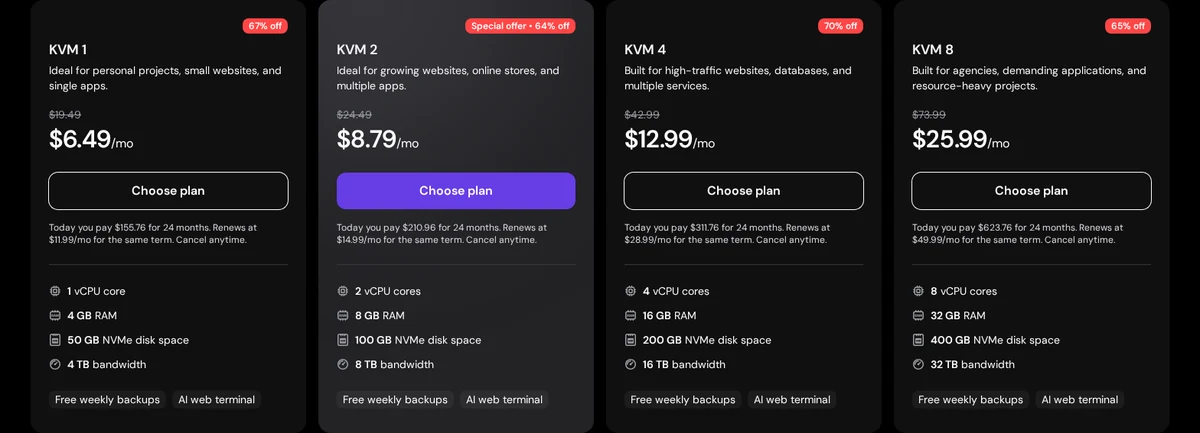
- KVM 1: 1 vCPU, 4GB RAM, 50GB NVMe, 4TB bandwidth
- KVM 1 (1 vCPU, 4GB RAM, 50GB NVMe)
- KVM 1 at $6.49/mo on a 24-month term
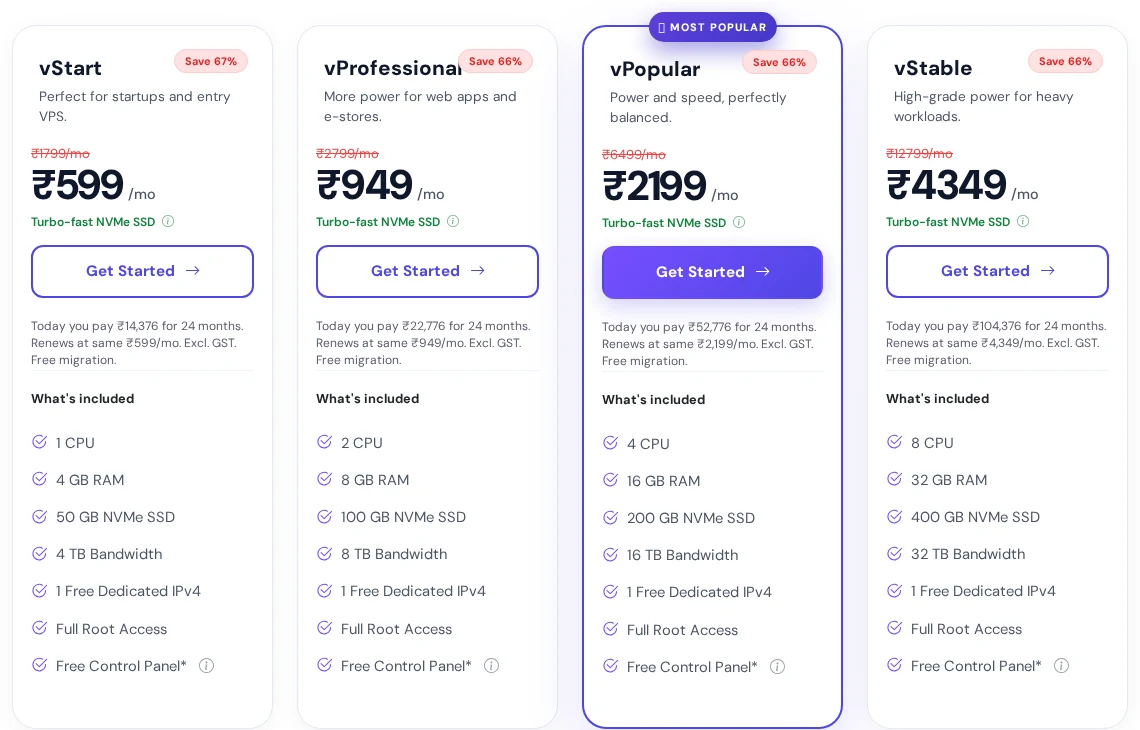
- vStart: 1 CPU, 4GB RAM, 50GB NVMe SSD, 4TB bandwidth
- vStart (1 CPU, 4GB RAM, 50GB NVMe)
- vStart at 599 INR (about $7) per month, renews at the same price
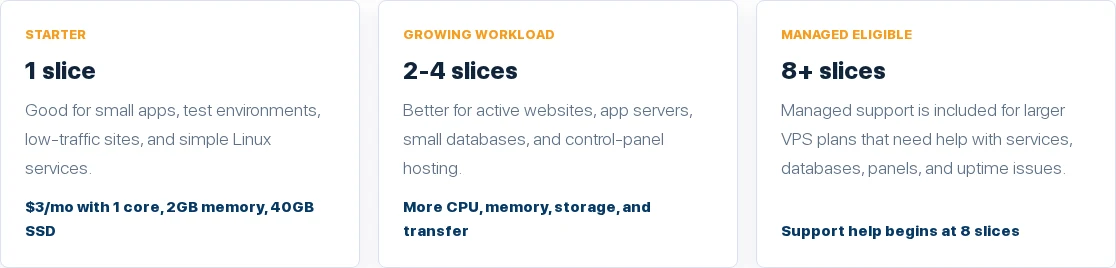
- 1 slice: 1 vCPU, 2GB RAM, 40GB SSD, 2TB transfer
- 1 slice (1 vCPU, 2GB RAM, 40GB SSD)
- 1 slice at $3/mo, billed monthly
Disclosure
Links to most hosting providers in this guide are affiliate links, and the order follows that: providers with an affiliate link come first and Contabo, which I link to directly, comes last. Prices and plan details come from each provider’s official pages in November 2026. I did not buy every plan or run Vaultwarden on every host for this guide.
What is Vaultwarden and why self host Vaultwarden on a VPS?
Vaultwarden is an unofficial, open-source server that implements the Bitwarden client API, written in Rust and licensed under AGPL-3.0. It was formerly known as bitwarden_rs. The project says it is not associated with Bitwarden or Bitwarden, Inc., and it is meant for self-hosted setups where running the official, resource-heavy service might not be ideal.
It supports a personal vault, Send, attachments, website icons and a personal API key, plus organizations with collections and password sharing, several two-factor methods (Authenticator, Email, FIDO2 WebAuthn, YubiKey and Duo), emergency access and an admin page. You use the normal Bitwarden apps and extensions and point them at your own server address.
Read this before you self host
The Vaultwarden project states that it cannot be held liable for any data loss, and that you should not use the official Bitwarden support channels for Vaultwarden issues. Its README does not mention third-party security audits. Self-hosting a password vault means you are responsible for updates, HTTPS and backups.
- Control: your encrypted vault lives on a server you choose, in a country you choose.
- Cost: a small VPS costs a few dollars a month, from $3 a month at InterServer or $26.99 a year at RackNerd.
- Family and teams: organizations and password sharing are supported without paying for a hosted tier.
- Always on: unlike a home server, a VPS has a fixed IP, business-grade power and network, and a host SLA.
It is not for everyone. If you do not want to maintain a server, the official hosted Bitwarden service is simpler. If you already self-host other apps, our guides to Supabase VPS hosting, OpenClaw VPS hosting and Jellyfin VPS hosting use the same kind of servers.
Vaultwarden VPS requirements: how much do you need?
The Vaultwarden project does not publish a minimum hardware requirement, so size your VPS by what runs next to it. The operating system, Docker, a reverse proxy such as Caddy and Vaultwarden itself are all small. A cheap VPS for Vaultwarden is enough. My recommendation is 1GB of RAM as a floor and 2GB to 4GB for comfort, with root access, a public IPv4 address and a domain name.
| Requirement | What you need | Why |
|---|---|---|
| RAM | 1GB minimum, 2GB to 4GB recommended (my sizing) | OS, Docker, proxy and Vaultwarden, with room for updates |
| CPU | 1 vCPU is enough for a personal or family vault | Vaultwarden is a light Rust server |
| Storage | 20GB or more | SQLite database, attachments and backups |
| Access | Root or sudo access | To install Docker and run containers |
| Domain and HTTPS | A DNS name and a TLS certificate | The web vault requires HTTPS and a secure context |
| Email (optional) | An external SMTP service | For invitations and email two-factor codes |
The official Vaultwarden README says the web vault requires HTTPS and a secure context for the Web Crypto API, and its wiki says enabling HTTPS is pretty much required. Mobile apps also need a valid certificate chain, so use the full chain file, such as fullchain.pem, rather than only the certificate. See the official Vaultwarden project page for the current instructions.
What to look for in a cheap VPS for Vaultwarden
- Root access: you need it to install Docker. Confirm it on managed platforms before you buy.
- 2GB of RAM or more: 1GB can work, but 2GB gives room for Docker, a proxy and updates.
- SSD or NVMe storage: a fast disk keeps the SQLite database responsive.
- Backups and snapshots: provider backups help, but the Vaultwarden wiki warns that filesystem or VM snapshots are hard to recover from, so make proper Vaultwarden backups too.
- Renewal price: a vault stays on one server for years, so compare the renewal rate, not only the first term.
- Port 25 and email: some hosts close port 25 on entry plans, so plan to use an external SMTP service.
- Location: pick a data center near your devices, and test latency with a TTFB tester.
- Refund window: use it to install Vaultwarden, move your vault and test the mobile apps.
The 10 best Vaultwarden VPS hosting providers compared
Here is every Vaultwarden VPS hosting provider side by side, with the plan that fits a password vault. Prices and hardware come from each host’s own pages.
| Provider | Plan | Price per month | Hardware | Locations | Best for | Rating |
|---|---|---|---|---|---|---|
| Hostinger | KVM 1 | $6.49 (24 mo) | 1 vCPU, 4GB, 50GB NVMe | 10 locations | Best overall | 4.8 / 5 |
| YouStable | vStart | About $7 (24 mo) | 1 CPU, 4GB, 50GB NVMe | Asia, Netherlands, USA | Same price at renewal | 4.6 / 5 |
| InterServer | 1 slice | $3 (monthly) | 1 vCPU, 2GB, 40GB SSD | New York, Dallas, Los Angeles | Month to month | 4.5 / 5 |
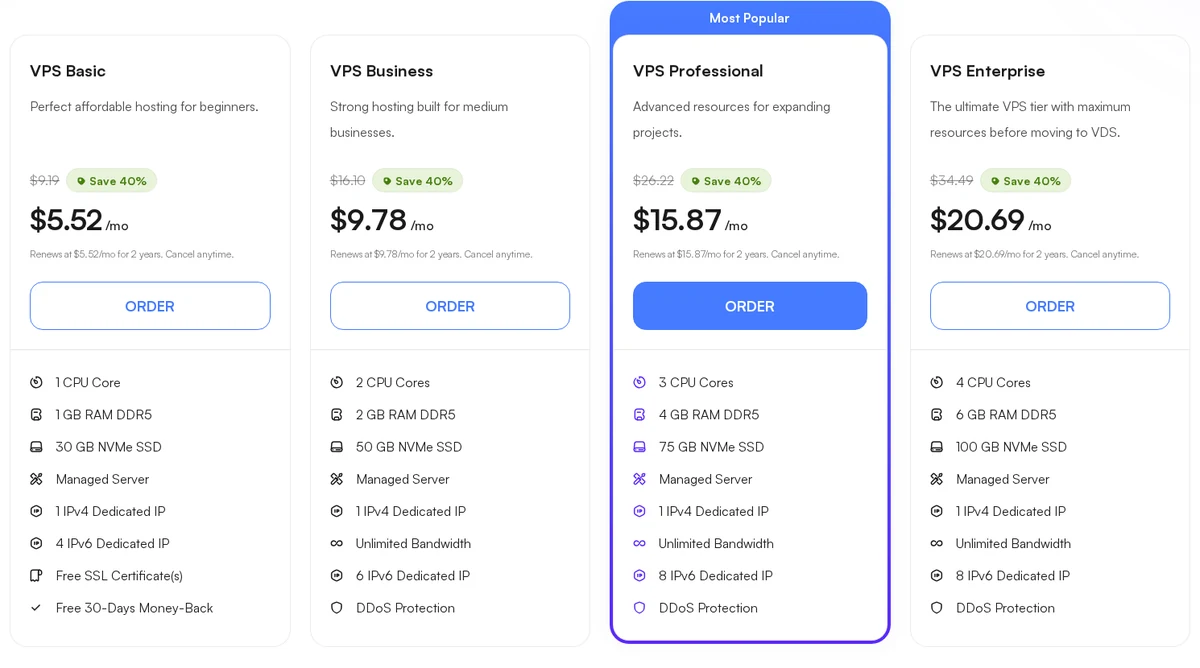
| UltaHost | VPS Basic | $5.52 (24 mo) | 1 vCPU, 1GB DDR5, 30GB NVMe | 30+ claimed | Managed with refund | 4.5 / 5 |
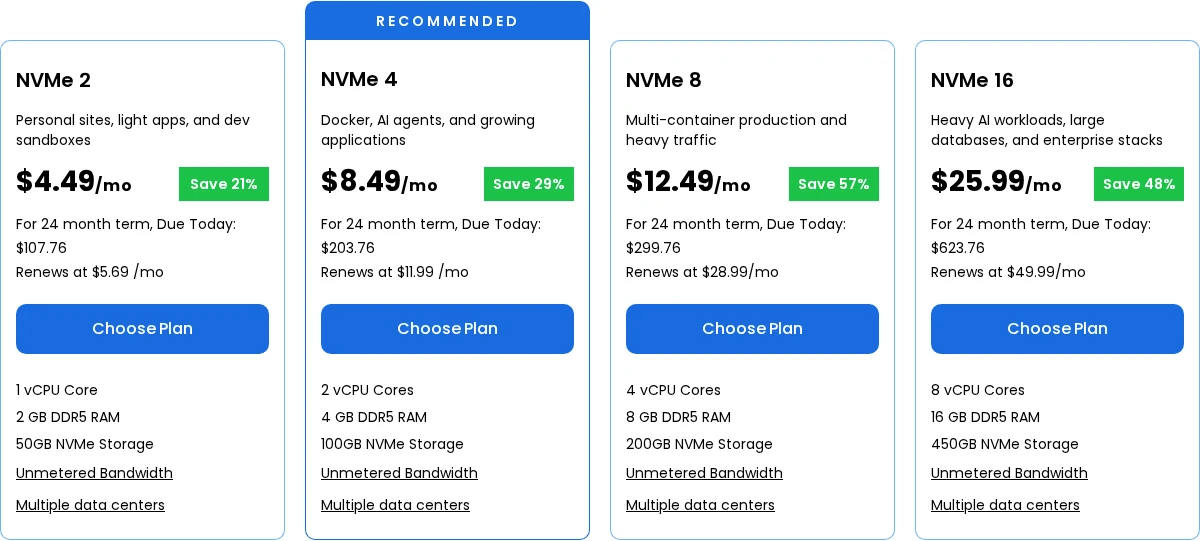
| Bluehost | NVMe 2 | $4.49 (24 mo) | 1 vCPU, 2GB, 50GB NVMe | USA, London, Toronto, Amsterdam | NVMe value | 4.4 / 5 |
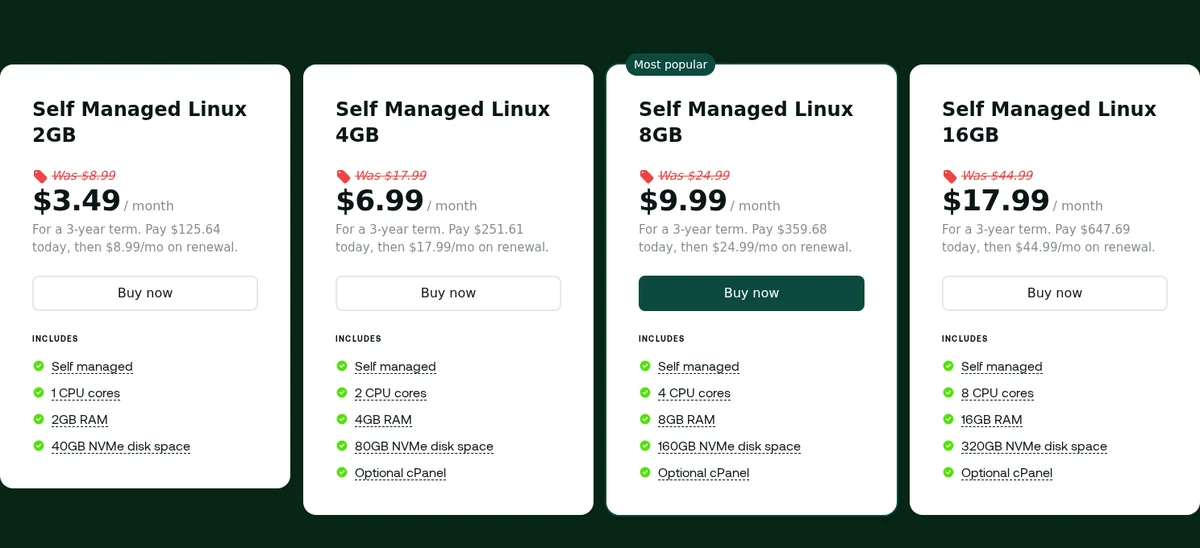
| Hosting.com | 2GB | $3.49 (3 years) | 1 CPU, 2GB, 40GB NVMe | 10 locations | Cheap long term | 4.4 / 5 |
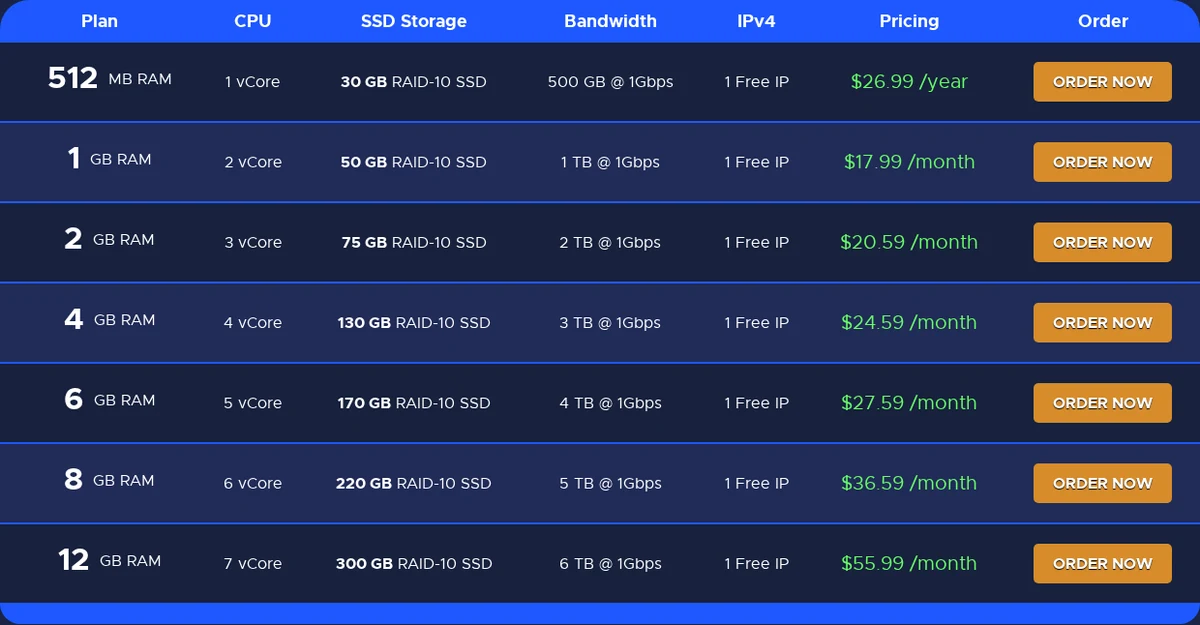
| RackNerd | 512MB | $26.99 (per year) | 1 vCore, 512MB, 30GB RAID-10 SSD | 12 locations | Cheapest yearly | 4.2 / 5 |
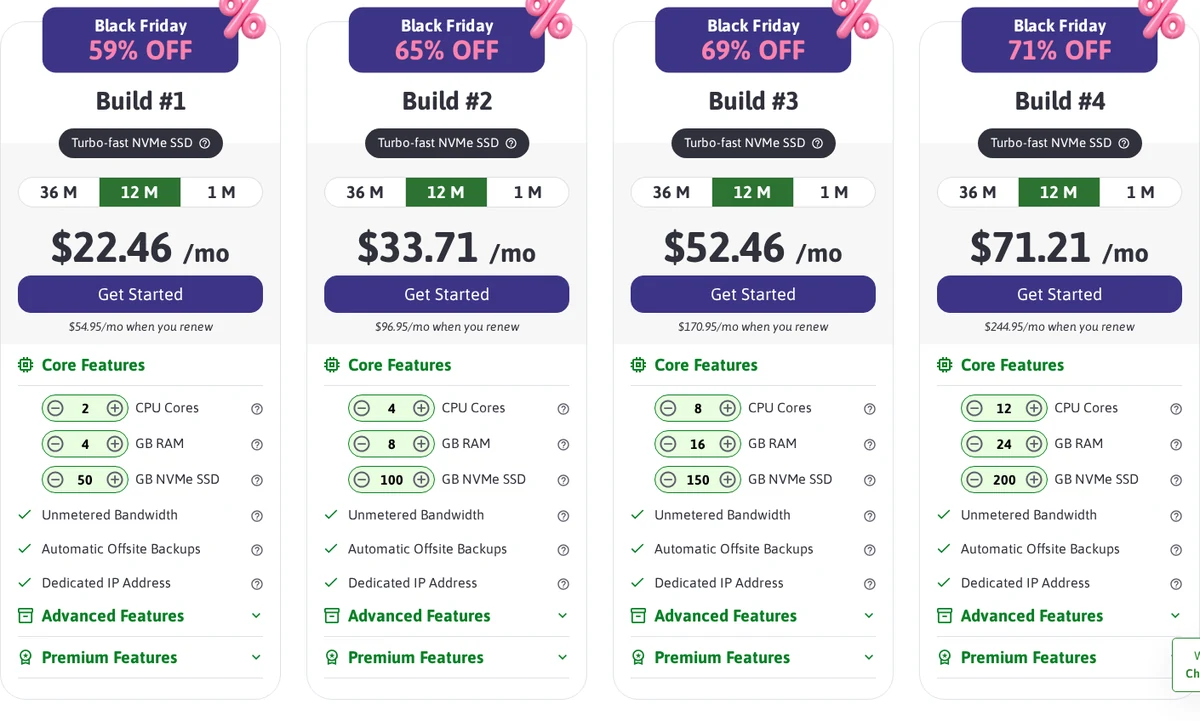
| ScalaHosting | Build #1 | $22.46 (intro) | 2 vCPU, 4GB, 50GB NVMe | Not listed on plan page | Fully managed | 4.2 / 5 |
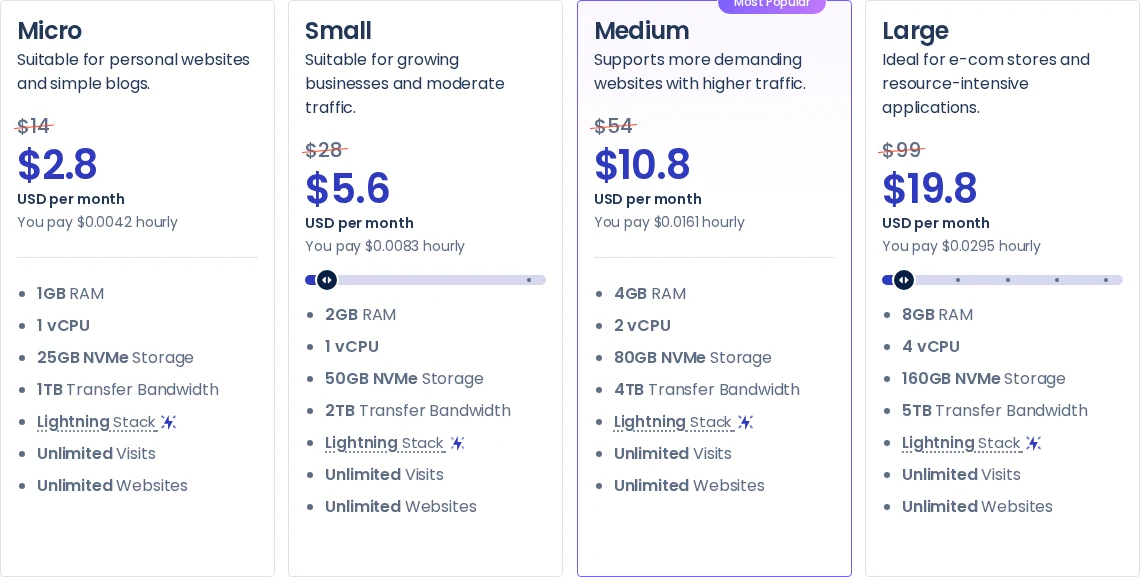
| Cloudways | Micro | $14 list | 1 vCPU, 1GB, 25GB NVMe | 5 infrastructure providers | Managed cloud | 4.0 / 5 |
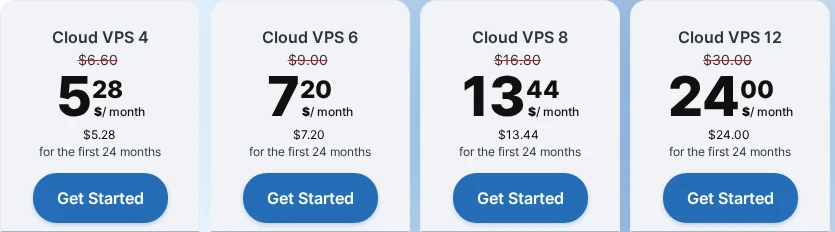
| Contabo | Cloud VPS 4 | $5.28 (24 mo) | 4 vCPU, 8GB, 100GB SSD | Chosen at checkout | Most resources | 4.6 / 5 |
10 best VPS for Vaultwarden, ranked
The best VPS for Vaultwarden is ranked by how well each plan combines root access, RAM, storage, backups and long-term price. Providers with an affiliate link come first and the rating shows my view of the plan, not sponsorship. Each section has a plan table, a screenshot and a link to the host.
1. Hostinger: Best Overall Vaultwarden VPS With a Docker Template

Pros
- A Docker and Traefik template and a Docker manager for Compose projects, which fits the official Docker Compose way to install Vaultwarden
- 4GB of RAM and 50GB of NVMe from $6.49 a month, free weekly backups, a 30-day money-back guarantee and 10 locations
Cons
- The $6.49 price needs a 24-month term and renews at $11.99
- Backups are weekly, so you still need your own Vaultwarden backup, and no uptime percentage is listed
Summary
Hostinger is the best overall Vaultwarden VPS: KVM 1 has 4GB of RAM and NVMe with a Docker template, free weekly backups and a 30-day refund from $6.49 a month on a 24-month term.
Price: USD 6.49 Per month, KVM 1, 24-month term, renews at $11.99
Visit HostingerVaultwarden is a small server, so the best plan is not the biggest one. It is the one that makes Docker easy, keeps your data safe and does not surprise you at renewal. Hostinger KVM 1 gives you 1 vCPU, 4GB of RAM and 50GB of NVMe for $6.49 a month on a 24-month term, which is far more room than a password manager needs.
The platform side is what makes it the top pick. Hostinger lists a Docker and Traefik template and a Docker manager for Compose projects, and the official Vaultwarden guide recommends its container images and a Docker Compose file. Free weekly backups are included, and the plans run on AMD EPYC with a 1 Gbps network and 10 locations.
Plan for the renewal, which rises to $11.99 a month after the first 24 months. A 30-day money-back guarantee is long enough to install Vaultwarden, move your vault and test the mobile apps before you commit.
Hostinger key features for Vaultwarden VPS hosting
- Docker-ready: A Docker and Traefik template and a Docker manager make the official Docker Compose install of Vaultwarden quick to set up.
- Plenty of RAM: KVM 1 includes 4GB of RAM, so the OS, Docker, a reverse proxy and Vaultwarden fit with room to spare.
- NVMe storage: Every plan uses NVMe storage, which keeps the SQLite database and attachments fast and responsive.
- Free weekly backups: Weekly dashboard backups add a safety net, but pair them with Vaultwarden’s own backup command.
- 30-day refund: A 30-day money-back guarantee gives you time to move your vault and test every device before paying long term.
Hostinger Vaultwarden VPS plans and prices
| Detail | Hostinger |
|---|---|
| Plan for Vaultwarden | KVM 1: 1 vCPU, 4GB RAM, 50GB NVMe, 4TB bandwidth |
| Price and renewal | $6.49/mo on 24 months ($155.76 upfront), renews at $11.99/mo |
| Next plan | KVM 2: 2 vCPU, 8GB, 100GB NVMe at $8.79/mo, renews at $14.99/mo |
| Docker | Docker and Traefik template plus a Docker manager for Compose projects |
| Backups | Free weekly backups restorable from the dashboard |
| Locations | 10 locations across four continents, including the USA, Europe, South America and Asia |
| Refund and network | 30-day money-back guarantee, AMD EPYC CPUs, 1 Gbps network and a public API |
| Root and access | Full VPS control with a public API and an AI web terminal |
Who should pick it: Anyone who wants the easiest, best-supported Vaultwarden VPS with Docker built in and a 30-day refund window. Looking for a discount? See our Hostinger coupon page before you order.
2. YouStable: Best Price That Stays the Same at Renewal

Pros
- The renewal stays at the signup price on every VPS plan, which suits a password vault that stays on one server for years
- NVMe storage, full root access, a free dedicated IPv4, free migration and a 99.95% uptime SLA
Cons
- Prices are in Indian rupees, so your card converts them
- The refund window is 7 days and there is no Docker template, so you install Docker yourself
Summary
YouStable is the predictable-cost pick: vStart gives 1 CPU, 4GB and 50GB NVMe for about $7 a month, with the price unchanged at renewal, root access and a 99.95% SLA.
Price: USD 7.13 Per month, vStart, 24-month term, renews at the same price (listed at 599 INR)
Visit YouStableA password manager is something you will leave on one server for years, so a price that does not jump at renewal matters. YouStable’s vStart plan gives you 1 CPU, 4GB of RAM and 50GB of NVMe for 599 Indian rupees a month, about $7, and the page says it renews at the same price.
You also get full root access, a free dedicated IPv4, free migration and a 99.95% uptime SLA. The plans are semi-managed, so YouStable looks after the hardware and network while you run Docker and Vaultwarden. Data centers are in Asia, the Netherlands and the USA.
The trade-offs are practical: prices are shown in rupees, the refund window is 7 days, and there is no Docker template, so you install Docker yourself. Our YouStable review covers the SLA, refund rules and real server specs.
YouStable key features for Vaultwarden VPS hosting
- Same price at renewal: The renewal price equals the 24-month price, which keeps the cost of a long-lived vault server predictable.
- 4GB for about $7: vStart has 4GB of RAM and 50GB of NVMe, far above what Vaultwarden needs.
- Root access: Full root access lets you install Docker, Compose and a reverse proxy exactly as the Vaultwarden guide describes.
- 99.95% uptime SLA: A written uptime SLA is stated, and the host runs the hardware, network and virtualization layer.
- Free migration: Free migration is included, which helps if you move an existing self-hosted vault from another provider.
YouStable Vaultwarden VPS plans and prices
| Detail | YouStable |
|---|---|
| Plan for Vaultwarden | vStart: 1 CPU, 4GB RAM, 50GB NVMe SSD, 4TB bandwidth |
| Price and renewal | 599 INR/mo on 24 months (about $7), renews at the same 599 INR/mo, excluding GST |
| Next plan | vProfessional: 2 CPU, 8GB, 100GB NVMe at 949 INR/mo (about $11) |
| Access | Full root access, a free dedicated IPv4 and a free control panel |
| Management | Semi-managed: the host runs hardware and network, you run the OS and apps |
| Uptime and refund | 99.95% uptime SLA and a 7-day money-back guarantee |
| Locations | Data centers in Asia, the Netherlands and the USA |
| Migration | Free migration on every plan |
Who should pick it: Users who want predictable long-term pricing and root access, and are comfortable installing Docker themselves.
3. InterServer: Best Cheap Month-to-Month Vaultwarden VPS

Pros
- The lowest month-to-month price in this guide: one slice is 1 vCPU, 2GB of RAM and 40GB of SSD for $3 a month
- Root access, AlmaLinux, Ubuntu, Debian and CentOS templates, a 10Gbps shared port and no long contract
Cons
- No trial period or money-back guarantee is listed on the VPS page
- Storage is SSD rather than NVMe, and managed support starts at 8 slices
Summary
InterServer is the cheapest flexible pick: one slice at $3 a month gives 2GB of RAM and root access with no contract, but there is no refund and storage is SSD.
Price: USD 3.00 Per month, 1 slice, billed month to month
Visit InterServerInterServer sells VPS by the slice, and one slice costs $3 a month. That single slice has 1 vCPU, 2GB of RAM and 40GB of SSD, which is more than enough for a personal or family Vaultwarden server, and you pay month to month with no contract.
Linux plans include root access and templates for AlmaLinux, Ubuntu, Debian and CentOS, with a 10Gbps shared port and servers in New York City, Dallas and Los Angeles. If your vault grows, you can add slices without changing hosts.
Be aware of what is missing: the VPS page lists no trial or money-back guarantee, storage is SSD rather than NVMe, and managed support starts at 8 slices.
InterServer key features for Vaultwarden VPS hosting
- $3 a month: One slice costs $3 a month, the lowest recurring price among the providers that list root access.
- No contract: Billing is monthly, so you can leave at any time and are never locked into a long term.
- Root and templates: Root access and AlmaLinux, Ubuntu, Debian and CentOS templates support the official Docker install.
- 10Gbps port: A 10Gbps shared port is listed, which is plenty for a vault that mostly sends small sync requests.
- Easy to scale: Adding slices raises RAM and storage in $3 steps if you later host more apps next to Vaultwarden.
InterServer Vaultwarden VPS plans and prices
| Detail | InterServer |
|---|---|
| Plan for Vaultwarden | 1 slice: 1 vCPU, 2GB RAM, 40GB SSD, 2TB transfer |
| Price | $3 per slice per month, billed month to month |
| More room | 2 slices $6 (1 vCPU, 4GB, 80GB) and 4 slices $12 (2 vCPU, 8GB, 160GB) |
| Network | 10Gbps shared port |
| Locations | New York City, Dallas and Los Angeles |
| Access | Root access on Linux with AlmaLinux, Ubuntu, Debian and CentOS templates |
| Uptime and refund | 99.9% uptime guarantee, no trial or money-back guarantee listed |
| Support | Managed support is included at 8 or more slices |
Who should pick it: Budget users who want the cheapest flexible Vaultwarden VPS and do not need a refund window.
4. UltaHost: Best Managed Vaultwarden VPS With a 30-Day Refund

Pros
- DDR5 memory and NVMe storage on every plan, with managed servers, free monthly management and full root access per the FAQ
- A 30-day money-back guarantee, a 99.99% uptime guarantee and DDoS protection on managed plans
Cons
- VPS Basic has only 1GB of RAM, so choose VPS Business with 2GB if you want headroom
- Port 25 is closed on entry plans unless the invoice total is $117 or more, so use an external SMTP service for Vaultwarden emails
Summary
UltaHost is the managed pick with a refund: VPS Basic gives 1GB of DDR5 and 30GB of NVMe from $5.52 a month, with root access, a 30-day refund and a 99.99% uptime guarantee.
Price: USD 5.52 Per month, VPS Basic, 24-month term, renews at the same rate for 2 years
Visit UltaHostUltaHost is a good fit if you want a little help from the host and a safety net. Its VPS plans use DDR5 memory and NVMe storage, are sold as managed servers with free monthly management, and carry a 99.99% uptime guarantee and a 30-day money-back guarantee.
For Vaultwarden, the VPS Basic plan with 1 vCPU, 1GB of DDR5 and 30GB of NVMe costs $5.52 a month on a 24-month term and renews at the same rate for two years. If you want extra headroom for Docker and a reverse proxy, VPS Business has 2GB for $9.78.
One thing to plan for: port 25 is closed on entry plans unless your invoice total is $117 or more. Vaultwarden can send invitation and verification emails, so use an external SMTP service on a different port.
UltaHost key features for Vaultwarden VPS hosting
- DDR5 and NVMe: Every plan pairs DDR5 memory with NVMe storage, which keeps the vault fast on a very small server.
- Managed with root: Servers are managed and the FAQ says root access is included, so you can run Docker while the host handles the basics.
- 30-day refund: A 30-day money-back guarantee lets you test your vault, apps and backups before you commit.
- 99.99% uptime: A 99.99% uptime guarantee is stated, one of the higher figures in this guide.
- DDoS protection: DDoS protection is listed on managed plans, which helps keep a public vault reachable.
UltaHost Vaultwarden VPS plans and prices
| Detail | UltaHost |
|---|---|
| Plan for Vaultwarden | VPS Basic: 1 vCPU, 1GB DDR5, 30GB NVMe, unlimited bandwidth |
| More headroom | VPS Business: 2 vCPU, 2GB, 50GB at $9.78/mo; VPS Professional: 3 vCPU, 4GB, 75GB at $15.87/mo |
| Price | $5.52/mo on 24 months, renewing at the same rate for 2 years |
| Management | Managed servers with free monthly management; full root access per the FAQ |
| Uptime and refund | 99.99% uptime guarantee and a 30-day money-back guarantee |
| Network | Unlimited bandwidth and DDoS protection on managed plans |
| Email note | Port 25 is closed on entry plans, so send mail through an external SMTP service |
| Locations | 30+ global locations claimed |
Who should pick it: Users who want a managed VPS with DDR5, NVMe and a 30-day refund, and will use an external SMTP service for email.
5. Bluehost: Best Big-Brand NVMe Vaultwarden VPS

Pros
- NVMe storage, unmetered bandwidth and root access over SSH and API on every VPS plan, from $4.49 a month for the NVMe 2 tier
- A stated 99.99% uptime guarantee and data centers in the USA, London, Toronto and Amsterdam
Cons
- Renewal rates rise sharply on larger tiers (NVMe 4 renews at $11.99), and the page shows two prices for NVMe 4
- The plans are self-managed with no cPanel or priority support, and a refund policy is not stated on the page
Summary
Bluehost is the big-brand budget NVMe pick: the NVMe 2 tier gives 1 vCPU, 2GB and 50GB of NVMe from $4.49 a month with root access, but renewals rise and the refund policy is not stated.
Price: USD 4.49 Per month, NVMe 2, 24-month term
Visit BluehostBluehost’s NVMe VPS line offers current storage at a low entry price. The NVMe 2 tier gives you 1 vCPU, 2GB of RAM and 50GB of NVMe for $4.49 a month on a 24-month term, with unmetered bandwidth on every plan.
Every tier includes root access over SSH and API, which is what a Docker install of Vaultwarden needs. Bluehost states a 99.99% uptime guarantee and has data centers in the USA (Virginia and Arizona), London, Toronto and Amsterdam.
Check the renewal and support details before you buy. Larger tiers renew at a higher rate, plans are self-managed without cPanel or priority support, and a refund policy is not stated on the VPS page.
Bluehost key features for Vaultwarden VPS hosting
- Low entry price: NVMe 2 is $4.49 a month, one of the lowest NVMe prices among the larger brands in this guide.
- NVMe storage: NVMe storage keeps the Vaultwarden database responsive, even on the smallest tier.
- Root over SSH and API: Root access through SSH and an API supports a Docker install and automated rebuilds.
- Unmetered bandwidth: Bandwidth is unmetered on the NVMe plans, so attachments and syncing never hit a cap.
- Four regions: Servers in the USA, London, Toronto and Amsterdam let you keep your vault close to your devices.
Bluehost Vaultwarden VPS plans and prices
| Detail | Bluehost |
|---|---|
| Plan for Vaultwarden | NVMe 2: 1 vCPU, 2GB RAM, 50GB NVMe, unmetered bandwidth |
| Price | $4.49/mo on a 24-month term; the renewal rate for NVMe 2 is not shown on the page |
| More room | NVMe 4: 2 vCPU, 4GB DDR5, 100GB NVMe at $8.49/mo, renews at $11.99/mo |
| Access | Root access over SSH and API on all plans |
| Management | Self-managed, with no cPanel or 24/7 priority support included |
| Uptime | 99.99% uptime guarantee |
| Locations | USA (Virginia and Arizona), London, Toronto and Amsterdam |
| Refund | Not stated on the VPS page |
Who should pick it: Users who want a well-known brand with NVMe at a low entry price and can accept self-managed servers.
6. Hosting.com: Best Cheap Long-Term Vaultwarden VPS

Pros
- Dedicated vCPU, RAM and NVMe on AMD EPYC with full root access, and resources you can scale without a rebuild
- 10 data center locations, a 99.9% uptime SLA and a choice of Ubuntu 22.04 LTS, Debian 12 or AlmaLinux 9
Cons
- The $3.49 price needs a 3-year term and renews at $8.99 a month
- Bandwidth and a refund policy are not listed on the plan page
Summary
Hosting.com is the cheap long-term pick: the 2GB plan costs $3.49 a month on a 3-year term with dedicated resources, NVMe, root access and 10 locations, but the renewal is higher.
Price: USD 3.49 Per month, Self Managed Linux 2GB, 3-year term, renews at $8.99
Visit Hosting.comHosting.com sells unmanaged Linux VPS plans with dedicated vCPU, RAM and NVMe on AMD EPYC, and the entry price is very low if you accept a 3-year term. The 2GB plan has 1 CPU and 40GB of NVMe for $3.49 a month, which is plenty for Vaultwarden.
You get full root access, a choice of Ubuntu 22.04 LTS, Debian 12 or AlmaLinux 9, a 99.9% uptime SLA and 10 locations. You can scale resources on demand without a rebuild if you later host more services.
The renewal is the catch: the 2GB plan renews at $8.99 a month, so decide whether a 3-year lock-in suits you. Bandwidth and a refund policy are not listed on the plan page.
Hosting.com key features for Vaultwarden VPS hosting
- Very low entry price: The 2GB plan costs $3.49 a month on a 3-year term, among the cheapest options with 2GB of RAM.
- Dedicated resources: Plans list dedicated vCPU, RAM and NVMe on AMD EPYC, so your vault is not slowed by neighbours.
- Choice of OS: Ubuntu 22.04 LTS, Debian 12 and AlmaLinux 9 are offered, all of which work with Docker.
- Scale without rebuild: You can add resources without rebuilding the server, which helps as your needs grow.
- 10 locations: Ten data center locations let you keep the vault close to your devices.
Hosting.com Vaultwarden VPS plans and prices
| Detail | Hosting.com |
|---|---|
| Plan for Vaultwarden | Self Managed Linux 2GB: 1 CPU, 2GB RAM, 40GB NVMe |
| Price and renewal | $3.49/mo on a 3-year term ($125.64 upfront), renews at $8.99/mo |
| More room | 4GB: 2 CPU, 80GB NVMe at $6.99/mo, renewing at $17.99/mo |
| Access | Full root access, self managed, optional cPanel |
| Uptime | 99.9% uptime SLA on hardware and network |
| OS choice | Ubuntu 22.04 LTS, Debian 12 or AlmaLinux 9 |
| Locations | 10 locations including London, New York, US West, Canada, Singapore, Sydney, Mexico, Europe and Dubai |
| Refund | Not listed on the plan page |
Who should pick it: Users who want the lowest long-term monthly price for 2GB of dedicated-resource NVMe and are fine with a 3-year term.
7. RackNerd: Best Smallest and Cheapest Yearly Vaultwarden VPS

Pros
- The cheapest plan in this guide at $26.99 a year, with 1 vCore, 30GB of RAID-10 SSD and 500GB of bandwidth at 1 Gbps
- 12 listed locations across the USA, Canada and Europe, one free IPv4 and 24×7 support
Cons
- 512MB of RAM leaves little room for Docker, a proxy and the OS, so it suits one user and needs careful setup
- Root access, uptime and refund terms are not stated on the plan page, and storage is SSD rather than NVMe
Summary
RackNerd is the cheapest yearly pick: the 512MB plan costs $26.99 a year with 12 locations and RAID-10 SSD, but the small RAM means careful setup, and root, uptime and refund terms are not stated.
Price: USD 2.25 Per month equivalent, 512MB KVM VPS, billed $26.99 per year
Visit RackNerdRackNerd is the budget extreme. Its entry KVM plan costs $26.99 a year and gives you 1 vCore, 30GB of RAID-10 protected SSD and 500GB of bandwidth at 1 Gbps. For one user running only Vaultwarden, that can be enough.
The page lists 12 locations (Los Angeles, San Jose, Seattle, Dallas, Atlanta, Chicago, New York, Ashburn, Amsterdam, France, Dublin and Toronto), a free IPv4 and 24×7 support.
The trade-offs are RAM and clarity. 512MB leaves little room for the OS, Docker and a proxy, so consider the 1GB or 2GB plans, which are priced monthly and cost more per month. The plan page does not state root access, uptime or the refund policy, so read the terms before ordering.
RackNerd key features for Vaultwarden VPS hosting
- Lowest yearly price: $26.99 a year is the cheapest recurring price in this guide for a plan with its own IPv4.
- RAID-10 SSD: Storage is RAID-10 protected SSD, which guards against a single drive failure, although it is not NVMe.
- 12 locations: A wide location list across the USA, Canada and Europe lets you place the vault near your devices.
- 1 Gbps on every plan: A 1 Gbps port is included on every plan, which is more than a vault needs.
- Control panel: A control panel handles start, stop, reinstall and console, which helps if you rebuild the server.
RackNerd Vaultwarden VPS plans and prices
| Detail | RackNerd |
|---|---|
| Plan for Vaultwarden | 512MB: 1 vCore, 30GB RAID-10 SSD, 500GB bandwidth at 1 Gbps |
| Price | $26.99 per year (about $2.25 a month) |
| More room | 1GB: 2 vCore, 50GB, 1TB at $17.99/mo; 2GB: 3 vCore, 75GB, 2TB at $20.59/mo |
| Storage | RAID-10 protected SSD, not NVMe |
| Network | 1 Gbps on every plan and one free IPv4 |
| Locations | Los Angeles, San Jose, Seattle, Dallas, Atlanta, Chicago, New York, Ashburn, Amsterdam, France, Dublin and Toronto |
| Support | 24×7 support listed |
| Terms | Root, uptime and refund terms are in the linked terms of service |
Who should pick it: Very cost-focused users who run a single-person vault, can manage a small-RAM setup and will read the terms first.
8. ScalaHosting: Best Fully Managed Vaultwarden VPS (Confirm Root Access)

Pros
- A fully managed VPS with SPanel, automatic offsite backups, a dedicated IP, unmetered bandwidth and an anytime money-back guarantee
- Setup, monitoring and maintenance are handled by ScalaHosting
Cons
- The price is far above the other options, and Build #1 renews at $54.95 a month
- Root access is optional and the SPanel stack is aimed at websites, so confirm Docker use with support before you buy
Summary
ScalaHosting is the hands-off pick: Build #1 gives 4GB of RAM and NVMe with automatic offsite backups and an anytime refund, but it costs much more than Vaultwarden needs and root access is optional.
Price: USD 22.46 Per month, Build #1, introductory price, renews at $54.95
Visit ScalaHostingScalaHosting is the hands-off option. Its managed VPS builds include automatic offsite backups, a dedicated IP, unmetered bandwidth, SPanel and an anytime money-back guarantee, and the team handles setup, monitoring and maintenance.
Build #1 offers 2 vCPU, 4GB of RAM and 50GB of NVMe for $22.46 a month, but that is an introductory price and it renews at $54.95. That is a lot for a server that only runs a password manager.
Vaultwarden needs root access to run Docker, and root is optional on ScalaHosting, so ask support to enable it before you buy. For more on the host, read our ScalaHosting review.
ScalaHosting key features for Vaultwarden VPS hosting
- Fully managed: ScalaHosting handles setup, monitoring and maintenance, which suits people who do not want to administer a server.
- Offsite backups: Automatic offsite backups are included, but you should still keep your own Vaultwarden backup.
- NVMe and unmetered bandwidth: Builds use NVMe storage with unmetered bandwidth, so syncing and attachments never hit a cap.
- Anytime refund: The money-back guarantee is described as available anytime, with no day count given.
- Custom builds: Custom builds let you pick CPU, RAM and SSD sizes if the standard builds do not fit.
ScalaHosting Vaultwarden VPS plans and prices
| Detail | ScalaHosting |
|---|---|
| Plan for Vaultwarden | Build #1: 2 vCPU, 4GB RAM, 50GB NVMe |
| Price | $22.46/mo intro, renews at $54.95/mo |
| Included | Unmetered bandwidth, automatic offsite backups, a dedicated IP and SPanel |
| Access | SPanel with SSH; root access is optional |
| Management | Managed VPS: ScalaHosting handles setup, monitoring and maintenance |
| Refund | Anytime money-back guarantee |
| Next build | Build #2: 4 vCPU, 8GB, 100GB NVMe at $33.71/mo intro |
| Review | See our ScalaHosting review for the full details |
Who should pick it: Users who want a fully managed server with offsite backups and will confirm root access and Docker with support first.
9. Cloudways: Best Managed Cloud If Docker Works for You

Pros
- A managed cloud platform on DigitalOcean, Vultr, Linode, AWS or Google Cloud, with automated backups included and a 5-day free trial with no card
- Wide choice of locations: 9 DigitalOcean, 30 Vultr, 25 Linode, 28 AWS and 28 Google Cloud
Cons
- The list price is high for the RAM: Micro is $14 a month for 1GB, and the pricing page does not state whether Docker Compose is supported
- It is built for managed web applications, so confirm Docker and port access during the free trial before you plan a Vaultwarden install
Summary
Cloudways is the managed cloud option with the widest location choice, but it costs more for 1GB of RAM and you must confirm Docker support during the free trial before relying on it.
Price: USD 14.00 Per month, Micro plan, list price; an 80% offer applies to the first 2 months
Visit CloudwaysCloudways is a managed cloud platform rather than a classic VPS. You pick DigitalOcean, Vultr, Linode, AWS or Google Cloud as the infrastructure, and Cloudways manages the server, with automated backups included and a 5-day free trial that needs no credit card.
The Micro plan has 1GB of RAM, 1 vCPU and 25GB of NVMe for $14 a month at list price, with an 80% offer currently applying to the first two months, which makes it $2.80. Larger plans cost much more for the same RAM than the other hosts here.
It is built for managed web applications, and the pricing page does not say whether you can run a Docker Compose stack. Test that during the trial before you plan to run Vaultwarden on it.
Cloudways key features for Vaultwarden VPS hosting
- Choice of infrastructure: You can choose DigitalOcean, Vultr, Linode, AWS or Google Cloud, with 9 to 30 locations each.
- Managed backups: Automated backups are mandatory and included, with offsite storage charged at $0.033 per GB.
- 5-day free trial: A 5-day free trial with no credit card lets you test whether Docker runs, outside AWS and Google Cloud.
- Managed servers: Cloudways manages the server layer, which saves system administration time.
- Simple scaling: You can resize a plan without moving hosts, although the price rises steeply.
Cloudways Vaultwarden VPS plans and prices
| Detail | Cloudways |
|---|---|
| Plan for Vaultwarden | Micro: 1GB RAM, 1 vCPU, 25GB NVMe, 1TB transfer at $14/mo list |
| Promo | An 80% offer applies to the first 2 months: $2.80 for Micro |
| More room | Small 2GB $28, Medium 4GB $54 and Large 8GB $99 per month list |
| Infrastructure | DigitalOcean (9 locations), Vultr (30), Linode (25), AWS (28) and Google Cloud (28) |
| Backups | Automated backups are mandatory and included; offsite storage costs $0.033/GB |
| Trial | 5-day free trial with no credit card (not available on AWS or Google Cloud) |
| Overage | DigitalOcean bandwidth overage is $0.02/GB |
| Docker | The pricing page does not state Docker support, so test it first |
Who should pick it: Users who already use Cloudways, want a managed cloud and can confirm Docker support during the free trial.
10. Contabo: Most Resources for the Price (No Affiliate Link)

Pros
- The most RAM and vCPU for the money: 4 vCPU and 8GB of RAM from $5.28 a month, far more than Vaultwarden needs
- A free firewall and DDoS protection, unlimited traffic, a stated 99.9% uptime and 1 to 3 snapshots depending on the plan
Cons
- The price shown changed between two visits to the page, so confirm the final price and region at checkout
- It is far more server than a password vault needs, and entry plans use SSD with NVMe on higher tiers
Summary
Contabo is the resource pick: 4 vCPU and 8GB of RAM from $5.28 a month with firewall, DDoS protection and snapshots. It is more than Vaultwarden needs, so choose it if you will host other apps beside it.
Price: USD 5.28 Per month, Cloud VPS 4, first 24 months, excluding VAT
Visit ContaboContabo is the pick when you want one server for many things. Cloud VPS 4 lists 4 vCPU and 8GB of RAM from $5.28 a month for the first 24 months, which is far more than Vaultwarden needs, but it leaves room for other self-hosted apps on the same machine.
It includes a free firewall and DDoS protection, advertises unlimited traffic and a 99.9% uptime figure, and gives one to three snapshots depending on the plan. An auto-backup option is shown as a toggle, which is worth switching on for a vault.
Two things to check before you pay. The price on the page differed between two visits, so confirm the total and the region at checkout. The entry plans also use SSD, and NVMe appears on higher tiers. I link to Contabo directly here rather than through an affiliate link, so it is listed last.
Contabo key features for Vaultwarden VPS hosting
- Resources for the price: Cloud VPS 4 starts at 8GB of RAM and 4 vCPU, far above what a vault needs and ideal for hosting more apps.
- Firewall and DDoS: A free firewall and DDoS protection are included at no extra cost.
- Snapshots: One to three snapshots are included depending on the plan, which gives a quick rollback before an upgrade.
- Unlimited traffic: Traffic is advertised as unlimited, so syncing and attachments do not hit a cap.
- Auto backup option: An auto-backup toggle is offered on the plans page, which adds a recovery point for your vault.
Contabo Vaultwarden VPS plans and prices
| Detail | Contabo |
|---|---|
| Plan for Vaultwarden | Cloud VPS 4: 4 vCPU, 8GB RAM, 100GB SSD |
| Price | $5.28/mo for the first 24 months, excluding VAT |
| Next sizes | Cloud VPS 6: 6 vCPU, 12GB, 200GB SSD or 100GB NVMe, $7.20/mo |
| Protection | Free firewall and DDoS protection |
| Snapshots | 1 snapshot on Cloud VPS 4, 2 on Cloud VPS 6 and 3 on larger plans |
| Traffic and uptime | Unlimited traffic and a stated 99.9% uptime |
| Add-ons | A VPS with Auto Backup option is offered as a toggle on the plans page |
| Link | This guide links to Contabo directly, not through an affiliate link |
Who should pick it: Users who want one larger server for Vaultwarden plus other self-hosted apps, and will confirm the final price at checkout.
How to self host Vaultwarden on a VPS with Docker Compose
To self host Vaultwarden on a VPS, follow this short version of the official Vaultwarden Docker Compose guide. The project recommends its container images, so Docker is the easiest way to run it.
- Create the VPS: order a plan with root access, install a current Linux such as Ubuntu or Debian and point a domain name at the server.
- Install Docker: install Docker Engine and Docker Compose.
- Write the Compose file: use the vaultwarden/server image, mount a folder to /data, and set the DOMAIN variable to your https address. Set SIGNUPS_ALLOWED to true only while you create your own account, then set it to false so strangers cannot register.
- Add HTTPS: put a reverse proxy in front of Vaultwarden. The wiki suggests Caddy for beginners because it gets Let’s Encrypt certificates automatically, and its public setup exposes ports 80, 443 and 443/udp.
- Start it: run docker compose up -d, open your domain, create your account and then close sign-ups.
- Connect your apps: in the Bitwarden app, set the self-hosted server URL to your domain and log in.
- Update regularly: run docker compose pull and docker compose up -d to update the container.
Do not skip the domain name
The wiki says a DNS name is required for Let’s Encrypt, not an IP address, and that the built-in Rocket TLS is not recommended because it is relatively immature and limited. Use a reverse proxy.
How to back up Vaultwarden (what to copy and how)
Back up the data folder, not the whole server. The Vaultwarden wiki lists exactly what matters, and it warns that filesystem or VM snapshots can be hard to recover from.
| File or folder | Backup | What it holds |
|---|---|---|
| db.sqlite3 | Required | Nearly all vault data, users, organizations and devices |
| attachments/ | Required | File attachments, which are stored outside the database |
| rsa_key files | Recommended | The keys that sign login tokens |
| config.json | Recommended | Admin page settings |
| sends/ and icon_cache/ | Optional | Temporary Send files and cached website icons |
- Use the SQLite online backup: the wiki recommends the sqlite3 .backup command, and Vaultwarden 1.32.1 and later also has a built-in backup command you can run inside the container.
- Do not copy a live database blindly: if you copy db.sqlite3 directly, also copy the matching db.sqlite3-wal file and restore both together.
- Store copies off the server: keep at least one copy on a different machine or provider.
- Test restores: the wiki advises testing restores from time to time.
A host that offers snapshots, such as Contabo, or automatic backups, such as ScalaHosting, adds a second layer, but it does not replace your own Vaultwarden backups.
Vaultwarden VPS security checklist
- Use HTTPS only, with a full-chain certificate, and keep the proxy as the only public service.
- Close sign-ups after you create your accounts by setting SIGNUPS_ALLOWED to false.
- Turn on two-factor authentication for every account, using a method such as an authenticator app or a security key.
- Protect or disable the admin page, as the project wiki describes, and use a strong secret if you enable it.
- Keep it updated: pull the new container image regularly and read release notes.
- Lock down the server: use SSH keys, a firewall and automatic security updates for the operating system.
- Keep an offline copy: store an encrypted export or backup somewhere other than your VPS.
Vaultwarden vs hosted Bitwarden: which should you choose?
| Question | Hosted Bitwarden | Vaultwarden on a VPS |
|---|---|---|
| Who runs the server? | Bitwarden | You, or your managed VPS host |
| Official support | Official Bitwarden support | Community only, not Bitwarden support |
| Setup effort | Create an account | Install Docker, HTTPS and backups |
| Cost | Plan pricing from Bitwarden | A VPS from a few dollars a month |
| Data location | Bitwarden’s regions | Any provider and region you choose |
| Best for | No maintenance | Control, low cost and learning |
Choose hosted Bitwarden if you want official support and no server work. Choose Vaultwarden if you want control and a low fixed cost and are comfortable with Linux, Docker and backups.
Common mistakes with Vaultwarden VPS hosting
- Running Vaultwarden over plain HTTP, which breaks the web vault and weakens security.
- Leaving sign-ups open after creating your account.
- Skipping backups, or relying only on VM snapshots, which the wiki says are hard to recover from.
- Copying db.sqlite3 while it is in use without the matching WAL file.
- Buying a plan without root access, so Docker cannot run.
- Ignoring renewal prices on a server that will stay for years.
- Not testing a restore until you need it.
Vaultwarden VPS hosting FAQ
What is the best VPS for Vaultwarden?
Hostinger KVM 1 is the best overall choice: 4GB of RAM and 50GB of NVMe with a Docker template and a 30-day refund from $6.49 a month on a 24-month term. YouStable keeps its price the same at renewal, and InterServer is the cheapest flexible option at $3 a month.
How much RAM does a VPS for Vaultwarden need?
The project does not publish a minimum. Vaultwarden is a light Rust server, so 1GB of RAM can work and 2GB to 4GB is comfortable once you add the OS, Docker and a reverse proxy.
What is the cheapest VPS for Vaultwarden?
RackNerd’s 512MB plan costs $26.99 a year, InterServer’s one slice is $3 a month with no contract, and Hosting.com’s 2GB plan is $3.49 a month on a 3-year term. Check renewal prices, because Hosting.com renews at $8.99 a month.
Does Vaultwarden need HTTPS?
Yes. The Vaultwarden README says the web vault requires HTTPS and a secure context for the Web Crypto API, and its wiki says enabling HTTPS is pretty much required. Use a domain name and a reverse proxy such as Caddy with Let’s Encrypt.
Is Vaultwarden safe to self host?
It can be, if you keep it updated, use HTTPS, enable two-factor authentication, close sign-ups and make regular backups. Remember that it is an unofficial project that states it is not associated with Bitwarden and cannot be held liable for data loss, and its README does not mention third-party audits.
What files do I need to back up for Vaultwarden?
Back up db.sqlite3 and the attachments folder, which are required, and keep the rsa_key files and config.json. Use the sqlite3 .backup command or the built-in backup command in Vaultwarden 1.32.1 and later, and store a copy off the server.
Can I use the Bitwarden apps with Vaultwarden?
Yes. Vaultwarden implements the Bitwarden client API, so the Bitwarden apps and browser extensions work when you set the self-hosted server URL to your domain.
Do I need root access to run Vaultwarden?
Yes for the recommended Docker install, because you must install Docker and run containers. Most hosts here include root access, but confirm it on ScalaHosting, where it is optional, and on Cloudways, where Docker support is not stated.
Can I self host Vaultwarden on a cheap VPS?
Yes. A cheap VPS for Vaultwarden is enough, because Vaultwarden is a light server. InterServer’s $3 a month slice, Hosting.com’s 2GB plan at $3.49 a month on a 3-year term and RackNerd’s $26.99 a year plan are the cheapest options here, so check root access and renewal prices first.
Can I run Vaultwarden on a $3 VPS?
Yes. InterServer’s one slice at $3 a month gives 1 vCPU, 2GB of RAM and 40GB of SSD with root access, which is enough for a personal or family vault. There is no refund, so test it carefully.
Which Vaultwarden VPS hosting has no renewal price jump?
YouStable states that its VPS plans renew at the same price as the 24-month rate, and UltaHost says its 24-month price renews at the same rate for 2 years. Hostinger, Hosting.com and ScalaHosting renew at higher rates.
Final verdict: the best VPS hosting for Vaultwarden
There is no single winner for Vaultwarden VPS hosting, because the app is small and the right plan depends on price, renewals and how much help you want. Hostinger is the best overall pick for a Docker-ready server, YouStable is best if you want a price that does not rise at renewal, and InterServer is the cheapest flexible option.
Choose UltaHost for managed DDR5 with a 30-day refund, Bluehost or Hosting.com for low-priced NVMe, RackNerd for the cheapest yearly plan, ScalaHosting for a fully managed server and Cloudways only if Docker works on it. Pick Contabo if you want one big server for Vaultwarden and many other apps.
Whichever VPS for Vaultwarden you pick, put it behind HTTPS, close sign-ups, turn on two-factor authentication and set up off-server backups on day one. For tools that send those backups offsite, see our guide to the best offsite backup software.
| Need | Best pick | Why |
|---|---|---|
| Best overall | Hostinger | 4GB, NVMe, Docker template and a 30-day refund at $6.49 |
| No renewal hike | YouStable | Same price at renewal on every VPS plan |
| Cheapest flexible | InterServer | $3 a month, no contract, root access |
| Managed with refund | UltaHost | DDR5, NVMe and a 30-day refund |
| Cheapest yearly | RackNerd | $26.99 a year, 12 locations |
| Most resources | Contabo | 8GB of RAM from $5.28 for 24 months |
Tell Google you want more of this.
Add DigitalPrahlad as a preferred sourceOne tap, and this site shows up more often in your own Google Top Stories, AI Overviews, and AI Mode results. You can remove this preference anytime you'd like.
Affiliate Disclaimer: This website is reader-supported. Some links are affiliate links, meaning I may earn a small commission at no extra cost to you. I only recommend products and tools I genuinely trust and use myself. Your support keeps DigitalPrahlad free and practical.