YouStable is a web hosting brand from Lucknow that sells shared hosting, WordPress hosting, VPS, Windows VPS and dedicated servers, with prices that start at a few rupees a month. This YouStable review covers what the company publishes about pricing, renewals, the uptime SLA, refunds, data centers and support, and it adds something most reviews cannot: digitalprahlad.com itself runs on a YouStable KVM VPS, so I could check real server specs and speed.
Disclosure
YouStable is a brand of QloudIn Technologies, and this site is hosted on its VPS. The links to YouStable on this page are affiliate links. I kept this review to published policies and my own measurements, and I list the drawbacks next to the strengths.
Figures were read from the official YouStable pages in November 2026. I did not open a support ticket for this review, so I only quote the support promises and do not rate response times. Prices are shown in Indian rupees on the site, and the dollar figures here are rounded conversions that will move with the exchange rate.

Pros
- Renewal at the same price is stated on every VPS and shared plan, so there is no renewal jump to plan around
- VPS plans from 4GB of RAM with NVMe storage, full root access and a free dedicated IPv4
- A written 99.95% uptime SLA for shared, WordPress, VPS and cloud hosting, plus data centers in Asia, Europe and North America
- Free migration on every plan, and a 30-day money-back guarantee on shared and WordPress hosting
Cons
- VPS refunds are limited to 7 days, and renewals, add-ons and dedicated servers are not refundable
- The SLA pays in extra service days, not cash
Summary
YouStable is a good-value host for VPS and shared hosting if you can work with a short VPS refund window. The same-price renewal, NVMe storage, root access and written SLA are its strongest points.
Price: INR 599 Per month, vStart VPS on a 24-month term, renews at the same price
Visit YouStableIs YouStable good? The quick verdict
In this YouStable review, the host scores 4.8 out of 5 as a good-value budget host. Its VPS plans give 4GB of RAM and NVMe storage from about $7 a month, renew at the same price, and come with root access and a written 99.95% uptime SLA. The two weak spots are the 7-day VPS refund window and SLA credits that are paid in extra service days instead of cash.
| Question | Short answer |
|---|---|
| Who runs YouStable? | QloudIn Technologies Private Limited, from Lucknow, founded in 2015 |
| Best product | VPS hosting: vProfessional gives 2 CPU, 8GB RAM and 100GB NVMe for about $11 a month |
| Cheapest product | Shared hosting DaStart at 59 rupees a month (about $0.70) on a 3-year term |
| Renewal price | Stated as the same as the signup price on VPS and shared plans |
| Speed on a 1 CPU VPS | WP Benchmark (wpbenchmark.io) overall score 7.6 out of 10 on this site, with fast disk and database results |
| Google PageSpeed Insights | 97 to 99 on mobile and 92 to 100 on desktop for this site, with Best Practices at 100 |
| Uptime SLA | 99.95% a month for shared, WordPress, VPS and cloud hosting |
| Refunds | 30 days for shared and WordPress, 7 days for VPS, none for dedicated or renewals |
| Data centers | Asia, the Netherlands and the USA |
| Worth it? | Yes for budget VPS and shared hosting, if you accept the policies above |
What is YouStable and who is behind it?
YouStable is a web hosting brand operated by QloudIn Technologies Private Limited, started in 2015 in Lucknow, India. The About page says it serves customers across India, the USA and Europe, lists the founder and CEO as Rajesh Chauhan, and claims a team of 20 or more people. It markets itself as independently owned and built on LiteSpeed, NVMe SSD and CloudLinux.
The site shows two different customer counts, 90K+ websites and 60K+ customers, and the hero text says 60,000+ websites. Treat these as marketing claims. The company sells shared hosting, WordPress hosting, cPanel hosting, VPS hosting (Linux, Windows, cPanel, WordPress, OpenClaw and n8n versions), dedicated servers, domains and an AI website builder called YouDesign.
YouStable at a glance
| Entity | Detail |
|---|---|
| Brand | YouStable (website youstable.com, tagline Get Set Host) |
| Operator | QloudIn Technologies Private Limited |
| Headquarters | Lucknow, Uttar Pradesh, India |
| Founded | 2015 |
| Founder and CEO | Rajesh Chauhan, per the About page |
| Products | Shared, WordPress, cPanel, VPS (Linux, Windows, cPanel, WordPress, n8n, OpenClaw), reseller, dedicated servers, domains, YouDesign AI builder |
| Server technology | KVM virtualization, NVMe SSD, LiteSpeed, CloudLinux |
| Control panels | DirectAdmin on shared hosting, cPanel, CyberPanel and Plesk on VPS |
| Data center regions | Asia, Europe (the Netherlands) and North America (the USA) |
| SLA and refunds | 99.95% uptime SLA, 30-day refund on shared, 7-day refund on VPS |
What is the technology behind YouStable hosting?
You will see a few technical terms on YouStable’s pages, so here is what they mean in plain words.
- KVM: Kernel-based Virtual Machine, the virtualization technology that gives each VPS its own dedicated slice of CPU and RAM and its own operating system.
- NVMe SSD: a much faster type of solid state drive than SATA SSD, which helps databases and WordPress sites respond quickly.
- LiteSpeed and LSCache: a web server and caching layer that serves WordPress pages from cache, which is why my cached pages respond in about 60 milliseconds.
- DirectAdmin: the lightweight control panel on YouStable shared hosting, used to manage files, email and databases.
- Imunify360: a security suite for Linux servers that scans for malware and blocks attacks on shared hosting.
- CloudLinux: an operating system for shared hosting that limits each account’s CPU and RAM so one site cannot slow down the others.
How did I test YouStable?
For this YouStable review I used four kinds of evidence, and I kept them separate from the marketing claims.
- Real server: digitalprahlad.com runs on a YouStable KVM VPS, so I checked its specs and ran a few light disk, CPU and network tests on it.
- Policies: I read the Refund Policy, the SLA, the Fair Usage Policy and the product pages myself, and saved screenshots of each section.
- Prices: every plan and price comes from the official YouStable pages, checked in November 2026.
- Not tested: I did not buy a new plan, open a support ticket or measure the data center latency claims. I ran Google PageSpeed Insights, but I did not run GTmetrix, so I do not show a GTmetrix waterfall.
What is YouStable VPS hosting like?
This YouStable VPS review starts with the product I know best. YouStable VPS hosting is KVM virtualization with dedicated CPU and RAM, NVMe SSD storage, full root access and a free dedicated IPv4 on every plan. Four Linux plans are listed, and each says it renews at the same price as the 24-month price, excluding GST. The page also lists a free control panel, free migration, free SSL, monitoring and alerts, DDoS protection, SSH and SFTP access and instant setup. The vStart plan is also one of the picks in our Vaultwarden VPS hosting guide, because its renewal price stays the same.
| Plan | CPU | RAM | Storage | Bandwidth | Price per month (24 months) | About in USD |
|---|---|---|---|---|---|---|
| vStart | 1 | 4GB | 50GB NVMe | 4TB | 599 rupees | $7 |
| vProfessional | 2 | 8GB | 100GB NVMe | 8TB | 949 rupees | $11 |
| vPopular | 4 | 16GB | 200GB NVMe | 16TB | 2,199 rupees | $26 |
| vStable | 8 | 32GB | 400GB NVMe | 32TB | 4,349 rupees | $52 |
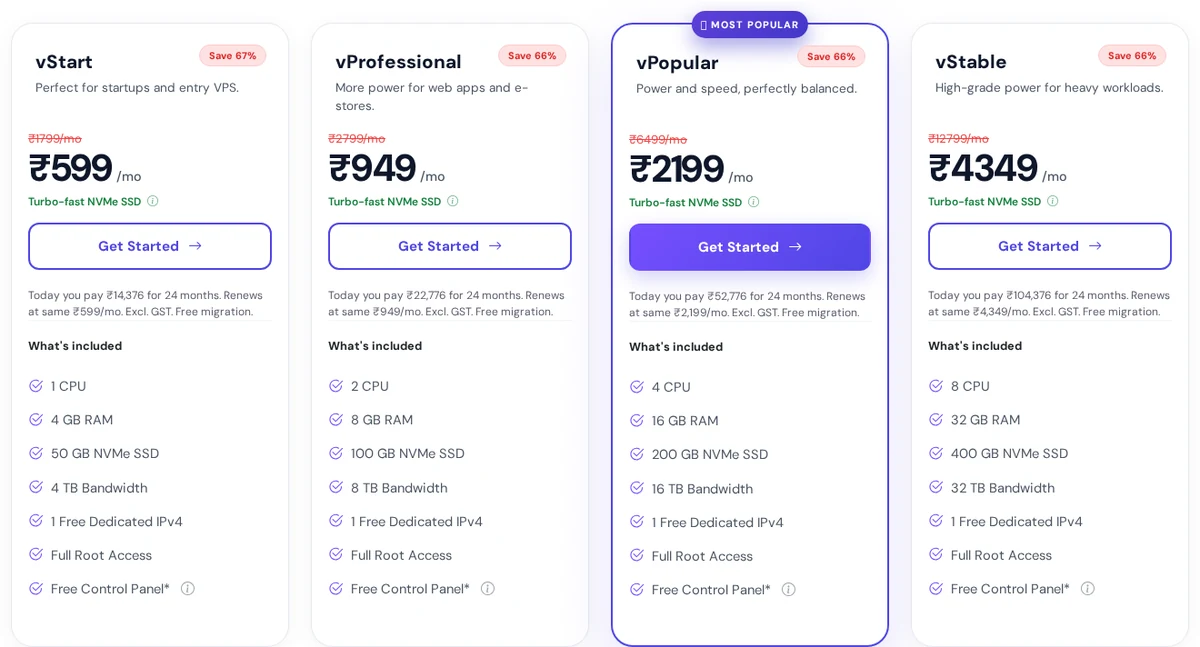
So what do you actually pay? The 24-month price is the lowest, and the page lists higher prices for the 12-month and 1-month terms. Because the renewal stays at the 24-month rate, a long term is a real saving here, unlike hosts whose price jumps after the first term. See how this compares with other VPS options for self-hosting Supabase, where renewal prices at some hosts rise by more than 70%.
The VPS that runs this website
Here is the part I like most about this review: I can show you a real YouStable VPS instead of a spec sheet. The server behind digitalprahlad.com is a KVM virtual machine on an AMD EPYC 7543 processor with 1 CPU, about 4GB of RAM, a 50GB disk, 8GB of swap and Ubuntu 22.04. Those figures match the entry vStart plan. It had been up for 65 days without a reboot when I checked on 13 November 2026, and it runs WordPress, LiteSpeed, a database and several background tools.
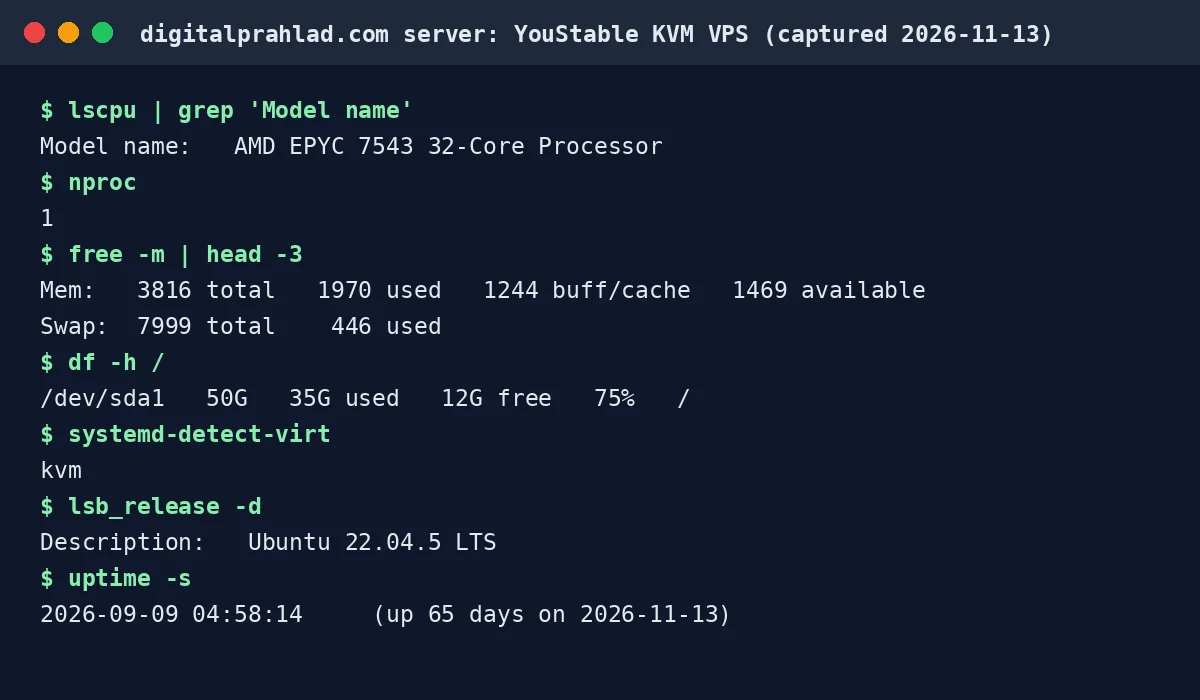
Tools used for these checks
Disk speed: dd (256MB write test). CPU: OpenSSL speed (SHA-256, one core). Network: ping to public DNS servers. Page response: curl against this site. All were run directly on the YouStable VPS on 13 November 2026.
| Check (run on this VPS) | Result | What it tells you |
|---|---|---|
| Disk write, 256MB with sync | About 245 MB/s | Solid for a 4GB NVMe plan, enough for WordPress and a database |
| Disk write, 256MB direct | About 1.5 GB/s | The storage layer is fast when writes bypass the cache |
| CPU hash test (SHA-256, one core) | About 1.78 GB/s on large blocks | A modern EPYC core, but you only get one core on vStart |
| Network round trip to public DNS servers | About 1 to 2 ms | The data center has good upstream connectivity |
| Cached page response (5 runs) | 48 to 66 ms | LiteSpeed cache hits are very fast, measured from the server itself |
| Memory use | About 2GB used, 446MB of swap in use | A 4GB plan is enough for one busy WordPress site, with little spare room |
So how fast is it? The honest limit is the single CPU. When I crawled all 135 pages of this site at once on 8 November, uncached pages took anywhere from under a second to more than 5 seconds to build, while cached pages came back in about 60 milliseconds. That is a limit of one core and my setup, not of the network, and a 2 CPU plan or a lighter site would do better. These are light tests on a live site, not a full benchmark, and they were measured from the server itself.
How does a YouStable VPS score on WP Benchmark?
Benchmark tool used: WP Benchmark (wpbenchmark.io)
WP Benchmark is a WordPress-specific speed test. It runs CPU and memory, filesystem, database, WordPress core, compression, image processing and network tests, scores each one out of 10 and gives an overall score. It was run on digitalprahlad.com, which is hosted on a YouStable VPS.
To get an independent number, I ran a WP Benchmark report for digitalprahlad.com on 13 November 2026 (the report link expires after a while, so I saved the full report as the screenshot below). It ran for 3 minutes 12 seconds on the same YouStable VPS and gave an overall score of 7.6 out of 10. The report calls that quite average, which is fair for a single CPU plan: the site runs well, but it will not break speed records.
| WP Benchmark test | Score out of 10 | Result |
|---|---|---|
| Small file IO | 9.86 | About 512 MB/s |
| Filesystem write | 8.48 | About 857 MB/s |
| Local file copy and access | 8.30 | About 587 MB/s |
| Simple database queries | 8.91 | 1.3 seconds |
| Complex database queries | 7.62 | 3.4 seconds |
| Importing large data to the database | 6.48 | 4.3 seconds |
| Iterative maths (CPU) | 8.55 | 2.2 seconds |
| WordPress option manipulation | 9.14 | 1.9 seconds |
| WordPress shortcode processing | 5.86 | 5.7 seconds |
| WordPress content filtering | 5.76 | 6.5 seconds |
| Download speed to the tester | 6.59 | About 79 mbit/s |
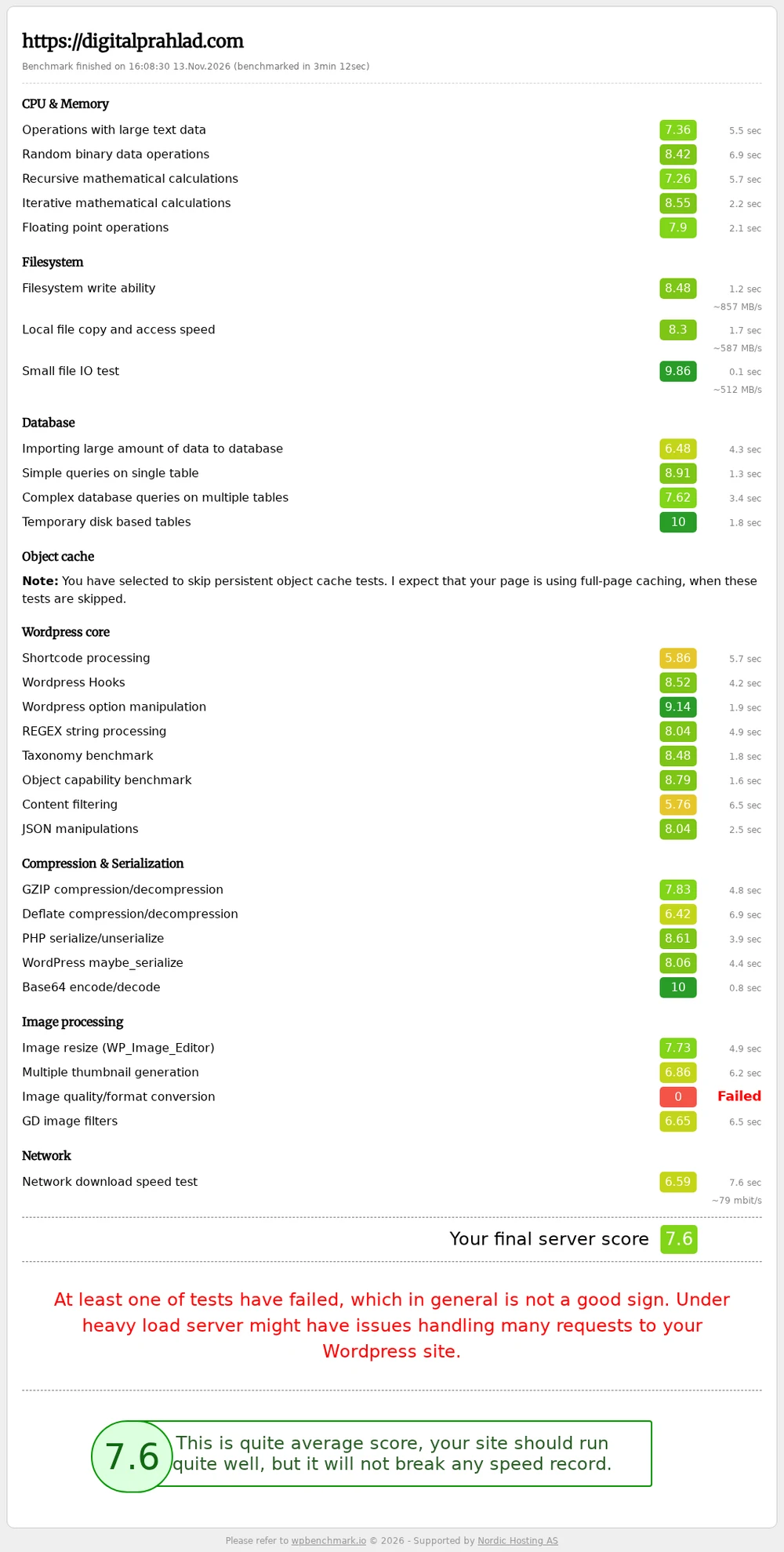
What stands out is the storage. Small file IO scored 9.86, and filesystem writes reached about 857 MB/s, which fits the NVMe storage YouStable advertises. Database queries scored well too, with 8.91 on simple queries and a perfect 10 on temporary disk-based tables. The weaker results are CPU-heavy WordPress work: shortcode processing (5.86) and content filtering (5.76), which is what you would expect from a single core.
Two honest caveats. The image quality and format conversion test failed and scored 0, so the overall score of 7.6 is pulled down by it. Imagick and GD are installed on the server, so I have not confirmed the cause and I treat it as a setting to investigate on my side rather than proof about YouStable. I also skipped the object cache test, because this site relies on full-page caching with LiteSpeed. GTmetrix was not run for this review, so the speed evidence here is the WP Benchmark report, Google PageSpeed Insights and my own server checks.
How does this YouStable VPS score on Google PageSpeed Insights?
Speed test tool used: Google PageSpeed Insights (pagespeed.web.dev)
Google PageSpeed Insights runs Lighthouse and scores Performance, Accessibility, Best Practices and SEO out of 100. I tested the home page and one long article on mobile and desktop on 13 November 2026. The site sits behind Cloudflare with LiteSpeed page caching, so these scores reflect the whole setup, not only the server.
| Page and device | Performance | Accessibility | Best Practices | SEO | First paint | Largest paint |
|---|---|---|---|---|---|---|
| Home page, mobile | 99 | 97 | 100 | 100 | 1.1 s | 1.1 s |
| Home page, desktop | 97 | 97 | 100 | 100 | 0.3 s | 0.7 s |
| Linux distro article, mobile | 99 | 95 | 100 | 92 | 1.2 s | 1.2 s |
| Linux distro article, desktop | 99 | 95 | 100 | 92 | 0.3 s | 0.3 s |
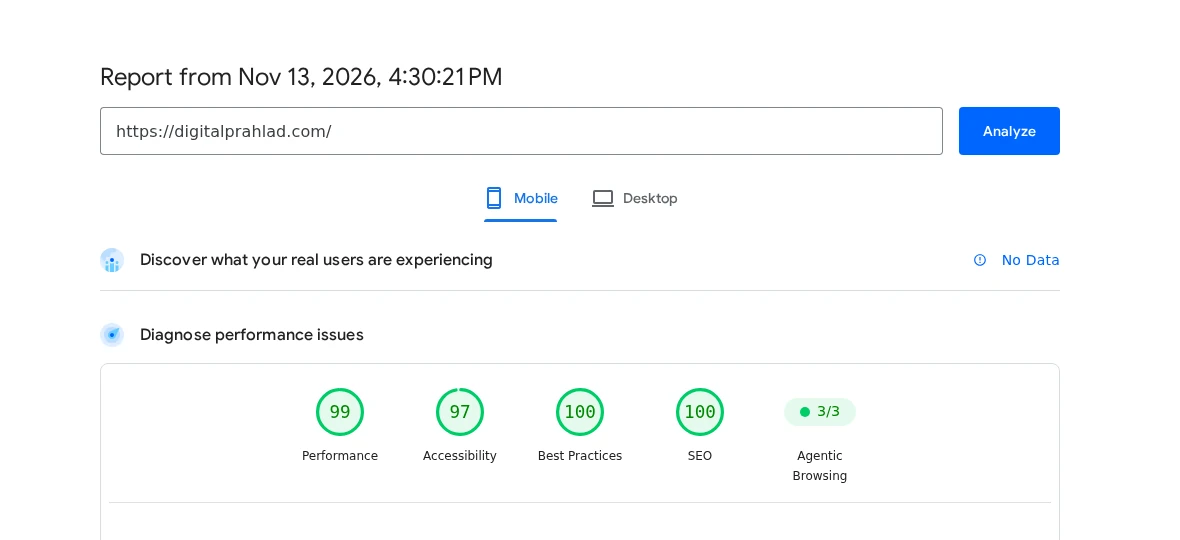
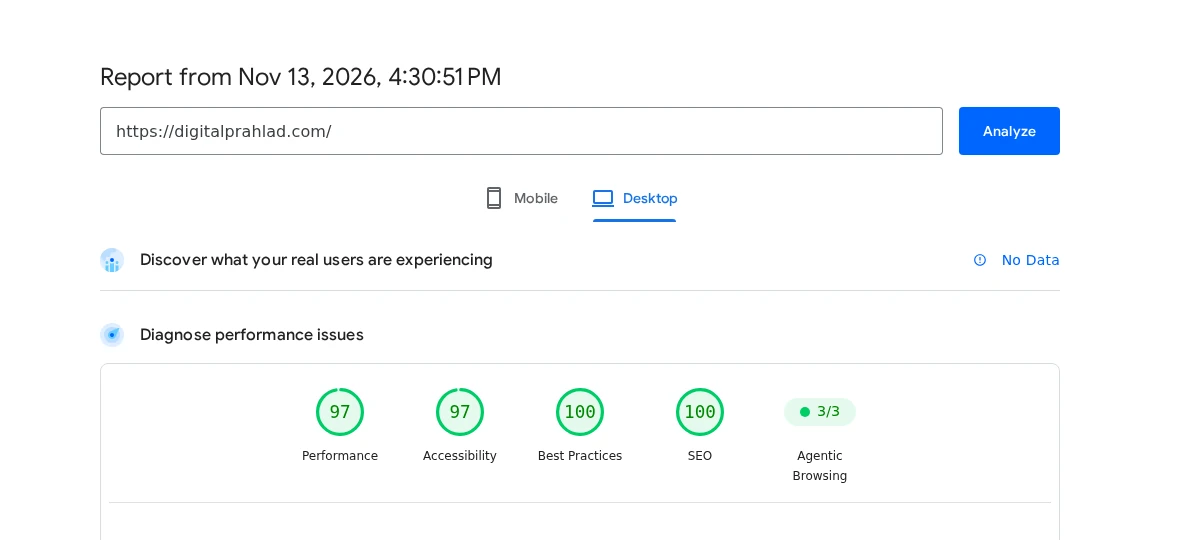
On mobile, total blocking time was 100 ms and layout shift was 0.001 on both pages, which is excellent. Scores move a little between runs: my first run gave 97 on mobile and 92 on desktop for the home page, and the second gave 99 and 97, so read them as a range. PageSpeed also showed no real-user field data for this site, so these are lab results only. They show that a single-CPU YouStable VPS can serve a cached WordPress site fast, but a heavy theme or uncached pages would score lower.
Other VPS versions: Windows, cPanel, WordPress, n8n and OpenClaw
YouStable also sells VPS pages tuned for specific uses, all starting from the same 599 rupee entry price with a 7-day money-back guarantee. The n8n page lists unlimited workflow executions, PM2 auto-restart and full root SSH with Docker support, and the OpenClaw page lists an Ubuntu VPS with auto-restart protection. If you run AI agents or self-hosted apps, compare it with our guides to the best OpenClaw VPS hosting, best Hermes Agent hosting and best Jellyfin VPS hosting.
Windows VPS
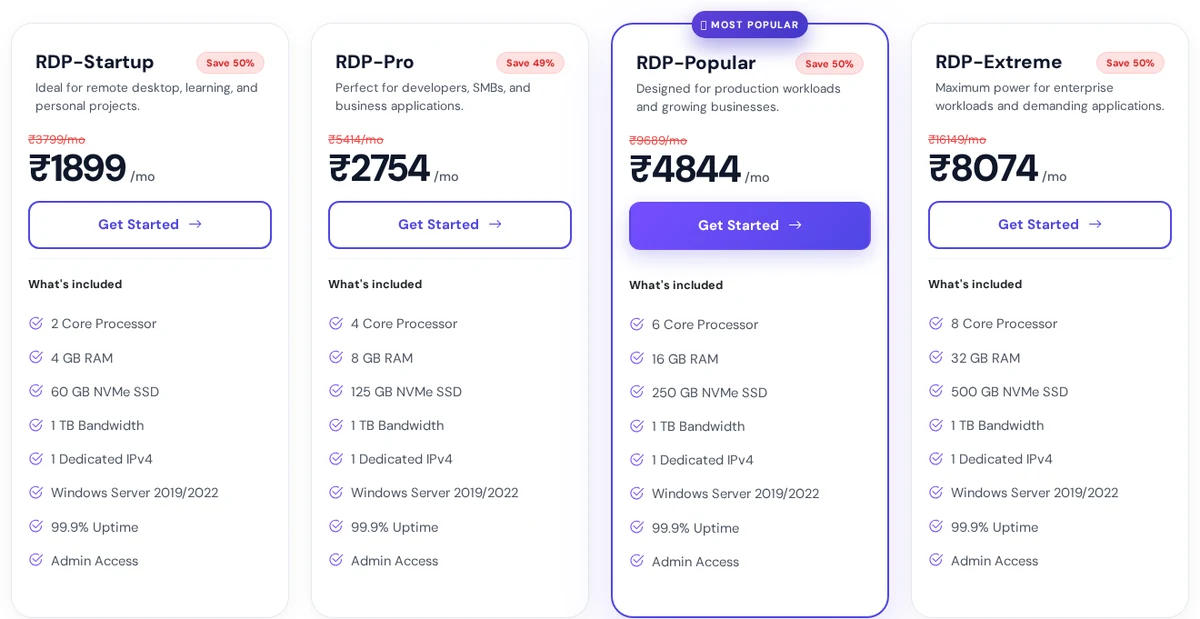
The Windows VPS line has four RDP plans on Windows Server 2019 or 2022 with admin access and NVMe storage. They cost more than Linux plans because of the licence, and the page states 99.9% uptime rather than 99.95%.
| Plan | CPU | RAM | Storage | Price per month |
|---|---|---|---|---|
| RDP-Startup | 2 | 4GB | 60GB NVMe | 1,899 rupees |
| RDP-Pro | 4 | 8GB | 125GB NVMe | 2,754 rupees |
| RDP-Popular | 6 | 16GB | 250GB NVMe | 4,844 rupees |
| RDP-Extreme | 8 | 32GB | 500GB NVMe | 8,074 rupees |
How good is YouStable shared hosting?
YouStable shared hosting costs from 59 rupees a month (about $0.70) on a 3-year term, includes 3 free months, and renews at the same price. All three plans use NVMe SSD storage, unmetered bandwidth, DirectAdmin, LiteSpeed with AccelerateWP caching, Imunify360 protection, free SSL and email, and weekly backups.
| Plan | Websites | Storage | Price per month (3 years) | Extras |
|---|---|---|---|---|
| DaStart | 1 | 50GB NVMe | 59 rupees (about $0.70) | Free SSL and email, OneClick backup restore |
| DaProfessional | Up to 25 | 100GB NVMe | 119 rupees (about $1.40) | Free domain, SSH access, 5 AI site generations |
| DaElite | Unlimited | 200GB NVMe | 219 rupees (about $2.60) | Free domain, SSH access, 10 AI site generations |
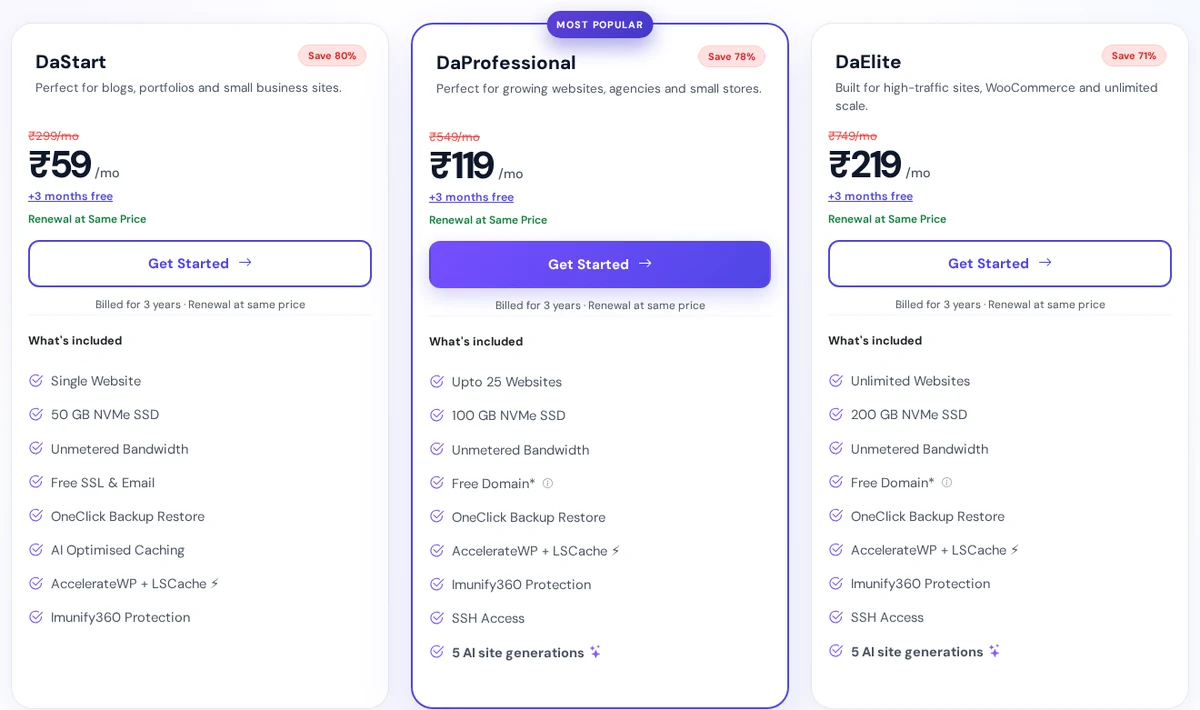
My YouStable shared hosting review in one line: very cheap, but small. The control panel is DirectAdmin, not cPanel, although a separate cPanel hosting page exists. Shared plans list data centers in India and the USA, and the 30-day money-back guarantee covers new purchases, not renewals, upgrades or monthly billing plans. If you only need a tiny site, our list of the best free web hosting providers shows what free tiers can and cannot do.
Does YouStable offer dedicated servers?
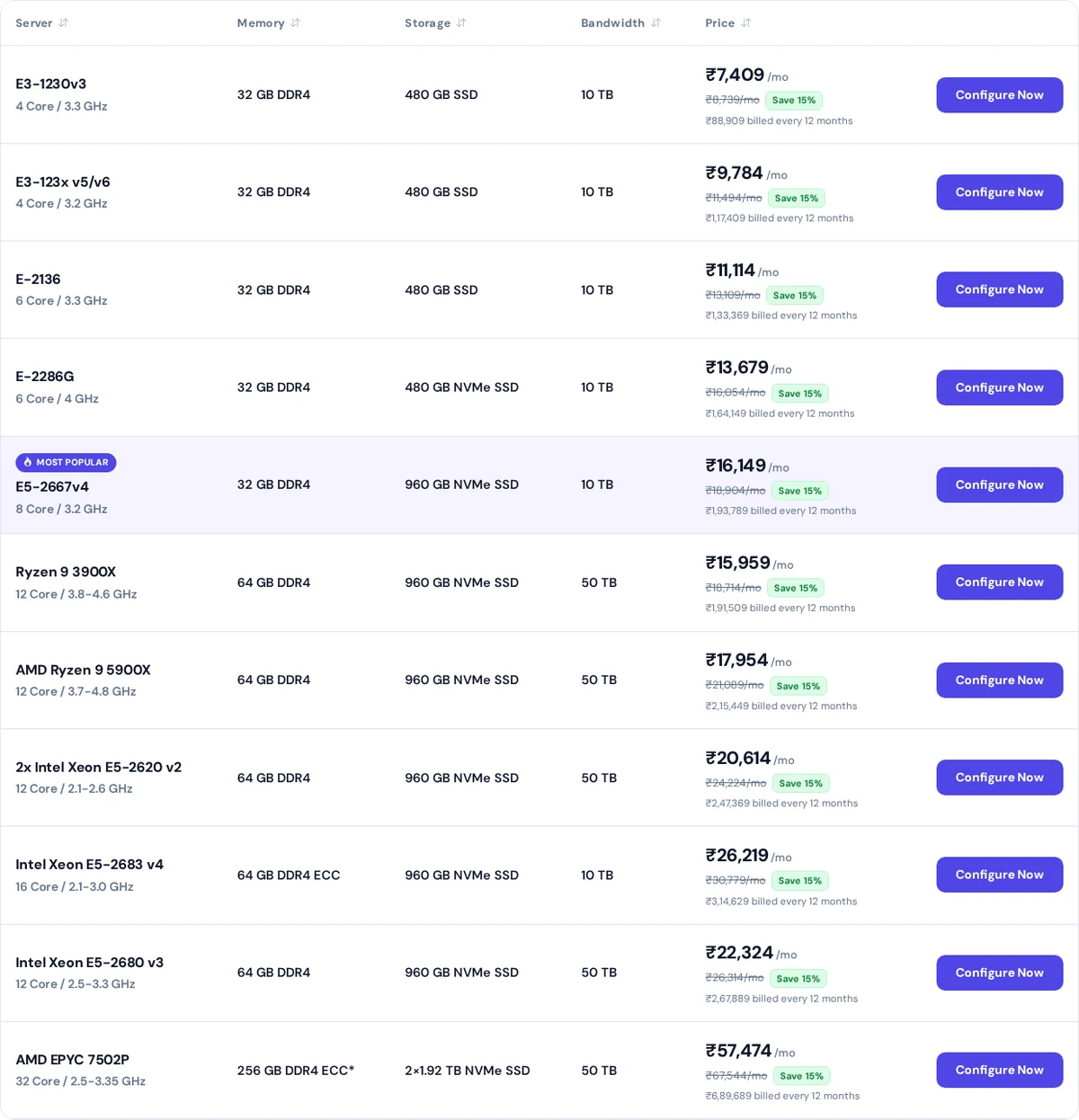
Dedicated servers start at 7,409 rupees a month (about $88) on a 12-month term for a 4-core Xeon E3-1230v3 with 32GB of DDR4, a 480GB SSD and 10TB of bandwidth, with zero setup fees. The range runs up to a 32-core AMD EPYC 7502P with 256GB of RAM. One note for this YouStable review: dedicated plans are non-refundable once provisioned. For other options, see our best dedicated servers in the USA.
Where are YouStable data centers located?
YouStable lists data centers in three regions: Asia, Europe (the Netherlands) and North America (the USA). The USA has the most nodes, with New York City, Miami, Tampa, Dallas and Irving on the east side and San Francisco and Los Angeles on the west. The Netherlands has North Holland and Amsterdam nodes, and the Asia region has three nodes. The data center page also claims average peak-hour latencies of about 5 ms from a nearby Asian city, 8 ms from London, 2 ms from New York and 4 ms from Los Angeles.
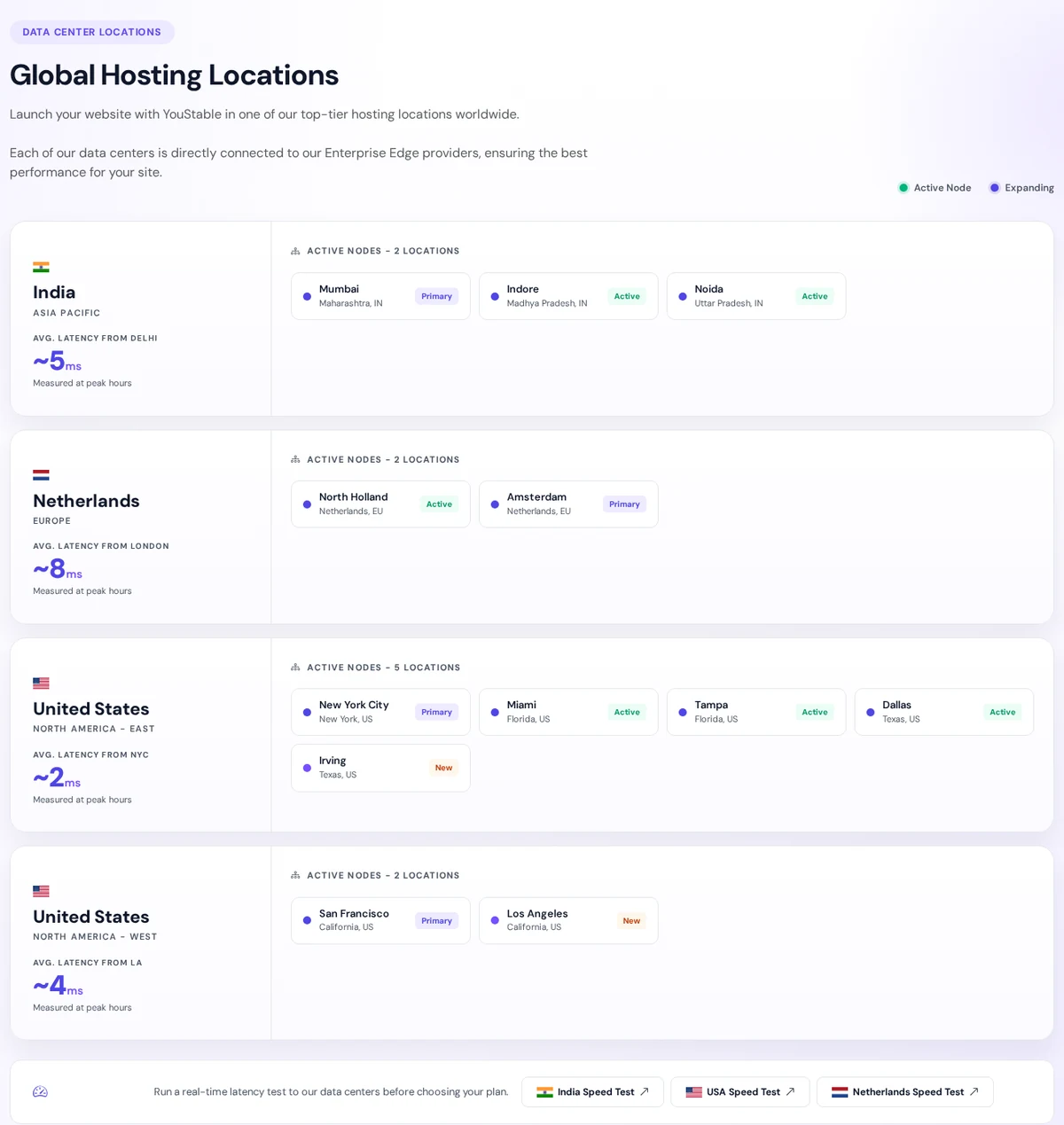
I did not measure those latency figures, so treat them as claims and test your own route before you commit. My YouStable review advice is to let your visitors choose the location: pick the USA for American traffic, the Netherlands for Europe and Asia for visitors nearby.
What uptime does YouStable guarantee?
The YouStable uptime SLA promises 99.95% monthly uptime for shared, WordPress, reseller, VPS, cloud and dedicated services, measured per service and per calendar month. You can read the full text on the official YouStable SLA page. If it misses the target and you file a valid claim, you get extra service days, not money: +3 days at 99.94% to 99.00%, +7 days at 98.99% to 95.00%, +15 days at 94.99% to 90.00% and +30 days below 90%. The maximum is 30 days per month.
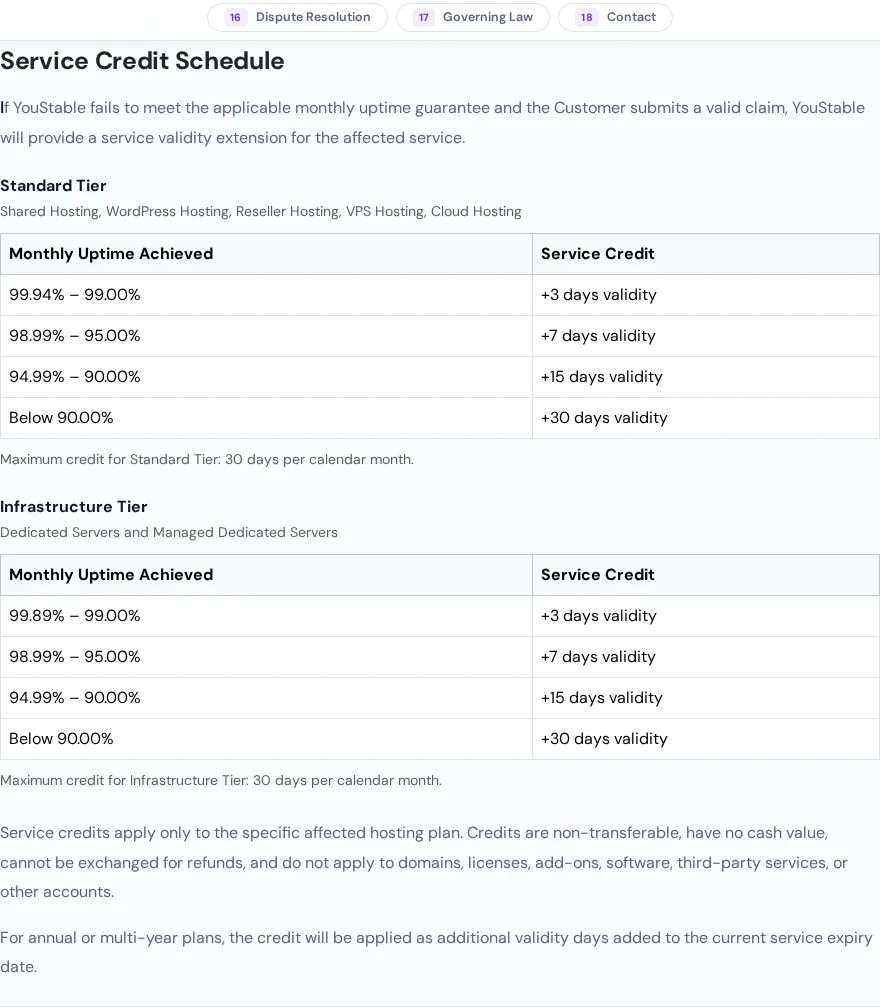
- Claims: submit within 30 calendar days through the Support Portal with the service ID, date, time and evidence. YouStable aims to respond within 7 business days and apply the credit within 10 business days of approval.
- Exclusions: announced maintenance, emergency maintenance, customer-side software or configuration errors, resource limit breaches, DDoS attacks and malware, third-party failures and partial slowdowns do not count as downtime.
- Self-managed servers: changes you make on a VPS or dedicated server, such as firewall rules, OS updates or kernel changes, are excluded.
- Backups: the SLA says you are responsible for your own independent backups, so see our guide to the best offsite backup software.
Two things to know from this YouStable review. The uptime figure is not consistent across pages: the VPS and SLA pages say 99.95%, while the Windows VPS and dedicated server pages state 99.9%. Credits are validity days with no cash value, so the SLA is a fairness promise rather than real compensation.
What is the YouStable refund policy?
| Product | Refund window | Notes |
|---|---|---|
| Shared, WordPress and reseller hosting | 30 days | New purchases only, first purchase of that product type, account in good standing |
| VPS and cloud hosting | 7 days from activation | First purchase only and once per lifetime; a partial refund may apply if heavy resources were used |
| Dedicated servers | None after provisioning | Full refund only if cancelled within 24 hours, before access is delivered |
| Renewals, domains, licences, add-ons | None | Monthly billing plans are also excluded from the 30-day guarantee |
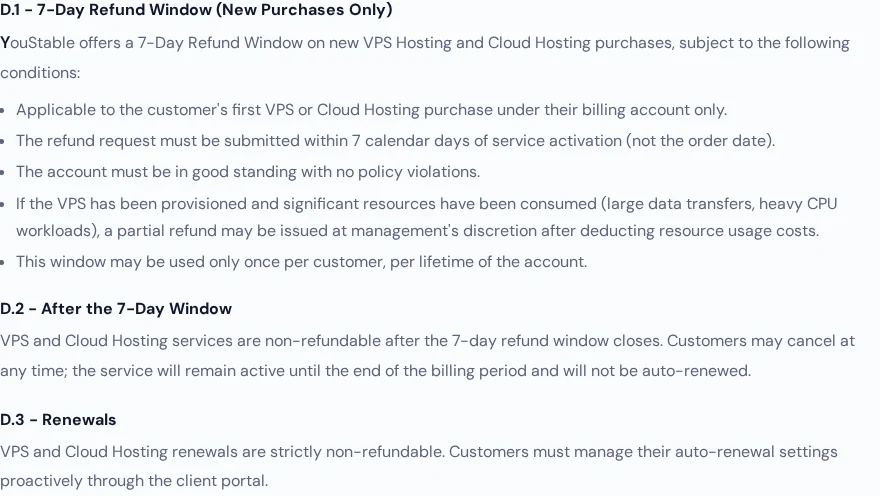
Is that long enough? The 7-day VPS window is the main weakness of the YouStable refund policy, which you can read on the official refund policy page. Seven days is enough to check CPU, disk and network speed, but not to run a full month of traffic, and VPS renewals are strictly non-refundable. Use the first week to install your stack, load real data and run your own benchmarks. Hostinger gives 30 days on its VPS plans, and you can read the details in our Hostinger coupon guide.
How is YouStable support?
YouStable lists 24/7 live chat, WhatsApp chat, support tickets and email, plus a phone line. The contact page says it tries to answer all enquiries within 24 hours on business days, and the site banner lists phone hours as Monday to Saturday, 9:00 AM to 5:30 PM IST. The SLA sets first-response targets of 4 business hours for medium issues and 12 business hours for low ones, and says these do not guarantee resolution time.
In this YouStable review I did not open a ticket, so I cannot rate response speed. The written targets are measured in business hours, which is slower than hosts that promise minutes. For managed help on a VPS, note that the plans are semi-managed: YouStable looks after hardware, network and virtualization, and you run the operating system and applications.
How much does YouStable cost, and does the price go up?
YouStable pricing looks cheap because it shows large discounts against crossed-out list prices, so judge the plan by the price you actually pay. On VPS plans the page states the total for 24 months, for example 14,376 rupees for vStart, and says it renews at the same 599 rupees a month. Shared plans are billed for 3 years with the renewal at the same price, excluding GST.
| Host and plan | Specs | Price per month | Renewal | Refund window |
|---|---|---|---|---|
| YouStable vProfessional | 2 CPU, 8GB, 100GB NVMe | About $11 (24 months) | Same price | 7 days |
| Hostinger KVM 2 | 2 vCPU, 8GB, 100GB NVMe | $8.79 (24 months) | $14.99 | 30 days |
| Hosting.com Self Managed 8GB | 4 CPU, 8GB, 160GB NVMe | $9.99 (3 years) | $24.99 | Not stated |
| Bluehost NVMe 8 | 4 vCPU, 8GB DDR5, 200GB NVMe | $12.49 (24 months) | $28.99 | Not stated |
YouStable vs Hostinger and other VPS hosts
So how does it compare? That table shows YouStable’s strength: a similar 8GB plan costs a little more at first, but it does not jump later. Hostinger is cheaper in the first term and gives a longer refund window, and you can compare both in our Supabase VPS hosting guide. Our ScalaHosting review covers another host with a steep renewal jump.
YouStable review: pros and cons
Pros
- Same-price renewal: stated on VPS and shared plans
- NVMe everywhere: VPS from 4GB of RAM with full root access
- Written SLA: 99.95% with a clear credit table
- Three regions: Asia, Europe and North America
- Free migration: included on shared, VPS and dedicated plans
- Low entry prices: shared from about $0.70 a month
Cons
- 7-day VPS refund: and none for renewals, add-ons or dedicated servers
- Credits, not cash: the SLA pays in extra service days
Who should choose YouStable, and who should not?
- Choose YouStable if you want a low-cost VPS with NVMe, root access and a price that does not rise at renewal, and you can pay in rupees on a 24-month term.
- Choose YouStable for small WordPress or business sites on shared hosting where free migration and weekly backups matter.
- Look elsewhere if you need a refund window longer than 7 days on a VPS, USD billing, or first-response support measured in minutes.
- Look elsewhere for heavy, uptime-critical workloads that need a cash-backed SLA or managed database administration.
YouStable review FAQ
Is YouStable good?
Yes for budget VPS and shared hosting. YouStable offers NVMe storage, root access, free migration and a same-price renewal, and this site runs on one of its VPS plans. The two trade-offs are the 7-day VPS refund window and SLA credits paid in extra service days instead of cash.
Is YouStable legit?
Yes. YouStable has operated since 2015 as a brand of QloudIn Technologies Private Limited in Lucknow, India, and publishes its refund policy, SLA and terms. Its customer counts are marketing claims, so check the policies before you buy.
Where is YouStable based and where are its data centers?
The company is based in Lucknow, India. It lists data centers in Asia, the Netherlands and the USA, with the most nodes in the USA.
How much does YouStable VPS hosting cost?
Linux VPS plans start at 599 rupees a month (about $7) for 1 CPU, 4GB of RAM and 50GB of NVMe on a 24-month term. vProfessional with 2 CPU and 8GB is 949 rupees (about $11), vPopular is 2,199 rupees and vStable is 4,349 rupees.
Does YouStable increase the price at renewal?
YouStable says VPS and shared plans renew at the same price as the term you signed up for, excluding GST. Check the order summary for your plan, because dedicated and add-on prices are set separately.
What is the YouStable refund policy?
Shared, WordPress and reseller hosting have a 30-day money-back guarantee. VPS and cloud hosting have a 7-day window from activation, once per customer. Dedicated servers, renewals, domains and add-ons are not refundable.
What uptime does YouStable guarantee?
The SLA promises 99.95% monthly uptime for shared, WordPress, reseller, VPS, cloud and dedicated services. If it is missed, you can claim extra service days, from 3 days up to 30 days, within 30 days of the downtime.
Does YouStable offer free website migration?
Yes. Free migration is listed on shared, VPS and dedicated plans. You share your current host login, and the YouStable team copies files, databases, emails and DNS records and checks the site before handover.
Is YouStable good for n8n or OpenClaw?
It has dedicated n8n and OpenClaw VPS pages that start at 599 rupees a month. The n8n page lists root SSH with Docker support and PM2 auto-restart, and 4GB of RAM meets the needs of most small self-hosted automation setups.
How fast is a YouStable VPS?
On the entry vStart plan with 1 CPU and 4GB of RAM, this site scored 7.6 out of 10 on WP Benchmark. Storage was the strongest part, with small file IO at 9.86 and filesystem writes of about 857 MB/s, while CPU-heavy WordPress tasks scored lower. A 2 CPU plan or more cores would help heavy uncached traffic.
How does YouStable compare with Hostinger in a YouStable vs Hostinger test?
A comparable 8GB VPS costs a little more at YouStable in the first term but renews at the same price, while Hostinger KVM 2 is $8.79 for 24 months and renews at $14.99. Hostinger gives a 30-day VPS refund window against 7 days at YouStable.
YouStable review final verdict: is it worth it?
This YouStable hosting review ends at 4.8 out of 5. It is a budget host that gets the important things right: NVMe storage, root access, a same-price renewal, free migration and a written SLA. The server behind this site shows that a 4GB, single-core plan is fine for one cached WordPress site, with a WP Benchmark score of 7.6 out of 10, while heavy uncached traffic needs more cores.
The two things holding it back are policy rather than technology: a 7-day VPS refund window and SLA credits paid in extra service days instead of cash. If you can live with those, this YouStable review ends with an easy recommendation for VPS and shared hosting. Use the first week to test your real workload.
Tell Google you want more of this.
Add DigitalPrahlad as a preferred sourceOne tap, and this site shows up more often in your own Google Top Stories, AI Overviews, and AI Mode results. You can remove this preference anytime you'd like.
Affiliate Disclaimer: This website is reader-supported. Some links are affiliate links, meaning I may earn a small commission at no extra cost to you. I only recommend products and tools I genuinely trust and use myself. Your support keeps DigitalPrahlad free and practical.