💬 Key Takeaways
- Offsite backup means a copy of your data stored away from the place it lives. It protects you from theft, fire, ransomware and a failed server, which a copy on the same disk cannot.
- IDrive is the best overall pick for computers and servers, with a free 10GB plan and 5TB for $6.99 a month on the Personal plan.
- Cheapest storage: Backblaze B2 from $6.95 per TB a month, with the first 10GB free, pairs with restic, Duplicati, Rclone and Arq.
- Best free tools: restic, Duplicati, BorgBackup and Kopia are free, and you pay only for storage.
- For WordPress, UpdraftPlus sends site backups to Google Drive, Dropbox or Amazon S3 from the free version.
- Follow the 3-2-1 rule: three copies, on two kinds of media, with one copy offsite. Then test a restore, because an untested backup is only a hope.
Offsite backup software copies your files to a location away from your computer or server, so one disaster cannot destroy both the original and the backup. It can be a cloud bucket, a remote server over SSH or a drive that lives somewhere else.
The tools differ a lot. Some are apps with a friendly screen, some are command line engines, and some are only storage. This guide compares the best offsite backup software in 2026 on price, encryption, platforms and ease of use, using each project’s own pages checked in November 2026.
For every tool you get the real pricing, what it backs up, where it can send data, its drawbacks and a screenshot. Prices change, so confirm the total before you pay, and read the section on testing a restore before you trust any of them.
- 5TB for multiple computers
- Free 10GB Basic plan
- Best overall for computers and servers
- Free egress up to 3x storage
- First 10GB free
- Best low-cost storage target
- Encrypted, single binary
- Version 0.19.1
- Best open-source command line tool
Disclosure
The links to these tools are plain links with no affiliate tracking, so the order is my own ranking and not sponsorship. Prices and features come from each official page in November 2026. I use UpdraftPlus on this site, and I did not install and test every other tool for this guide.
What is offsite backup software and why do you need it?
Offsite backup software automatically copies your data to a different physical location from the original. A copy on the same server protects you from a deleted file, but not from a failed disk, a hacked server, ransomware or a fire. An offsite copy does.
- Onsite backup: a copy on the same machine or network, for example an external drive or a snapshot on the same server.
- Offsite backup: a copy somewhere else, such as cloud storage or a server in another data center.
- 3-2-1 rule: keep 3 copies of your data, on 2 different types of media, with 1 copy offsite.
- Immutable or append-only storage: backups that cannot be changed or deleted by the machine being backed up, which helps against ransomware.
- Client-side encryption: data is encrypted on your machine before upload, so the storage provider cannot read it.
How did I pick the best offsite backup software?
- Offsite by design: the tool must be able to send backups to a location away from the source.
- Encryption: I looked for encryption before the data leaves your machine.
- Price and limits: real prices from the official pages, plus free tiers and caps.
- Platforms: Windows, macOS, Linux, servers, virtual machines and WordPress are all covered across the list.
- Ease of use: a friendly app earns credit, and a command line tool is scored on how well it is documented.
- What I tested: I ran UpdraftPlus myself. For the other nine I read official pages and captured screenshots, and I did not run a restore on each one.
The 10 best offsite backup software tools compared
Here is every tool side by side. Prices come from each official page, and the free tools cost nothing except the storage you choose.
| Tool | Type | Price | Platforms | Rating |
|---|---|---|---|---|
| IDrive | Computers, servers, phones | Free 10GB, then $6.99/mo | Windows, macOS, Linux, mobile | 4.8 / 5 |
| Backblaze B2 | Cloud storage target | $6.95/TB/mo | Any S3-compatible tool | 4.7 / 5 |
| restic | Command line backup | Free | Linux, BSD, macOS, Windows | 4.6 / 5 |
| Duplicati | Free GUI backup | Free, console from $2/machine/mo | Desktop and servers | 4.5 / 5 |
| UpdraftPlus | WordPress sites | Free, premium from $70/yr | WordPress | 4.5 / 5 |
| BorgBackup and BorgBase | Linux servers | Free, BorgBase from $30/yr | Linux, macOS, BSD | 4.5 / 5 |
| Veeam Community Edition | VMs and servers | Free up to 10 workloads | VMware, Hyper-V, Proxmox, Windows, Linux | 4.4 / 5 |
| Arq | Mac and Windows desktops | One-time license, $25/yr updates | macOS, Windows | 4.4 / 5 |
| Kopia | GUI plus CLI | Free | Windows, macOS, Linux | 4.3 / 5 |
| Rclone | Syncing to any cloud | Free | Windows, macOS, Linux, FreeBSD | 4.3 / 5 |
10 best offsite backup software tools, ranked
The best offsite backup software depends on what you back up. These ten are ranked by how well each combines offsite storage, encryption, price and ease of use. Each section has a rating, a price table, a screenshot and a link to the official site.
1. IDrive: Best overall for computers and servers

Pros
- Free Basic plan with 10GB and no credit card
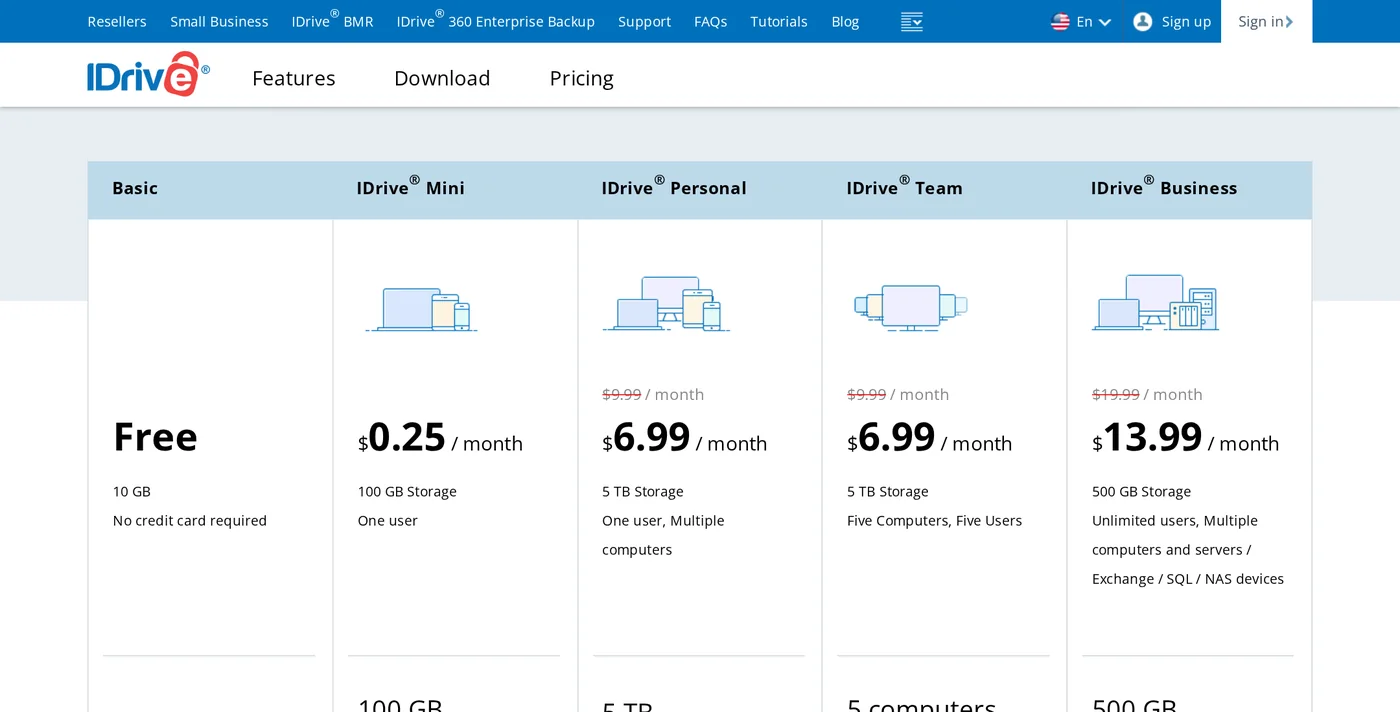
- Personal 5TB covers one user with multiple computers for $6.99 a month
- Team, Business and server backup plans in the same product
Cons
- The crossed-out standard price is higher than the deal price, so plan for the standard rate after the first term
- Extra storage beyond the plan is billed at $0.25 per GB a month on Personal
Summary
IDrive backs up many computers, servers and phones to one account, and its free 10GB plan lets you test it first.
Price: USD 6.99 Per month, Personal 5TB plan on yearly billing
Visit IDriveIDrive is the easiest first choice if you want offsite backup software that just works across several computers. One account covers Windows, macOS, Linux and phones, and the Personal plan gives 5TB for one user with multiple computers.
The free Basic plan gives 10GB without a credit card, so you can test a real backup before paying. Business plans add unlimited users and server backup, and a Server Backup add-on is listed at $5 a month per server.
IDrive key features for offsite backup
- Many devices, one account: Personal covers one user with multiple computers, and Team covers 5 or more computers.
- Free 10GB plan: A real free tier to test with, no credit card needed.
- Server and database backup: Business plans list Exchange, SQL and NAS devices, and a server add-on is available.
- Mobile apps: iPhone, iPad and Android are listed as supported platforms.
IDrive pricing and details
| Detail | IDrive |
|---|---|
| Free plan | Basic, 10GB, no credit card required |
| Mini | 100GB for 1 user at $0.25 a month, 500GB at $0.83 a month |
| Personal | 5TB at $6.99 a month on yearly billing (crossed-out $9.99), 10TB at $10.49 |
| Team | 5TB for 5 computers and 5 users at $6.99 a month |
| Business | 500GB at $13.99 a month on yearly billing, unlimited users and servers |
| Server backup add-on | $5 a month per server |
| Overage | $0.25 per GB a month on Personal, $0.50 on Team and Business |
| Platforms | Windows, macOS, Linux, Windows Server, iPhone, iPad and Android |
Who should pick it: Home users, freelancers and small teams who want one paid account for several computers and phones. Check the standard price after the first term.
2. Backblaze B2: Best low-cost storage target

Pros
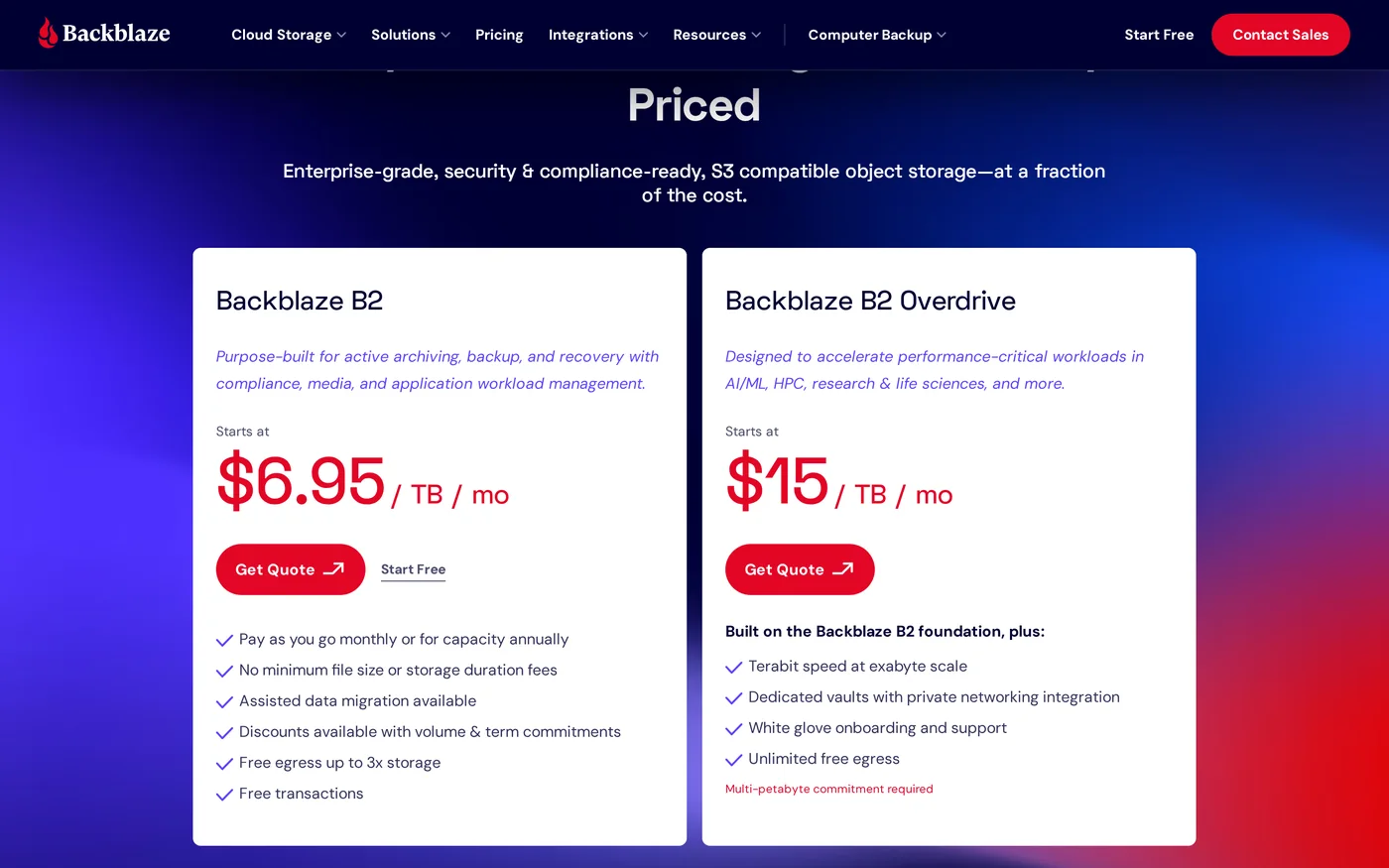
- From $6.95 per TB per month with no minimum storage duration
- First 10GB always free, and free egress up to 3 times your average monthly storage
- Works as the offsite target for many tools in this guide
Cons
- It is storage, not a backup app, so you need a tool such as restic, Duplicati or Arq on top
- Egress above the free limit costs $0.01 per GB
Summary
Backblaze B2 is cheap object storage that works with restic, Duplicati, Rclone and many other backup tools.
Price: USD 6.95 Per TB per month, pay as you go
Visit Backblaze B2Backblaze B2 is the storage you point your backup tool at. Pricing starts at $6.95 per TB per month, the first 10GB is free, and there is no minimum storage duration, so a short test costs almost nothing.
Because it speaks the S3-compatible protocol, B2 works as an offsite target for restic, Duplicati, Rclone and many other tools. Duplicati’s page lists Backblaze B2 as a supported destination, and so does the UpdraftPlus premium plugin.
Backblaze B2 key features for offsite backup
- Simple pricing: One storage rate, a free egress allowance and no minimum duration fees.
- Free transactions: Class A, B and C API calls are free on pay as you go.
- Annual commitments: 1 to 5 year commitments lock in the rate for the term.
- Pairs with many tools: Restic, Duplicati, Rclone and others can all write to it.
Backblaze B2 pricing and details
| Detail | Backblaze B2 |
|---|---|
| Storage price | From $6.95 per TB per month, billed by byte-hour |
| Free storage | First 10GB always free |
| Egress | Free up to 3x your average monthly storage, then $0.01 per GB |
| Minimums | No minimum file size fee and no minimum storage duration fee |
| API calls | Classes A, B and C free on pay as you go, Class D $0.004 per 10,000 calls after the first 2,500 a day |
| Commitment | Annual capacity commitments of 1 to 5 years with locked rates |
| Billing | Monthly pay as you go by card, or annual invoicing |
Who should pick it: Anyone who runs a command line or open-source backup tool and wants a cheap, reliable offsite bucket. Backblaze also sells a separate computer backup product, which this guide does not price.
3. restic: Best open-source command line tool

Pros
- Free under the BSD 2-Clause license
- A single executable with no server to run
- Encrypts everything and transfers only the changed parts of files
Cons
- Command line only, so it has a learning curve
- You must choose and pay for the storage yourself
Summary
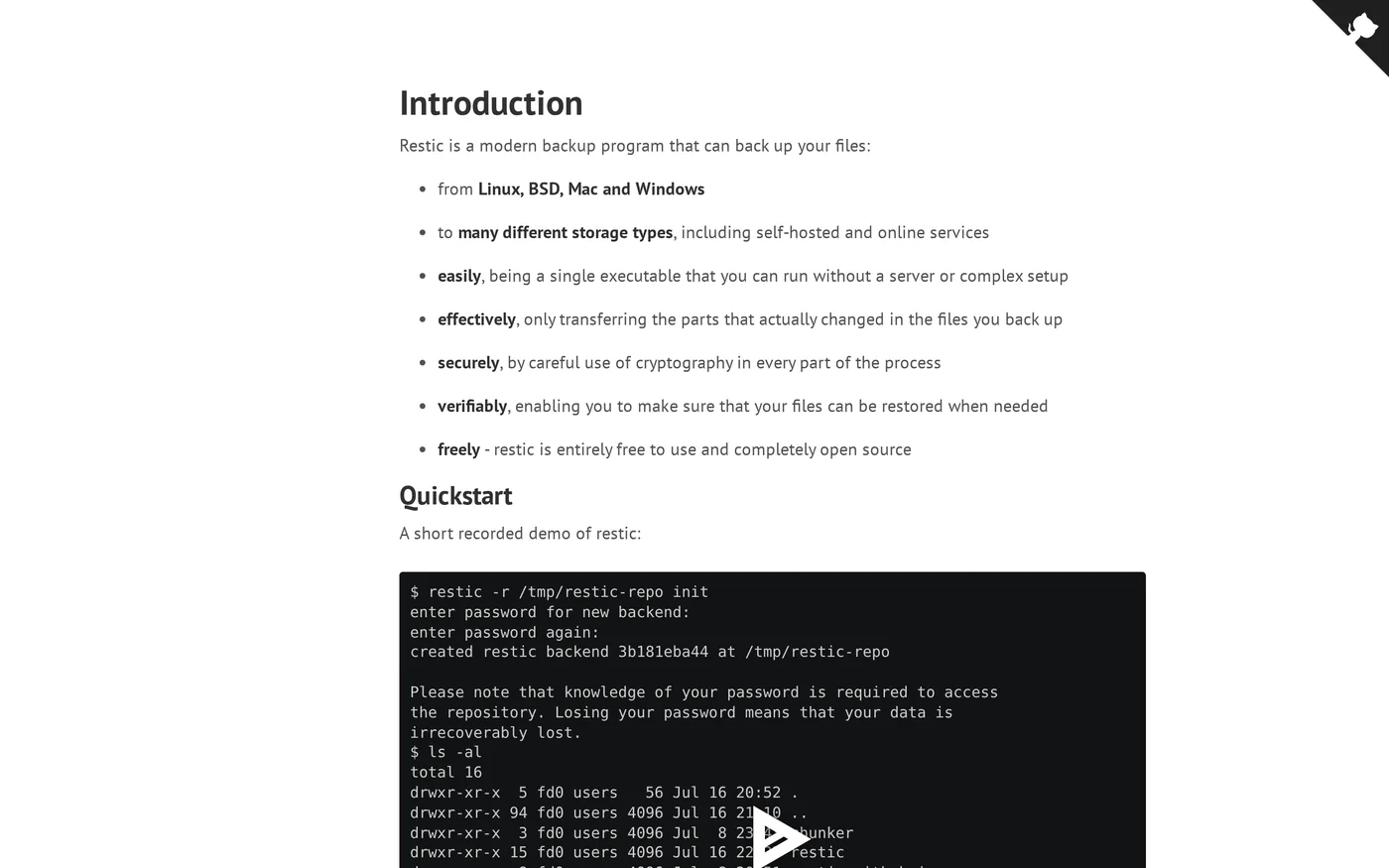
restic is a fast, encrypted, open-source backup program for Linux, BSD, macOS and Windows that sends data to many storage types.
restic is one of the most trusted open-source tools for offsite backup. It is a single program that runs on Linux, BSD, macOS and Windows, needs no server, and sends encrypted data to many kinds of storage.
It only transfers the parts of files that changed, which keeps repeat backups small and fast. Pair it with Backblaze B2 or BorgBase, since BorgBase lists restic as a supported tool.
restic key features for offsite backup
- Encryption by default: Data is encrypted before it leaves your machine.
- Incremental transfers: Only changed parts of files are sent after the first run.
- No server needed: A single executable, so setup is one download.
- Verifiable restores: The project describes backups that can be verified and restored when needed.
restic pricing and details
| Detail | restic |
|---|---|
| Price | Free |
| License | BSD 2-Clause |
| Platforms | Linux, BSD, macOS and Windows |
| Latest version | 0.19.1, released 5 July 2026 |
| Storage | Many storage types, self-hosted and online |
| Security | Cryptography in every part of the process |
| Interface | Command line |
Who should pick it: Developers, sysadmins and VPS owners who are comfortable with a terminal and want a free, reliable engine for offsite backups.
4. Duplicati: Best free backup with a web interface

Pros
- Free and open source with AES-256 encryption done on your machine
- Supports a long list of destinations, from Amazon S3 and Backblaze B2 to SFTP and OneDrive
- A central console is available for managing many machines
Cons
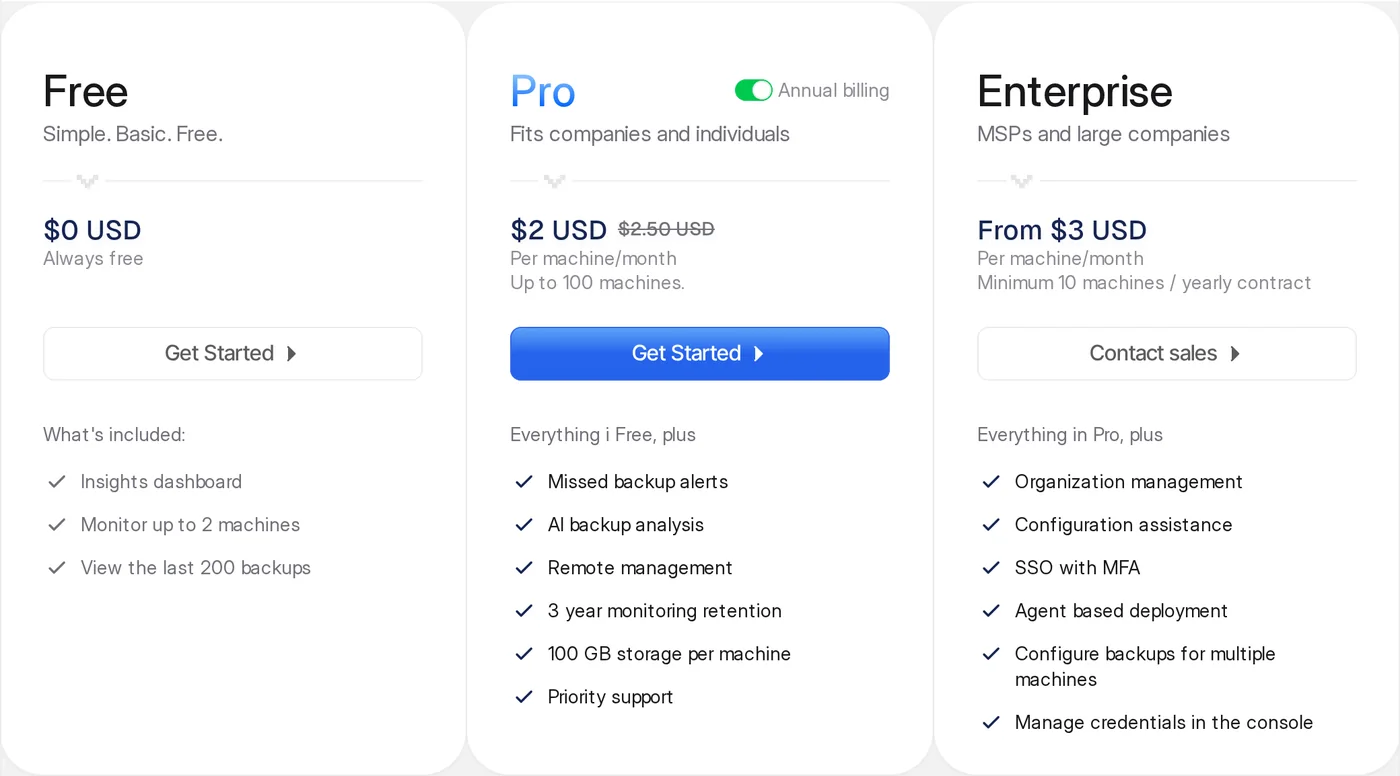
- The pricing page shows two Pro prices, $2 and $2.50 per machine a month, without explaining the difference
- The Free console monitors only 2 machines and shows the last 200 backups
Summary
Duplicati is free, open-source backup with local AES-256 encryption and a central console for many machines.
Duplicati is the friendliest free option if you want a graphical interface instead of a terminal. The backup engine is open source, and your data is encrypted with AES-256 on your own machine before it is sent anywhere.
It supports a wide list of destinations, including Amazon S3, Backblaze B2, SFTP, Dropbox and OneDrive. A paid console adds missed-backup alerts and remote management when you look after many machines.
Duplicati key features for offsite backup
- Local AES-256 encryption: Data is encrypted before it reaches the network or cloud.
- Many destinations: Cloud storage, SFTP, FTP, NAS and external drives.
- Central console: Monitor several machines, with alerts on paid plans.
- Immutable storage: The vendor mentions immutable storage support for ransomware protection.
Duplicati pricing and details
| Detail | Duplicati |
|---|---|
| Free | $0, monitor up to 2 machines, view the last 200 backups |
| Pro | $2 or $2.50 per machine a month, up to 100 machines, 100GB storage per machine, alerts and remote management |
| Enterprise | From $3 per machine a month, minimum 10 machines, yearly contract, SSO with MFA |
| Encryption | AES-256, applied locally before data reaches the network |
| Destinations | Amazon S3, Azure Blob, Google Cloud, Backblaze B2, Wasabi, Storj, Dropbox, OneDrive, SFTP, FTP, NAS and more |
Who should pick it: Home users and small offices who want a free, encrypted backup with a web interface, and teams that need a central console at a low per-machine price.
5. UpdraftPlus: Best offsite backup for WordPress sites

Pros
- Free version sends backups to Google Drive, Dropbox, Amazon S3, FTP and more
- Five daily backups in a row ran without errors on this site
- Premium starts at $70 a year for 2 sites
Cons
- WordPress only
- Encryption, incremental backups and more than one remote location need premium
Summary
UpdraftPlus backs up a WordPress site and sends it to Google Drive, Dropbox or Amazon S3, and I run it daily on this site.
If your website runs on WordPress, UpdraftPlus is the simplest way to get an offsite copy. It backs up the files and the database on a schedule and uploads them to Google Drive, Dropbox, Amazon S3 and other storage.
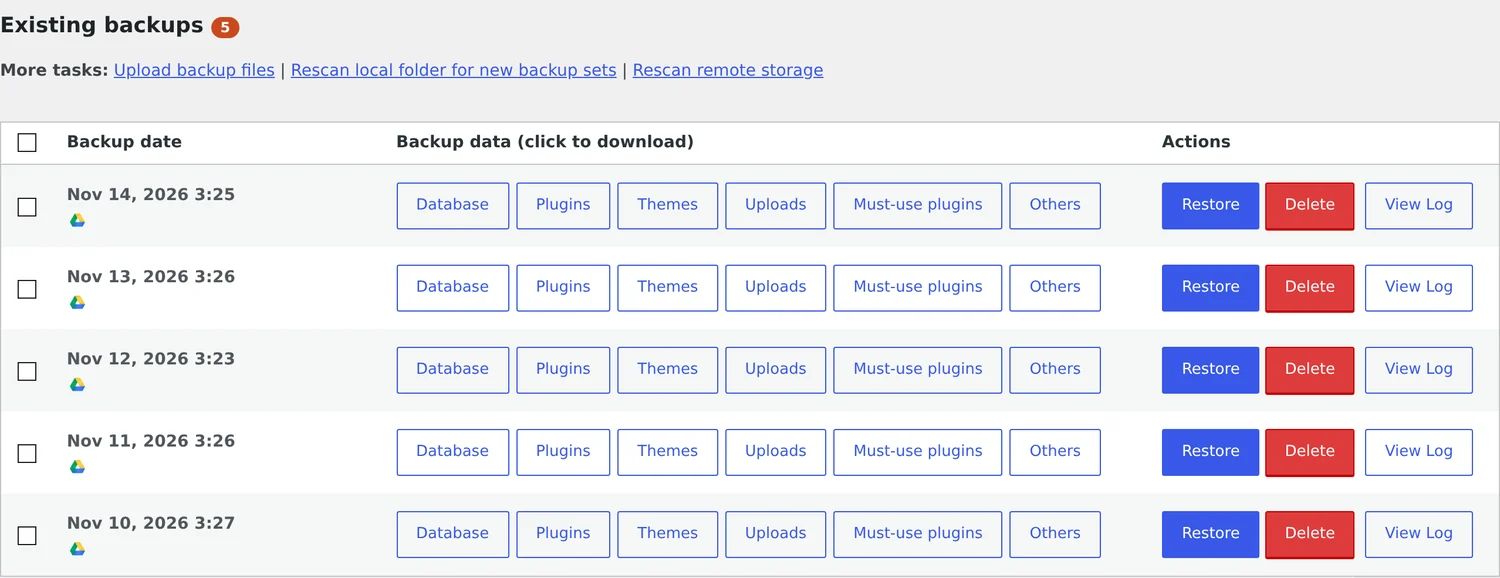
I use the free version on this site, with daily backups to Google Drive. The latest run was 279.9MB and finished in about 61 seconds, and five daily runs in a row succeeded. Premium adds encryption and incremental backups when you need them. Read the full UpdraftPlus review for screenshots, plans and prices.
UpdraftPlus key features for offsite backup
- WordPress aware: It backs up plugins, themes, uploads and the database as separate parts.
- Many free destinations: Google Drive, Dropbox, Amazon S3, FTP and others.
- Restore from the dashboard: Each backup has Restore, Delete and View Log buttons.
- Premium upgrade path: Plans from $70 a year add encryption, incremental backups and the Migrator.
UpdraftPlus pricing and details
| Detail | UpdraftPlus |
|---|---|
| Free version | Scheduled files and database backups, remote storage, restore from the dashboard |
| Premium | $70 (2 sites), $95 (10), $145 (35), $195 (unlimited), $399 (unlimited with 50GB) per year |
| Free destinations | Dropbox, Google Drive, Amazon S3, Rackspace, FTP, DreamObjects, OpenStack Swift, email |
| Premium adds | Incremental backups, encryption, OneDrive, Backblaze B2, SFTP, multisite, WP-CLI |
| My latest backup | 279.9MB, finished in about 61 seconds |
Who should pick it: WordPress site owners who want a free offsite backup to Google Drive or Dropbox. It does not protect your laptop or non-WordPress servers.
6. BorgBackup and BorgBase: Best deduplicating backup for Linux servers

Pros
- Free BSD-licensed tool with deduplication, compression and authenticated encryption
- Backs up over SSH to any remote machine with no agent
- BorgBase adds managed repositories with append-only mode and alerts
Cons
- Linux, macOS and BSD only, with no Windows version listed
- Command line only
Summary
BorgBackup deduplicates, compresses and encrypts backups over SSH, and BorgBase offers managed Borg and restic hosting.
BorgBackup splits files into chunks and stores each unique chunk once, so repeat backups are tiny. It compresses and encrypts the data, and it can send backups to any machine you can reach over SSH, with no daemon or agent on the other end.
BorgBase is a hosting service built for Borg and restic. It adds append-only mode, which protects existing backups even if the machine being backed up is compromised, and it alerts you when backups go stale.
BorgBackup and BorgBase key features for offsite backup
- Deduplication: Each unique chunk is stored once across files, machines and history.
- Strong encryption: AES with authentication, so the backup server never needs to be trusted.
- Mountable archives: Browse old versions as a filesystem with FUSE.
- Append-only repositories: BorgBase protects existing backups from a compromised client.
BorgBackup and BorgBase pricing and details
| Detail | BorgBackup and BorgBase |
|---|---|
| BorgBackup | Free, BSD license, stable release 1.4.5, version 2.0 in beta |
| Compression | lz4, zstd, zlib or lzma |
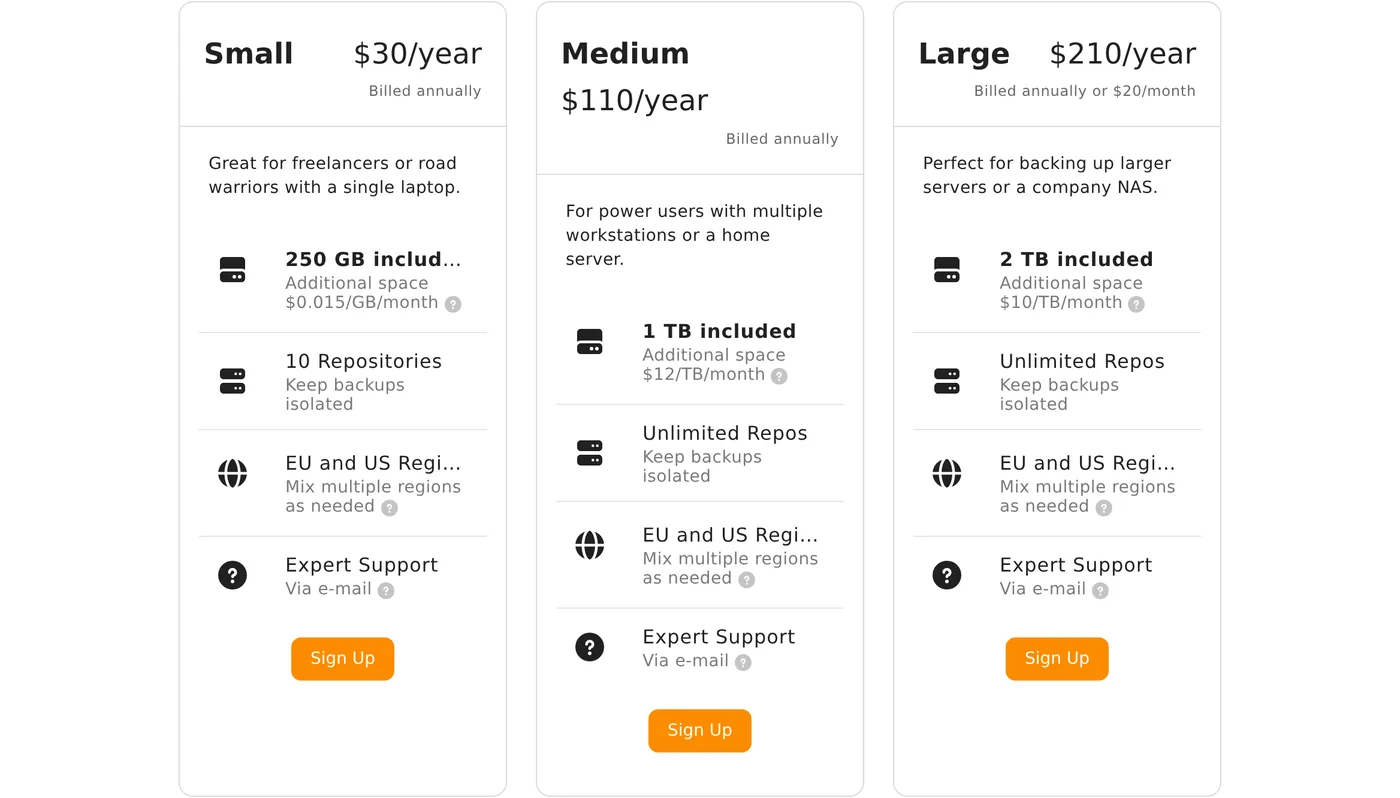
| BorgBase Free | 10GB, 2 repositories |
| BorgBase Small | $30 a year, 250GB, 10 repositories |
| BorgBase Medium | $110 a year, 1TB, unlimited repositories |
| BorgBase Large | $210 a year or $20 a month, 2TB, unlimited repositories |
| Locations | EU and US, chosen per repository |
Who should pick it: Linux and VPS administrators who want efficient, encrypted backups to a remote server, and want a managed repository without running their own.
7. Veeam Community Edition: Best free backup for VMs and servers

Pros
- Free for up to 10 workloads
- Covers Proxmox VE, VMware and Hyper-V virtual machines plus Windows and Linux servers and NAS devices
- Application item-level recovery for Microsoft applications
Cons
- The page does not mention macOS
- Technical support is not included in the free edition, and paid pricing is not shown on the page
Summary
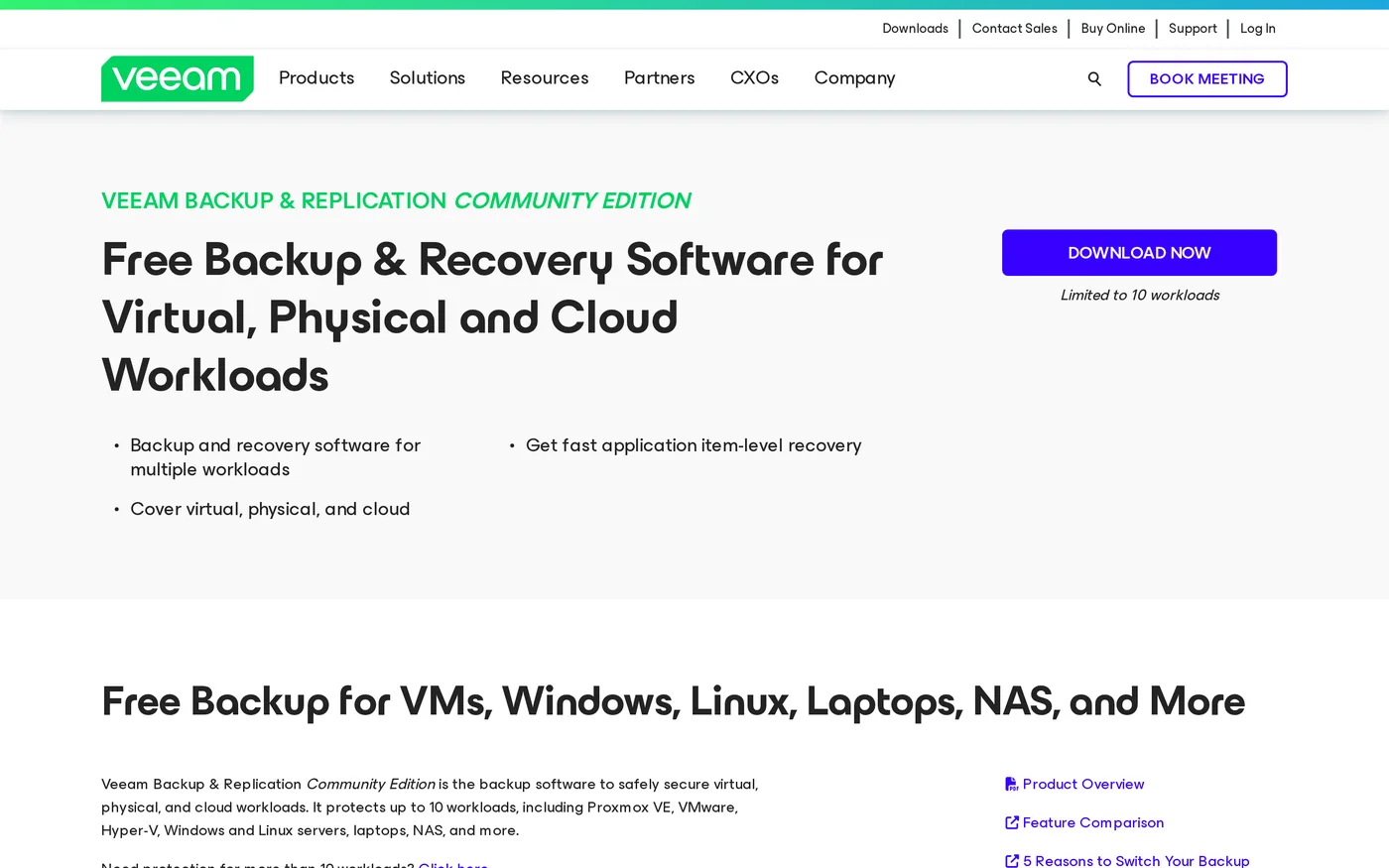
Veeam Backup and Replication Community Edition is free for up to 10 workloads, covering VMware, Hyper-V and Proxmox VMs and Windows and Linux servers.
Veeam is built for companies with servers and virtual machines. The Community Edition is free for up to 10 workloads and covers VMware, Hyper-V and Proxmox VMs, Windows and Linux servers, laptops and NAS devices.
It also offers replication and item-level recovery for Microsoft applications. The free edition does not include technical support, so it suits teams that can read documentation, and a paid edition covers up to 50 workloads with support.
Veeam Community Edition key features for offsite backup
- Free up to 10 workloads: Enough for a small server room or homelab.
- VM aware: Proxmox VE, VMware and Hyper-V are covered.
- Replication: Create bootable copies onsite or offsite.
- Cloud options: Free AWS and Azure native backup editions, each limited to 10 resources.
Veeam Community Edition pricing and details
| Detail | Veeam Community Edition |
|---|---|
| Free limit | Up to 10 workloads |
| Virtual machines | Proxmox VE, VMware and Hyper-V |
| Physical | Windows and Linux servers, laptops and NAS |
| Cloud | Free native backup tools for AWS EC2 and Azure VMs, each limited to 10 resources |
| Paid step up | Veeam Data Platform Essentials covers up to 50 workloads, with technical support |
| Price | Not shown on the page, see the Veeam store |
Who should pick it: Small IT teams and homelabbers running virtual machines or Windows and Linux servers who want a professional tool for free.
8. Arq: Best desktop backup to your own cloud
Pros
- Perpetual license, with one free year of updates
- Backs up to your own cloud, SFTP, NAS or external drives, and to several destinations at once
- End-to-end encryption with an open, documented storage format
Cons
- The page I captured does not list the base license price
- Each additional year of updates costs $25 per computer
Summary
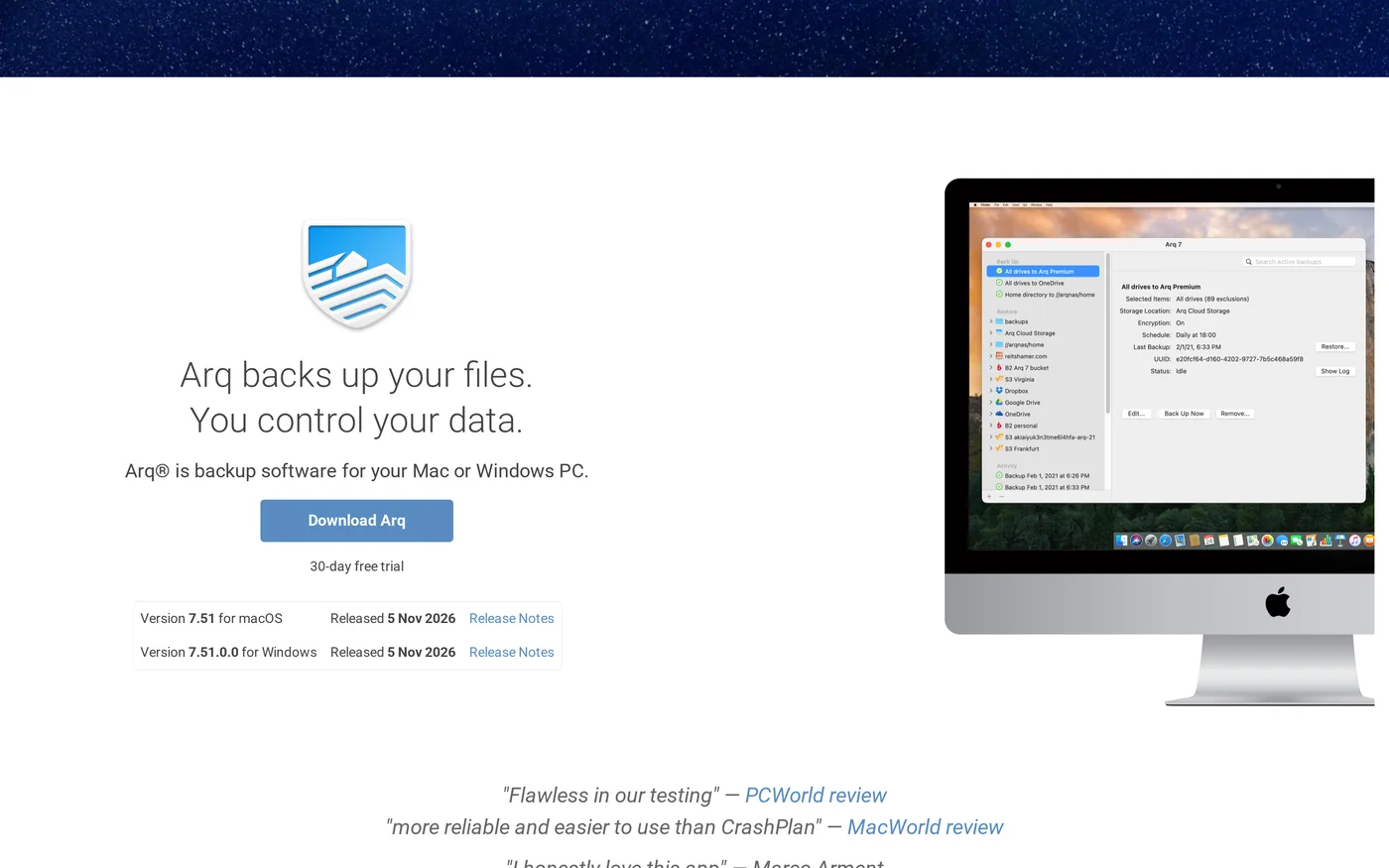
Arq 7 backs up Mac and Windows computers to your own cloud account, SFTP server, NAS or drive with end-to-end encryption.
Arq is a desktop backup app for Mac and Windows that sends encrypted backups to storage you choose. That can be a cloud account such as Backblaze B2, an SFTP server, a NAS or an external drive, and you can back up to several of them at once.
You pay once for a perpetual license, and each additional year of updates costs $25 per computer. There is also Arq Premium, a subscription that bundles managed cloud storage for up to 5 computers.
Arq key features for offsite backup
- Your storage, your choice: Use your own cloud account, SFTP, NAS or a drive.
- Multiple destinations: Send the same backup to more than one place.
- End-to-end encryption: Only you can read the data.
- Open format: The storage format is documented, so you are not locked in.
Arq pricing and details
| Detail | Arq |
|---|---|
| Platforms | macOS and Windows, Arq 7 version 7.51, released 5 November 2026 |
| One-time license | Perpetual, one free year of updates, then $25 per computer per extra year |
| Arq Premium | Subscription for up to 5 computers with managed cloud storage, storage above 1TB at $0.00699 per GB a month |
| Destinations | Your own cloud account, SFTP server, external drive or NAS, several at once |
| Encryption | Strong end-to-end encryption |
| Trial | 30-day free trial |
Who should pick it: Mac and Windows users who want a polished desktop app with one-time pricing and full control over where the backup goes.
9. Kopia: Best open-source backup with GUI and CLI

Pros
- Free and open source
- Both a desktop GUI and a command line
- Encrypted, compressed and deduplicated backups
Cons
- The home page does not list every supported storage backend
- You choose and pay for the cloud storage yourself
Summary
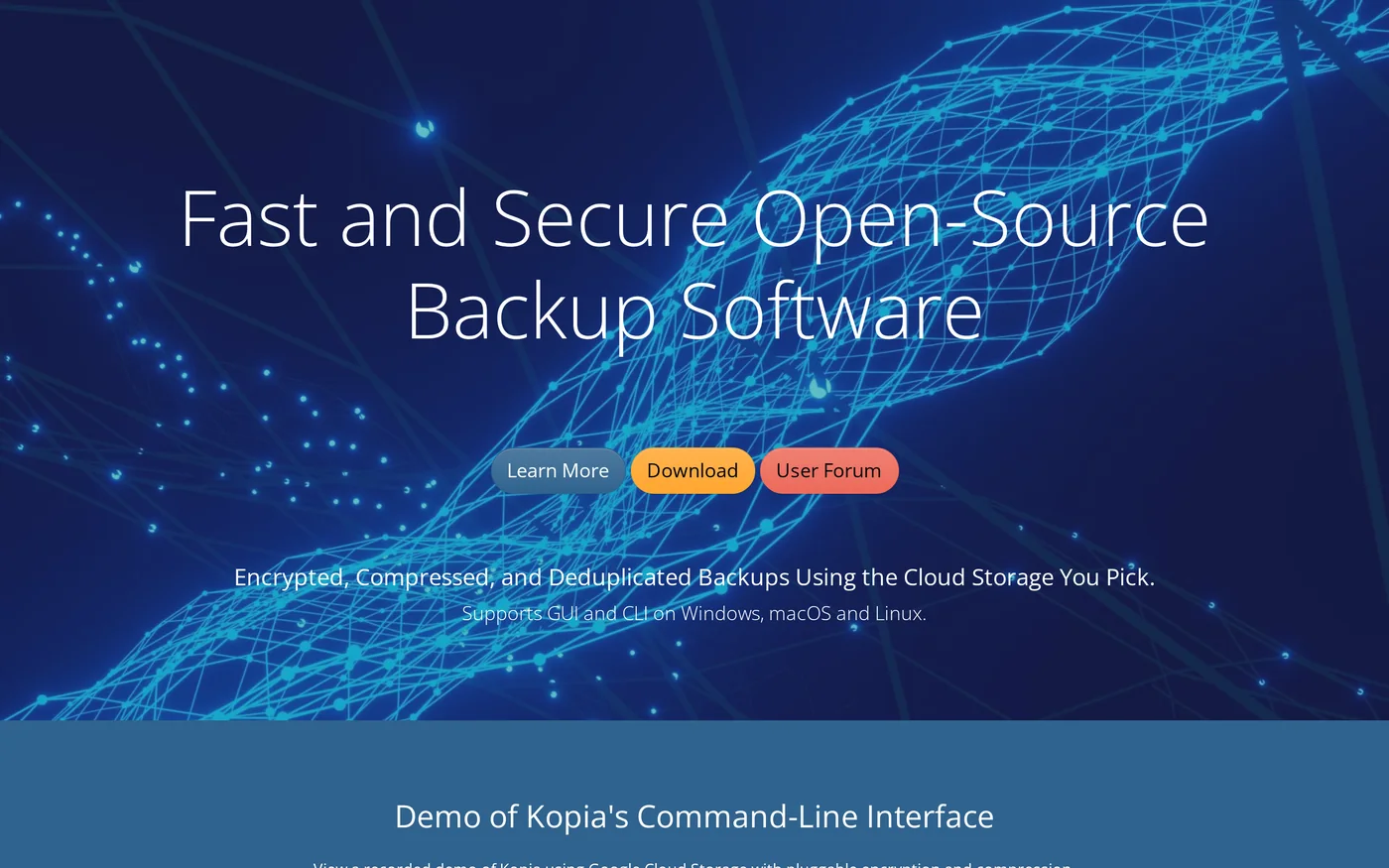
Kopia is open-source backup with a desktop GUI and a command line, with encryption, compression and deduplication.
Kopia is a newer open-source backup tool that gives you both a desktop interface and a command line. It encrypts, compresses and deduplicates your backups, and runs on Windows, macOS and Linux.
The GUI lets you create snapshots, set policies and restore files, while the CLI suits scripts and servers. You bring your own cloud storage, so pair it with a bucket from Backblaze B2 or similar.
Kopia key features for offsite backup
- GUI and CLI: Use whichever fits the machine.
- Snapshots and policies: Define what to back up and how long to keep it.
- Encryption and compression: Both are pluggable.
- Deduplication: Repeat backups only store what changed.
Kopia pricing and details
| Detail | Kopia |
|---|---|
| Price | Free |
| Platforms | Windows, macOS and Linux |
| Interfaces | Desktop GUI and command line |
| Security | Encrypted, with pluggable encryption |
| Efficiency | Compressed and deduplicated |
| Storage | Your own cloud storage, the CLI demo uses Google Cloud Storage |
Who should pick it: Users who like restic or Borg but want a graphical option, and who are happy to choose their own storage.
10. Rclone: Best for syncing files to any cloud

Pros
- Free, open-source, and supports over 70 cloud storage products
- Crypt backend encrypts what you store on other remotes
- Checks MD5 and SHA1 hashes and can resume interrupted transfers
Cons
- It is a sync tool first, not a versioned backup tool, and sync makes the destination identical to the source
- Command line only
Summary
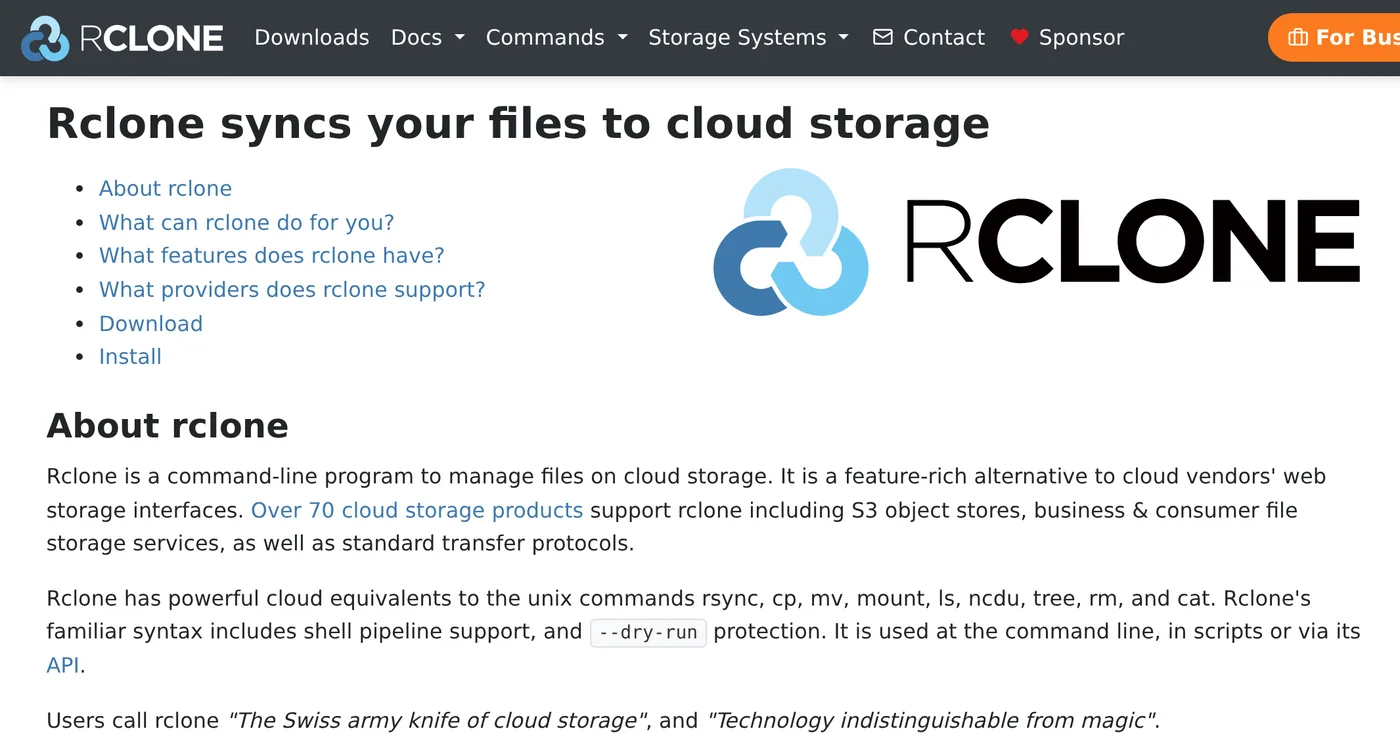
Rclone copies and syncs files to over 70 cloud storage products, with optional encryption and hash checks.
Rclone is the Swiss army knife of cloud storage. It copies and syncs files to over 70 cloud storage products, including S3-compatible stores, SFTP, FTP and WebDAV, and it can encrypt the data with its Crypt backend.
Use it with care for backups. A one-way sync makes the destination identical to the source, so a file you delete by mistake is deleted offsite too. Use copy, or keep versions, when you want it to act like a backup.
Rclone key features for offsite backup
- 70+ storage providers: One tool for almost any cloud.
- Crypt encryption: Encrypt files on any remote.
- Integrity checks: Hashes are verified during transfers.
- Mount: Show cloud storage as a network disk.
Rclone pricing and details
| Detail | Rclone |
|---|---|
| Price | Free, open source |
| Providers | Over 70 cloud storage products, including S3-compatible stores, SFTP, FTP and WebDAV |
| Commands | Copy, sync (one way), bisync (two way), move and mount |
| Encryption | Crypt backend |
| Integrity | MD5 and SHA1 hashes checked, timestamps preserved |
| Platforms | Mount on Windows, macOS, Linux and FreeBSD |
Who should pick it: Admins who move files between clouds and want scriptable offsite copies, and who understand the difference between sync and backup.
Which offsite backup software should you choose?
| Your situation | Best pick | Why |
|---|---|---|
| Several family or office computers | IDrive | One account for many computers and phones, with a free 10GB plan |
| You want the cheapest storage | Backblaze B2 | From $6.95 per TB a month, first 10GB free |
| You use Linux or a VPS | restic or BorgBackup | Free, encrypted and efficient over SSH or object storage |
| You want a free app with a screen | Duplicati or Kopia | Graphical interface and encryption, no license fee |
| You run WordPress | UpdraftPlus | Backs up files and database to Google Drive, Dropbox or Amazon S3 |
| You run virtual machines | Veeam Community Edition | Free up to 10 workloads |
| You have a Mac or Windows PC and want one-time pricing | Arq | Your own cloud, end-to-end encryption, perpetual license |
| You move files between clouds | Rclone | Over 70 providers, with optional encryption |
How do you test that your offsite backup actually works?
A backup that has never been restored is only a hope. Whichever offsite backup software you choose, test it before you need it.
- Restore a few files to a different folder and open them.
- Do a full restore on a spare machine or a staging site at least once, and time how long it takes.
- Keep the encryption key or password somewhere else. Tools like restic warn that losing the password means losing the data.
- Turn on failure alerts, such as an email report, so a failed run does not go unnoticed for weeks.
- Check the schedule monthly, and confirm the newest backup date is recent.
Offsite backup software FAQ
What is the best offsite backup software?
IDrive is the best all-round choice for most people because one account covers several computers and phones, and a free 10GB plan lets you test it. For developers, restic or BorgBackup with Backblaze B2 or BorgBase is a free, encrypted alternative.
What is offsite backup?
Offsite backup is a copy of your data stored in a different physical location from the original, such as cloud storage or a remote server. It protects you from theft, fire, ransomware and server failure.
Is cloud backup the same as offsite backup?
Mostly. Cloud backup is one way to keep an offsite copy, since the data lives in a provider’s data center. Offsite backup also includes a remote server over SSH or a drive stored in another building.
What is the 3-2-1 backup rule?
Keep 3 copies of your data, on 2 different types of media, with 1 copy offsite. For example, the original on your computer, a copy on an external drive and a third copy in cloud storage.
What is the cheapest offsite backup?
Free tools such as restic, Duplicati, BorgBackup and Kopia cost nothing, and you pay only for storage. Backblaze B2 storage starts at $6.95 per TB a month with the first 10GB free, and BorgBase has a free 10GB plan.
Is there free offsite backup software?
Yes. restic, Duplicati, BorgBackup, Kopia and Rclone are free and open source, UpdraftPlus has a free version for WordPress, Veeam Community Edition is free for up to 10 workloads, and IDrive has a free 10GB plan.
What is the best offsite backup for WordPress?
UpdraftPlus. The free version sends backups of your files and database to Google Drive, Dropbox, Amazon S3 and other storage on a schedule, and premium plans start at $70 a year.
Does backup software encrypt my data?
Many tools do. restic, BorgBackup, Kopia, Arq and Duplicati encrypt on your machine before upload. In UpdraftPlus, database encryption is a premium feature. Always keep your password safe, because lost keys cannot be recovered.
What is the difference between sync and backup?
Sync makes two places identical, so deleting a file deletes it in both. A backup keeps older versions you can go back to. Rclone sync is one way and mirrors the source, so use copy or versioning if you want backup behavior.
How often should I back up offsite?
Daily is a good default for most sites and computers. Back up more often if your data changes quickly, such as an online store. Whatever the schedule, test a restore regularly.
Best offsite backup software: final verdict
For most people, IDrive is the best offsite backup software: one account, many devices and a free plan to test. If you are comfortable with a terminal, restic or BorgBackup plus Backblaze B2 or BorgBase gives you encrypted, low-cost offsite backups. WordPress owners should start with UpdraftPlus.
Whichever offsite backup software you pick, set it to run automatically, keep your encryption key somewhere else and test one restore this week.
| Need | Best pick | Why |
|---|---|---|
| Best overall | IDrive | Many devices, free 10GB plan |
| Cheapest storage | Backblaze B2 | $6.95 per TB a month |
| Best free engine | restic | Encrypted, single binary |
| Best for WordPress | UpdraftPlus | Free backups to Google Drive |
Tell Google you want more of this.
Add DigitalPrahlad as a preferred sourceOne tap, and this site shows up more often in your own Google Top Stories, AI Overviews, and AI Mode results. You can remove this preference anytime you'd like.
Affiliate Disclaimer: This website is reader-supported. Some links are affiliate links, meaning I may earn a small commission at no extra cost to you. I only recommend products and tools I genuinely trust and use myself. Your support keeps DigitalPrahlad free and practical.