UpdraftPlus is the most installed backup plugin for WordPress, and it is free to start. This UpdraftPlus review answers the questions most people have before they install it: does the free version really back up everything, how much does the premium version cost, and is it reliable enough to trust with a live website?
Most plugin reviews only repeat the feature list. For this one I used the free version of UpdraftPlus on digitalprahlad.com, with daily backups going to Google Drive, and I took the screenshots from my own WordPress dashboard. So the backup sizes, timings and settings below come from a real site, not from a demo.
Disclosure
I use the free version of UpdraftPlus on this site. The links to UpdraftPlus on this page are plain links with no affiliate tracking, and I list the drawbacks next to the strengths. Premium features and prices come from the official UpdraftPlus pages and the WordPress.org plugin page, read in November 2026, because I have not tested the premium version.
One limit up front: I did not run a full restore on the live site for this review, because restoring over a working website is risky. I explain what I checked instead, and what you should test on a staging copy before you rely on any backup plugin.

Pros
- Free version backs up files and database on a schedule and sends them to Google Drive, Dropbox, Amazon S3 and more
- Five daily backups in a row finished without errors on this site, each in about a minute
- Setup takes a few minutes, and every backup has its own Restore, Delete and View Log buttons
- Premium starts at $70 a year for 2 sites and adds incremental backups, encryption and the Migrator
Cons
- The free version cannot fix the backup time, encrypt backups or use more than one remote location
- Migration, incremental backups and automatic backups before updates need a paid plan
Summary
UpdraftPlus is a dependable, simple backup plugin. The free version is enough for most small sites, and premium is worth it when you need incremental backups, encryption or one-click migration.
Price: USD 70 Per year, Personal plan for up to 2 sites, free version also available
Visit UpdraftPlusIs UpdraftPlus good? The quick verdict
In this UpdraftPlus review the plugin scores 4.5 out of 5. It does the one job a backup plugin must do, and it did it on every run I checked: files and database zipped, uploaded to Google Drive and logged, in about a minute for a site of roughly 280MB. The score is held back by what the free version leaves out, mainly encryption, a fixed backup time and incremental backups.
| Question | Short answer |
|---|---|
| What is it? | A WordPress plugin that backs up files and the database, stores them off the server and restores them from the dashboard |
| Is there a free version? | Yes. It is free, and this site uses it |
| Where can free backups go? | Dropbox, Google Drive, Amazon S3 or compatible, Rackspace Cloud Files, FTP, DreamObjects, OpenStack Swift or email |
| Premium price | From $70 a year (Personal, 2 sites) to $399 a year (Gold, unlimited sites and 50GB storage) |
| Real backup on this site | 279.9MB in total, finished in about 61 seconds, 5 of 5 recent daily runs successful |
| Biggest weakness | Encryption, incremental backups and migration are premium only |
| Worth it? | Yes for small and medium WordPress sites, with a restore test before you need it |
What is UpdraftPlus and who makes it?
UpdraftPlus is a WordPress backup, restore and migration plugin made by TeamUpdraft. The WordPress.org plugin page lists more than 4 million active installations and a 4.8 out of 5 rating from 8,730 reviews. It was last updated in October 2026 (version 1.26.14) and is tested up to WordPress 7.1.4, which matches the version running on this site.
| Entity | Detail |
|---|---|
| Plugin | UpdraftPlus (also called UpdraftPlus Backup and Restore) |
| Maker | TeamUpdraft, which also makes UpdraftCentral, UpdraftClone and other WordPress plugins |
| Version reviewed | 1.26.14, free version, on WordPress 7.1.4 and PHP 8.2 |
| Where to get it | WordPress.org plugin directory (free) and teamupdraft.com (premium) |
| Backs up | Plugins, themes, uploads, must-use plugins, other files in wp-content, and the database |
| Built-in cloud storage | UpdraftVault (1GB included with premium) |
| Related products | UpdraftCentral (manage many sites) and UpdraftClone (temporary clone sites) |
What do the backup terms mean?
- Remote storage: a place outside your web server, such as Google Drive, where the backup file is stored. If the server fails, the backup is still safe.
- Retention: how many backup sets are kept before the oldest is deleted. This site keeps 5.
- Incremental backup: a backup that copies only files that changed since the last run, which saves time on large sites. It is a premium feature.
- Migration: copying a whole site to a new domain or host. UpdraftPlus does this with its Migrator add-on in premium.
- WP-Cron: the WordPress task scheduler that starts scheduled backups when the site is visited or a server cron calls it.
How did I test UpdraftPlus?
For this UpdraftPlus review I used four sources, and I kept them separate from marketing claims.
- My own dashboard: I opened the UpdraftPlus screens in WordPress and captured them with a Chromium browser. Account details and the Google login shown on the settings page are left out of the screenshots.
- The backup log: UpdraftPlus writes a log for every run. I read the log of the most recent backup for timings and sizes.
- Official pages: pricing and premium features come from the TeamUpdraft pricing page and the WordPress.org plugin page.
- Not tested: the premium version, a full restore on the live site, the migration tools and UpdraftClone.
How did UpdraftPlus perform on a real website?
The site behind this UpdraftPlus review runs on a single VPS, hosted on YouStable, with daily backups of files and database sent to Google Drive. The latest run started at 3:25 AM in my site timezone on 14 November 2026 and the log ends with the line The backup succeeded and is now complete.
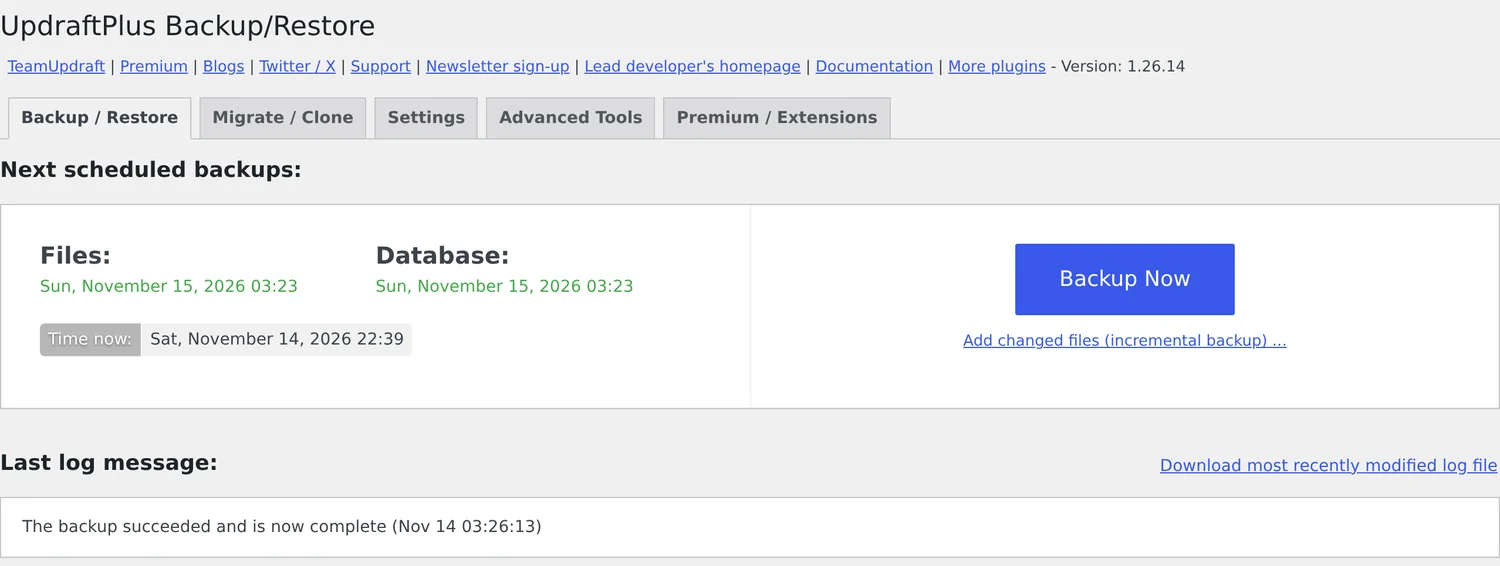
| Backup part | Size in the latest run | What it contains |
|---|---|---|
| Database | 15.7MB (compressed) | Posts, settings and plugin data |
| Uploads | 236.2MB | Images and media files |
| Plugins | 25.1MB | All installed plugins |
| Themes | 1.5MB | Parent and child theme |
| Others | 1.4MB | Other files in wp-content |
| Must-use plugins | 9KB | Must-use plugin files |
| Total | 279.9MB | Reported by UpdraftPlus in its own log |
So how long does it take? From the first log line to the success message the run lasted about 61 seconds. The large uploads archive reached Google Drive in 13.35 seconds, the plugins archive in 5.18 seconds and the themes archive in 2.8 seconds. That is quick for a site of this size, and I saw no timeouts or resumption messages in the log.
Tool used for these numbers
UpdraftPlus backup log (Backup / Restore tab, View Log) and the backup history stored by the plugin. Timings are from the log of the run that started on 13 November 2026 at 21:55 UTC, which is 3:25 AM on 14 November in the site timezone.
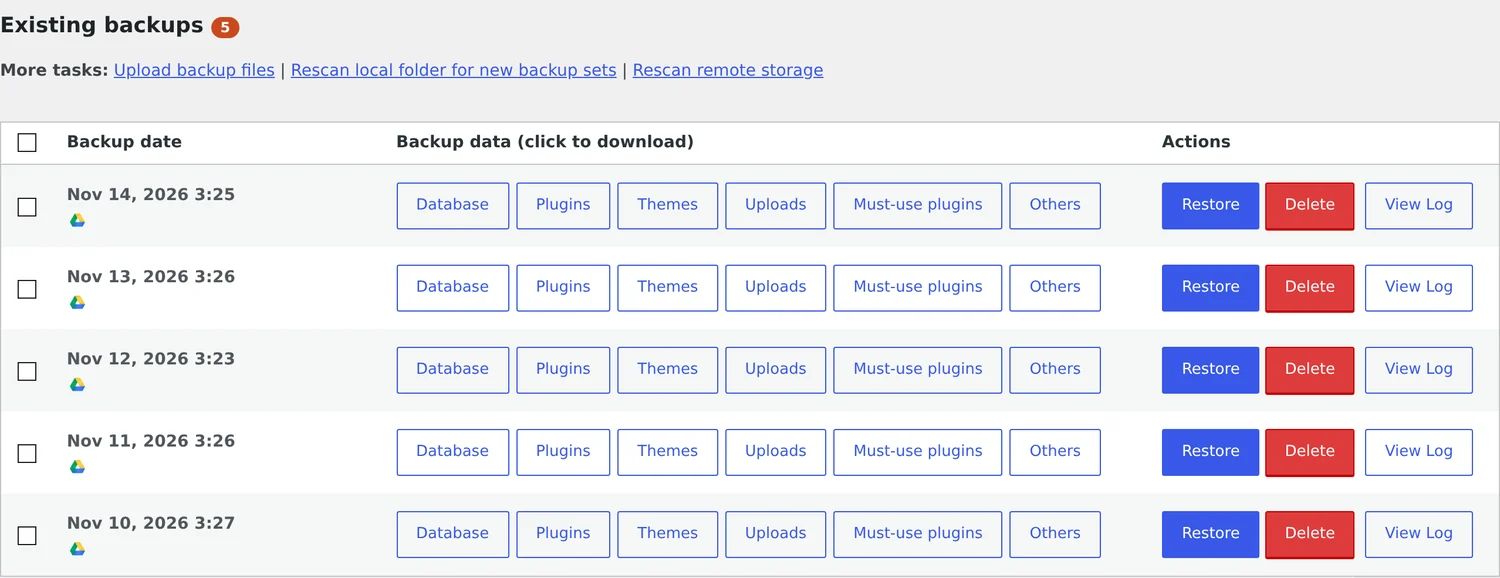
The existing backups list is where UpdraftPlus is at its best. Each backup set has separate download buttons for Database, Plugins, Themes, Uploads, Must-use plugins and Others, plus Restore, Delete and View Log. A small Google Drive icon under the date confirms that the set is stored remotely. Five days of backups in a row, all green, is the reliability evidence I care about most.
What UpdraftPlus settings do I use?
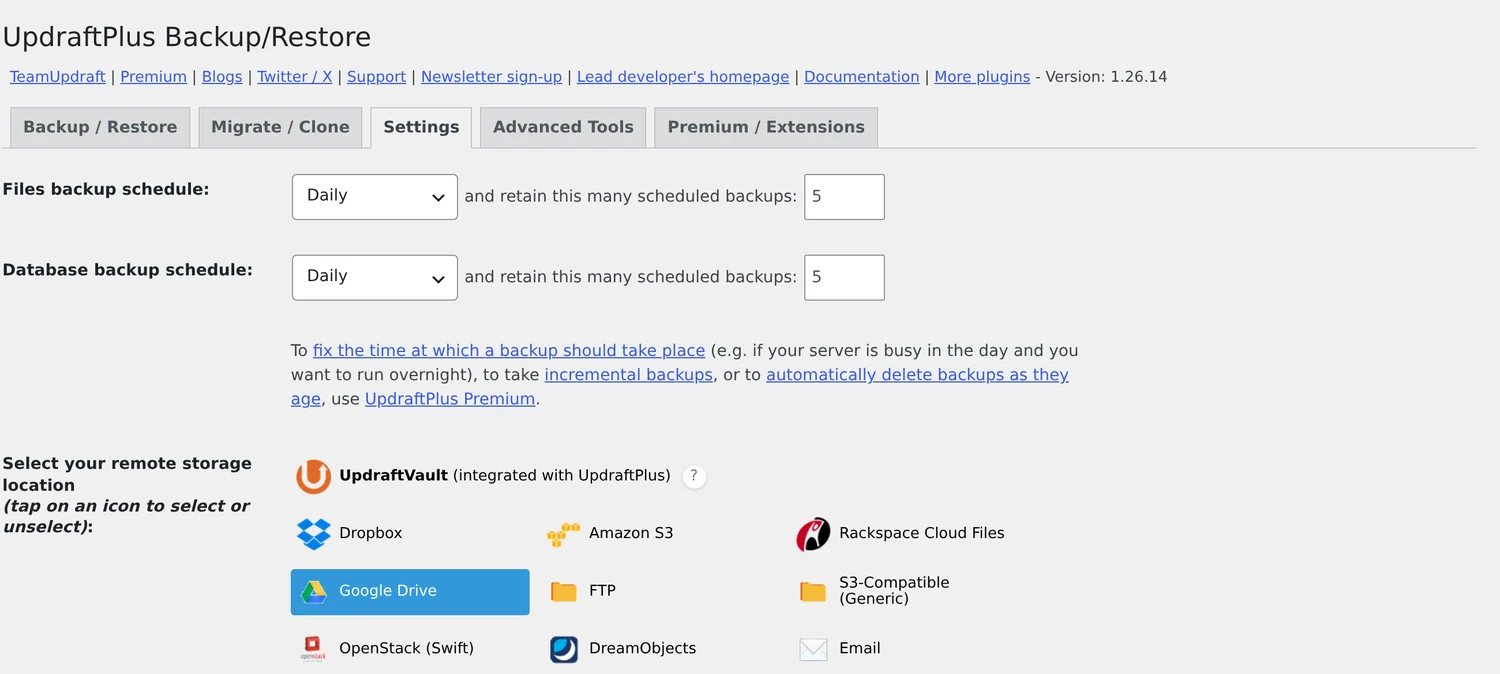
| Setting | My value | Why |
|---|---|---|
| Files backup schedule | Daily, keep 5 | A five day history is enough for a site that changes a little every day |
| Database backup schedule | Daily, keep 5 | The database changes most often, so it gets its own daily copy |
| Remote storage | Google Drive | Free to set up and independent of the web server |
| Include in backup | Plugins, themes, uploads and other wp-content files | Everything needed to rebuild the site |
| Archive split size | 400MB | Large zip files can fail on weak servers, so the plugin splits them |
| Delete local copy after upload | On | Saves disk space on the VPS, since the copy is already on Google Drive |
| Encryption and email report | Off | Encryption is premium only, and I have not set an email address for reports |
The free schedule menu offers every 2, 4, 8 or 12 hours, daily, weekly, fortnightly or monthly, according to the WordPress.org plugin page. The dashboard also says that fixing the exact time of a backup, taking incremental backups and deleting backups as they age need UpdraftPlus Premium. In practice my daily backups ran between 3:23 and 3:27 AM, so the time drifts by a few minutes instead of staying fixed.
UpdraftPlus free vs premium: what do you get?
| Feature | Free | Premium |
|---|---|---|
| Scheduled backups of files and database | Yes | Yes |
| Restore from the dashboard | Yes | Yes |
| Google Drive, Dropbox, Amazon S3, Rackspace, FTP, DreamObjects, OpenStack Swift, email | Yes | Yes |
| OneDrive, Azure, Google Cloud, Backblaze B2, SFTP, SCP, pCloud, WebDAV | No | Yes |
| Backups to more than one location | No | Yes |
| Incremental backups | No | Yes |
| Automatic backup before updates | No | Yes |
| Database encryption | No | Yes |
| Site migration and cloning (Migrator) | No | Yes |
| Multisite support | No | Yes |
| Backup of non-WordPress files and databases | No | Yes |
| WP-CLI management | No | Yes |
| UpdraftVault storage | No | 1GB included |
| Premium support | Forum only | Yes |
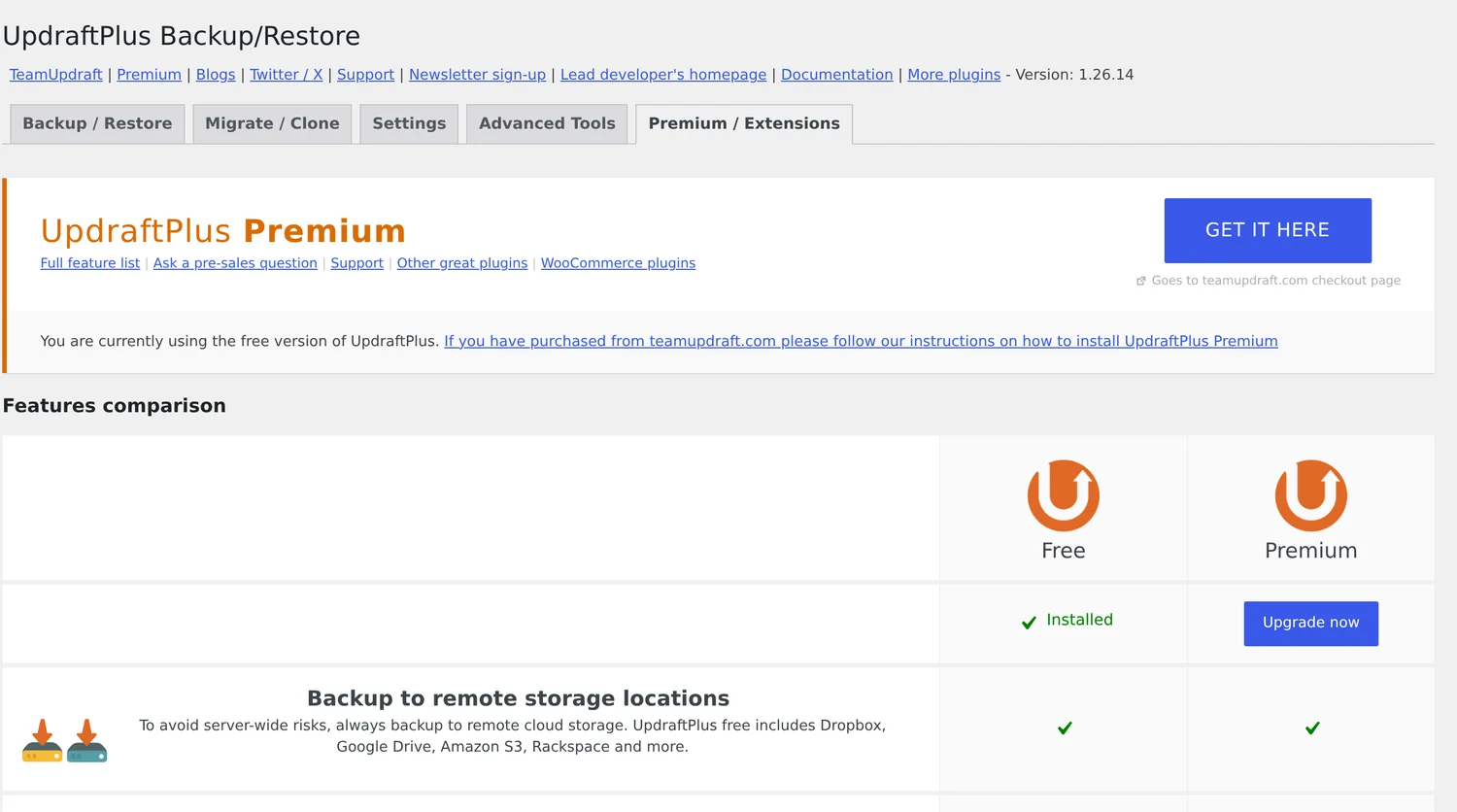
The list comes from the WordPress.org plugin description and from the comparison screen above. The dashboard marks cloning and migration, anonymisation of personal data and incremental backups with a red cross for the free version.
How much does UpdraftPlus Premium cost?
| Plan | Price per year | Sites | Storage | Staging |
|---|---|---|---|---|
| Personal | $70 | Up to 2 | 1GB | Basic |
| Business | $95 | Up to 10 | 1GB | Standard |
| Agency | $145 | Up to 35 | 1GB | Advanced |
| Enterprise | $195 | Unlimited | 1GB | Ultimate |
| Gold | $399 | Unlimited | 50GB | Ultimate, plus UpdraftCentral |
So what does UpdraftPlus pricing look like in practice? Every plan lists incremental backups, the Migrator, automatic backups before updates and premium support. The difference is the number of sites and the storage. Subscriptions renew automatically. You can cancel at any time, but after the 12-month term you lose premium support and new updates.
Check the refund window
The pricing page mentions a money-back guarantee in more than one place, with 14 days in one section and 10 days in another. Confirm the current terms with TeamUpdraft before you pay, and do not count on a longer window.
For a single site, Personal at $70 a year is the sensible starting point. If you manage client sites, Business at $95 a year for 10 sites is the better value per site, and it is the cheapest route to using the Migrator more than once.
What about UpdraftPlus migration and cloning?
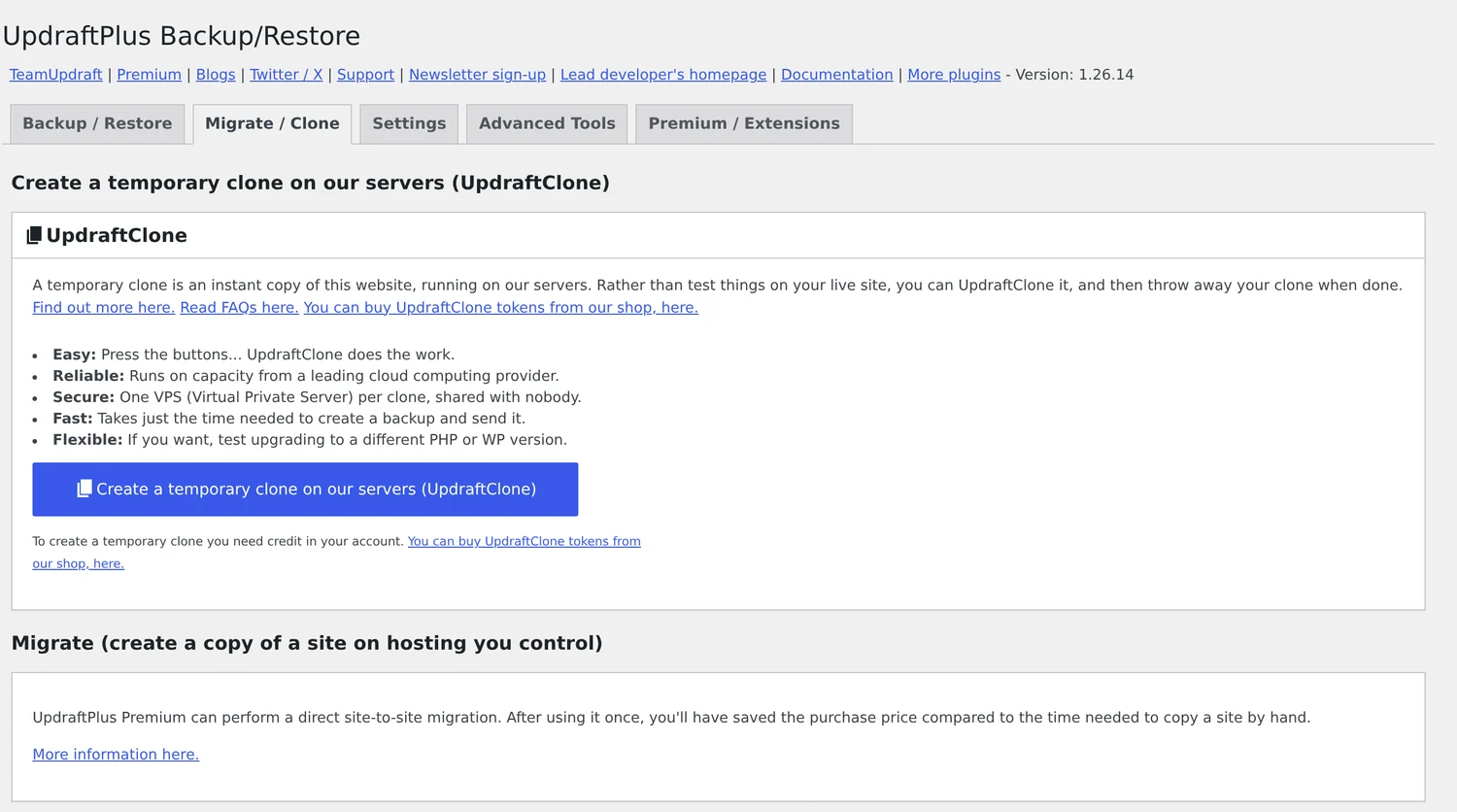
The Migrate and Clone tab offers two things. UpdraftClone creates a temporary copy of your site on TeamUpdraft servers so you can test updates and then throw the clone away. It needs tokens, which you buy separately. The second, direct site-to-site migration, is part of UpdraftPlus Premium. I did not use either, so I only report what the dashboard says.
What are the drawbacks of UpdraftPlus?
- No encryption in the free version: my backups sit on Google Drive as plain zip files and a database dump, protected only by my Google account. Database encryption is a premium feature.
- The backup time is not fixed: the free version starts the job when WP-Cron runs it, so my runs drift between 3:23 and 3:27 AM. This does not matter for me, but it matters if you want a quiet hour for a very busy server.
- One remote location: backing up to two places at once, for example Google Drive and Amazon S3, is premium only.
- No email report on my setup: the log says that no email will be sent because I have not set an address. You can add one, and I should, so a failed run does not go unnoticed.
- Restore is only as good as your last test: the Restore button is easy to find, but I have not run it on this live site. Test a restore on a staging copy once, so you know it works before you need it.
- Large uploads folders take space: the uploads archive is 236.2MB here, and five sets on Google Drive add up to well over a gigabyte, so watch your free Drive quota.
Do you still need UpdraftPlus if your host makes backups?
Yes, for one reason: where the copy lives. Many hosts keep their backups on the same infrastructure as your site, so a billing problem, an account suspension or a server failure can take both away together. UpdraftPlus sends a copy to storage you control, which is exactly the point of an offsite backup.
Host backups are still useful for a quick one-click restore, and I would keep both. A good setup is a host backup for speed and an UpdraftPlus copy on Google Drive, Dropbox or Amazon S3 for safety. If you run on a VPS like this site does, the plugin matters even more, because a plain VPS does not include backups unless you add them. For other tools that send backups offsite, see our guide to the best offsite backup software.
UpdraftPlus review: pros and cons
Pros
- Free and capable: scheduled file and database backups with remote storage
- Reliable here: five daily runs in a row, about a minute each
- Simple dashboard: Backup Now, Restore, Delete and View Log in one list
- Many storage targets: Google Drive, Dropbox, Amazon S3 and more
- Trusted: more than 4 million active installs and a 4.8 rating
- Fair premium prices: from $70 a year for 2 sites
Cons
- Premium only: encryption, incremental backups, migration and multiple locations
- Time drift: the free version cannot fix the backup time
Who should use UpdraftPlus, and who should not?
- Use the free version if you run a blog, business site or portfolio on WordPress and want daily backups sent to Google Drive or Dropbox without paying.
- Buy Premium if you move sites between hosts, manage client sites, need encrypted backups, or want a backup before every plugin update.
- Look at other options if you need real-time backups of a busy store, where every order must be saved the moment it happens. Daily and incremental backups can still lose a few hours of orders.
- Look at other options if you want a fully managed service that also monitors and restores for you.
UpdraftPlus review FAQ
Is UpdraftPlus good?
Yes. UpdraftPlus is a reliable WordPress backup plugin with more than 4 million active installs and a 4.8 rating on WordPress.org. On this site, five daily backups in a row finished without errors, each in about a minute. The free version lacks encryption and incremental backups.
Is UpdraftPlus free?
Yes. The core plugin is free and includes scheduled backups of files and database, restore from the dashboard and remote storage on Google Drive, Dropbox, Amazon S3, Rackspace, FTP, DreamObjects, OpenStack Swift or email. Premium plans start at $70 a year.
How much does UpdraftPlus Premium cost?
Personal costs $70 a year for up to 2 sites, Business $95 for up to 10, Agency $145 for up to 35, Enterprise $195 for unlimited sites and Gold $399 for unlimited sites with 50GB of storage. All plans renew automatically.
What is the difference between UpdraftPlus free and premium?
Premium adds incremental backups, automatic backups before updates, database encryption, the Migrator for cloning and moving sites, backups to more than one location, more storage services such as OneDrive and Backblaze B2, multisite support, WP-CLI and premium support.
Does UpdraftPlus back up to Google Drive?
Yes. Google Drive is supported in the free version. This site sends daily backups there. You authorise UpdraftPlus once from the Settings tab, and each backup set then shows a Google Drive icon in the existing backups list.
How long does an UpdraftPlus backup take?
It depends on site size and server speed. A 279.9MB backup of this site, with files and database, took about 61 seconds from start to the success message, including uploading to Google Drive.
How many backups does UpdraftPlus keep?
You choose. The default is to retain a set number of scheduled backups for files and for the database. This site keeps 5 of each, and older sets are deleted automatically once new ones are uploaded.
Can UpdraftPlus restore my site?
Yes. Every backup in the list has a Restore button that rebuilds the files and database from the stored copy, and you can also upload backup files from another computer. I did not run a restore on this live site, so test one on a staging copy first.
Does the free version of UpdraftPlus encrypt backups?
No. Database encryption is a premium feature. Free backups are stored as standard zip files and a compressed database file, so protect the storage account with a strong password and two-factor login.
Is UpdraftPlus better than a host backup?
They do different jobs. A host backup is quick to restore, but it often lives on the same infrastructure as your site. UpdraftPlus keeps a copy in your own cloud storage. Using both is the safest setup.
UpdraftPlus review final verdict: is it worth it?
This UpdraftPlus review ends at 4.5 out of 5. The plugin earns its install count: it backed up this site every day, uploaded to Google Drive in about a minute, and gave me a clear list of backups to download or restore. For a single WordPress site, the free version already covers the basics.
Pay for premium only when you hit a real limit, such as encryption, incremental backups on a large site or moving sites between hosts. Whatever you choose, send a copy off the server, set an email report, and test one restore on a staging site. If you also care about site speed, read the LiteSpeed Cache settings guide I use on the same site.
Tell Google you want more of this.
Add DigitalPrahlad as a preferred sourceOne tap, and this site shows up more often in your own Google Top Stories, AI Overviews, and AI Mode results. You can remove this preference anytime you'd like.
Affiliate Disclaimer: This website is reader-supported. Some links are affiliate links, meaning I may earn a small commission at no extra cost to you. I only recommend products and tools I genuinely trust and use myself. Your support keeps DigitalPrahlad free and practical.