- Requesting indexing through Search Console’s URL Inspection tool is still the fastest direct crawl trigger, but it’s rate-limited and never guarantees a page actually gets indexed.
- An error-free XML sitemap plus a couple of internal links from pages Google already has indexed does more for indexing speed at scale than clicking “Request Indexing” on every single URL.
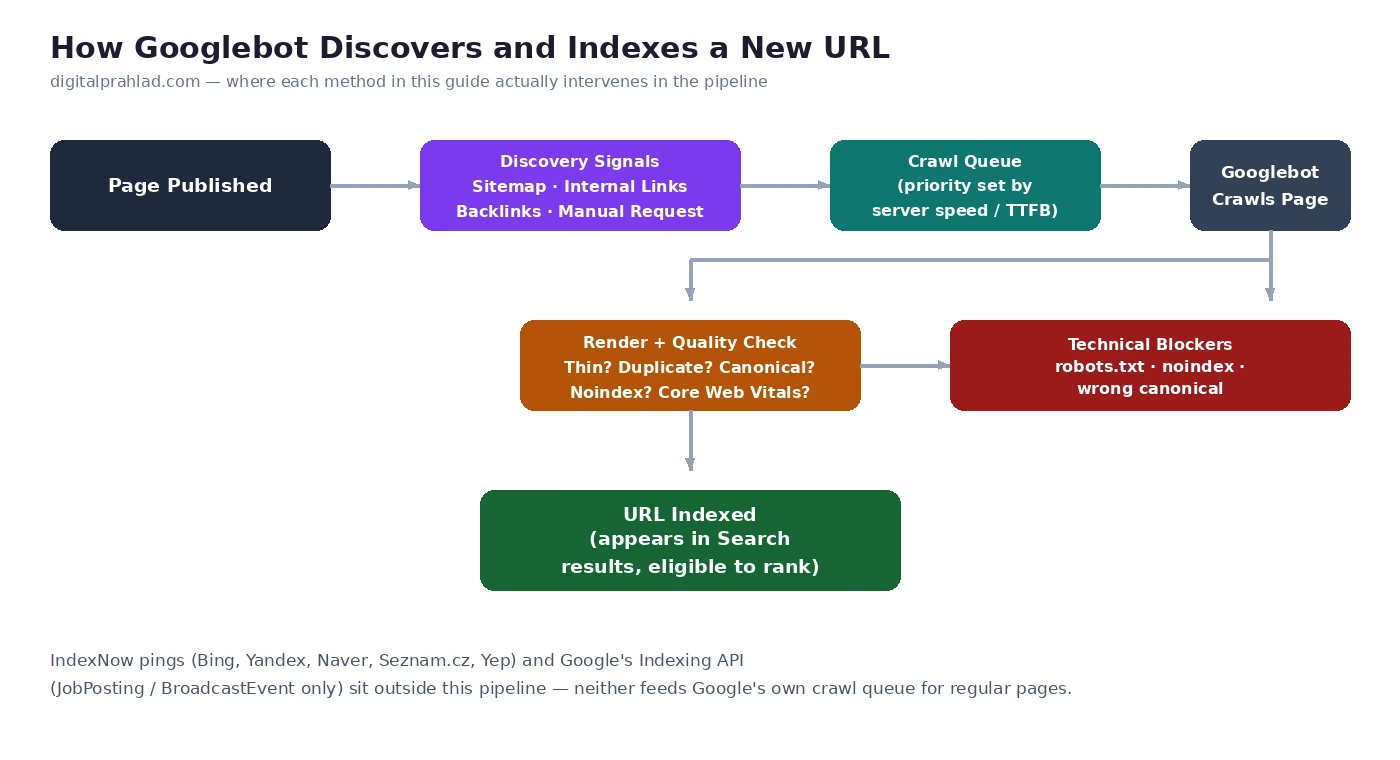
- Google does not support IndexNow. That protocol is only consumed by Bing, Yandex, Naver, Seznam.cz, and Yep, submitting your URLs there has zero effect on Google’s own crawl queue. Plugins like Rank Math send IndexNow pings automatically, as we tested in our Rankmath review.
- Google’s Indexing API is officially restricted to
JobPostingandBroadcastEventpages only, using it to “force-index” a regular blog post works technically but is flagged by Google itself as abuse that can get API access revoked. - Thin content, slow server response time (high TTFB), and orphan pages with no internal links are the three most common reasons a new URL sits in “Discovered, currently not indexed” for weeks.
Publish a new page and the wait begins: refresh Search Console, check the URL Inspection tool, refresh again a day later. Google crawls and indexes trillions of pages, and every site competes for a slice of a finite crawl budget, so a new URL on a small or medium site can sit unindexed for days or weeks with no explanation beyond a generic status label.
“Faster” here means something specific. Nothing on this list makes Google index a page in minutes on command, and any tool claiming otherwise is either describing a lucky coincidence or selling something. What actually works is removing the specific reasons Googlebot deprioritizes a URL, crawl-budget waste, weak internal linking, slow server response, thin content, and fixing them in the order that moves the needle fastest.
The 10 methods below are listed in roughly the order to work through them, starting with the direct, manual nudge and ending with the structural fixes that keep every future URL from having this problem at all.
1. Submit the URL Through Google Search Console’s URL Inspection Tool
This is still the single fastest way to put a specific URL in front of Googlebot on demand. Paste the full URL into the URL Inspection tool at the top of Search Console, wait for the live test to finish, and click Request Indexing if the page is eligible.
- It’s a crawl request, not an indexing guarantee. Google still runs the page through its normal quality and relevance checks before deciding whether to index it at all.
- The quota is small and unofficial. Google has never published an exact number, but in practice most properties get roughly 10-12 effective requests per day before submissions stop doing anything.
- Save it for pages that matter. A cornerstone guide or a page replacing an old URL after a migration is worth a manual request; a tag archive or a filtered URL variant isn’t.
2. Make Sure the URL Is Actually Inside Your XML Sitemap
A sitemap doesn’t force indexing, but it’s the single clearest signal you can give Google about which URLs on your site you consider worth crawling. If Rank Math or Yoast is active, new posts and pages are added to your sitemap automatically, the step most sites skip is verifying it, not generating it.
- Check the Sitemaps report in Search Console after publishing a batch of new content, not just once when you first set the site up, and confirm the “Discovered URLs” count actually moved.
- Keep the sitemap free of errors. A sitemap that 404s, redirects, or includes noindexed URLs teaches Google to trust it less, which slows down how quickly new, legitimate URLs in it get crawled.
- Resubmit after structural changes, a new category, a bulk URL migration, or a theme change that altered permalinks, rather than assuming Google will notice on its own schedule.
- Skip the old “sitemap ping” URL (
google.com/ping?sitemap=...) if you still see it recommended anywhere, Google deprecated that endpoint at the end of 2023 and it now just returns a 404. Submitting through Search Console, or referencing the sitemap in robots.txt, are the only methods that still do anything.
3. Add Internal Links From Pages Google Has Already Indexed
Googlebot discovers most new URLs by following links from pages it already knows about, not by polling your sitemap in real time. A brand-new post with zero internal links pointing to it is reachable only through the sitemap, which is a slower, lower-priority discovery path than a direct link from an already-crawled, already-trusted page.
- Link to the new URL from a high-traffic, frequently-crawled page within the first day or two of publishing, a relevant cornerstone post, a category hub, or your homepage if it genuinely fits.
- Use descriptive anchor text, not “click here”, since the anchor text itself is one of the context signals Google uses to understand what the new page is about before it’s even fully indexed.
- Don’t rely on a “Recent Posts” widget alone. Those links are real, but a contextual in-content link from a page with established authority passes more crawl priority than a sidebar list every page on the site shares equally.
4. Clean Up robots.txt Blocks and Crawl Errors in Search Console
Before assuming a URL is simply “slow” to index, rule out that you’re not actively telling Google to leave it alone. Open the Page Indexing report (under Indexing in the left sidebar) and look specifically for these statuses against the URL in question:
- “Blocked by robots.txt”, meaning your own robots.txt file is disallowing the path, check it directly at yourdomain.com/robots.txt for an overly broad
Disallowrule. - “Excluded by noindex tag”, meaning the page itself carries a
noindexmeta robots tag, common on staging content or a default setting in your SEO plugin that never got switched for a new post type. - “Crawled, currently not indexed”, meaning Google visited the page and chose not to index it, usually a content-quality call rather than a technical block, which points you toward Method 6 below.
These errors spike most often right after a site migration or URL restructuring, if that’s the situation you’re in, our 22-step SEO checklist for website migration covers the redirect and crawl issues that specifically cause this.
“Submit to IndexNow and Google will index it instantly.” IndexNow is a real, working protocol, but Google does not consume it. It was built by Microsoft and Yandex, and the only search engines that currently act on IndexNow pings are Bing, Yandex, Naver, Seznam.cz, and Yep. Setting it up can genuinely speed up Bing’s indexing, but it has no effect on Google’s crawl queue.
“Use Google’s Indexing API to force-index any page.” Google’s Indexing API is officially restricted to pages carrying JobPosting or BroadcastEvent (livestream) structured data, nothing else. The API doesn’t validate this and will accept and return a 200 response for any URL, which is why guides claiming it “works for blog posts too” keep circulating, but Google’s own John Mueller has publicly called this out as abuse and warned that accounts misusing it this way can have access revoked. A 200 response only confirms Google received the request, not that it indexed, or will ever index, the page.
5. Lower Your Server Response Time So Googlebot Can Crawl More Pages Per Visit
Googlebot allocates crawl activity partly based on how your server behaves under load. If your Time to First Byte (TTFB) is consistently high, Googlebot’s own crawl-rate algorithm backs off to avoid overloading the server, which means fewer pages get crawled per visit and new URLs further down your internal link structure wait longer to be discovered at all.
- A slow origin server compounds across every page, not just the one you’re trying to get indexed, since crawl budget is a site-wide resource Google allocates based on overall server health.
- CDN and cache-layer response time matters just as much as the origin, a cache miss on a rarely-visited new URL can produce a far higher TTFB than your cached homepage, which is worth checking specifically rather than assuming your site is “fast” because the homepage feels fast.
- Test from multiple real locations, not just your own connection, a server that responds quickly to you can still be slow for Googlebot’s crawling infrastructure or for visitors on the other side of the world.
If you haven’t checked this recently, our free TTFB Tester runs a real request from 22 global locations at once and breaks down DNS, TCP, TLS, and server response time separately, so you can see exactly where the delay is actually coming from instead of guessing. If the bottleneck turns out to be the host itself rather than your page weight, our SEO checklist for web hosting covers what to actually look for before switching.
6. Publish Genuinely Original Content, Not Thin or Duplicate Pages
“Crawled, currently not indexed” is overwhelmingly a content-quality decision, not a technical glitch. Google’s indexing systems are explicitly designed to skip pages that don’t add anything beyond what’s already indexed elsewhere, your own site or someone else’s.
- Thin, templated pages are the most common cause at scale. Programmatic pages built from a thin template with only a swapped-out city name, product variant, or date rarely clear the bar on their own without genuinely unique data or copy per page.
- Near-duplicate internal content competes with itself. Two posts covering almost the same query dilute each other’s signals; Google often indexes one and quietly leaves the other in limbo rather than indexing both.
- Scraped or lightly-rewritten content is treated as duplicate even when the wording differs, Google’s systems compare meaning and structure, not just exact text matches.
7. Earn a Few Backlinks From Sites Google Already Crawls Frequently
A backlink from a site Google crawls on a daily or near-daily basis gives a new URL a second, independent discovery path that doesn’t depend on your own sitemap or internal links at all. This is slower to execute than the other methods here, but it’s also the one most likely to pull a stubborn URL out of “Discovered, currently not indexed.”
- Frequency of crawling matters more than raw domain authority for this specific purpose, a smaller site that publishes daily and gets crawled constantly can surface a new link faster than a huge but rarely-updated one.
- A single genuine, editorially-placed link does more here than a batch of low-quality directory submissions, which Google’s spam systems are specifically built to discount.
- This compounds with Method 3, once an external, already-indexed page links to your new URL, pairing it with a strong internal link gives Google two independent, converging signals instead of one.
8. Use Canonical Tags Correctly So Google Doesn’t Index the Wrong Version
A new URL can fail to get indexed not because Google refuses it, but because a canonical tag is quietly pointing Google toward a different URL entirely. This shows up in Search Console as “Duplicate, Google chose different canonical than user” or “Alternate page with proper canonical tag,” and it’s purely a technical misconfiguration, not a content-quality judgment.
- Every indexable page needs a self-referencing canonical pointing at its own clean URL, check this directly in the page source rather than assuming your SEO plugin set it correctly for a new post type or custom template.
- URL parameters (tracking tags, filters, sort order) should canonical back to the clean URL, not be left to default to self-referencing, which creates duplicate-content competition Google has to resolve on its own.
- After a migration or URL structure change, audit a sample of new URLs specifically for stale canonical tags still pointing at the old structure, since this is a common copy-paste error when migrating templates.
9. Pass Core Web Vitals and Make Sure the Page Is Mobile-Friendly
Google indexes using the mobile version of your page by default, so a page that renders broken, has unstable layout shifts, or loads slowly on mobile is being judged on exactly that experience, not the cleaner desktop version you tested in your browser. Page experience isn’t the deciding factor in whether a page gets indexed at all, but it is one of the signals feeding the same quality evaluation that decides whether a borderline page clears the bar.
- Test the actual mobile rendering, not just the desktop layout, via the URL Inspection tool’s live test or Chrome DevTools’ mobile emulation.
- Fix Cumulative Layout Shift from late-loading ads or images specifically on new post templates, since a template-level CLS issue affects every future URL built from it, not just the one you’re currently troubleshooting.
- Confirm nothing critical is blocked for mobile crawling, a responsive site that still blocks a CSS or JS file mobile rendering depends on can cause Google to see a broken, incomplete version of the page.
10. Eliminate Orphan Pages With a Logical Internal Link Structure
An orphan page, one with no internal links pointing to it from anywhere on your site, is reachable by Google only through your sitemap, which is consistently the slowest and lowest-priority discovery path available. Fixing this once, structurally, prevents every future URL from hitting the same problem instead of requiring a manual link-building pass per page.
- Every page should be reachable within a few clicks from the homepage through a logical category or hub structure, not buried behind pagination or accessible only via search.
- Audit for orphans periodically, a crawler tool like Screaming Frog combined with your site’s own internal link graph will surface pages your navigation and content silently stopped linking to over time.
- Related-post sections and breadcrumbs count as real internal links for this purpose, build them into your templates so every new URL is automatically linked from somewhere the moment it’s published, rather than depending on someone remembering to add a manual link.
What Each Search Console Indexing Status Actually Means
Before troubleshooting further, confirm which specific status Search Console is showing for the URL, since the fix is different for each one.
| Status | What It Means | Fix |
|---|---|---|
| Discovered, currently not indexed | Google knows the URL exists but hasn’t crawled it yet, usually a crawl-budget or priority issue | Add internal links from indexed pages, improve server response time, request indexing manually |
| Crawled, currently not indexed | Google visited the page and chose not to index it, almost always a content-quality decision | Expand or rewrite the content so it’s genuinely distinct from what’s already indexed elsewhere |
| Duplicate without user-selected canonical | Google sees near-identical content and hasn’t been told which version is canonical | Add a clear, self-referencing or cross-referencing canonical tag |
| Submitted URL blocked by robots.txt | Your own robots.txt is disallowing the path Google is trying to crawl | Remove or narrow the Disallow rule, then test it live in the robots.txt report |
| Excluded by noindex tag | The page itself carries a noindex directive | Remove the noindex tag if the page should be indexed, or confirm it’s intentional |
Frequently Asked Questions
How long does it normally take Google to index a new URL in 2026?
There’s no fixed number, anywhere from a few hours to several weeks depending on the site’s overall authority, crawl frequency, and the specific page’s content quality and internal linking. A well-linked page on an established, frequently-crawled site can be indexed within a day; a weakly-linked page on a new or low-authority site can take considerably longer.
Does requesting indexing in Search Console guarantee a page gets indexed?
No. Request Indexing only asks Google to crawl the page sooner than it otherwise would. Google still runs its normal quality and relevance checks afterward and can choose not to index the page at all if it doesn’t clear that bar.
Does Google support IndexNow?
No. IndexNow is only consumed by Bing, Yandex, Naver, Seznam.cz, and Yep. Google has its own separate crawling and indexing pipeline and does not act on IndexNow pings, so setting it up has no effect on how quickly Google indexes your URLs.
Why does my sitemap show the URL as submitted, but it still says “Discovered, currently not indexed”?
A sitemap entry only tells Google the URL exists, it doesn’t influence how high a priority Google assigns to crawling it. This status usually means the URL needs stronger internal links from already-indexed pages, or that your site’s overall crawl budget is being consumed elsewhere, often by a slow server response time.
Does server speed (TTFB) really affect indexing, or just ranking?
Both, but through different mechanisms. A high Time to First Byte causes Googlebot’s own crawl-rate systems to slow down how many pages they request from your server per visit, which directly reduces how quickly new URLs further down your site’s structure get discovered and crawled, independent of any ranking effect.
Can duplicate or thin content prevent a URL from ever getting indexed?
Yes, indefinitely, if nothing changes. “Crawled, currently not indexed” isn’t a queue a page eventually ages out of, it’s Google’s ongoing assessment that the page doesn’t add enough beyond what’s already indexed. The page needs to become genuinely more useful or distinct, not simply wait longer.
Do backlinks help a URL get indexed faster?
Yes. A link from a site Google crawls frequently gives a new URL an independent discovery path outside your own sitemap and internal links, which is particularly useful for URLs that have been stuck in “Discovered, currently not indexed” despite otherwise solid on-site signals.
What’s the fastest realistic way to get a brand-new page indexed?
Request indexing manually in Search Console, add at least one internal link from an already-indexed, frequently-crawled page on your own site within the first day or two, and confirm the page isn’t blocked by robots.txt or a stray noindex tag. Those three steps together cover most of what’s within your direct control.
Can I use Google’s Indexing API to index a regular blog post or page?
You can technically call it and get a 200 response, but it’s not what the API is for. Google’s Indexing API is officially restricted to pages with JobPosting or BroadcastEvent structured data, and Google’s own John Mueller has publicly described using it for other content as abuse that can get an account’s API access revoked. A 200 response only confirms Google received the request, it doesn’t mean the page was crawled or indexed.
Final Verdict
There’s no single switch that makes Google index a page instantly, but the wait is rarely random either. Most slow-to-index URLs are stuck for one of a small number of identifiable reasons: no internal links pointing to them yet, a server that’s slow enough to make Googlebot pull back on crawling, content that’s too thin or too similar to something already indexed, or a stray technical block like a misconfigured canonical or robots.txt rule.
Work through the list in order. Request indexing and confirm the sitemap first, since they take minutes. Then fix internal linking and server response time, since those two compound across every future URL, not just the one you’re troubleshooting today. Content quality and backlinks take longer, but they’re what actually moves a URL out of “Discovered, currently not indexed” when the faster fixes alone don’t.
If getting indexed is step one of a broader push to actually get found, by Google or by AI answer engines, our 6 layers of AI search visibility strategy covers where indexing fits alongside content answerability, technical access, and citations.
Tell Google you want more of this.
Add DigitalPrahlad as a preferred sourceOne tap, and this site shows up more often in your own Google Top Stories, AI Overviews, and AI Mode results. You can remove this preference anytime you'd like.
Affiliate Disclaimer: This website is reader-supported. Some links are affiliate links, meaning I may earn a small commission at no extra cost to you. I only recommend products and tools I genuinely trust and use myself. Your support keeps DigitalPrahlad free and practical.