💬 Key Takeaways
- WordPress is the best choice for most people who want SEO, a blog and long-term growth. It runs 38.7% of all websites, and you own the site and can move hosts.
- Wix is the easiest start. It is the only one of the three with a free plan, and its paid plans begin at $17.77 a month on annual billing, with online selling from the Core plan at $29.77.
- Squarespace is the design-first pick. It has no free plan, a 14-day free trial with no card, and a 0% store fee from the Core plan.
- The cheapest option over three years is self-hosted WordPress, with shared hosting from about $0.70 a month, against $640 to $1,432 for Wix over 36 months at its annual prices.
- Exit costs differ a lot. Wix has no full-site export, Squarespace exports content only in part, and WordPress files and database are yours.
- WordPress.com and WordPress.org are different things, and mixing them up is the most common mistake in this comparison.
Wix vs Squarespace vs WordPress is the question almost everyone asks before they build a website, and the honest answer is that the best website builder depends on who you are and what you are building. Wix is a hosted drag-and-drop builder, Squarespace is a hosted builder known for polished design, and WordPress is open-source software that powers more than a third of the web and gives you the most control.
Most comparisons repeat the same adjectives. This one checks the numbers instead: the plan prices on each official pricing page in November 2026, a 36-month cost model, W3Techs market share from 14 November 2026, store fees, and what each platform lets you take with you if you leave. This site runs on WordPress, so I also explain where WordPress costs more effort than the other two.
By the end you will know which platform fits your site, what it really costs over three years, and which mistakes to avoid. If you only want the short answer, the key takeaways above and the quick chooser later in the page cover it.

- Open source, you own the site
- Best SEO, blog and store flexibility
- 38.7% of all websites

- Free plan, no card needed
- Drag and drop editor
- Core plan adds online selling

- Polished design, 14-day free trial
- 0% store fee on Core and Advanced
- Unlimited bandwidth and storage
How I compared them, and what I did not do
Prices, plan limits and store fees come from the official Wix, Squarespace and WordPress.com pricing pages in November 2026, market share from W3Techs, and requirements from WordPress.org. This site runs on self-hosted WordPress with Rank Math, so my WordPress comments come from using it. I did not build test sites on Wix or Squarespace for this article, so my ease-of-use and design comments rest on how the editors are built and on each platform’s own feature lists. Some links to hosting providers are affiliate links.
Wix vs Squarespace vs WordPress: the quick verdict
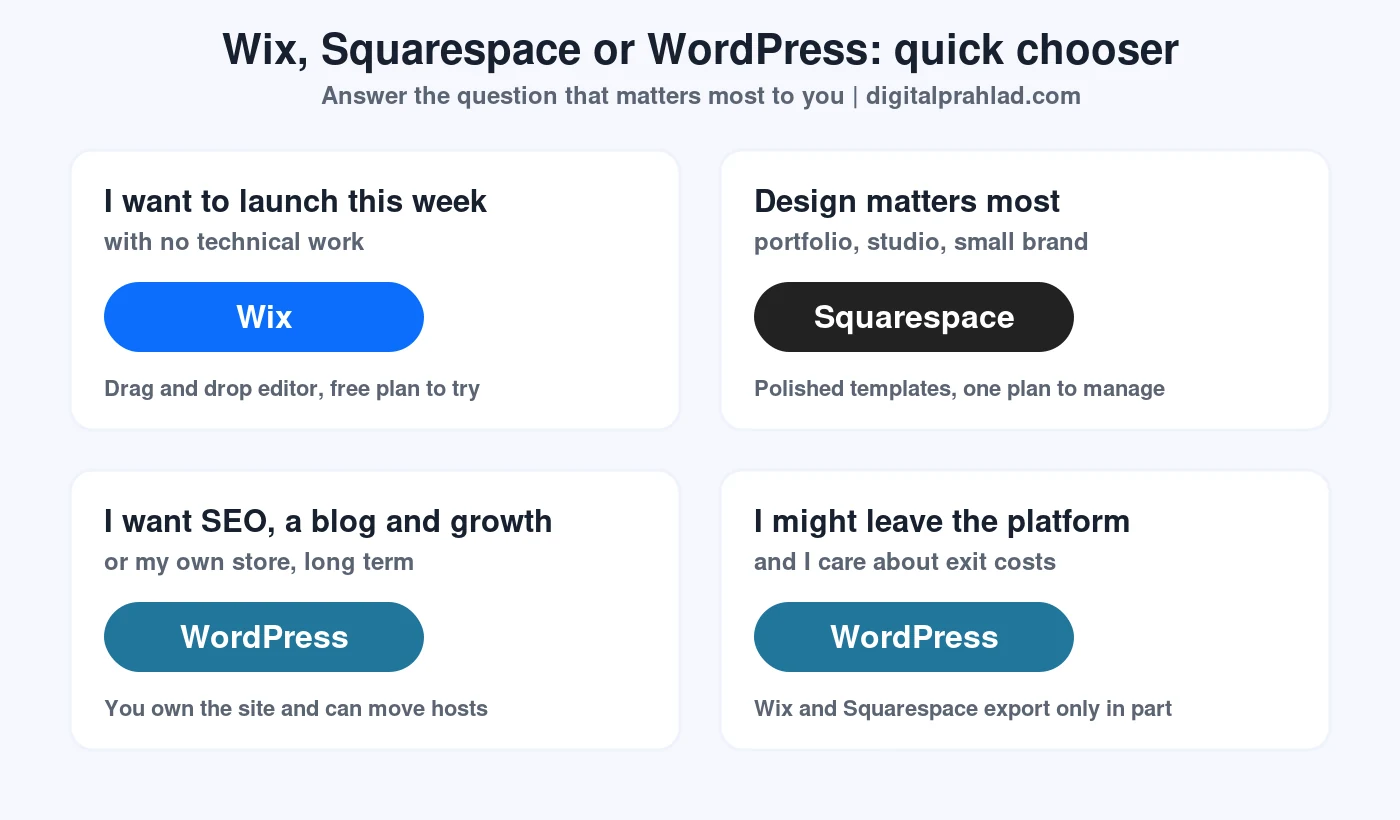
In the Wix vs Squarespace vs WordPress debate, choose WordPress for SEO, blogging and growth, Wix for the easiest start, and Squarespace for design-led sites that stay simple. If you are unsure, WordPress is the safest long-term choice because you can change the theme, the host or the whole setup later without losing your content.
| Wix | Squarespace | WordPress (self-hosted) | |
|---|---|---|---|
| Type | Hosted website builder | Hosted website builder | Open-source software you host yourself |
| Free plan | Yes, no card needed | No, 14-day free trial | Software is free, hosting is not |
| Entry paid price | $17.77/mo (Light, annual) | 630 rupees/mo shown in my region (Basic, annual) | Shared hosting from about $0.70/mo (3-year term) |
| Online store | From Core, $29.77/mo | All plans, 2% fee on Basic | WooCommerce plugin, or WordPress.com Commerce |
| Ownership and export | No full-site export | Partial content export | You own files and database |
| Best for | Fast launch for small businesses | Portfolios, studios and small brands | Blogs, SEO, stores and growing sites |
| Share of all websites (W3Techs) | 4.2% | 2.4% | 38.7% |
What are Wix, Squarespace and WordPress?
Wix and Squarespace are all-in-one website builders: you pay a monthly subscription and they provide the editor, the hosting, the security and the support in one place. You design inside their editor, you cannot move the site files to another host, and the company decides which features exist.
WordPress is open-source content management software that you install on a web host, or use through a hosted service. It is maintained by a global community, runs on PHP and a MySQL or MariaDB database, and is extended with themes and plugins. The software is free, but you pay for hosting and a domain.
WordPress.com vs WordPress.org: the difference that confuses everyone
| WordPress.org (self-hosted) | WordPress.com (hosted) | |
|---|---|---|
| What it is | The free open-source software | A hosted service that runs WordPress for you |
| Hosting | You choose and pay a web host | Included in the plan |
| Cost | Hosting and domain only | Free plan, then from $4/mo on annual billing |
| Control | Full control of files, plugins and themes | Depends on the plan |
| Best for | People who want ownership and flexibility | People who want WordPress without managing a server |
When this guide says WordPress without a qualifier, it means self-hosted WordPress.org, because that is the version behind most of the WordPress share in the market data. The WordPress.com plans are covered in the pricing section. For the server side, WordPress.org recommends PHP 8.3 or greater, MariaDB 10.11 or greater or MySQL 8.4 or greater, and HTTPS, as listed on its official requirements page.
How popular are Wix, Squarespace and WordPress?
In the Wix vs Squarespace vs WordPress market, WordPress powers 38.7% of all websites and 57.6% of the sites that use a content management system, according to W3Techs on 14 November 2026. Wix is at 4.2% of all websites (6.2% of CMS users) and Squarespace at 2.4% (3.6%). Shopify, which is a store platform rather than one of the three, sits at 5.4%.
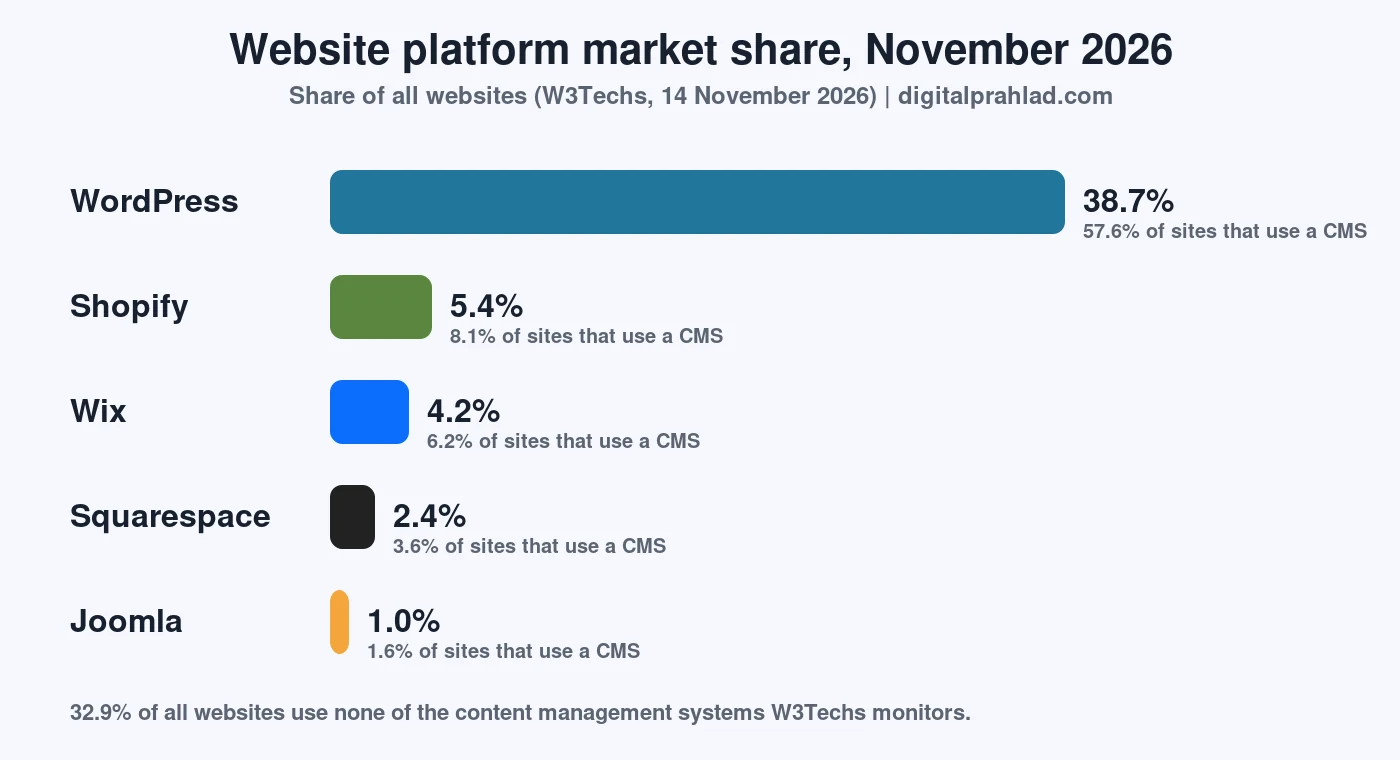
Popularity is not the same as quality, but it matters in practice. A larger ecosystem means more themes, more plugins, more developers to hire and more tutorials when something breaks. WordPress.org also describes its plugin directory as the largest directory of free and open-source WordPress plugins, and WordPress.com lists 60,000+ plugins on its plans.
Wix vs Squarespace vs WordPress pricing in 2026
Wix vs Squarespace vs WordPress pricing is easier to understand when you separate the platforms: Wix costs $17.77 to $159.77 a month, Squarespace has three plans, and WordPress costs whatever hosting you choose, from under $1 a month on a long shared-hosting term. The tables below use the prices on each official pricing page in November 2026. Prices vary by country and billing term, so confirm yours before you buy.
Wix plans and prices
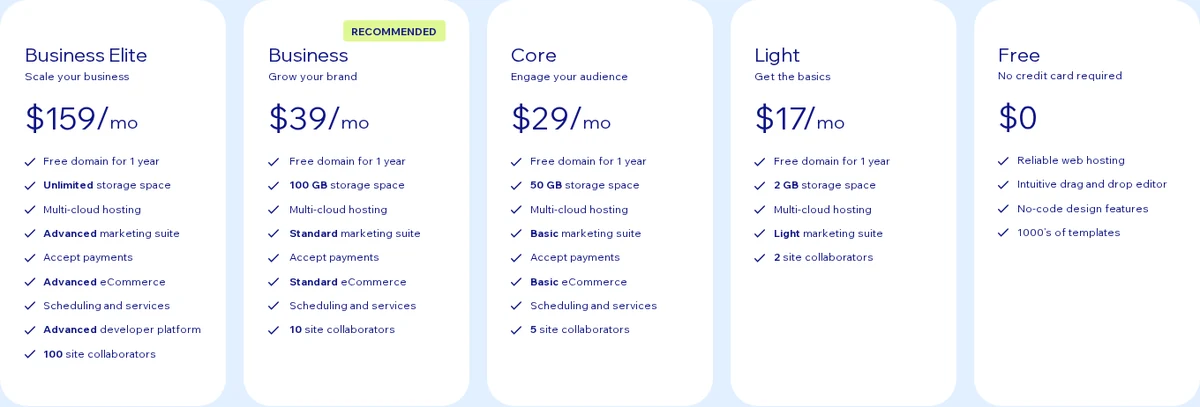
| Plan | Price per month (annual billing, USD reference) | Storage | Collaborators | Online selling |
|---|---|---|---|---|
| Free | $0, no credit card required | Not listed | Not listed | None |
| Light | $17.77 | 2 GB | 2 | None listed |
| Core | $29.77 | 50 GB | 5 | Accept payments and basic eCommerce, scheduling |
| Business (recommended) | $39.77 | 100 GB | 10 | Standard eCommerce |
| Business Elite | $159.77 | Unlimited | 100 | Advanced eCommerce and developer platform |
Every paid Wix plan includes a free domain for one year, and Wix offers a 14-day money-back guarantee on the first premium upgrade. The page notes that prices and currency vary by location and that prices shown are for reference.
Squarespace plans and prices
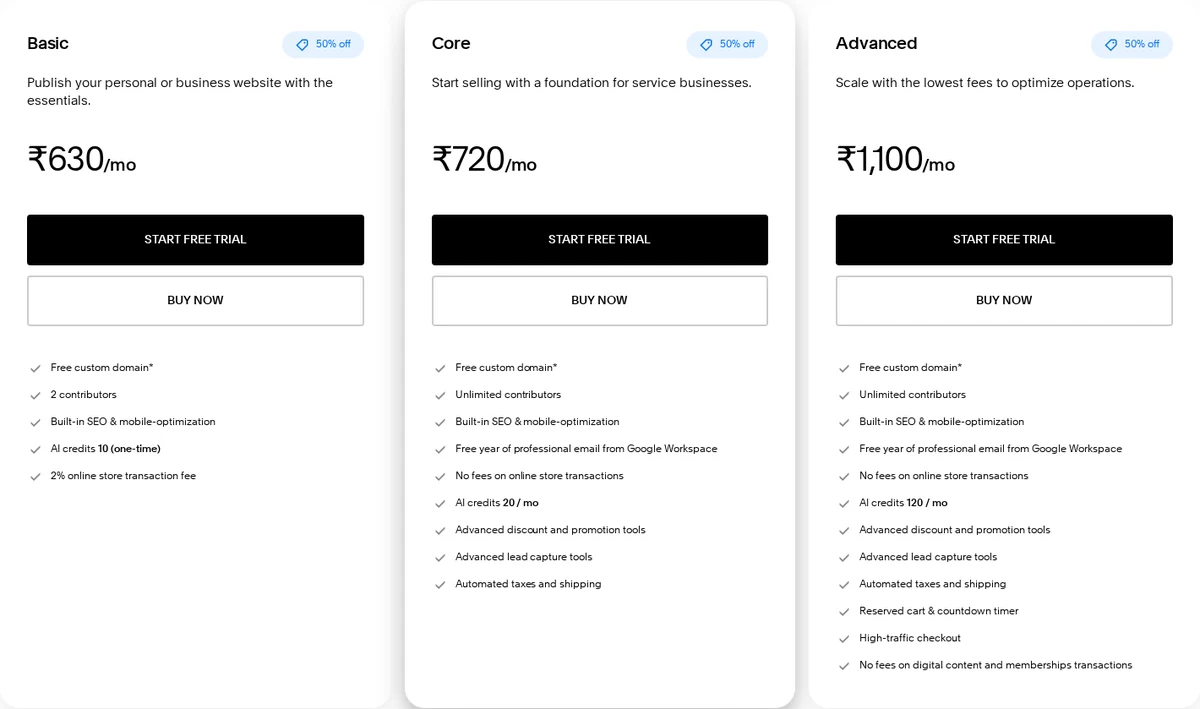
| Basic | Core (recommended) | Advanced | |
|---|---|---|---|
| Price per month, annual billing (shown in my region) | 630 rupees | 720 rupees | 1,100 rupees |
| Online store transaction fee | 2% | 0% | 0% |
| Digital content and memberships fee | 7% | 5% | 0% |
| Storage and bandwidth | Unlimited | Unlimited | Unlimited |
| Contributors | 2 | Unlimited | Unlimited |
| Video hosting | 30 minutes | 5 hours | Unlimited |
| AI credits | 10, one time | 20 per month | 120 per month |
Squarespace has no free plan, but it gives a 14-day free trial with no credit card. Annual plans include one free domain for the first year. The pricing page shows prices in your local currency, so the rupee figures here are what I saw from my region and your USD, GBP or EUR prices will differ. Check the Squarespace pricing page for your price.
WordPress.com plans and prices
| Plan | Monthly billing | Annual billing | 3-year billing | Storage |
|---|---|---|---|---|
| Free | $0 | $0 | $0 | 1 GB |
| Personal | $9 | $4 | $2.75 | 6 GB |
| Premium | $18 | $8 | $5.50 | 13 GB |
| Business | $40 | $25 | $17.50 | 50 GB |
| Commerce | $70 | $45 | $31.50 | 50 GB |
All prices are per month, from the WordPress.com pricing page. The page also shows a payment fee that falls from 10% on Free to 0% on Commerce, but its FAQ and fee table disagree about the Business plan, so confirm the fee before you rely on it. WordPress.com refunds are described as no-questions-asked, without a day count on the page.
What self-hosted WordPress really costs
Self-hosted WordPress has no licence fee, so the cost is hosting, a domain and anything you add. Shared hosting from YouStable starts at 59 rupees a month (about $0.70) on its 3-year term, rising to 119 rupees (about $1.40) for 25 sites and 219 rupees (about $2.60) for unlimited sites, with renewal at the same price. For busier sites, our managed WooCommerce hosting guide and cloud hosting guide compare the paid step up.
The 36-month cost of each platform
| Platform and plan | Price per month | Cost over 36 months | Notes |
|---|---|---|---|
| Wix Light | $17.77 | $639.72 | If the annual price stays the same |
| Wix Core | $29.77 | $1,071.72 | First plan with online selling |
| Wix Business | $39.77 | $1,431.72 | Standard eCommerce |
| Squarespace Basic | 630 rupees | 22,680 rupees | Price in my region, annual billing |
| Squarespace Core | 720 rupees | 25,920 rupees | 0% store fee |
| WordPress.com Personal | $2.75 | $99 | 3-year billing, hosted |
| WordPress.com Business | $17.50 | $630 | 3-year billing, hosted |
| Self-hosted WordPress, shared hosting | About $0.70 to $1.40 | About $25 to $51 plus a domain | YouStable 3-year plans, domain and theme extra |
A domain usually adds roughly $10 to $20 a year, and some themes or plugins cost extra, so a realistic self-hosted WordPress site often lands between $60 and $150 over three years. Those extras are my estimate and vary by extension and vendor. The gap to Wix is large, but the cheaper option also asks for more of your time.
Three real-world examples over 36 months
Totals change with your needs, so here are three common projects priced from the plans above. Payment processor fees, domains after the first year and optional extras are not included, and rupee amounts are converted at about 84 rupees to the dollar.
| Project | Wix | Squarespace | WordPress.com | Self-hosted WordPress |
|---|---|---|---|---|
| Portfolio, 5 pages, no store | Light: $639.72 | Basic: 22,680 rupees | Personal: $99 | About $25 hosting plus a domain, so roughly $60 to $100 |
| Local business with blog and bookings | Core: $1,071.72, scheduling included | Core: 25,920 rupees | Business: $630 | About $51 hosting plus a domain and a booking plugin, so roughly $100 to $200 |
| Online store, around 100 products | Business: $1,431.72 | Core: 25,920 rupees, 0% platform fee | Commerce: $1,134 | WooCommerce on a VPS from 599 rupees a month, about $257 plus a domain |
The pattern is clear. Self-hosted WordPress is the cheapest in every case, WordPress.com sits in the middle, and Wix climbs fastest as you add features. The price you pay with WordPress is time: you manage updates, backups and security unless your host does it.
Wix vs Squarespace vs WordPress ease of use: which is easiest?
In the Wix vs Squarespace vs WordPress ease-of-use test, Wix is the easiest to start with, Squarespace is a close second, and WordPress has the steepest learning curve. Wix and Squarespace give you one dashboard where hosting, security, updates and the editor are already handled, so there is nothing to install.
- Wix: a drag-and-drop editor with free-form placement, so you can put elements almost anywhere. The cost of that freedom is that a page can look uneven if you are not careful.
- Squarespace: a more guided editor with curated templates. You have less freedom than on Wix, but pages tend to look consistent without much effort.
- WordPress: the block editor is friendly for writing, but you also choose a host, a theme and plugins, and you keep them updated. A good host and a page builder reduce that effort.
If you do not want to manage updates and backups, a managed WordPress host or a WordPress.com plan removes much of the work. If you already have a site on another host, our guide on how to migrate WordPress to a new host shows how little downtime a move needs.
Wix vs Squarespace vs WordPress design: which has the best templates?
Squarespace is the strongest on out-of-the-box design, Wix gives the most placement freedom, and WordPress has the widest range of themes. Squarespace templates are built around typography and spacing, which suits portfolios, photographers and small brands. Wix is better when you want to position every element yourself. WordPress themes range from simple blog layouts to full page builders, and the quality varies, so choose a well-maintained theme.
| Wix | Squarespace | WordPress | |
|---|---|---|---|
| Editor style | Free-form drag and drop | Guided sections | Block editor plus themes and page builders |
| Consistency of look | Depends on you | High by default | Depends on the theme |
| Custom code | Available, more on higher plans | Code injection on paid plans | Full access to theme and plugin code |
| Changing design later | Possible within Wix | Possible within Squarespace | Switch theme, keep content |
Wix vs WordPress for SEO, and where Squarespace fits
For SEO, WordPress gives you the most control in the Wix vs Squarespace vs WordPress comparison, while Wix and Squarespace cover the basics well enough for small local sites. All three let you edit titles, meta descriptions, URLs and image alt text, and all three create sitemaps and support SSL. The difference is depth and flexibility.
- WordPress: an SEO plugin such as Rank Math adds schema, redirects, sitemaps, keyword analysis and internal link suggestions. This site uses it, and our Rank Math review explains what it adds. You also control caching, server speed and URL structure.
- Wix: a built-in SEO setup checklist and editable metadata help beginners get the basics right, but you cannot change the server or the underlying code.
- Squarespace: clean URLs, editable metadata and automatic sitemaps make it tidy for small sites, with fewer advanced options than WordPress.
Switching later is where SEO risk appears: a move changes URLs and layout, so plan redirects with our SEO checklist for website migration. If you choose WordPress, the host matters for speed too, and the SEO checklist for web hosting lists what to check.
WordPress vs Wix vs Squarespace for blogging
WordPress is the best blogging platform because it started as one. It has categories, tags, scheduled posts, multiple authors, revisions, comments and RSS built in, and thousands of plugins extend them. Squarespace has a clean blog with a good reading experience. Wix has a capable blog, but it is easier to outgrow if you publish a lot.
If you plan to publish regularly and want your content to be portable, WordPress is the safer choice. If you want a simple blog next to a portfolio, Squarespace or Wix is enough. For a free starting point, see how to create a free musician website.
Squarespace vs Wix vs WordPress for an online store
For a store in the Wix vs Squarespace vs WordPress comparison, Squarespace Core is the simplest store with no platform fee, Wix Core and Business add selling at a higher price, and WordPress with WooCommerce is the most flexible. The fees and limits below come from the official plan pages.
| Wix | Squarespace | WordPress | |
|---|---|---|---|
| Selling starts at | Core ($29.77/mo): accept payments and basic eCommerce | Every plan, but Basic charges a 2% transaction fee | WooCommerce plugin on any host, or WordPress.com Commerce ($45/mo annual) |
| Platform transaction fee | Payment processor fees apply | 2% on Basic, 0% on Core and Advanced | None from WordPress, only payment processor fees |
| Digital products and memberships | Plan-dependent | 7% on Basic, 5% on Core, 0% on Advanced | Plugins, with fees set by your payment provider |
| Customization | Moderate | Moderate | Very high |
Always add the payment processor’s own fee to these numbers. If you are starting a store on a budget, compare free WooCommerce hosting with a paid plan, because WooCommerce needs more resources than a blog. For serious stores, several comparisons suggest looking at Shopify too.
Wix vs Squarespace vs WordPress speed: which is faster?
Speed depends on setup more than on the platform name in the Wix vs Squarespace vs WordPress comparison. Wix and Squarespace manage hosting and caching for you, so speed is consistent but you cannot tune the server. WordPress speed depends on your host, caching and theme, so a good setup is very fast and a poor setup is slow.
As an example of a well-tuned WordPress site, digitalprahlad.com scores 97 to 99 on mobile in Google PageSpeed Insights for its home page, running on a LiteSpeed server with page caching, as documented in my YouStable review. That is one site on one setup, not a controlled comparison with Wix or Squarespace, so treat it as an example. If a WordPress site feels slow, our WordPress speed optimization service fixes the usual causes.
Who owns your site? Export, lock-in and Wix to WordPress migration
In Wix vs Squarespace vs WordPress, only WordPress lets you own the files and the database, on Squarespace you can export content in part, and on Wix you cannot export a complete site. This is the most overlooked difference in these comparisons, and it decides how expensive it is to leave later.
| Wix | Squarespace | WordPress | |
|---|---|---|---|
| Full-site export | No full-site export that WordPress can import | No, export is partial | Yes, files and database |
| What you can usually move | Blog posts through the RSS feed, which holds only the most recent posts; images, pages and store data need separate work | An XML export covers blog posts and pages, while layout, styling and some media need rebuilding | Everything, to any host |
| Switching host | Not possible | Not possible | Yes, any time |
| Cost of leaving | High, usually a rebuild | Medium | Low |
These export notes come from migration guides, so check the current export tools in your own account before you plan a move. The practical lesson is simple: if you might leave one day, pick WordPress at the start, because moving a Wix or Squarespace site to WordPress means rebuilding pages and redirecting URLs. Our website migration service handles that kind of move.
Security, backups and maintenance: who does the work?
Wix and Squarespace handle security, updates and backups for you, while WordPress splits that work between you and your host. That is a real advantage for people who do not want to think about servers, and it is the main reason hosted builders feel easier.
| Task | Wix and Squarespace | WordPress on shared hosting | WordPress on managed hosting |
|---|---|---|---|
| Software updates | Handled by the platform | You update core, themes and plugins | Often automatic |
| Backups | Handled by the platform | Host backups, such as weekly, plus your own | Daily backups are common |
| Security | Platform level | Host security tools plus good plugin choices | Included in the plan |
| Uptime | Platform managed | Host SLA, for example YouStable lists 99.95% | Host SLA |
| Your effort | Low | Medium | Low to medium |
A good host closes most of the gap. For example, the YouStable review shows how a written 99.95% uptime SLA, weekly backups and malware scanning work on a budget plan. Whatever you choose, keep your own backup of your content, because platform backups do not protect you from every mistake.
How to move from Wix or Squarespace to WordPress, step by step
Moving is the situation where the export differences matter most. Here is a safe order of work that protects your search traffic.
- List every URL: crawl your current site and save all page and post addresses, so you can redirect each one later.
- Export what you can: for Wix, use the blog RSS feed; for Squarespace, use the XML export from its settings. Both move text only in part.
- Choose hosting: pick a WordPress host and a data center close to your visitors, then install WordPress.
- Import and rebuild: import the posts, then rebuild pages and the design in a WordPress theme.
- Fix images: download images from the old platform and upload them to WordPress, because imported posts may still point to the old server.
- Keep your URLs: match the old address structure where possible, and add 301 redirects for anything that changes.
- Set up SEO: install an SEO plugin, copy titles and descriptions, and submit the new sitemap.
- Test, then switch DNS: check forms, speed and mobile layout before you point your domain to the new host.
- Monitor: watch Search Console for errors and ranking changes for several weeks.
Our SEO checklist for website migration covers each of these checks in detail, how to migrate WordPress to a new host covers the host move, and the website migration service does the work for you. If you need a host first, start with our hosting guides.
AI tools, apps and integrations
Squarespace includes AI credits on every plan (10 one time on Basic, 20 a month on Core and 120 a month on Advanced). Wix and WordPress also offer AI features, through the editor on Wix and through plugins on WordPress. Apps and integrations are where WordPress is strongest, because the plugin directory is open to any developer, while Wix and Squarespace only allow what their own app stores approve.
Which should you choose? Match your situation
| If you are… | Choose | Why |
|---|---|---|
| Launching a simple business site this week | Wix | Free plan to try, fast editor, no technical work |
| A photographer, designer or studio | Squarespace | Design-first templates and a simple plan structure |
| A blogger or content publisher | WordPress | Best blogging tools and SEO control |
| A local business that wants to rank on Google | WordPress | Most SEO control, schema and speed tuning |
| Selling a few products with low effort | Squarespace | 0% store fee from Core and a tidy store |
| Building a store you expect to grow | WordPress with WooCommerce | Flexible, with no platform fee |
| On a very small budget | WordPress on shared hosting | Under $1 a month on a long term |
| Worried about being locked in | WordPress | You own files and database and can move hosts |
| An agency or developer | WordPress | Full code access, plugins and client handover |
| Testing an idea with no spend | Wix Free or WordPress.com Free | Both have a free plan, Squarespace has a 14-day trial |
WordPress verdict
Pros: the cheapest over three years, the best SEO and blogging, ownership and portability, a huge plugin ecosystem and 38.7% market share. Cons: you handle hosting, updates and security, plugins vary in quality, and the first setup takes longer.
Wix verdict
Pros: the easiest start, a free plan, a 14-day money-back guarantee and a flexible editor. Cons: no full-site export, selling only from the Core plan, and costs that rise on higher plans.
Squarespace verdict
Pros: polished design, unlimited bandwidth and storage, 0% store fee from Core and a clear plan ladder. Cons: no free plan, a 2% fee on Basic, partial export and fewer advanced options than WordPress.
Common mistakes when choosing between Wix, Squarespace and WordPress
- Mixing up WordPress.com and WordPress.org and expecting the same control and price.
- Choosing on the first-year price without checking renewal and the 36-month cost.
- Ignoring the exit cost: moving off Wix or Squarespace later usually means a rebuild.
- Starting a store on a plan that charges a transaction fee, such as Squarespace Basic at 2%.
- Picking WordPress without planning for hosting quality, updates and backups.
- Judging speed by the platform name instead of the setup.
- Forgetting redirects and SEO checks when switching platforms.
Wix vs Squarespace vs WordPress FAQ
In Wix vs Squarespace vs WordPress, which is better?
WordPress is better for SEO, blogging, stores and long-term control, Wix is better for the easiest start, and Squarespace is better for design-led sites. If you are unsure, WordPress is the safest long-term pick because you own the site and can change hosts.
Is WordPress better than Wix for SEO?
Yes, for most sites. WordPress with an SEO plugin gives more control over schema, redirects, speed and site structure, while Wix covers the basics with a built-in checklist. Both can rank well for small local sites.
Which is cheapest in Wix vs Squarespace vs WordPress?
Self-hosted WordPress is cheapest. Shared hosting starts at about $0.70 a month on a 3-year term, against $17.77 a month for Wix Light and 630 rupees a month for Squarespace Basic in my region. Over 36 months Wix costs $640 to $1,432 on its annual prices.
Is Wix or Squarespace better for beginners?
Wix is usually easier for day-one beginners because the editor is free-form and there is a free plan. Squarespace is more guided and gives consistent design, with a 14-day free trial and no free plan.
Can I move from Wix to WordPress?
Yes, but not as a one-click move. Wix has no full-site export that WordPress can import, so pages and layout are usually rebuilt. Blog posts can often move through the RSS feed, but images, pages and store data need separate steps.
What is the difference between WordPress.com and WordPress.org?
WordPress.org is the free open-source software that you install on your own host, while WordPress.com is a hosted service with plans from free to commerce. WordPress.org gives full control, and WordPress.com is simpler to start.
Does Squarespace have a free plan?
No. Squarespace offers a 14-day free trial with no credit card, then paid plans named Basic, Core and Advanced. Wix has a free plan, and so does WordPress.com.
Which is best for an online store?
Squarespace Core is the simplest store with a 0% platform fee, Wix Core adds selling from $29.77 a month, and WordPress with WooCommerce is the most flexible and has no platform fee. Payment processor fees apply on all three.
How much does a WordPress website really cost?
Hosting from about $0.70 a month on a 3-year shared plan, a domain at roughly $10 to $20 a year, and optional themes or plugins. A realistic total is often $60 to $150 over three years, but busy stores need better hosting.
Is Squarespace cheaper than Wix?
It depends on the plan and your country, because both show local prices. Squarespace has three plans and includes unlimited bandwidth and storage, while Wix has more tiers and starts with a free plan. Compare the 36-month cost for the plan that has the features you need, such as online selling.
Do Wix and Squarespace charge transaction fees?
Squarespace charges a 2% online store fee on Basic and 0% on Core and Advanced, plus fees on digital content and memberships of 7%, 5% and 0%. Wix lists payment features by plan, and payment processor fees apply. Check the current fee tables before you sell.
What is the best website builder for a small business?
For a small business that wants to rank on Google and grow, WordPress is the best long-term choice. If you want to launch quickly with no technical work, Wix is easier, and Squarespace suits design-led brands such as studios and photographers.
Is WordPress free?
The WordPress software is free and open source, but you need a web host and a domain. WordPress.com is a hosted version with a free plan limited to 1 GB of storage.
Final verdict: Wix, Squarespace or WordPress?
Wix vs Squarespace vs WordPress has no single best platform, but there is a best match for you. WordPress wins for SEO, blogging, stores and ownership, and it is the cheapest over three years. Wix wins for the fastest, easiest start, and Squarespace wins for design-led sites that stay simple.
If your site will grow, or you might leave the platform one day, start on WordPress. If you want a site live today with no technical work, start on Wix. If the look of the site is the product, start on Squarespace. Whichever you pick, check the 36-month cost and the export options before you pay for a long term.
Tell Google you want more of this.
Add DigitalPrahlad as a preferred sourceOne tap, and this site shows up more often in your own Google Top Stories, AI Overviews, and AI Mode results. You can remove this preference anytime you'd like.
Affiliate Disclaimer: This website is reader-supported. Some links are affiliate links, meaning I may earn a small commission at no extra cost to you. I only recommend products and tools I genuinely trust and use myself. Your support keeps DigitalPrahlad free and practical.