Most Rank Math review posts are written after a weekend of clicking through the settings. This one isn’t. We’ve paid for Rank Math PRO every year since 2021, it runs every page of DigitalPrahlad.com, and every post on this site, including the one you’re reading, was optimised, scored, marked up with schema and pushed to search engines through it.
So for this Rankmath review I did what a product manager would do before recommending a tool to a team: I tested each feature against real data from our own install, measured what it adds to the front end, looked for where it breaks or misleads, and compared the price and features with Yoast SEO, All in One SEO and SEOPress using their own pricing pages. You’ll see the real numbers, the screenshots from our dashboard, and the things I’d change.
Pros
- Free version includes redirects, 404 monitor, schema and IndexNow that rivals charge for
- PRO covers unlimited personal sites for less than one Yoast Premium licence
- Loads zero CSS or JS files on the front end of our site
- Modular: switch off anything you don't use
Cons
- So many settings that beginners can get lost
- The 100-point score tempts people to over-optimise
- AI features need separate credits, and the free allowance is small
- Link audit flags bot-blocked links as broken, so results need checking
Summary
Rank Math is the most complete WordPress SEO plugin for the money. It replaced several separate tools on our site, adds almost nothing to page weight, and its free version beats most paid competitors. The trade-off is complexity.
Price: EUR 7.99 Per month, PRO billed yearly; renews at EUR 8.99/month. Free version available.
Get Rank MathRankmath review: the verdict in 60 seconds
The short Rankmath review: Rank Math is the best value SEO plugin for WordPress in 2026, and it’s what we use. The free version already includes tools Yoast and AIOSEO only sell in paid plans, such as a redirect manager and a 404 monitor. PRO adds rank tracking, advanced schema and AI tools, and one PRO licence covers unlimited personal sites for about the price of a single Yoast Premium site.
It’s not the simplest. If you want a plugin you set once and never think about, Yoast’s traffic-light approach is calmer. And if you manage dozens of client sites, SEOPress’s unlimited plan can be cheaper.
| Choose Rank Math if you… | Look elsewhere if you… |
|---|---|
| Want schema, redirects, 404 logs and IndexNow without extra plugins | Want the fewest possible settings |
| Run several personal sites or blogs | Need the cheapest licence for 100+ client sites |
| Care about front-end speed | Rely heavily on AI writing inside WordPress |
| Like detailed, test-by-test feedback while writing | Get stressed by a score out of 100 |
What is Rank Math?
Before the Rank Math review details: Rank Math is a WordPress SEO plugin, launched in 2018, with a free version on WordPress.org and paid PRO, Business and Agency plans. On the day I checked, WordPress.org listed it at 4,000,000+ active installs and a 4.8 out of 5 rating from 7,511 reviews, with the latest release (1.0.280) shipped on 6 October 2026.
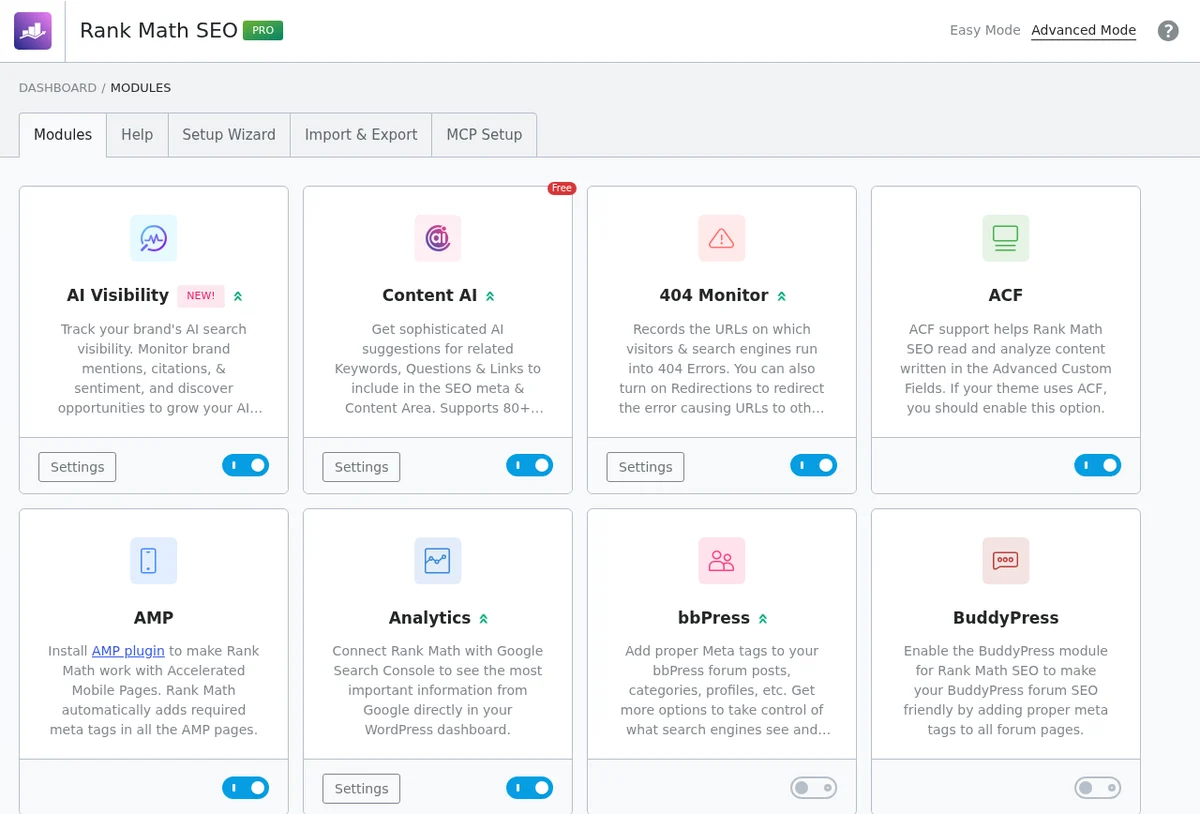
It handles everything an SEO plugin is expected to do, like titles, meta descriptions, sitemaps and canonical tags, then goes much further: a schema generator, redirect manager, 404 monitor, IndexNow submission, internal link auditing, an llms.txt generator and, in 2026, AI visibility tracking for ChatGPT-style answers. Each of these is a module you can turn on or off.
How we tested Rank Math
This Rankmath review is based on years of paid, daily use, not a demo install. We have renewed Rank Math PRO every year since 2021.
Our invoices also show how Rank Math PRO’s price has moved for a long-time customer: $59 in 2021 and 2022, $69 in 2023, and $95.88 in 2024 and 2026. That’s a 62% rise over five years, which is worth knowing before you buy. It’s still less than one Yoast Premium site at $118.80 a year, but early buyers have seen steady increases.
Here is exactly what was tested and where the numbers come from:
- Live site: DigitalPrahlad.com, running Rank Math 1.0.280 and Rank Math PRO 3.0.123 with 20 modules active, alongside LiteSpeed Cache, GeneratePress and ACF blocks.
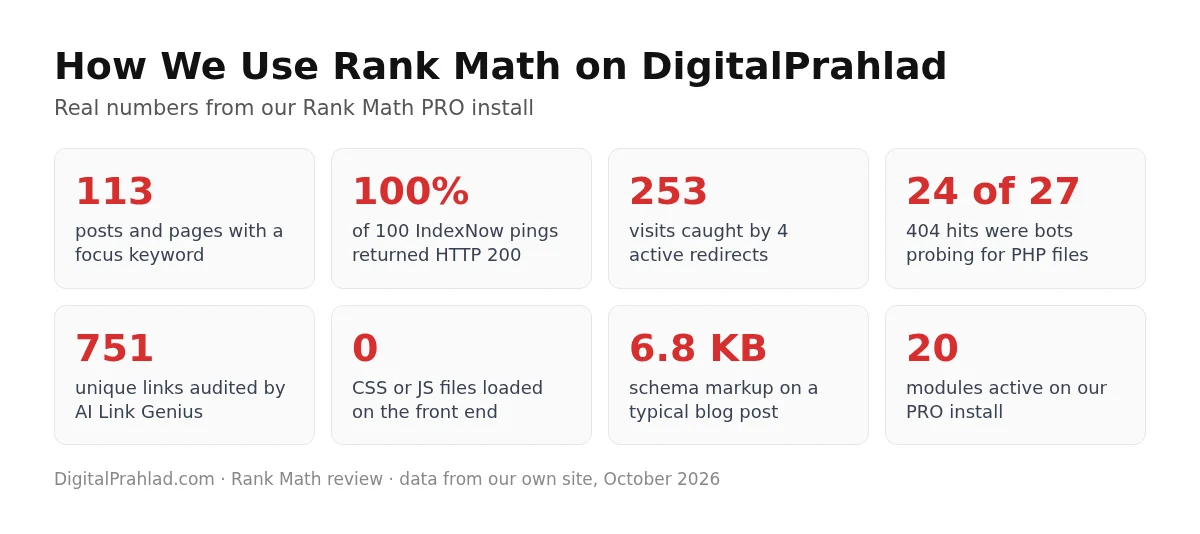
- Content data: 113 posts and pages with focus keywords, and saved SEO scores for all 68 published posts.
- Feature logs: Rank Math’s own redirection hits, 404 logs, IndexNow submission history and AI Link Genius audit, read straight from the database.
- Front-end footprint: the HTML of live posts, checked for every file and tag Rank Math adds.
- Pricing: the official pricing pages of Rank Math, Yoast SEO, AIOSEO and SEOPress, checked on 10 October 2026.
- What I didn’t test: Rank Math’s support team, because we haven’t needed to open a ticket, and the Analytics module, because we use Google Search Console directly.
How to set up Rank Math SEO plugin, step by step
Most Rankmath review articles skip setup, but getting it right matters. These screenshots come from the setup wizard on our own site, so you can follow along exactly. The whole process takes about 10 minutes.
Step 1: Install and activate Rank Math
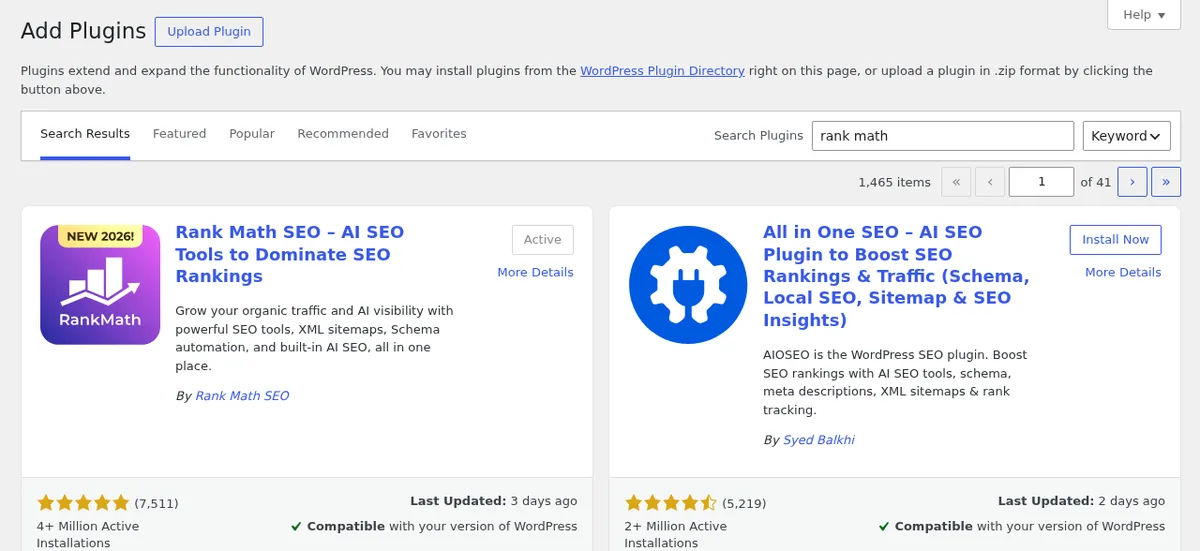
In WordPress, go to Plugins, Add New, search for Rank Math, then install and activate Rank Math SEO. If you bought PRO, upload the PRO plugin as well. Deactivate any other SEO plugin first, after importing its data (see the migration section below).
Step 2: Connect your account and choose a mode
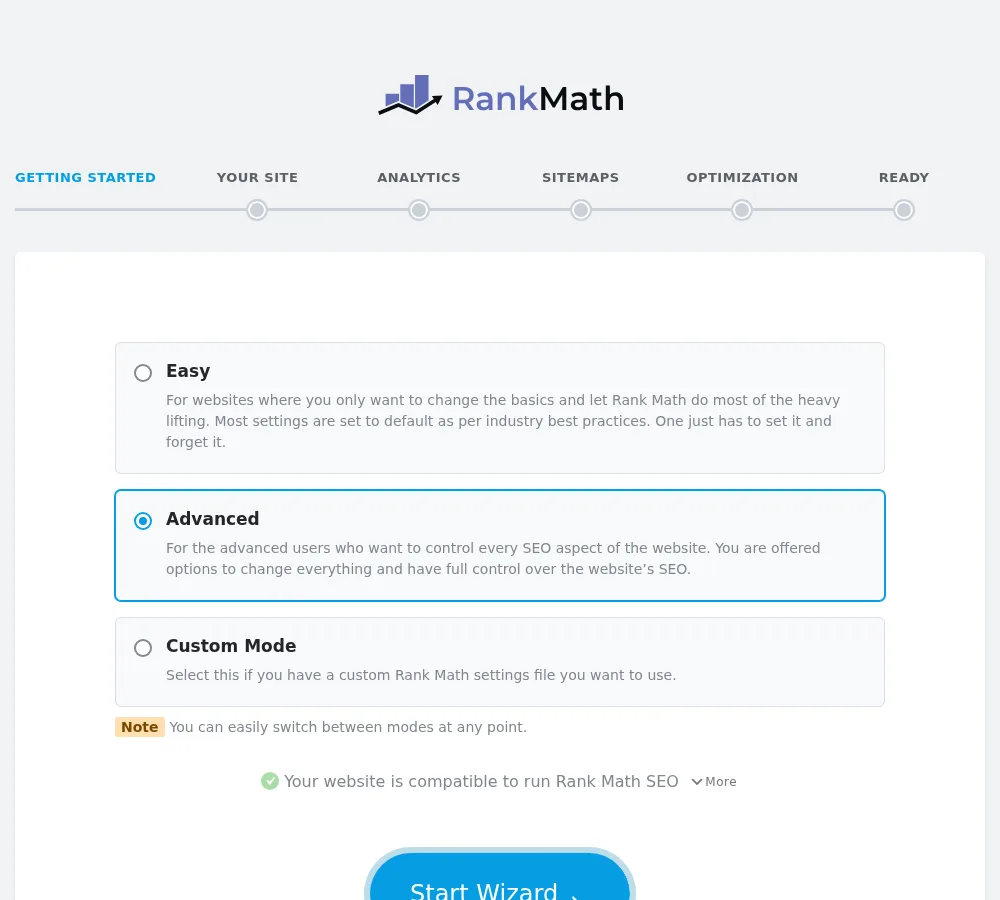
Connect a free Rank Math account, then pick a mode. Easy sets sensible defaults, Advanced shows every option, and Custom lets you pick. The wizard also confirms your site is compatible. We use Advanced.
Step 3: Describe your site
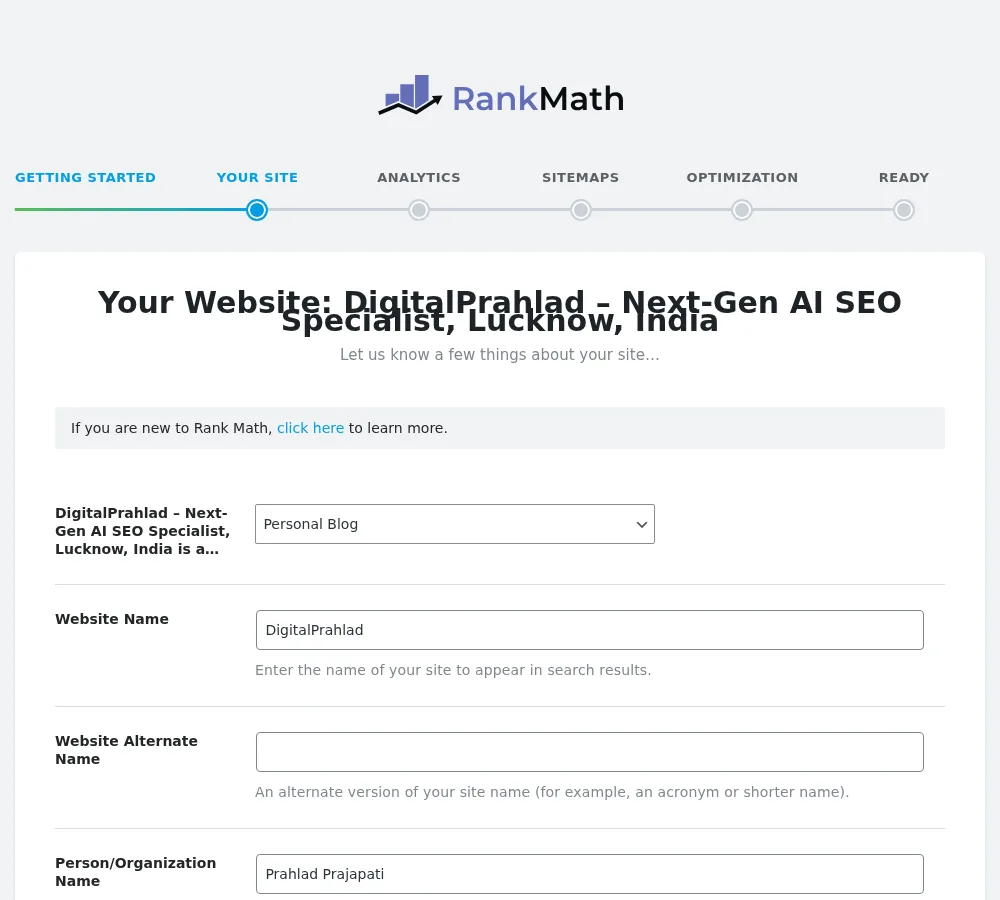
Choose your site type (blog, business, shop and so on), your site name, and whether you are a person or an organisation. This feeds the Organization or Person schema that appears on every page, so fill it in carefully, with a logo.
Step 4: Connect Google services (optional)
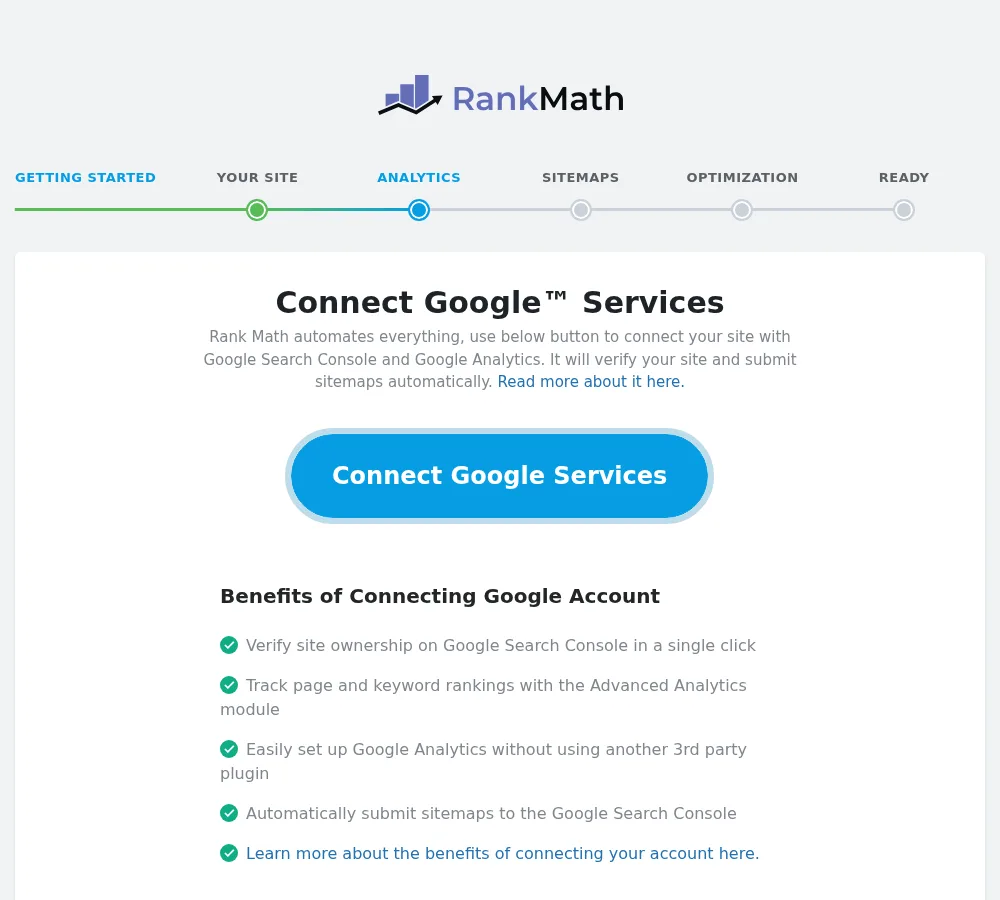
Connecting Google Search Console and Analytics lets Rank Math verify your site and show traffic and rankings in WordPress. It’s optional; you can skip it and connect later.
Step 5: Configure sitemaps
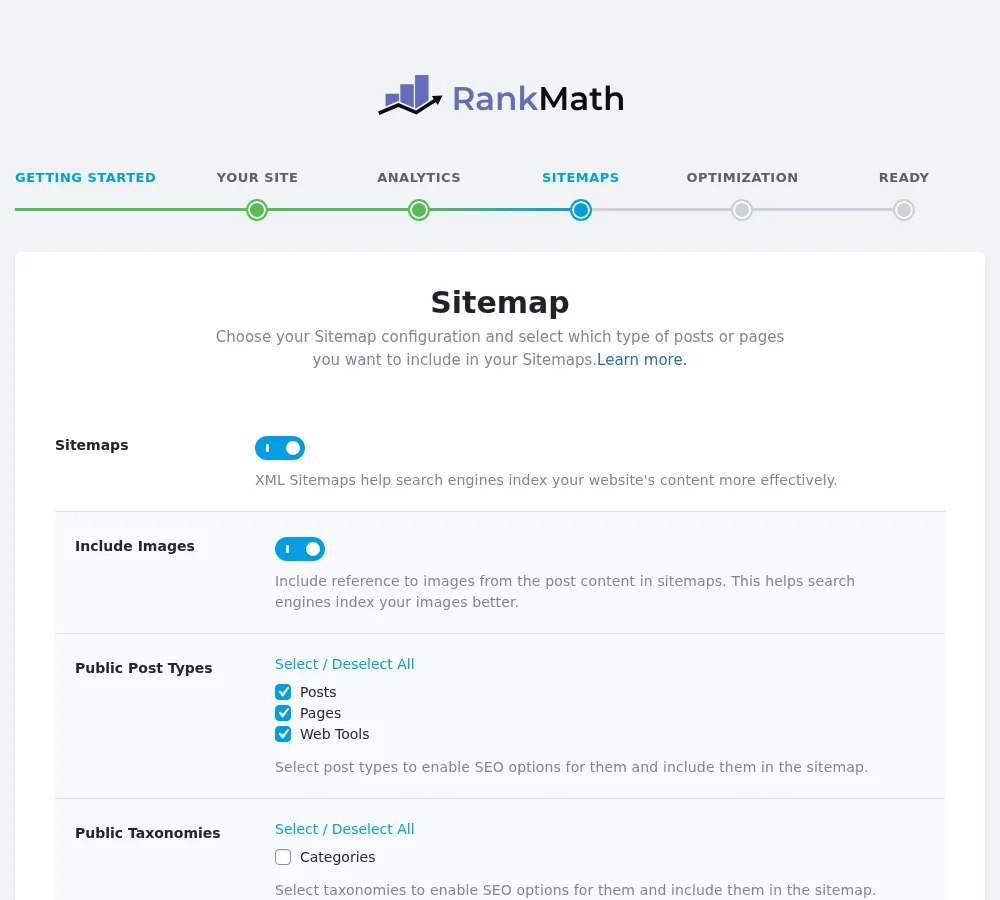
Keep sitemaps on, include images, and tick only the post types and taxonomies you want indexed. We include posts, pages and our tool pages, and leave thin archives out.
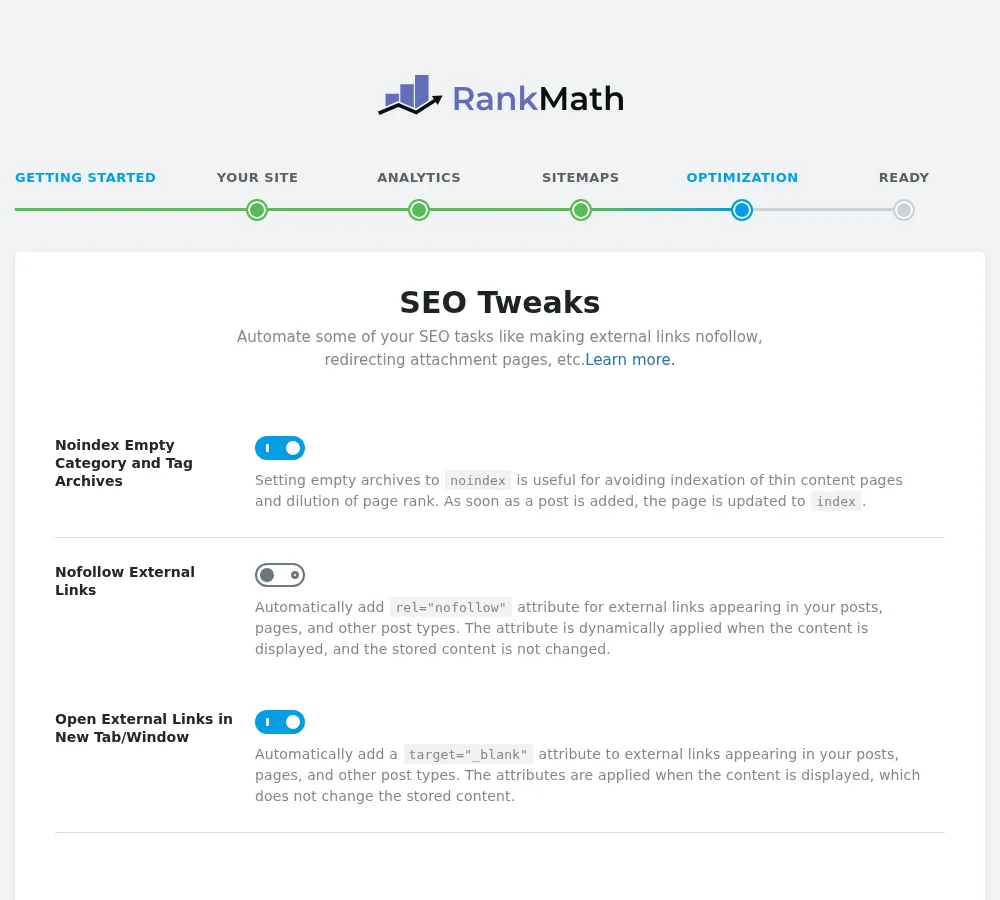
Step 6: Apply SEO tweaks
Turn on noindex for empty category and tag archives. Decide whether external links should be nofollow (we leave it off and set nofollow per link) and whether they open in a new tab.
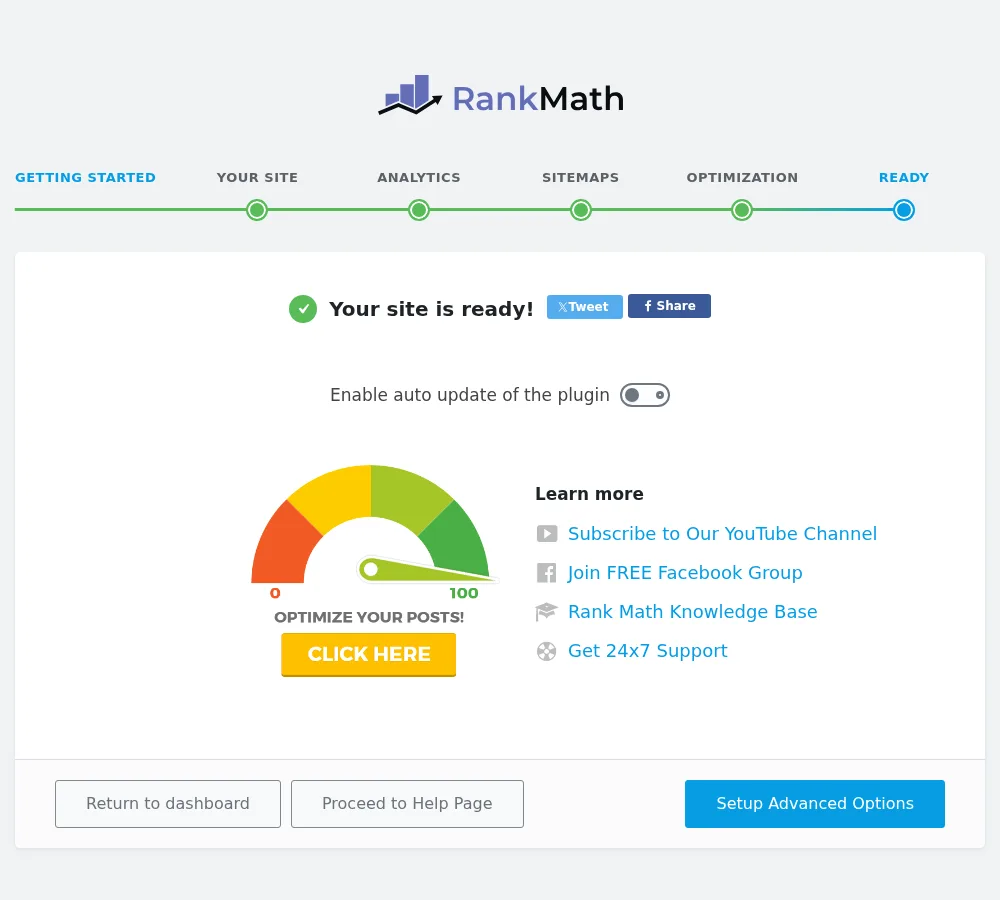
Step 7: Finish, then open the advanced options
The wizard ends with a ready screen. Click Setup Advanced Options to configure the Role Manager, 404 Monitor, Redirections and default schema.
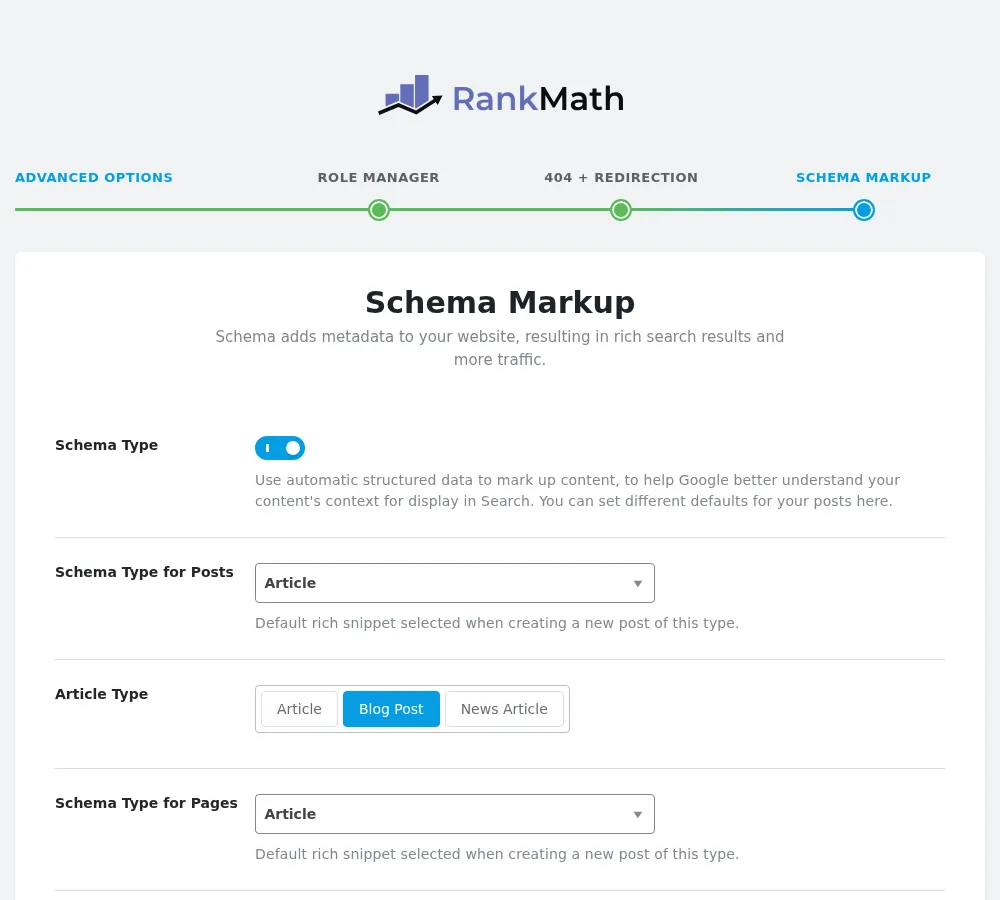
Step 8: Set default schema and fine-tune modules
Pick a default schema type for posts and pages, such as Article with the Blog Post subtype. Then open the Modules dashboard, switch off anything you won’t use, and set your title templates in Titles & Meta. Aim for a score of 80 or more on each post, then focus on the content itself.
Content analysis and the 100-point score
Content analysis is the heart of any Rank Math review, because this is where you’ll spend most of your time. In the editor, Rank Math shows a score out of 100 in the toolbar and a sidebar with your snippet preview, focus keywords and a list of tests grouped into Basic SEO, Additional, Title Readability and Content Readability.
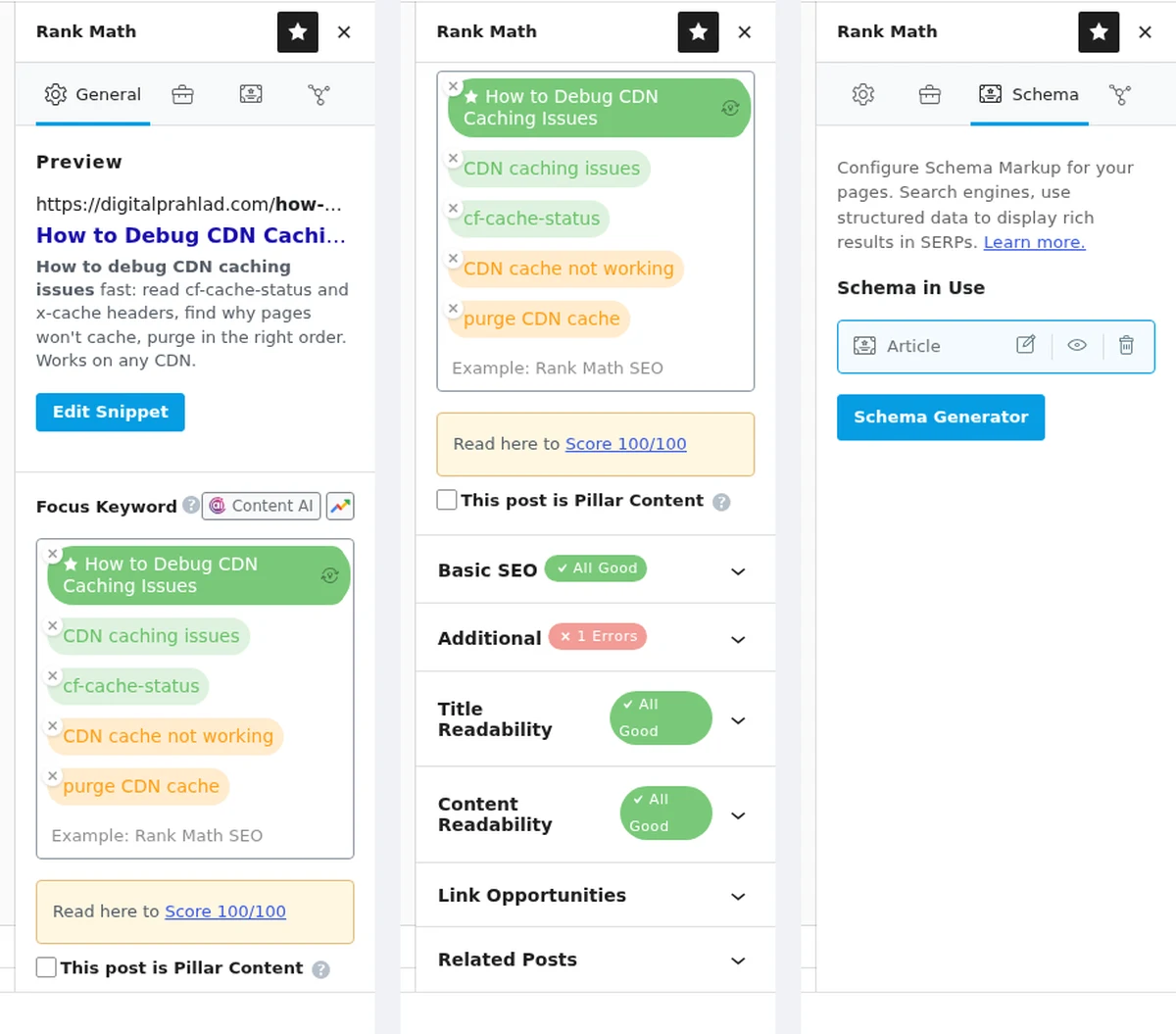
Compared with Yoast’s red, orange and green lights, the score is more precise, and adding multiple focus keywords per post lets you optimise for close variants together. Here’s how our 68 published posts actually score:
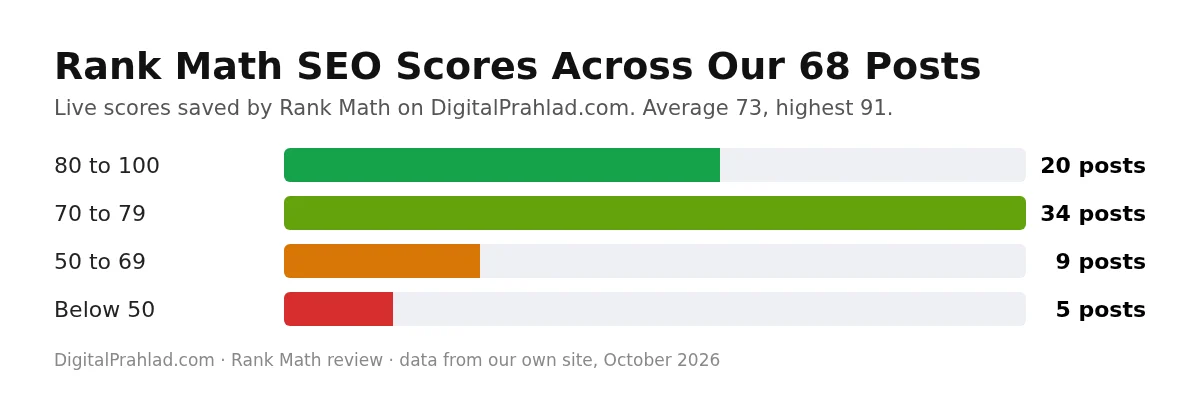
Our average is 73 and our best is 91. After pushing many posts above 85, here is what I learned about the score:
- Some checks can’t pass without paying for credits. The Content AI check stays red unless you run Content AI research, and on our free Content AI plan, research had 0 uses left.
- Some checks fight good writing. The title sentiment check wants an emotional word in every title, which doesn’t suit a data study or a technical guide. The external link check also fails on posts where you deliberately link out to no one.
- Custom blocks can be invisible to the analysis. Our table of contents is an ACF block, and Rank Math’s TOC check didn’t recognise it until we added a small filter that registers the block. If you use a page builder or custom blocks, expect the odd false failure.
- The score is a checklist, not a ranking factor. Google never sees it. Treat anything above 80 as done and spend the rest of the time on the content itself.
Schema markup and rich results
In this Rankmath review, schema is the feature that impressed me most, and it’s Rank Math’s strongest. You can set a default schema type for each post type, add schema per post through the Schema Generator, and the free FAQ block outputs valid FAQPage markup automatically.
Across our site, Rank Math currently manages Service schema on 34 pages, BlogPosting on 17, ItemList on 7, plus ContactPage, Person and ProfessionalService on single pages. A typical blog post here carries about 6.8 KB of structured data, combining the Organization, WebSite, BreadcrumbList, WebPage, Person, BlogPosting and FAQPage types in one connected graph.
One honest gotcha: Rank Math only knows about the schema it creates. When another plugin also outputs schema, like our review box does, you need to check the two don’t duplicate or contradict each other. Our entity and knowledge graph work always starts with that audit, and Google’s own structured data guide explains the rules.
Titles, meta and social previews
Titles & Meta lets you set templates for every post type, taxonomy, author page and the homepage, using variables like %title% and %sep%. Per post, the snippet editor shows a live Google preview, and the Social tab shows exactly how the post will look when shared on Facebook or X.
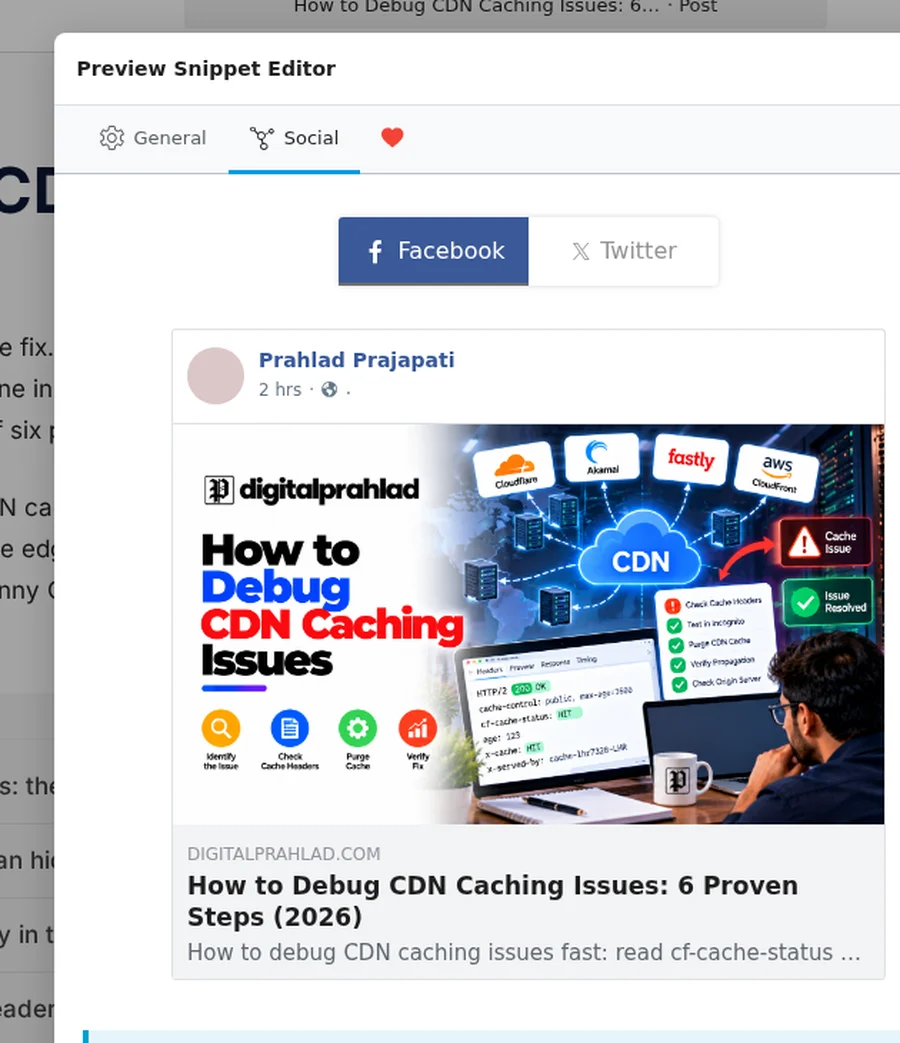
On a live post, Rank Math adds 24 social meta tags (Open Graph, Twitter cards and article tags), which is what makes shared links show a proper image, title and description.
Technical SEO tests
For a Rankmath review to mean anything, it has to look at the actual output. An SEO plugin is only as good as the code it puts on the page, so I ran 11 technical checks against our live site on 10 October 2026. These are the same checks we run in a technical SEO review.
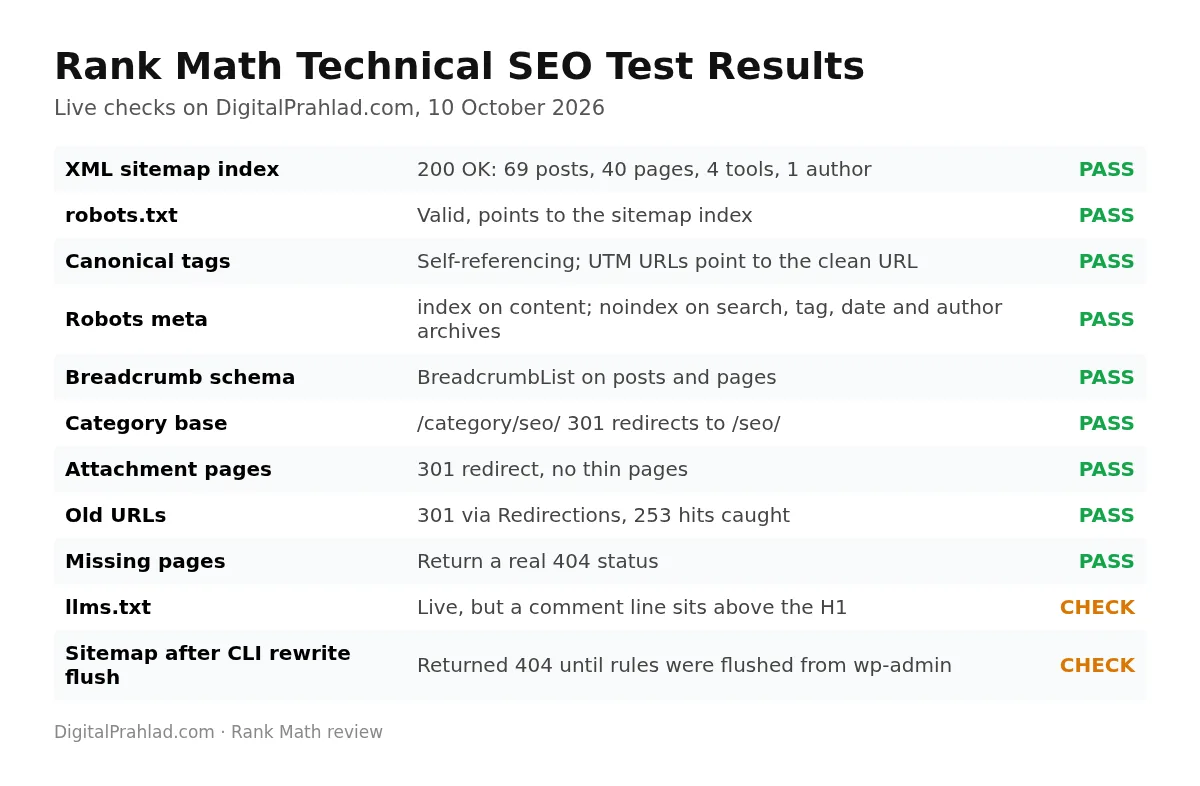
| Test | Result |
|---|---|
| XML sitemap index | 200 OK, with sitemaps for 69 posts, 40 pages, 4 tool pages and 1 author |
| robots.txt | Valid and points to the sitemap index |
| Canonical tags | Self-referencing on posts and pages; a URL with ?utm_source= points back to the clean URL |
| Robots meta | index, follow on content; noindex on search results, tag, date and author archives |
| Breadcrumbs | BreadcrumbList schema on posts and pages |
| Category base | /category/seo/ redirects (301) to /seo/ |
| Attachment pages | Redirect (301), so no thin image pages get indexed |
| Old URLs | Redirect (301) through the Redirections module |
| Missing pages | Return a real 404 status, not a soft 404 |
| llms.txt | Live; by default a credit line sits above the H1, which we removed with a filter |
The sitemap gotcha we hit
During this review, our sitemap index suddenly returned 404, and because our cache stored that 404, Googlebot saw it too. The cause: rewrite rules had been flushed from the command line with WP-CLI, where Rank Math’s sitemap rules aren’t loaded, so only WordPress’s default sitemap rules were saved. Simply opening Settings, Permalinks in the dashboard rebuilt the rules and the sitemap came straight back. If you manage WordPress from the command line, check your sitemap after any rewrite flush. It’s not a Rank Math bug as such, but it’s an easy way to lose your sitemap without noticing.
Sitemaps, robots.txt and llms.txt
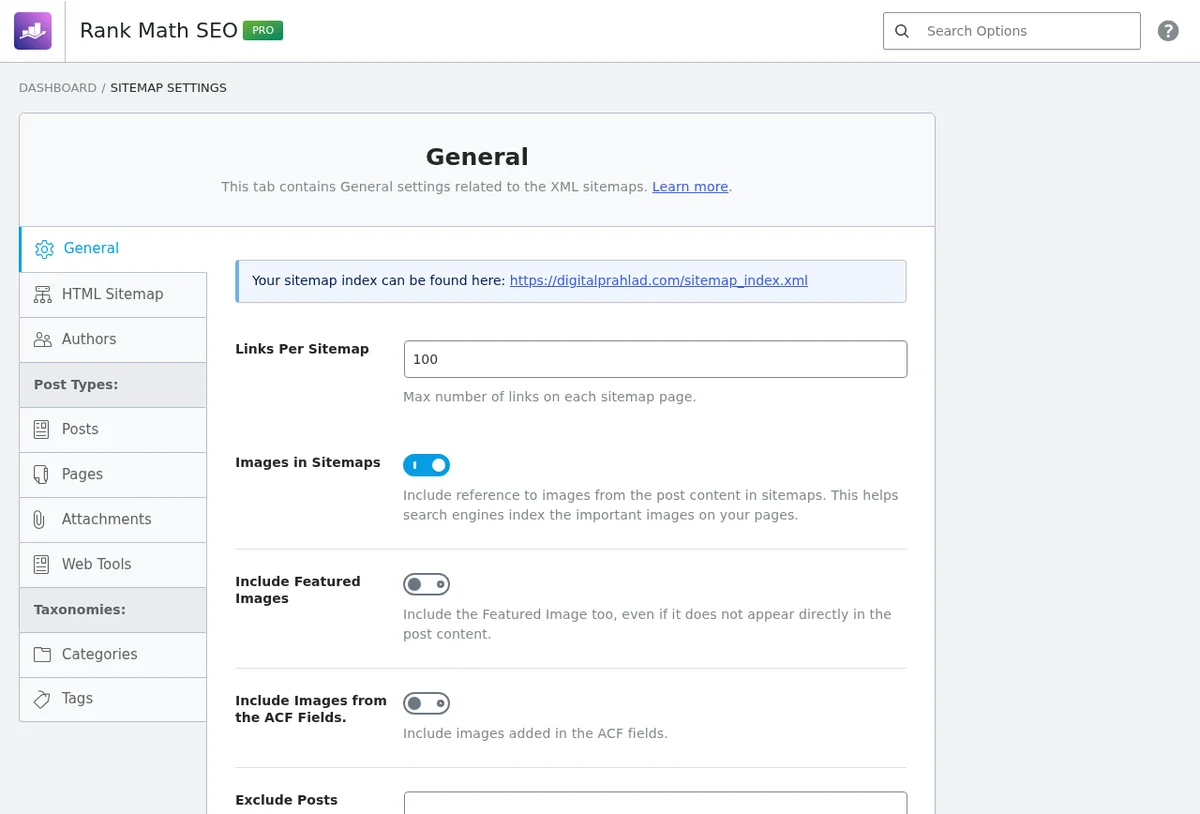
General Settings includes editors for robots.txt, .htaccess and llms.txt, so routine changes don’t need FTP.
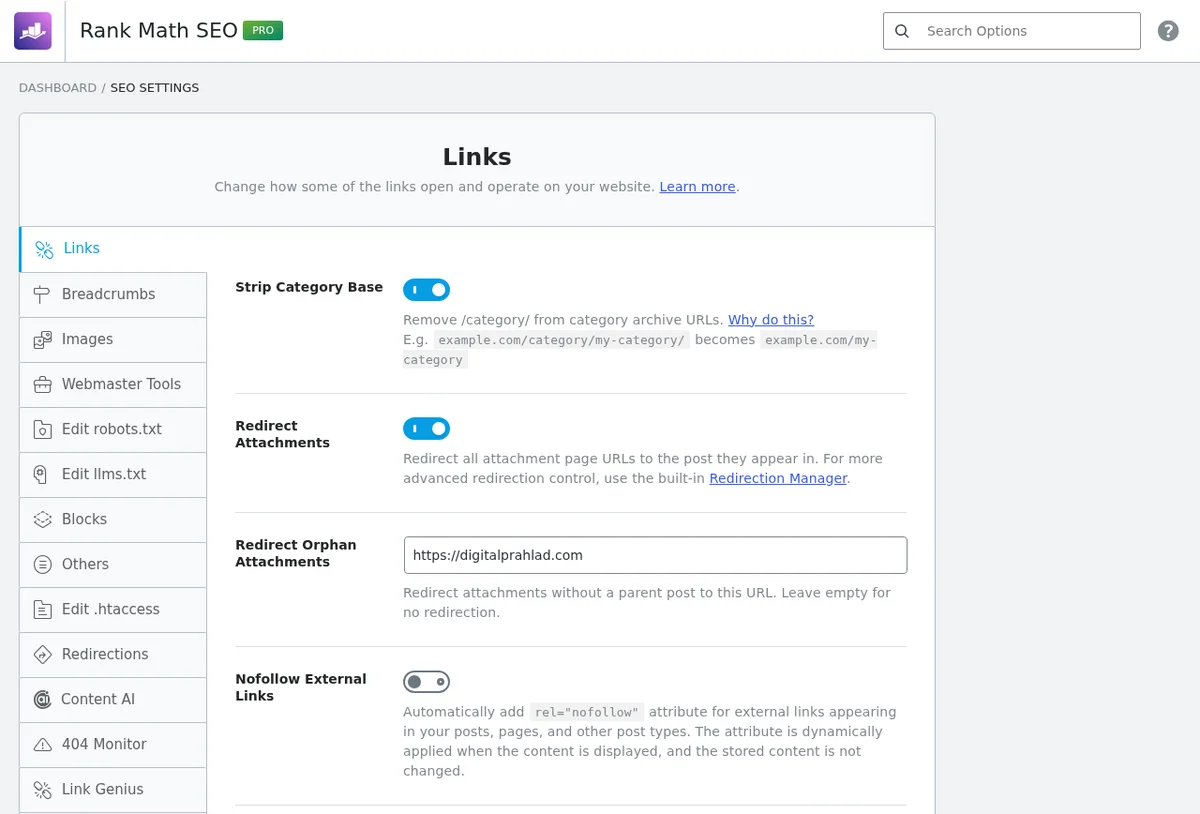
The llms.txt generator works, but it starts with a line saying the file was generated by Rank Math, placed above the main heading, while the llms.txt format expects the site name first. In our llms.txt adoption study I found the same pattern on several plugin-generated files. The fix is easy and update-safe: Rank Math has a built-in filter, rank_math/llms_txt/remove_credit, that drops the credit line, and you can fill in the llms.txt summary field so the file gets the blockquote summary the format expects. We did both, and our file now starts with the site name, a one-line summary and 92 clean links.
Redirections and the 404 Monitor
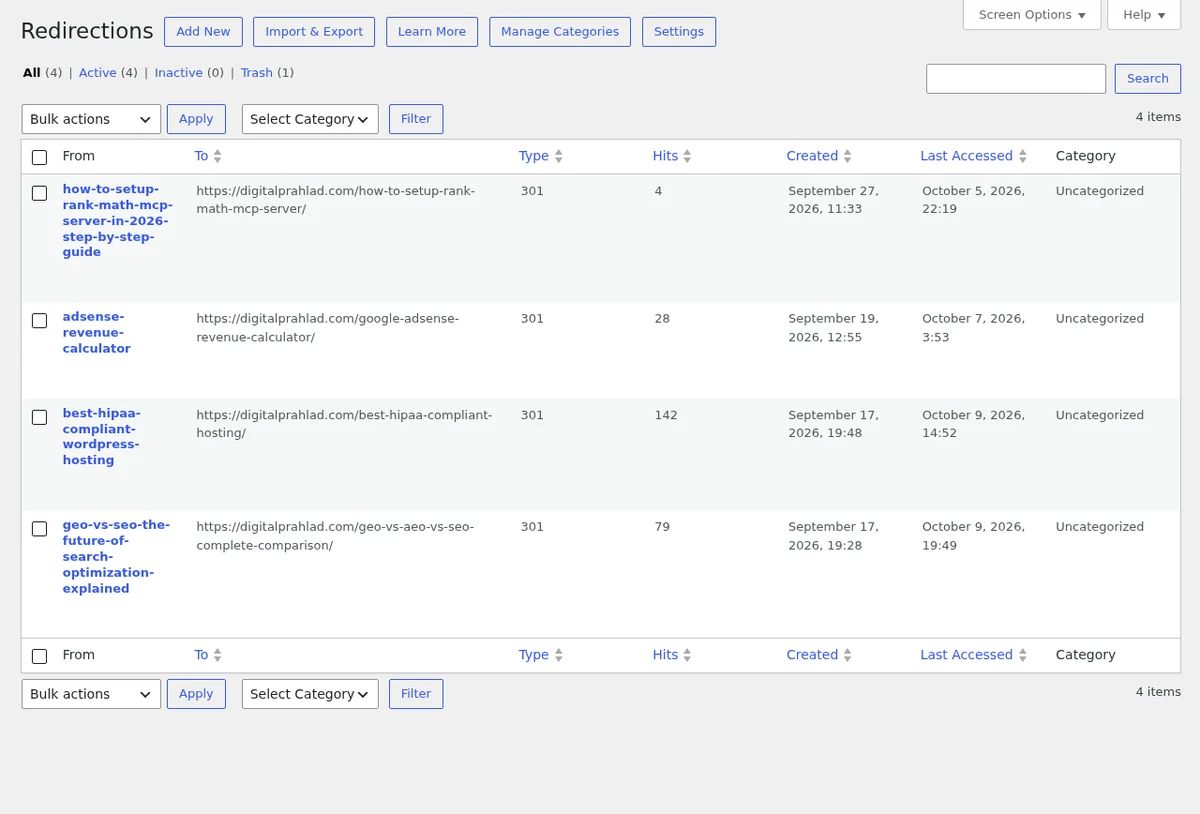
Both are free, both replace separate plugins, and both earned a place in this Rank Math review. The Redirections module supports 301, 302, 307, 410 and 451 redirects with hit counters. On our site, 4 active 301 redirects, mostly from old slugs we renamed, have caught 253 visits that would otherwise have landed on error pages.
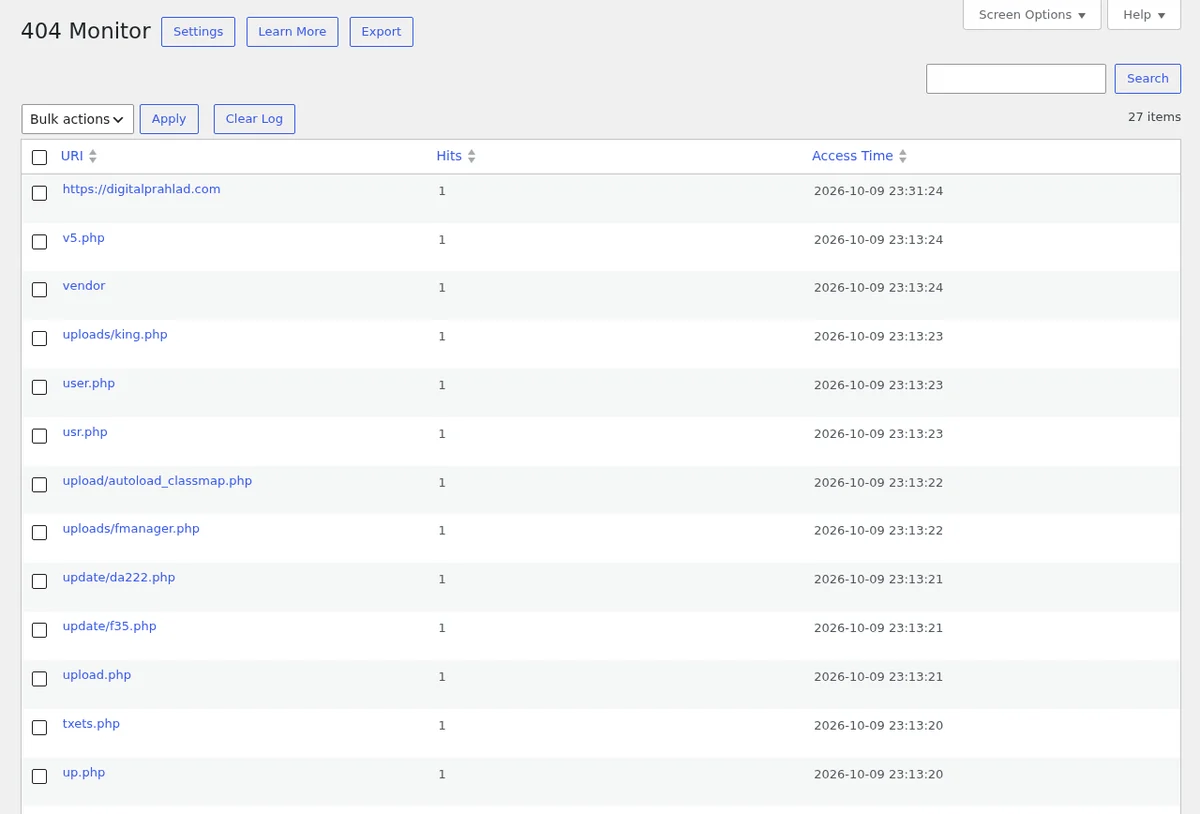
The 404 Monitor logs every URL that returned a 404. Of the 27 entries in our log, 24 were bots probing for PHP files like uploads/king.php and tinyfilemanager.php, which is a common sign of automated hacking attempts. So the monitor is useful for spotting security noise as well as broken links. Keep it in Simple mode on busy sites to avoid filling the database.
Instant Indexing with IndexNow
In our Rank Math review testing, IndexNow was one of the most reliable modules. Rank Math can notify search engines the moment you publish or update a page through IndexNow. We use it on every new post. Our submission history shows 100 of the last 100 pings returned HTTP 200.
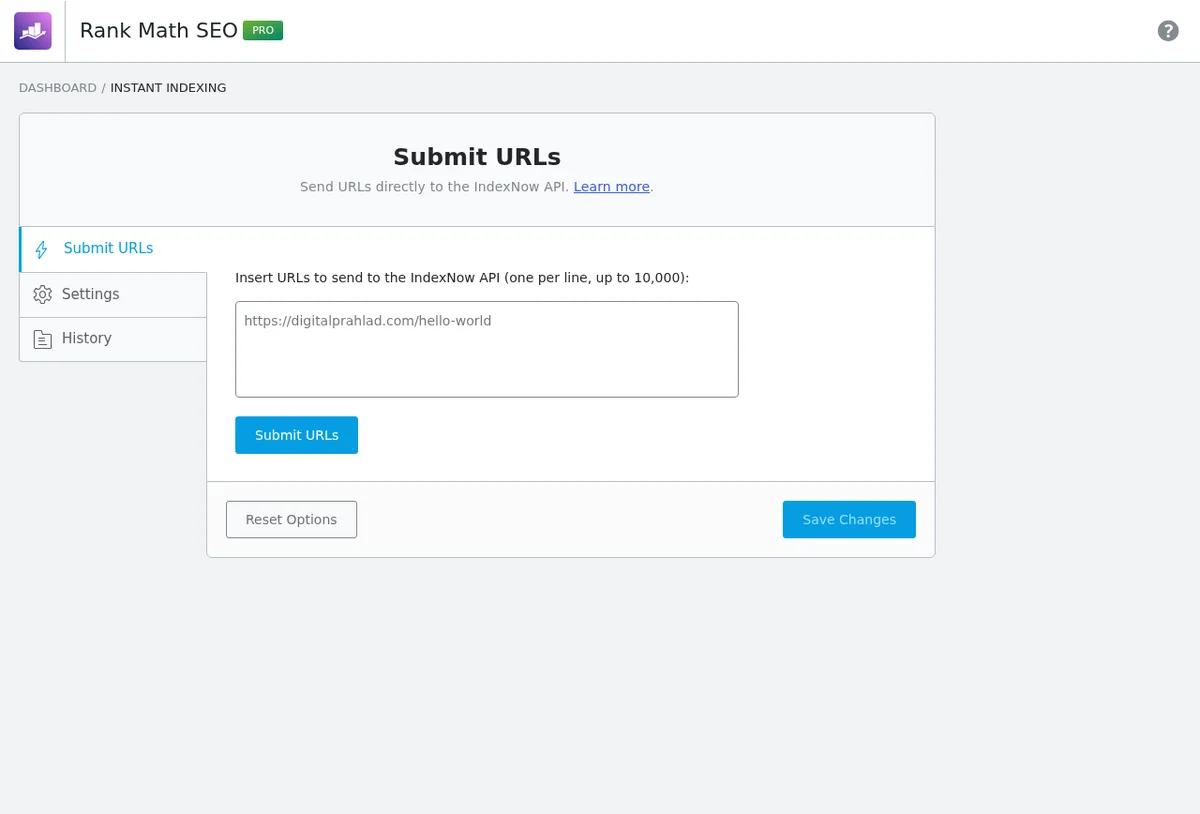
Know the limits, though. IndexNow is used by Bing, Yandex, Seznam and others, but Google doesn’t use IndexNow. For Google you still rely on your sitemap, internal links and Search Console, which I cover in 10 ways to get your URLs indexed by Google faster. Instant Indexing is a nice speed boost for Bing and the AI tools that draw on Bing’s index, not a Google shortcut.
AI Link Genius: internal links and link audits
AI Link Genius is new in 2026, and this Rankmath review is one of the first to test it on a real site. It maps every link on your site. Ours indexed 1,029 internal and external links and ran a status audit on 751 unique URLs.
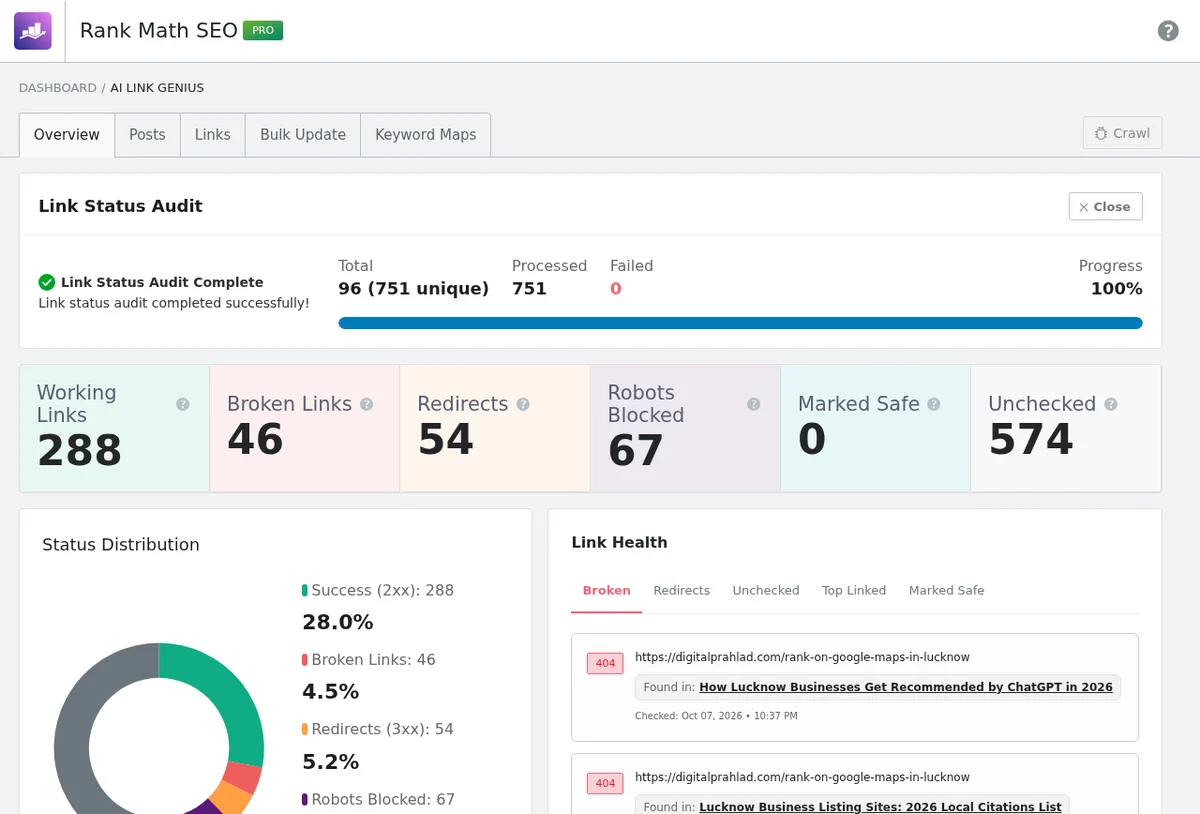
The audit flagged 46 links as broken. When I re-checked every one by hand, none of our internal links were actually broken: four were missing a trailing slash and simply redirected. Most of the external ones returned 403 because sites like Medium and Tripadvisor block automated checkers, and only two links were real 404s. The tool is genuinely useful for finding problems, but treat its broken link count as a list to verify, not a list to delete.
AI features: Content AI, AI Visibility and MCP
Rank Math now has three AI layers. Content AI offers 40+ writing tools, from blog post outlines to meta descriptions, and research that suggests keywords and questions for a post. AI Visibility tracks how often brands are mentioned and cited in AI answers, with a visibility score, sentiment and citation counts. And an MCP setup lets AI assistants work with your Rank Math data directly.
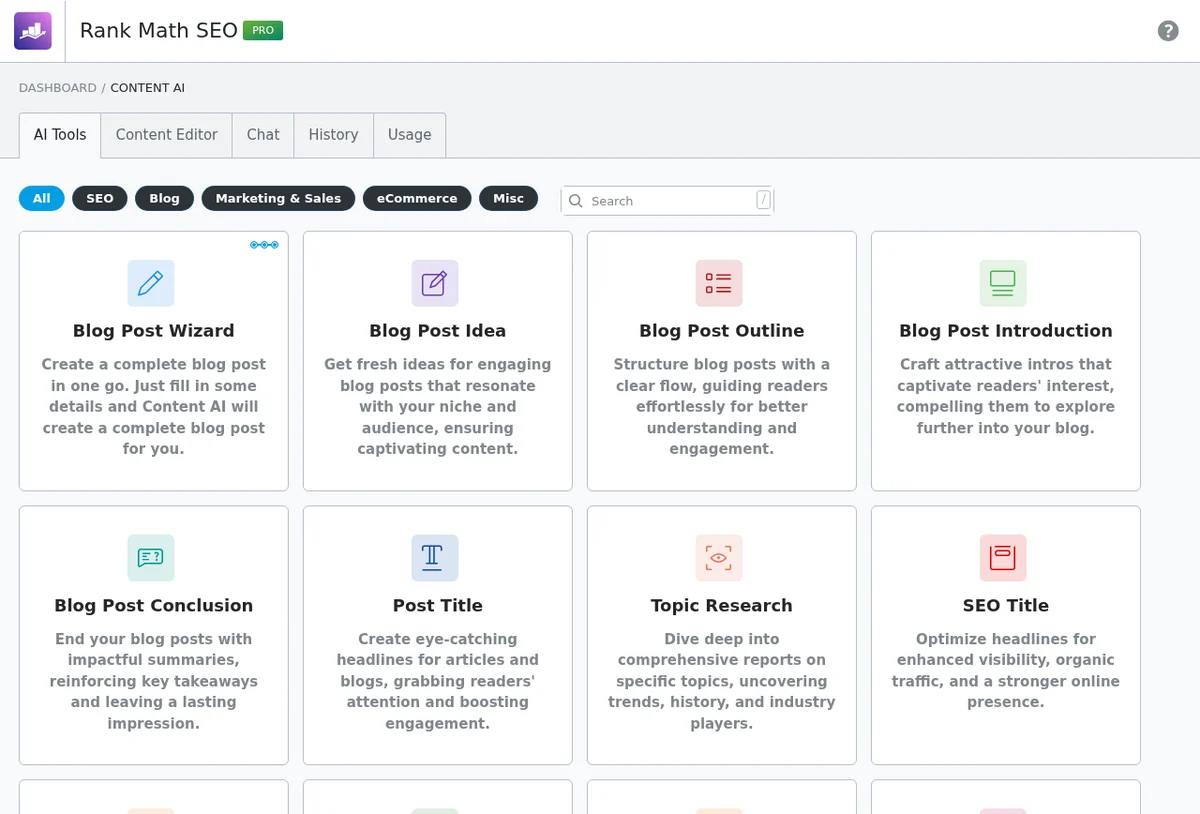
Our honest Rankmath review take: these are the least essential parts of Rank Math. The free Content AI allowance is small, the research feature had no free uses left on our account, and AI writing inside an SEO plugin is no substitute for real expertise. AI Visibility is promising for tracking generative search, which matters more every month, as I explain in GEO vs AEO vs SEO. And MCP is genuinely clever if you work with AI assistants. Our Rank Math MCP server setup guide walks through it.
Analytics and rank tracking
Connecting Google Search Console and Analytics lets Rank Math show traffic, impressions, keyword positions and index status inside WordPress. PRO tracks up to 500 keywords, Business 10,000 and Agency 50,000. We haven’t connected it on this site, because we already work in Search Console every day, so I can’t vouch for its accuracy first-hand. If you prefer one dashboard, it’s a convenient extra; if you already live in Search Console, you won’t miss it.
Speed and performance footprint
Speed is where a Rank Math review should be strict. SEO plugins have a reputation for slowing sites down, so I checked exactly what Rank Math adds to our live pages:
| What Rank Math adds to a live post | Our result |
|---|---|
| CSS or JavaScript files loaded on the front end | 0 |
| Structured data (JSON-LD) on a typical blog post | About 6.8 KB |
| Social and article meta tags | 24 tags |
| Robots meta tag | 1 tag (index, follow, plus snippet settings) |
Zero front-end files is the headline. Everything Rank Math adds is plain HTML in the page head, which costs almost nothing to load. The admin side is heavier, as you’d expect from a plugin with 20 modules, so switch off modules you don’t use. If you want to check your own server response time, try our global TTFB tester, and if pages seem stale after SEO changes, our guide on how to debug CDN caching issues will help.
Compatibility
- Themes: works with any theme that uses standard WordPress hooks. We run it on GeneratePress with a child theme.
- Caching: runs alongside LiteSpeed Cache on our site without conflicts. Purge your cache after changing titles or schema.
- Page builders: PRO has dedicated Elementor and Divi integrations, including breadcrumbs widgets and FAQ schema from accordions. If you build dynamic Elementor sites, see our Crocoblock review too.
- Custom blocks: content checks only read what they recognise. Our ACF table of contents block needed a small filter before the TOC check passed.
- Other SEO plugins: don’t run two at once. Rank Math detects Yoast, AIOSEO and SEOPress for importing, then they should be deactivated.
- Requirements: current WordPress and PHP versions; the free plugin was updated on 6 October 2026, so it keeps pace with WordPress releases.
Integrations
| Integration | What it does | Plan |
|---|---|---|
| Google Search Console and Analytics 4 | Traffic, keyword positions and index status inside WordPress | Free (more history in PRO) |
| IndexNow | Instant URL submission to Bing, Yandex and other engines | Free |
| WooCommerce | Product schema, product SEO and WooCommerce sitemaps | Free basics, PRO for full features |
| Elementor and Divi | SEO panel inside the builders, breadcrumbs, FAQ schema from accordions | PRO |
| ACF | Includes ACF field content in the SEO analysis | Free module |
| bbPress, BuddyPress, Web Stories, AMP | SEO and schema for these plugins | Free modules |
| AI assistants via MCP | Lets AI tools read and work with your Rank Math data | Free plugin, AI plan for some tools |
Security and stability
- Role Manager: decide which user roles can change SEO settings, important on team and client sites.
- Version rollback: roll back to a previous release from Status & Tools if an update misbehaves.
- 404 Monitor as a security signal: it showed us bots scanning for PHP shell files we’d never otherwise see.
- No front-end assets: nothing extra loads for visitors, which also means no extra attack surface on the front end.
Support and documentation
Rank Math has a large knowledge base, video tutorials, a Facebook community and ticket support, with 24/7 support on PRO and priority support on Business and Agency. We haven’t opened a ticket in our time using it, which says something about stability, but it also means I can’t rate the support team from personal experience.
Rank Math pricing in 2026
Pricing is a big part of any Rankmath review. Rank Math’s pricing page showed us prices in euros, billed yearly and excluding VAT, on 10 October 2026:
| Plan | Price | Renews at | Sites | Tracked keywords |
|---|---|---|---|---|
| Free | €0 | – | Unlimited | – |
| PRO | €7.99/month, billed yearly | €8.99/month | Unlimited personal sites | 500 |
| Business | €24.99/month, billed yearly | €27.99/month | 100 client sites | 10,000 |
| Agency | €54.99/month, billed yearly | €64.99/month | 500 client sites | 50,000 |
Our own invoices show PRO has risen from $59 a year in 2021 to $95.88 today, so budget for renewals rising over time.
All paid plans include a 30-day money-back guarantee. Note the difference between personal and client sites: PRO is for your own sites, and you need Business once you’re managing sites for clients.
Rank Math Free vs Rank Math Pro
| Feature | Free | PRO |
|---|---|---|
| SEO analysis, titles, meta, sitemaps | Yes | Yes |
| Redirections and 404 Monitor | Yes | Advanced, with CSV import and export |
| Schema | Pre-defined types and FAQ/HowTo blocks | Custom schema builder, 840+ types, import schema from any site |
| Focus keyword optimisation | Multiple keywords per post | Unlimited |
| Keyword rank tracking | No | 500 keywords |
| Local SEO, WooCommerce SEO, Image SEO, News and Video sitemaps | Basic | Full PRO versions |
| Google data history | 90 days | 180 days |
The Rankmath review verdict on plans: for a single blog, the free version is genuinely enough. PRO earns its price once you want rank tracking, custom schema, or the WooCommerce and local SEO extras.
Why we chose Rank Math over Yoast and other SEO plugins
This is the question most people searching for a Rankmath review really want answered. Here is how the four big WordPress SEO plugins compare, using each company’s own pricing page and WordPress.org listing on 10 October 2026.
| Plugin | Installs (WordPress.org) | Rating | Redirect manager | 404 monitoring | Entry paid price | Many sites | Renewal |
|---|---|---|---|---|---|---|---|
| Rank Math | 4M+ | 4.8 (7,511) | Free | Free | €7.99/month billed yearly, unlimited personal sites | Business €24.99/month, 100 client sites | Rises to €8.99/month |
| Yoast SEO | 10M+ | 4.8 (27,819) | Premium only | Not listed | $118.80/year per site | $118.80 per site | Same |
| All in One SEO | 2M+ | 4.7 (5,219) | Pro plan and up | Pro plan and up | $49.50 first year, 1 site | Elite $299.50 first year, 100 sites | Doubles after year one |
| SEOPress | 300K+ | 4.8 (1,265) | PRO only | PRO only | $49/year, 1 site | $149/year, unlimited sites | Same price |
Why Rank Math wins for us:
- More in the free version. Redirects, a 404 monitor, a schema generator and IndexNow are free. With Yoast, the redirect manager needs Premium. With AIOSEO and SEOPress, redirects and 404 tracking are paid features.
- Better value for multiple personal sites. One Rank Math PRO licence covers all our own sites. Yoast Premium is $118.80 per site per year.
- Deeper schema. Per-post schema, multiple schema types per page and a full custom builder in PRO.
- Lighter front end. On our site, Rank Math adds no front-end CSS or JS at all.
- Faster feedback while writing. A test-by-test checklist and multiple focus keywords suit how we write long-form guides.
Where the others win: Yoast is simpler, has the largest user base and is the safest choice for a non-technical client. SEOPress is the cheapest for large numbers of sites, with no renewal increase. AIOSEO’s beginner-friendly TruSEO analysis suits people who just want guidance. If any of those matter more to you than features and value, they’re good plugins too.
Rank Math alternatives
No honest Rankmath review would pretend there are no alternatives. Rank Math isn’t the only good choice. Here’s when each alternative makes more sense, based on their own pricing pages and WordPress.org listings.
| Plugin | Best for | Paid price | Redirects and 404 log | Standout feature |
|---|---|---|---|---|
| Rank Math | Most sites and power users | €7.99/month billed yearly, unlimited personal sites (renews €8.99) | Both free | Schema generator, IndexNow, AI Link Genius |
| Yoast SEO | Beginners and non-technical clients | $118.80/year per site (same at renewal) | Redirects in Premium | Simplest analysis; Local, News and Video SEO in Premium |
| All in One SEO | Guided setup for beginners | $49.50 first year, 1 site (renewal doubles) | Pro plan and up | TruSEO score and link assistant |
| SEOPress | Agencies with many sites | $49/year for 1 site, $149 unlimited (same at renewal) | PRO only | Predictable pricing, multi-provider AI |
Yoast SEO
The most installed SEO plugin, with 10M+ active installs. Its traffic-light analysis is the easiest to understand, and since July 2025 Yoast SEO Premium ($118.80 a year per site) bundles Local, News and Video SEO, plus a redirect manager and internal linking suggestions. Choose it for non-technical owners or clients who want simplicity.
All in One SEO (AIOSEO)
2M+ active installs and a beginner-friendly TruSEO score. Paid plans start at $49.50 for the first year on one site, but renewals double (for example, Pro is $199.50 the first year, then $399). Choose it if you want guided setup and are comfortable with the renewal pricing.
SEOPress
300K+ active installs, a clean interface and no upsell clutter. SEOPress PRO costs $49 a year for one site or $149 a year for unlimited sites, renewing at the same price, and supports several AI providers. Choose it if you manage many sites and want predictable pricing.
How to migrate from Yoast to Rank Math
If this Rankmath review has convinced you to switch, it’s safer than most people expect, because Rank Math imports Yoast’s data directly. This is the process we recommend:
- Back up your site, database included.
- Install and activate Rank Math while Yoast is still active, so Rank Math can detect it.
- Open Rank Math, Status & Tools, Import & Export. Under Other Plugins, select Yoast SEO and choose what to import: settings, post meta (titles, descriptions, focus keywords), term and user meta, redirects and schema.
- Run the import, then spot-check 5 to 10 important pages: title, meta description, canonical and robots tags should match what Yoast output.
- Deactivate Yoast so two plugins don’t output duplicate tags.
- Check your sitemap at /sitemap_index.xml and submit it in Search Console. Yoast’s sitemap uses the same address, so most sites need no change.
- Crawl the site and watch Search Console for a couple of weeks for any indexing changes.
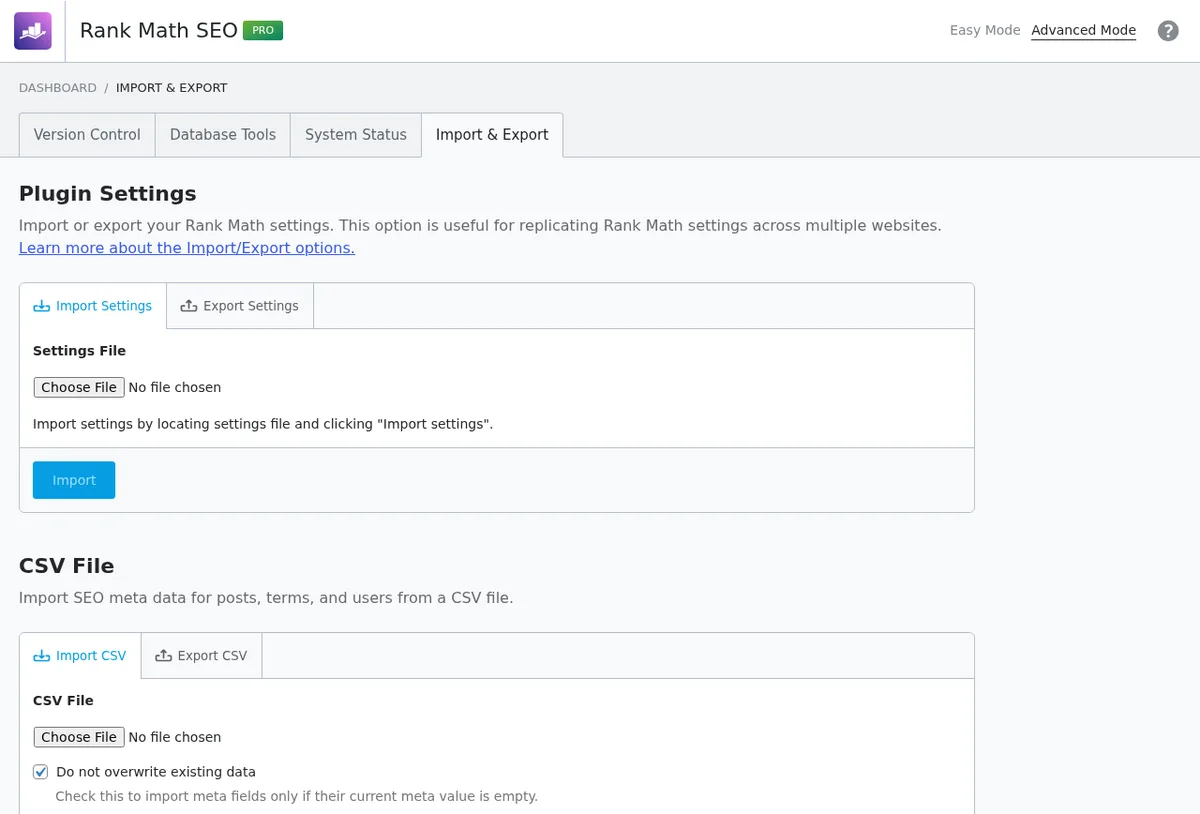
For larger sites, treat it like any migration and follow our SEO checklist for website migration. If you’d rather have an expert check it, a technical SEO audit covers exactly this.
Rank Math pros and cons
Pros
- Most features in a free SEO plugin: redirects, 404 monitor, schema and IndexNow included
- Excellent value: PRO covers unlimited personal sites
- Zero front-end CSS or JS: on our live site
- Best-in-class schema: per-post types, FAQ block and a custom builder
- Modular: switch off anything you don’t need
- Fast development: llms.txt, AI Visibility, Link Genius and MCP in 2026
- Safe updates: one-click version rollback
Cons
- Steep learning curve: 20+ modules and hundreds of settings
- Score obsession: some checks reward box-ticking over quality
- AI credits extra: free allowance is small
- Link audit false positives: bot-blocked links flagged as broken
- llms.txt defaults: credit line above the H1 until you add a filter
- Client sites cost more: PRO is for personal sites only
Who should use Rank Math?
| You are… | Our recommendation |
|---|---|
| A blogger with one site | Rank Math Free |
| Running several of your own sites | Rank Math PRO |
| A WooCommerce store | Rank Math PRO for WooCommerce SEO and product schema |
| A local business | Rank Math PRO for Local SEO with multiple locations |
| A freelancer or agency with client sites | Rank Math Business, or SEOPress if price per site matters most |
| A non-technical owner who wants minimal settings | Yoast SEO |
Overall experience
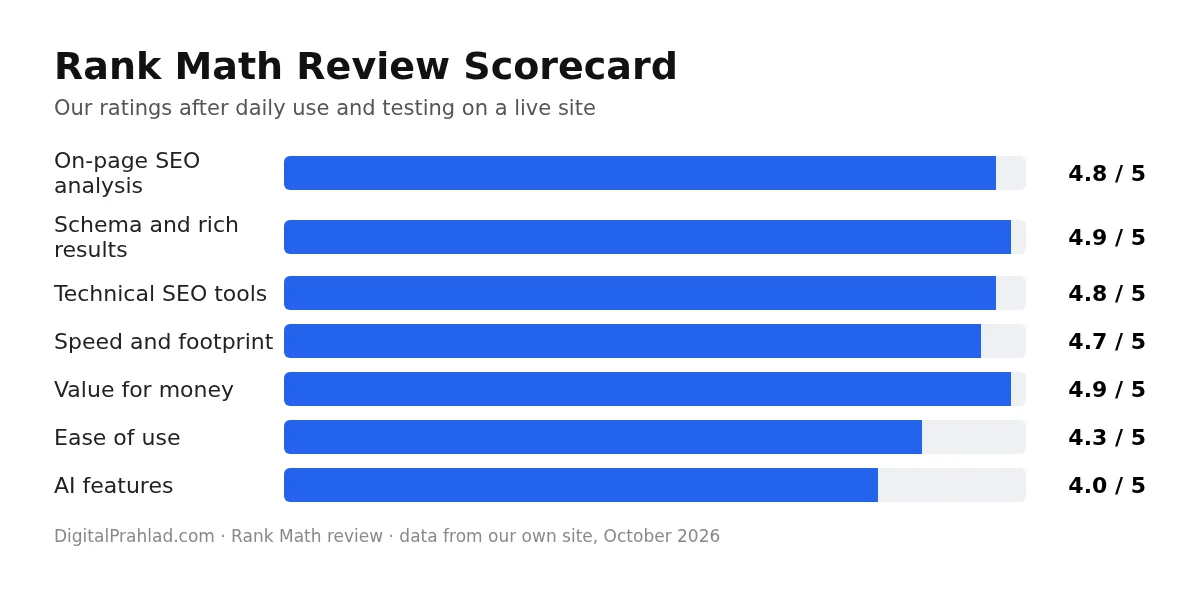
To wrap up this Rankmath review: after using Rank Math across every page of a live site and testing each module against our own data, my overall experience is very positive. It replaced what would otherwise be four or five separate plugins: SEO meta, schema, redirects, 404 logging and IndexNow. It adds nothing to front-end page weight beyond the HTML tags it needs, and it keeps shipping useful features.
The weaknesses are real but manageable: the learning curve, a score that’s easy to over-chase, AI tools that cost extra, and a link audit that needs a human to check its results. That’s why this Rankmath review gives it 4.8 out of 5, and why it’s the SEO plugin we use and recommend for most WordPress sites in 2026.
Frequently asked questions
Is Rank Math free?
Yes. The free version on WordPress.org includes SEO analysis, titles and meta, sitemaps, schema, redirects, a 404 monitor and IndexNow. PRO starts at €7.99 a month billed yearly.
Is Rank Math better than Yoast?
For most sites, yes. Rank Math includes more in its free version, such as redirects and a 404 monitor, and one PRO licence covers unlimited personal sites, while Yoast Premium costs $118.80 per site per year. Yoast is simpler, though, which suits non-technical users.
Does Rank Math slow down WordPress?
Not on the front end in our testing. On our live site, Rank Math loads no CSS or JavaScript files on the front end and only adds HTML meta tags and about 6.8 KB of schema to a typical post.
Can I switch from Yoast to Rank Math?
Yes. Rank Math’s Import & Export tool can import settings, titles, meta and redirects from Yoast, All in One SEO and SEOPress. Crawl your site afterwards to confirm nothing changed.
Does Rank Math Instant Indexing work with Google?
No. Instant Indexing uses IndexNow, which is supported by Bing, Yandex and others but not Google. For Google, rely on your sitemap, internal links and Search Console.
Is Rank Math PRO worth it?
PRO is worth it if you want keyword rank tracking, advanced schema, WooCommerce or local SEO features, or you run several personal sites. A single small blog can do well on the free version.
Can I use Rank Math and Yoast together?
No. Running two SEO plugins outputs duplicate meta tags and schema. Import your Yoast data into Rank Math, then deactivate Yoast.
How long have you used Rank Math?
We have paid for Rank Math PRO every year since 2021, and it runs on every page of DigitalPrahlad.com. Our invoices show the price rising from $59 a year in 2021 to $95.88 in 2026.
What score should I aim for in Rank Math?
Aim for 80 or more. Some checks, like Content AI or title sentiment, may not suit every post, and Google never sees the score, so content quality matters more than the last few points.
Tell Google you want more of this.
Add DigitalPrahlad as a preferred sourceOne tap, and this site shows up more often in your own Google Top Stories, AI Overviews, and AI Mode results. You can remove this preference anytime you'd like.
Affiliate Disclaimer: This website is reader-supported. Some links are affiliate links, meaning I may earn a small commission at no extra cost to you. I only recommend products and tools I genuinely trust and use myself. Your support keeps DigitalPrahlad free and practical.